

Free · no upload · no sign-up
Color palette from image — get the HEX codes from any photo, free
Add a picture and see its main colours with HEX and RGB codes. Press any spot to add that exact colour. It runs in your browser, so your picture stays on your device.
- Picture stays on your device
- No sign-up
- 3 to 10 colours
- HEX, RGB, CSS and PNG
Updated by the Kenerate AI team
Made with Kenerate
On this page
Quick answer
How do you get a color palette from an image?
To get a color palette from an image, add the picture to the tool on this page. It finds the main colours and shows each one with its HEX and RGB code and how much of the picture it covers. Choose 3 to 10 colours, press the picture to add an exact colour, then copy the codes or download a PNG. It's free with no sign-up, and it runs in your browser, so nothing is uploaded.
Key facts
- Cost
- Free · no credits
- Account
- Not needed
- Pictures in
- JPG, PNG, WebP up to 50 MB
- Colours
- 3 to 10, plus up to 10 you pick
- Codes
- HEX and RGB
- Export
- PNG, HEX list, CSS, prompt line
- Uploads
- None, read in your browser
- Shown per colour
- Share of the picture
Gallery
Palettes from real pictures
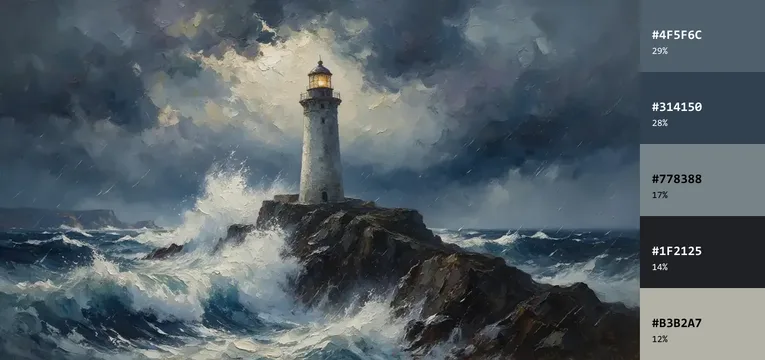
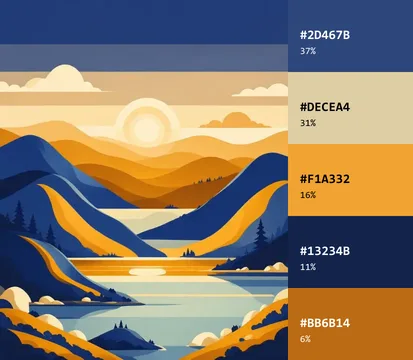
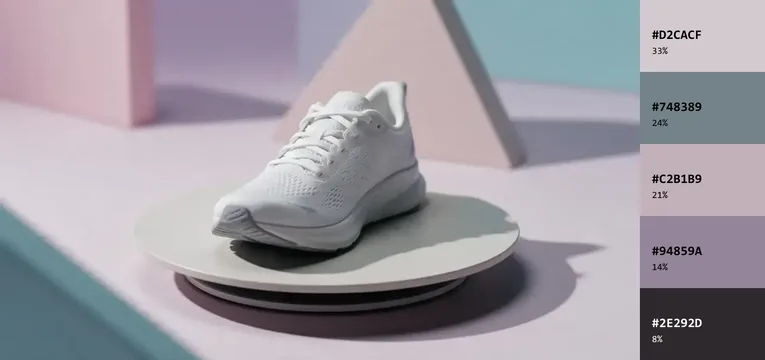
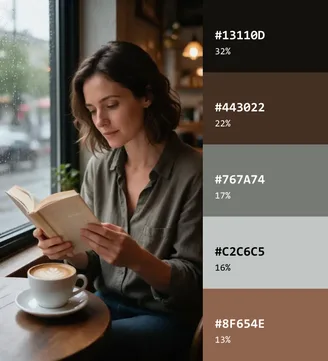
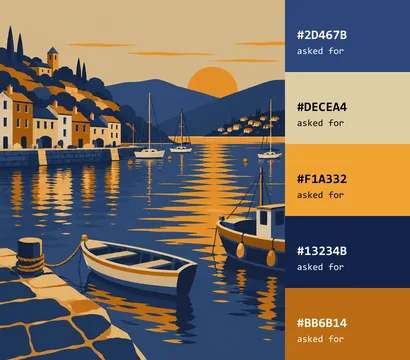
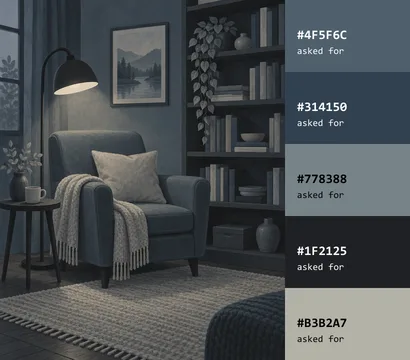
Four pictures with the five colours the tool found, then two new pictures made from those palettes with a prompt.
How to
How to get a color palette from an image
- Time needed
- Steps
- 4 steps
Step 1
Add your picture
Choose a JPG, PNG or WebP, drop it on the box at the top of this page, or paste it.
Step 2
Set the number of colours
Choose 3 to 10 colours, then Most common or Most vivid.
Step 3
Add exact colours
Press any spot in the picture to add the colour at that spot.
Step 4
Copy or download
Press a code to copy it, copy the whole list as HEX or CSS, or download a PNG.
Tips
Get a palette you can use
Which settings suit which job.
A website or a slide deck → 3 or 4 colours, so one can lead and one can stand out.
A brand board or an illustration → 5 or 6 colours, which covers light, dark and an accent.
A busy photo → 8 to 10 colours, then keep the ones you like with your eye.
The palette looks dull → switch to Most vivid, or press the bright spot in the picture.
A colour looks a bit off → press near that spot again, because nearby pixels can differ slightly in a JPG.
Too much black → shadows count as colours, so crop the picture first if you only want the subject.
FAQ
Color Palette From Image questions
10 questions
How do I get a color palette from an image?
Add the picture to the tool at the top of this page. The main colours appear straight away with their HEX and RGB codes, and you can copy them or download a PNG.
Link to this answerIs this color palette generator free?
Yes. It uses no credits and needs no account, because your own browser does the work.
Link to this answerIs my picture uploaded?
No. The tool reads the picture in your browser, so it never reaches our servers. You can check this in the Network tab of your browser's developer tools.
Link to this answerHow many colours should a palette have?
Three to five suits most designs: one main colour, one supporting colour and one accent, with one or two extras if you need them. Use 8 to 10 when you want to see everything in a busy photo, then cut it down.
Link to this answerHow do I match a colour from a picture?
Press the spot in the picture that has the colour you want. The tool adds that exact pixel's colour to your palette with its HEX and RGB code, ready to copy.
Link to this answerAre the colours really in my picture?
Yes. Each swatch is a real pixel colour from your picture, the one closest to the middle of its colour group. It isn't a blend of several pixels.
Link to this answerWhat does the percentage mean?
It's about how much of the picture is closest to that colour. The tool measures it on a smaller copy of your picture, so treat it as a guide.
Link to this answerWhat's the difference between Most common and Most vivid?
Most common goes by area. Most vivid gives bright colours more pull, so a small accent is more likely to get its own swatch. On muted photos the two look much the same.
Link to this answerWhy did I get fewer colours than I asked for?
The tool merges colours that look almost the same, so a logo or flat graphic can stop at two or three. Transparent areas are ignored too.
Link to this answerCan I use these colours in an AI image prompt?
Yes. Press Copy for a prompt and paste the line into your prompt. In our test the pictures kept to the palette, but the colours came out close to the codes, not exact.
Link to this answerIn depth
Color Palette From Image, explained
What works, what to avoid, and how to pick a model.
On this page
How many colours should you take from a photo?
Start with three. The 60-30-10 rule from interior design gives you a simple way to use them, and designers apply it to screens too:
- 60%: the most common colour, for backgrounds and large areas.
- 30%: the second colour, for panels, headings and supporting shapes.
- 10%: the most vivid colour, for buttons and small accents.
How the tool picks the colours
It looks at a smaller copy of your picture, up to 256 pixels on the long side, and sorts the pixels into groups of similar colours. This method is called k-means. It compares colours in CIELAB, a colour space built around how people see colour, so the groups look right to the eye.
From each group it takes the real pixel colour closest to the middle. Colours that look almost the same are merged. The steps always run the same way, so one picture gives the same palette every time.
Most common or Most vivid?
Most common suits backgrounds and overall mood. Most vivid helps when a small bright detail matters. On one dark poster it added a bright orange, #ED6F2C, that covers only 3% of the picture. On our muted café photo the five colours barely changed.
If the colour you want still doesn't appear, press it in the picture and it joins your palette.
How to match a colour from a picture
Press the spot you want. In a JPG, neighbouring pixels can differ slightly, so a flat area may give a few close codes. In our test, a blue area saved as a JPG read #0000FE, not the #0000FF that went in, so press a couple of spots if you need the most typical one.
A HEX code describes a colour on a screen. If you're matching paint or fabric, use the code as a starting point and check a physical sample, because screens and lighting change how a colour looks. To try a colour on your walls first, use the AI paint color visualizer.
How to use a palette in an AI prompt
Press Copy for a prompt, paste the line after your description in the AI image generator, and keep the description free of other colour words. We tried this with two palettes and GPT Image 2.5 Sunburst, then read the results back with this tool. Both pictures kept to the palette, and some colours landed closer than others:
- Closest: we asked for #BB6B14 and found #B66814.
- Further off: we asked for #F1A332 and found #E3922E, a slightly deeper amber.
- Greys drifted most in hue: we asked for the blue-grey #4F5F6C and found the more neutral #525657.
- For a brand colour that must match exactly, finish with a pixel-level colour change, as our recolor image test explains.
How to check that nothing is uploaded
Open your browser's developer tools, go to the Network tab and add a picture: no request carries it. That makes the tool a good fit for unreleased designs and client work.
Your picture is read when you add it, and it's gone when you close or reload the page.