

Cartoon · anime · 3D · pixel · vector · professional
Avatar Maker — design your own avatar in any style
Describe the avatar you want — hair, face, outfit, colours, style — and get a square, ready-to-use avatar in seconds. No parts library to pick from and no photo needed; add your own photo only if you want it to look like you.


- No photo needed
- Any style you can describe
- Square 1:1, four variants
- No watermark
Updated by the Kenerate AI team




Made with Kenerate


On this page
Quick answer

How do you make an avatar with AI?
An avatar maker creates a small picture that stands for you or a character online — on a profile, in a game, a forum or a chat. On Kenerate AI you describe the avatar (who, hair, outfit, background and a style such as cartoon, anime, 3D, pixel art or flat vector) and an image model draws it as a square 1:1 image. Our six test avatars took one try each: GPT Image 2.5 Sunburst at 7.2 credits an avatar, and Qwen Image 3.0, a free-plan model, at 9 credits. New accounts get 25 free credits.
Key facts
- Avatars made
- 6 styles, one try each
- Input
- A description · optional photo
- Shape
- Square 1:1 · Avatar preset makes 4 variants
- Models used
- GPT Image 2.5 Sunburst · Qwen Image 3.0
- Watch out for
- Style words matter — “painting” came back photo-like
- Watermark
- None
Gallery
Six avatars, six styles
Real generations from a description alone — no photo — made for this page, one try each. Open any one to copy the prompt and change the person, colours or style.
How to
How to use the avatar maker
- Time needed
- Steps
- 4 steps
Step 1
Open the Image Studio
Sign in free for 25 starter credits and pick the Avatar preset: square 1:1, four variants.
Step 2
Pick a model
GPT Image 2.5 Sunburst for most styles, or Qwen Image 3.0 on the free plan.
Step 3
Describe your avatar
Who, hair, outfit, one accessory, background colour and the style — cartoon, anime, 3D, pixel, vector or professional.
Step 4
Download
Keep the best variant, or change one detail and run it again. No watermark.
See it in the app

Open Image Studio and type what you want to see — subject, style, lighting and mood.


Watch the tour · 1:23
Prompts, styles, references, edit, Arena & chat
Chapters
Tips
Get an avatar that works as a profile picture
What worked in our six tests.
Start with “square avatar, head and shoulders, centred” — it keeps the face big enough to read when it's shrunk to a small circle.
Describe the person in 3–4 details: age, hair, one accessory, one piece of clothing.
Name the style precisely: “clean anime line art”, “32-bit pixel art”, “smooth stylised 3D render”, “flat vector, three colours”.
Use a plain or simple background — a solid colour or a circle — so the avatar stays clear at small sizes.
Add “no text”; most avatars look better without letters.
Want it to look like you? Add a clear photo as a reference, or use the AI profile picture generator.
Models
Models for avatars
What each model is good at. Open any one straight in the generator.

OpenAI
GPT Image 2.5 Sunburst
- Reference images
- Up to 16
- Output
- 1K–4K
Open GPT Image 2.5 SunburstBest for
Made five of our six avatars
- Free plan

Alibaba
Qwen Image 3.0
- Reference images
- Up to 3
- Output
- 1K · 2K
Open Qwen Image 3.0Best for
Free plan; made the flat vector avatar

ByteDance
Seedream 5.0 Pro
- Reference images
- Up to 10
- Output
- Up to 2K
Open Seedream 5.0 ProBest for
Illustration and anime
Google
Nano Banana 2.1
- Reference images
- Up to 14
- Output
- Up to 4K
Open Nano Banana 2.1Best for
Same character across many avatars
FAQ
Avatar Maker questions
9 questions

How do I make an avatar?
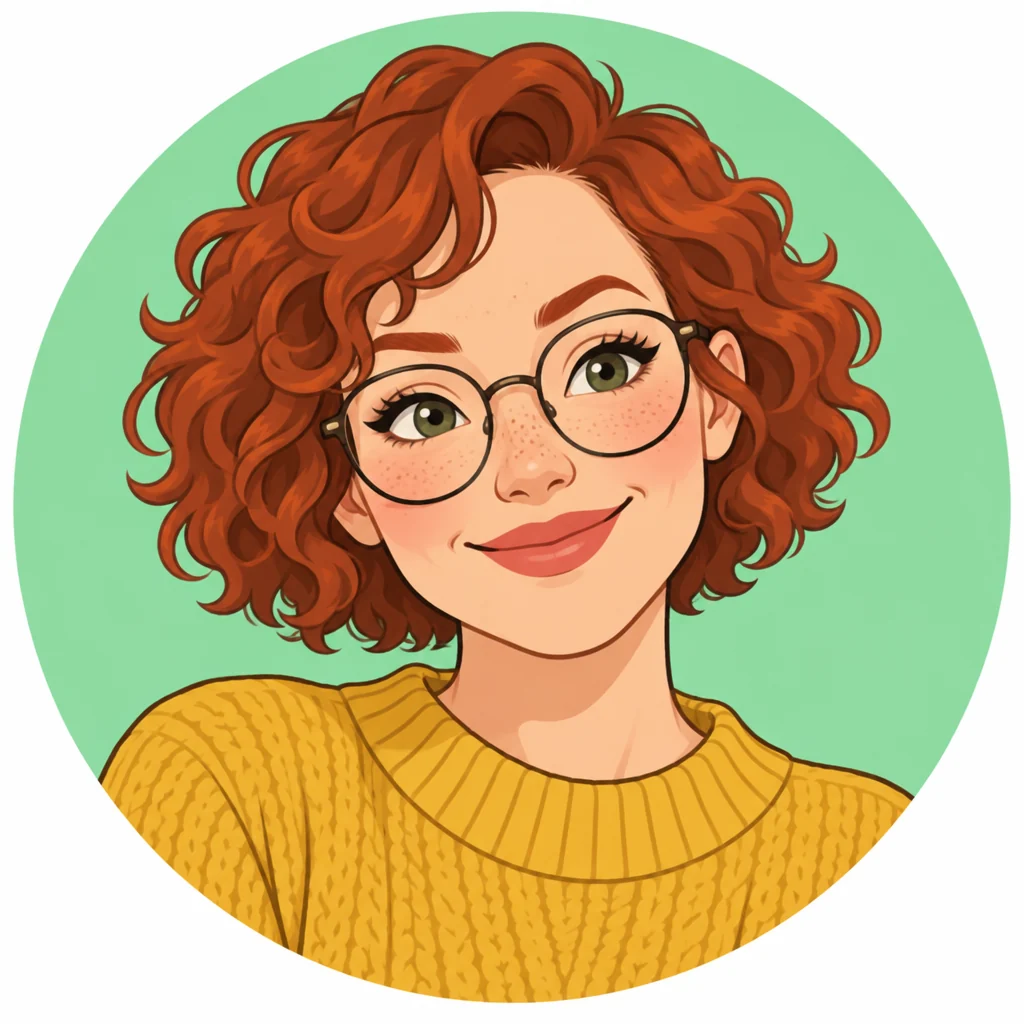
Open Kenerate's Image Studio, pick the Avatar preset (square, four variants) and describe it: “square cartoon avatar of a woman with short curly red hair and round glasses, mustard sweater, mint-green circle background, no text”. GPT Image 2.5 Sunburst drew ours in one try. Change one detail at a time until it looks right, then download.
Link to this answerIs this avatar maker free?
Free to start. A new account gets 25 credits on sign-up — about three avatars on GPT Image 2.5 Sunburst at 7.2 credits each, or two on Qwen Image 3.0, a free-plan model, at 9. After that, credits come in one-time packs that never expire, with no subscription. Downloads carry no watermark.
Link to this answerDo I need a photo to make an avatar?
No. Every avatar on this page was made from a description alone. Add a photo only if you want the avatar to look like you; for that, the AI profile picture generator restyles your own photo and keeps your face recognisable.
Link to this answerWhich avatar styles can I make?
Any style you can describe. Our tests covered cartoon, anime, 3D animated, 32-bit pixel art, flat vector and a professional look. Others that work the same way: chibi, watercolour, comic book, low-poly, claymation, line art or a fantasy RPG portrait.
Link to this answerWhat size should an avatar be?
Make it square. Most profiles crop avatars to a circle, so keep the face centred with some space around it. The Avatar preset makes 1:1 images at 1024 pixels, which is plenty for profiles; GPT Image 2.5 Sunburst can also render 2K or 4K if you need a larger file.
Link to this answerCan I make the same character in different styles or poses?
Yes. Make one avatar you like, then add it as a reference image and ask for a new style or expression — GPT Image 2.5 Sunburst takes up to 16 references and Nano Banana 2.1 up to 14. Keep the description of the face, hair and outfit the same each time.
Link to this answerCan I make an avatar of a real person?
Only of yourself, or of someone who has agreed. Don't make avatars of celebrities or other real people without their consent. Invented characters, like every avatar on this page, are always fine.
Link to this answerWhy didn't my avatar match the style I asked for?
Style words are the strongest part of the prompt, and soft ones get read loosely. Our “semi-realistic digital painting” came back looking like a photo, and our flat vector kept thin outlines although we asked for none. Be blunt — “clearly illustrated, visible brush strokes” or “flat shapes, absolutely no outlines” — and regenerate.
Link to this answerIn depth
Avatar Maker, explained
What works, what to avoid, and how to pick a model.
On this page
What an avatar maker does
An avatar is the small picture that stands for you where your face doesn't have to: a profile, a game, a forum, a chat or a newsletter byline. Classic avatar makers give you a parts library — face shapes, hair, outfits, accessories — and you click them together. You get something quick, but only from the parts they drew.
An AI avatar maker swaps the parts library for a sentence. You describe the person and the style, and the model draws a new avatar from scratch, so the hair, outfit, colours and style can be anything you can name.
The avatar prompt, piece by piece
Every prompt on this page follows the same order:
- Format: “square … avatar, head and shoulders, centred”.
- Who: an adult, an age range, hair, skin tone if you like, one accessory (glasses, earrings, a cap).
- Outfit: one clear piece of clothing — a knit sweater, a denim jacket, a hooded cloak.
- Style: cartoon with bold outlines, clean anime line art, 3D animated-movie, 32-bit pixel art, flat vector, semi-realistic.
- Background: one solid colour or a coloured circle.
- Finish: “profile picture style, no text”.
Avatar maker or profile picture generator?
Use this avatar maker when you want a character: someone you invent, a mascot, a gaming persona, or a stylised version of yourself built from a description. Nothing is uploaded unless you choose to add a photo.
Use the AI profile picture generator when the avatar must be recognisably you: it starts from your photo and keeps your face while changing the style. For a polished work photo, the AI headshot generator does the same with a suit and a studio backdrop.
Free avatar makers vs this one
Free part-based builders are quick and cost nothing, but every avatar is made of the same parts, so many look alike. AI tools that only offer preset filters are fast too, but you can't steer the details.
Here you write the description, so the avatar can include anything, and every example shows its prompt. The trade-off is credits: 25 free on sign-up, then one-time packs that never expire.
What we got
Six avatars, one try each, from a description alone:
- Cartoon (GPT Image 2.5 Sunburst): bold outlines, glasses and freckles, the mint circle exactly as asked.
- Anime (Sunburst): silver hair, amber eyes and the small pin on the collar, on a starry sky.
- 3D animated (Sunburst): the clearest “movie character” look of the set, cap and corduroy right.
- Pixel art (Sunburst): visible pixels and a limited palette; braid, cloak and satchel strap all there.
- Flat vector (Qwen Image 3.0, free plan): clean three-colour icon, but with thin outlines we asked to leave out.
- Professional (Sunburst): a convincing work portrait, but photo-like rather than the painting we asked for.
By the Kenerate AI teamLast updated and reviewed
We build and run the Kenerate generator. Every example is a real output of the model named under it; models and presets were checked against the app's code.
Sources: Kenerate Image Studio · Kenerate pricing
