Background blur · bokeh · free to start
Blur Background — keep the subject sharp, blur the rest
Upload a photo, say how much to blur the background and keep the subject as it is. The background goes soft with a bokeh look, and the person or product stays sharp.
- Subject stays sharp
- Light or strong bokeh
- Set the level in words
- No watermark
Updated by the Kenerate AI team




On this page
Quick answer

How do you blur the background of a photo with AI?
To blur the background of a photo with AI, upload the photo to Kenerate's Image Studio and describe the blur: "blur the background with a soft bokeh, keep the person sharp and unchanged". GPT Image 2.5 Sunburst redraws the background as soft colour and keeps the subject in focus. Our two tests on one photo gave a light bokeh and a strong one, with the subject unchanged in both. A blur edit costs 11.7 credits, and a new account starts with 25 free credits.
Key facts
- Blur edits made
- 2 (light bokeh · strong bokeh)
- Subject kept sharp
- Yes, in both
- Model
- GPT Image 2.5 Sunburst (OpenAI)
- Blur level
- Set in the prompt: soft, light or strong bokeh
- Watch out for
- Fine edges like hair can shift a little
- Watermark
- None
Gallery
One photo, two blur levels
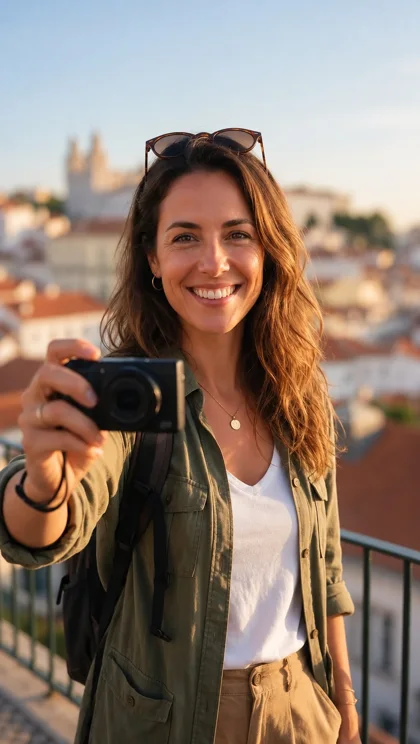
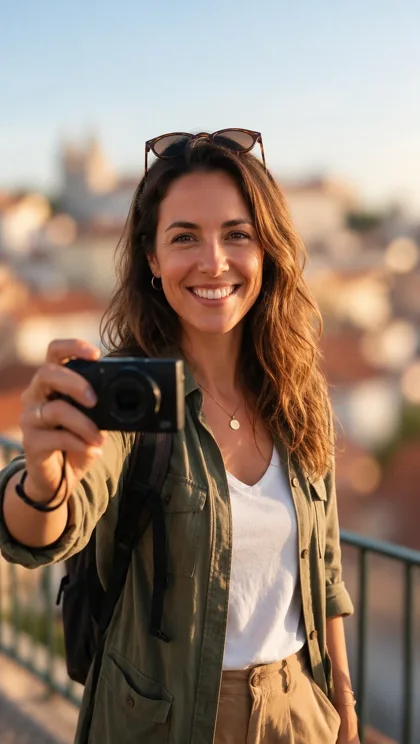
Real GPT Image 2.5 Sunburst edits of one test photo, one try each. Open either to copy the prompt.
How to
How to use the blur background
- Time needed
- Steps
- 4 steps
Step 1
Upload your photo
In /app/image, add a clear photo as a reference. Sign in free for starter credits.
Step 2
Pick GPT Image 2.5 Sunburst
It kept the subject sharp in both of our tests.
Step 3
Describe the blur
Say what to keep sharp, and the blur level: soft, light or strong bokeh.
Step 4
Download
Regenerate if an edge looks off, then download with no watermark.
See it in the app

Open Image Studio and type what you want to see — subject, style, lighting and mood.


Watch the tour · 1:23
Prompts, styles, references, edit, Arena & chat
Chapters
Tips
Get a blur that looks like a real lens
What worked in our tests.
Say which part to keep sharp: “keep the person sharp and unchanged”, or “keep the product in focus”.
Pick the level in words: “soft natural bokeh” for a light blur, “strong bokeh, shallow depth of field” for a heavy one.
Use a photo where the subject is clearly separate from the background; busy edges are harder to split.
Ask for “same pose, face, clothing and lighting” so the subject is not redrawn.
Keep text out of the prompt, or say “no text”; the edit should only change the background.
For a hard cut-out with a sharp edge, use the Remove BG tool first, then blur the background in a second edit.
Models
Models for background blur
What each model is good at. Open any one straight in the generator.

OpenAI
GPT Image 2.5 Sunburst
- Reference images
- Up to 16
- Output
- 1K–4K
Open GPT Image 2.5 SunburstBest for
Made both blur tests
Google
Nano Banana 2.1
- Reference images
- Up to 14
- Output
- Up to 4K
Open Nano Banana 2.1Best for
Built for keeping the same subject
- Free plan

FAQ
Blur Background questions
9 questions

How do I blur the background of a photo?
Upload the photo in Kenerate's Image Studio, pick GPT Image 2.5 Sunburst and describe the blur: “blur the background with a soft bokeh, keep the person sharp and unchanged”. Our test photo came back with the city behind a soft, even blur and the subject unchanged.
Link to this answerIs there a free background blur tool?
Yes, to start. A new Kenerate account gets 25 credits on sign-up, enough for two blur edits at 11.7 credits each on GPT Image 2.5 Sunburst. After that, credits come in one-time packs with no subscription, and downloads carry no watermark. Other blur tools are free too, usually with a daily limit.
Link to this answerCan I control how strong the blur is?
Yes, with words rather than a slider. “Soft natural bokeh” gives a light blur where the background stays recognisable. “Strong bokeh, shallow depth of field” dissolves it into colour. Our two tests show the difference.
Link to this answerWill the subject stay sharp?
In both of our tests, yes: the face, clothing and pose stayed as they were. Ask for “keep the person sharp and unchanged” to make the edit leave the subject alone.
Link to this answerIs it the same as a portrait mode blur?
It gives the same look — a sharp subject on a blurred background — but it is made from the prompt, not from depth data in a phone's camera. A prompt edit can shift fine edges like loose hair a little, so check them on the download.
Link to this answerCan I blur the background of a product photo?
Yes. Describe the product to keep in focus and the surface behind it: “keep the bottle sharp and unchanged, blur the kitchen behind it with a soft bokeh”. Add a reference photo of the product so the label and shape stay the same.
Link to this answerDoes the blur tool change the person?
Only if the prompt allows it. Our prompts say “same pose, face, clothing and lighting on the subject”, and both tests kept the subject as it was. Avoid asking for other changes in the same edit.
Link to this answerHow much does a background blur cost?
11.7 credits for one photo on GPT Image 2.5 Sunburst at 1K. Each extra reference photo adds 4.5 credits. Credits are one-time packs that never expire.
Link to this answerCan I blur the background of a video?
Not on this page. This tool edits still images. For video, use the video tools on Kenerate AI or a video editor.
Link to this answerIn depth
Blur Background, explained
What works, what to avoid, and how to pick a model.
On this page
What a background blur does
A background blur keeps the subject in focus and softens everything behind it. A camera does this with a wide aperture and a long lens; a phone does it with depth data. An AI edit does it by redrawing the background as soft colour and leaving the subject as it was.
The result works for portraits, headshots, product shots and social posts, where the background should not compete with the subject.
How the prompt sets the blur
Kenerate's blur is set by the words. Write three parts:
- What to keep: “keep the person sharp and unchanged”, “keep the bottle in focus”.
- The blur level: “soft natural bokeh” for light, “strong bokeh, shallow depth of field” for heavy.
- What stays the same: “same pose, face, clothing and lighting on the subject”.
Blur versus a cut-out
A blur keeps the whole photo and changes only the background. A cut-out removes the background entirely, so you can drop the subject onto a new scene. Use the blur when the real background matters and you just want it out of focus; use the Remove BG tool when you want the subject alone.
What we got
One stock photo, two edits, both on GPT Image 2.5 Sunburst:
- Light bokeh: the old town and the sky stay recognisable as soft shapes; the subject is sharp.
- Strong bokeh: the city dissolves into warm colour blobs; the face, camera and jacket are unchanged.
By the Kenerate AI teamLast updated and reviewed
We build and run the Kenerate generator. Every example is a real output of the model named under it; models and presets were checked against the app's code.
Sources: Kenerate Image Studio · Pollo AI — Blur Background · NoteGPT — AI blur background