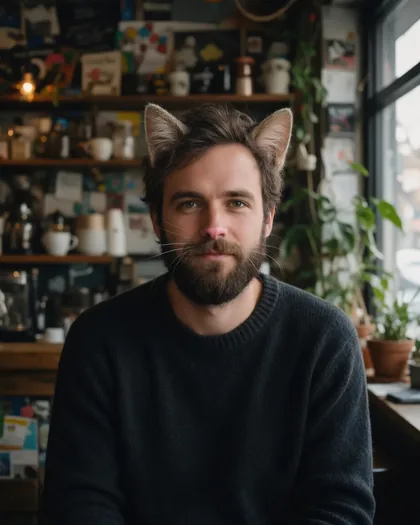
Your own photo · cat ears · full cat · dog filter
Cat filter — turn your photo into a cat or a dog
Upload a photo of yourself and an AI edit adds cat ears and whiskers, or swaps your head for a full cat. Prefer dogs? Change a few words for floppy ears or a golden retriever. Your clothes and background stay the same.
- Your own photo
- Cat and dog looks
- Ears only or full animal
- No watermark
Updated by the Kenerate AI team




On this page
Quick answer

How do I turn myself into a cat?
To turn yourself into a cat, upload a clear photo of yourself to an AI image editor and describe the change, for example "add realistic cat ears and fine white whiskers; keep my face the same". Kenerate's cat filter opens the editor with that instruction filled in, so you only add your photo and press Create. Swap the words for a full tabby cat, or use the same page as a dog filter with floppy ears or a golden retriever.
Key facts
- Works on
- Your own photo, or one you have permission to edit
- Cat looks
- Ears and whiskers · full cat
- Dog looks
- Ears and nose · full dog
- Keeps
- Clothing · background · lighting
- Default model
- Qwen Image 3.0 (free plan)
- Live camera
- No, still photos only
- Watermark
- None
Cat and dog looks
Cat and dog looks to try, and the words that get them
Copy the words into the filter and keep the line about what stays the same. The first four are the prompts behind the examples below.
| Look | What changes | Your face | Prompt words |
|---|---|---|---|
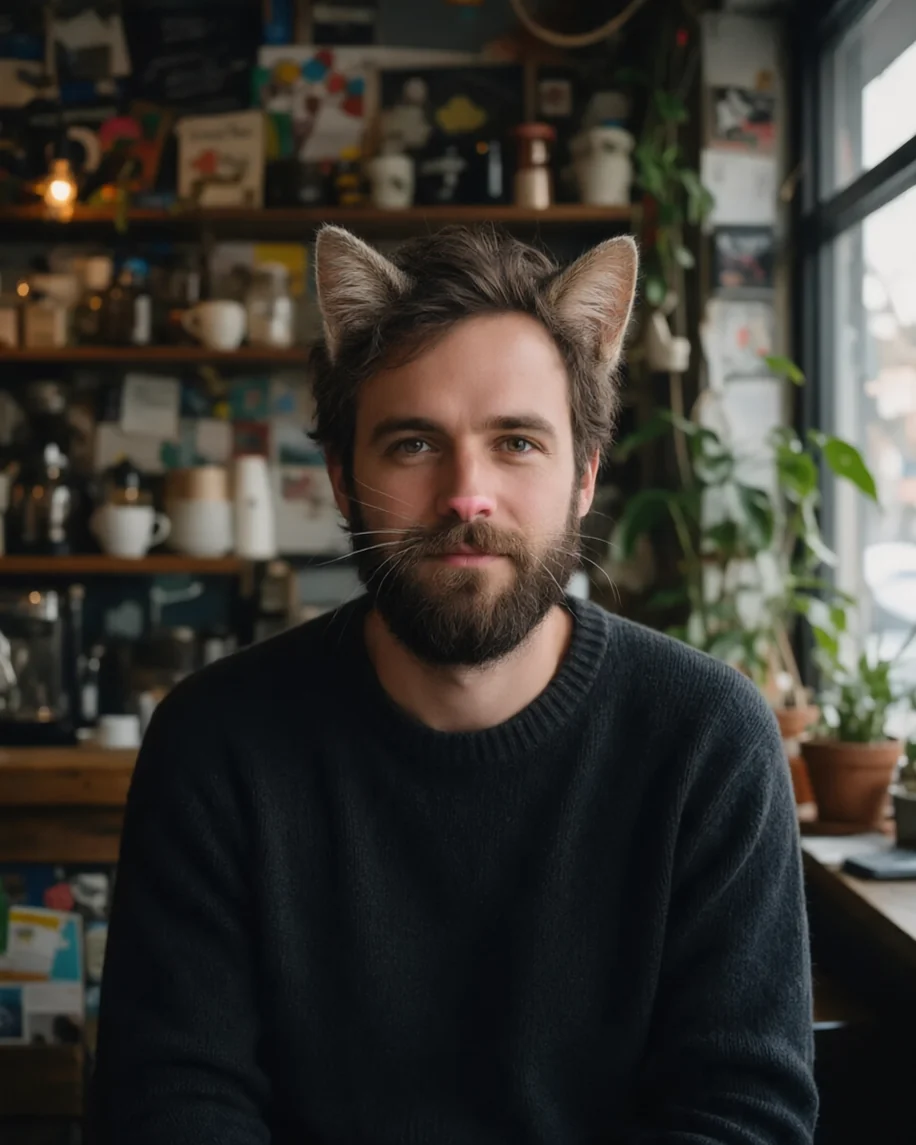
| Cat ears and whiskers | Fur ears, whiskers, a small pink nose | Stays yours | realistic cat ears with soft tabby fur, fine white whiskers on my cheeks, a small pink cat nose |
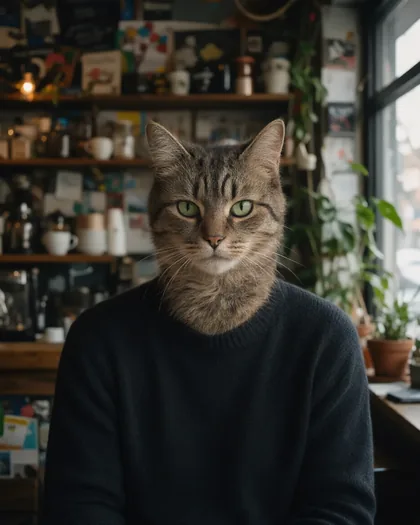
| Full tabby cat | Your head and neck become a cat | Replaced | turn me into a real tabby cat with cat fur, a cat face and green cat eyes |
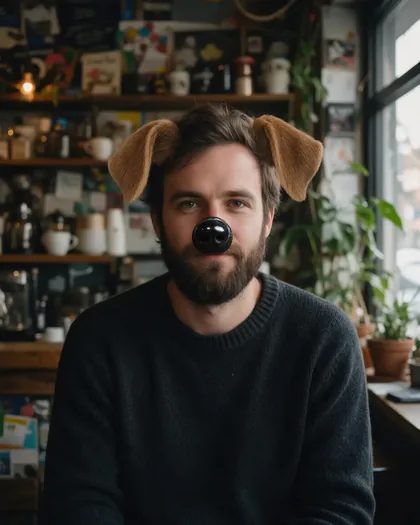
| Dog ears and nose | Floppy ears and a shiny dog nose | Stays yours | floppy brown dog ears on the sides of my head, a shiny black dog nose |
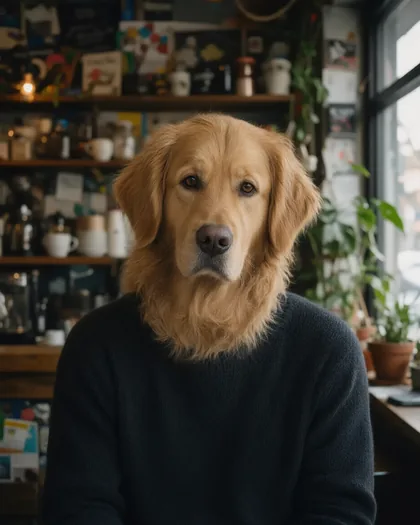
| Full golden retriever | Your head and neck become a dog | Replaced | turn me into a real golden retriever with dog fur, a dog face and warm brown eyes |
| Another cat | Any coat or breed you name | Replaced | turn me into a real ginger cat / black cat / grey Persian cat |
| Another dog | Any breed you name | Replaced | turn me into a real husky / pug / border collie |
Sources: Kenerate Image Studio
Gallery
Cat filter and dog filter examples
Four real Qwen Image 3.0 edits of one sample portrait of an adult, each from a single try.
How to
How to use the cat filter
- Time needed
- Steps
- 4 steps
Step 1
Open the cat filter
Press “Add your photo”. Image Studio opens with the cat ears instruction in the prompt box. Sign in free for starter credits.
Step 2
Upload your photo
Add a clear photo of yourself facing the camera, with your whole head in the frame.
Step 3
Pick the animal
Keep the cat ears, or swap in the words for a full cat, dog ears or a golden retriever from the table above.
Step 4
Create and download
Press Create and run it again if the ears don't sit right. Download your favourite without a watermark.
See it in the app

Open Image Studio and type what you want to see — subject, style, lighting and mood.


Watch the tour · 1:23
Prompts, styles, references, edit, Arena & chat
Chapters
Tips
Get a better cat or dog result
What made the difference in our test edits.
Use a front-facing photo with your whole head in frame, so the ears have room.
Say where things go: “on top of my head”, “on my cheeks”, “on the tip of my nose”.
Name the coat: “tabby”, “ginger”, “golden retriever”. A named animal looks more real than “a cat”.
Keep the line “keep my clothing, the background and the lighting the same”.
Want to stay recognisable? Use ears and whiskers. The full looks replace your face.
Run it twice. Ears and noses vary between runs, and our dog nose came out big and cartoonish.
Models
Models for cat and dog edits
What each model is good at. Open any one straight in the generator.
- Free plan

Alibaba
Qwen Image 3.0
- Reference images
- Up to 3
- Output
- 1K or 2K
Open Qwen Image 3.0Best for
Default here · free plan · made the examples above

ByteDance
Seedream 5.0 Pro
- Reference images
- Up to 10
- Output
- Up to 2K
Open Seedream 5.0 ProBest for
A second option for portrait edits
Google
Nano Banana 2.1

OpenAI
GPT Image 2.5 Sunburst
- Reference images
- Up to 16
- Output
- 1K to 4K
Open GPT Image 2.5 SunburstBest for
Precision edits with fine detail
FAQ
Cat Filter questions
8 questions

How do I turn myself into a cat?
Upload a clear, front-facing photo of yourself to the cat filter and press Create. The editor opens with an instruction for cat ears, whiskers and a pink nose. For a full cat, replace it with “turn me into a real tabby cat with cat fur, a cat face and green cat eyes; keep my clothing and the background the same”.
Link to this answerIs the cat filter free?
Yes, to start. A new Kenerate account gets free starter credits, and Qwen Image 3.0, the default model here, is on the free plan. Seedream 5.0 Pro, Nano Banana 2.1 and GPT Image 2.5 Sunburst use credits from a one-time pack; there's no subscription and bought credits don't expire. Results download without a watermark.
Link to this answerIs there a dog filter too?
Yes, this page is both. Change the instruction to “add floppy brown dog ears on the sides of my head and a shiny black dog nose” for the classic look, or “turn me into a real golden retriever” for a full dog. Any breed works as a prompt word, such as husky, pug or border collie.
Link to this answerWill I still look like me?
With ears and whiskers, yes: in our test the face, beard and background stayed the same. The full cat and dog looks replace your head and neck, so you keep only your clothes, pose and background. Pick ears and whiskers if you want friends to recognise you.
Link to this answerDoes it work as a live camera filter?
No. This filter edits a still photo you upload, so it can't run on your camera in real time. For a live effect on a video call or a story, use a lens app such as Snapchat. An AI edit takes a little longer, but you can describe the exact animal you want.
Link to this answerCan I use it on a picture of my pet?
This page is for turning a person into an animal. For photos of your real cat or dog, the AI pet portrait generator is the better fit. To go the other way and see your pet as a person, try dog to human AI.
Link to this answerWhy do the ears look pasted on?
Usually the photo crops the top of your head, or the prompt didn't say where they go. Use a photo with space above your head, say “on top of my head”, and describe the fur so it matches your hair or the light. Run it again, since each try is different.
Link to this answerCan I use someone else's photo?
Only your own photo, or one an adult has agreed to. A cat filter still edits a real person's likeness, so don't use photos of public figures, and share results only with consent. Never upload photos of anyone under 18. Kenerate's content rules apply to every edit.
Link to this answerIn depth
Cat Filter, explained
What works, what to avoid, and how to pick a model.
On this page
How does an AI cat filter work?
It's an instruction edit. Your photo and one sentence go to an image model's edit endpoint, and the model draws the ears, whiskers or animal into the picture, matching the light of your photo. A phone lens works differently: it tracks your face live and lays a ready-made overlay on top, which is why it can run on video but always gives the same ears.
How do I write a cat filter prompt?
Three parts are enough:
- The animal and the look: “realistic cat ears with soft tabby fur”, “a real golden retriever”.
- Where it goes: “on top of my head”, “on my cheeks”, “instead of my face”.
- What must not change: “keep my clothing, the background and the lighting exactly the same”.
What to expect from the full cat or dog
In our four test edits, the small add-ons left the face alone, and the full looks kept the sweater, the room and the light while replacing the head and neck. So the result reads as an animal wearing your clothes, not a whole animal. If you'd rather have a full-body cat, ask for one and drop the line about your clothing, though that's a new picture more than an edit. Moderation blocks words such as “baby”, so ask for a cat or a dog, not a baby one.
By the Kenerate AI teamLast updated and reviewed
We build and run the Kenerate generator. Every example is a real output of the model named under it; models and presets were checked against the app's code.
Sources: Kenerate Image Studio