Your photo · your masthead · your cover lines
AI Magazine Cover Maker — put your photo on the cover
Upload a photo, name your magazine and write the headlines — AI builds the whole cover around you: masthead, lead line, cover lines, date strip and barcode, in a travel, fashion or birthday style.
- Keeps your face
- Your own headlines
- Fashion, travel, birthday
- No watermark
Updated by the Kenerate AI team
On this page
Quick answer
How do you put your photo on a magazine cover with AI?
An AI magazine cover maker turns your photo into a magazine cover: you upload the picture, type the masthead and cover lines, and the model lays them out around you like a real issue. On Kenerate AI, GPT Image 2.5 Sunburst — an image model built for text rendering — made all three covers on this page in one try each, with every headline spelled as asked. A cover from a photo costs 11.7 credits.
Key facts
- Covers made
- 3 (travel · fashion · birthday)
- Text spelled right
- Yes, every line on all three
- Model
- GPT Image 2.5 Sunburst (OpenAI)
- Cover shape
- 3:4 (close to US letter); 2:3, 4:5, 9:16 too
- Watermark
- None
Gallery
Three photos, three magazine covers
Real GPT Image 2.5 Sunburst edits of our test photos, one try each, with made-up magazine names. Open any one to copy the full prompt.
Same prompt
The photo, then the cover
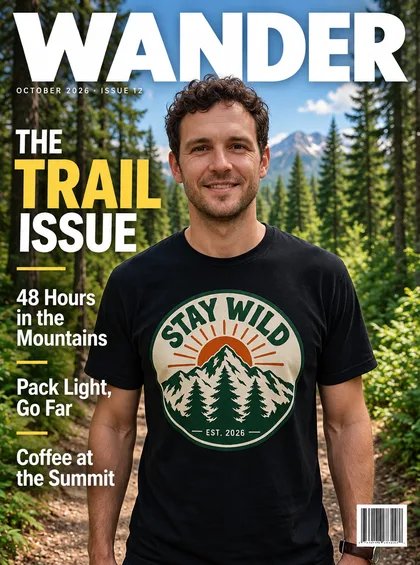
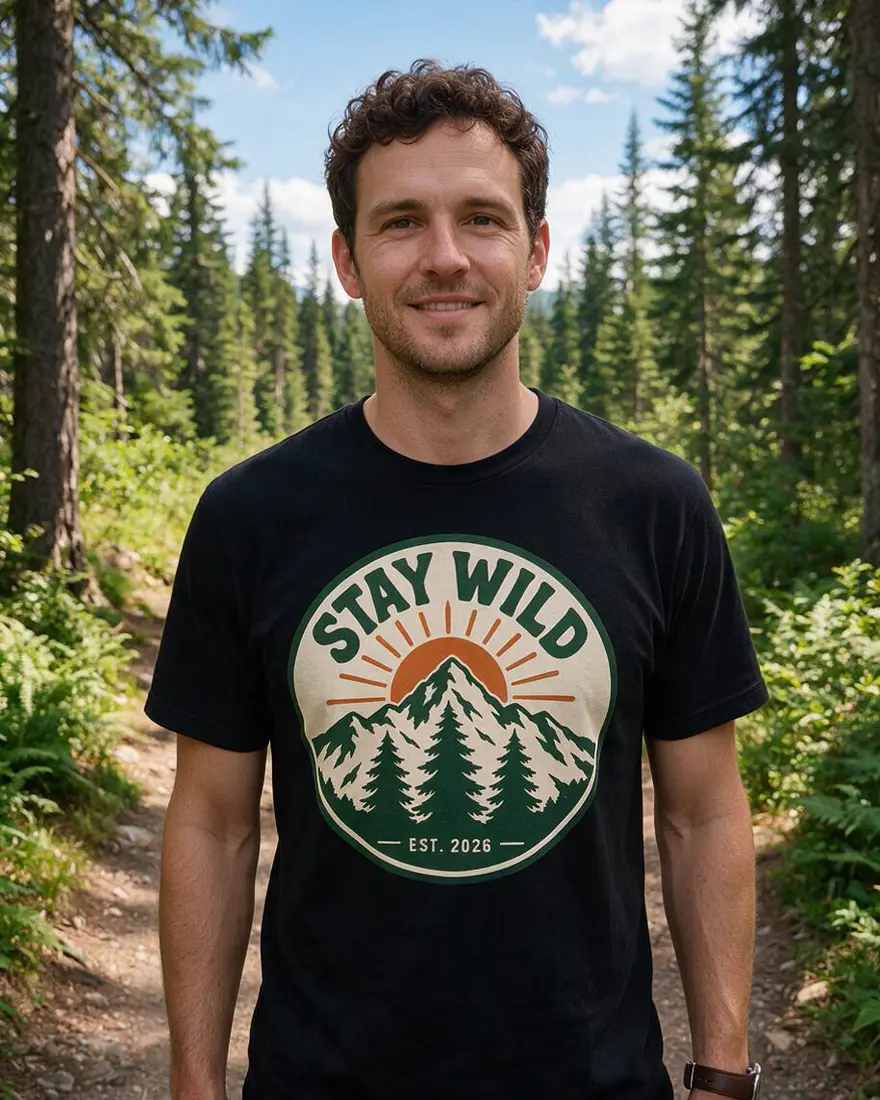
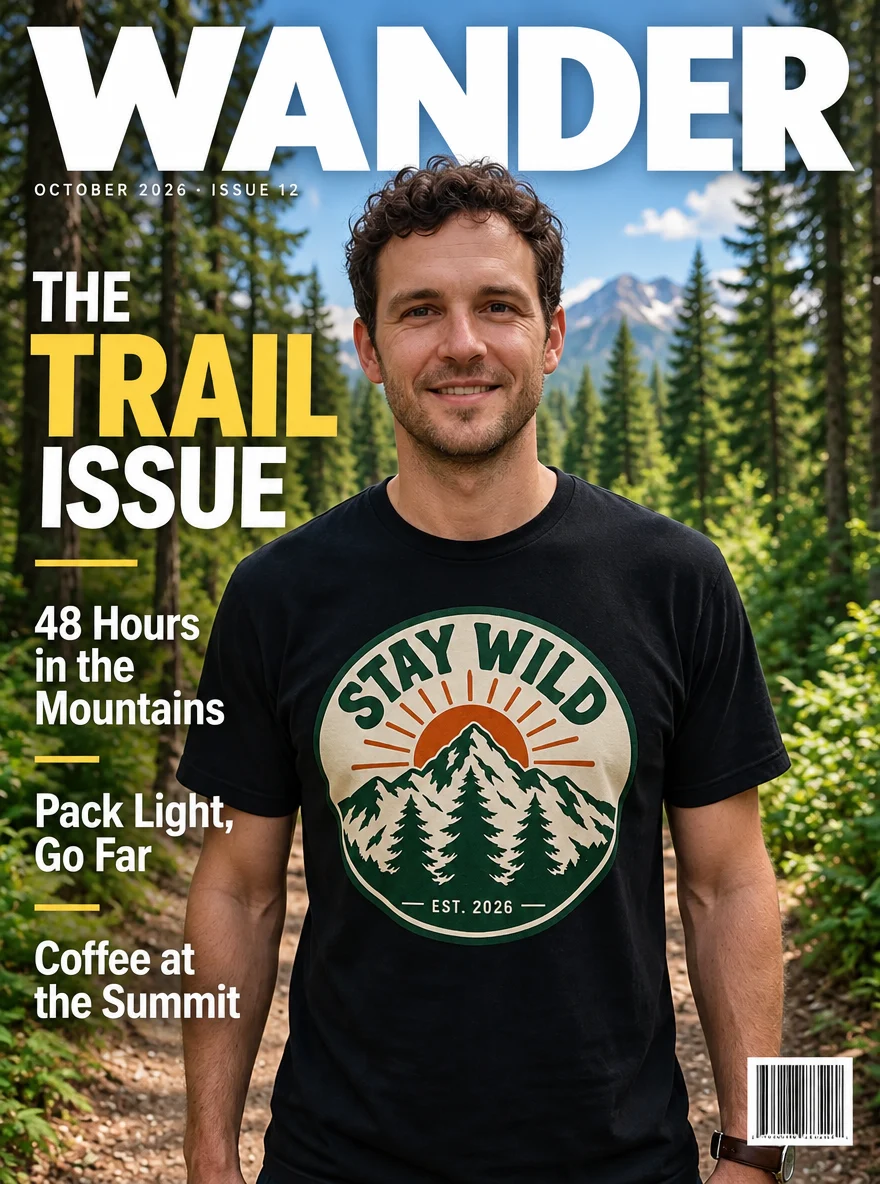
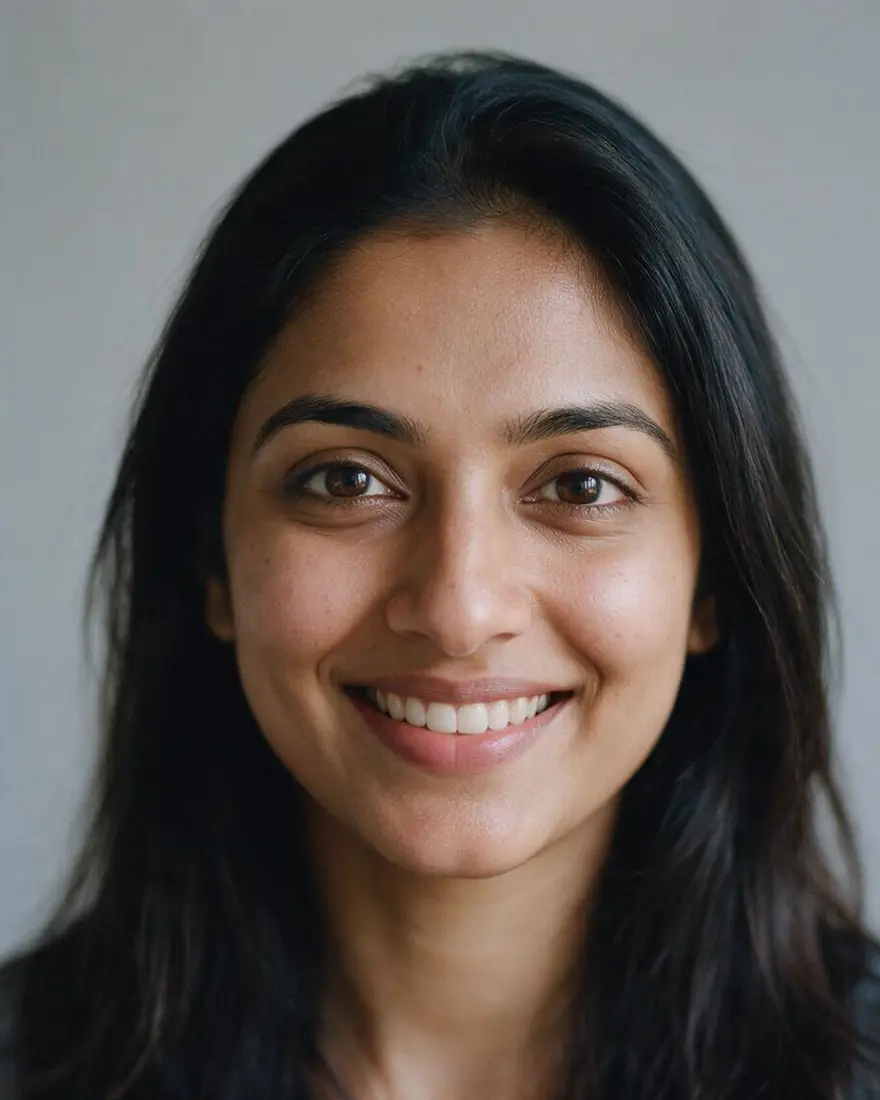
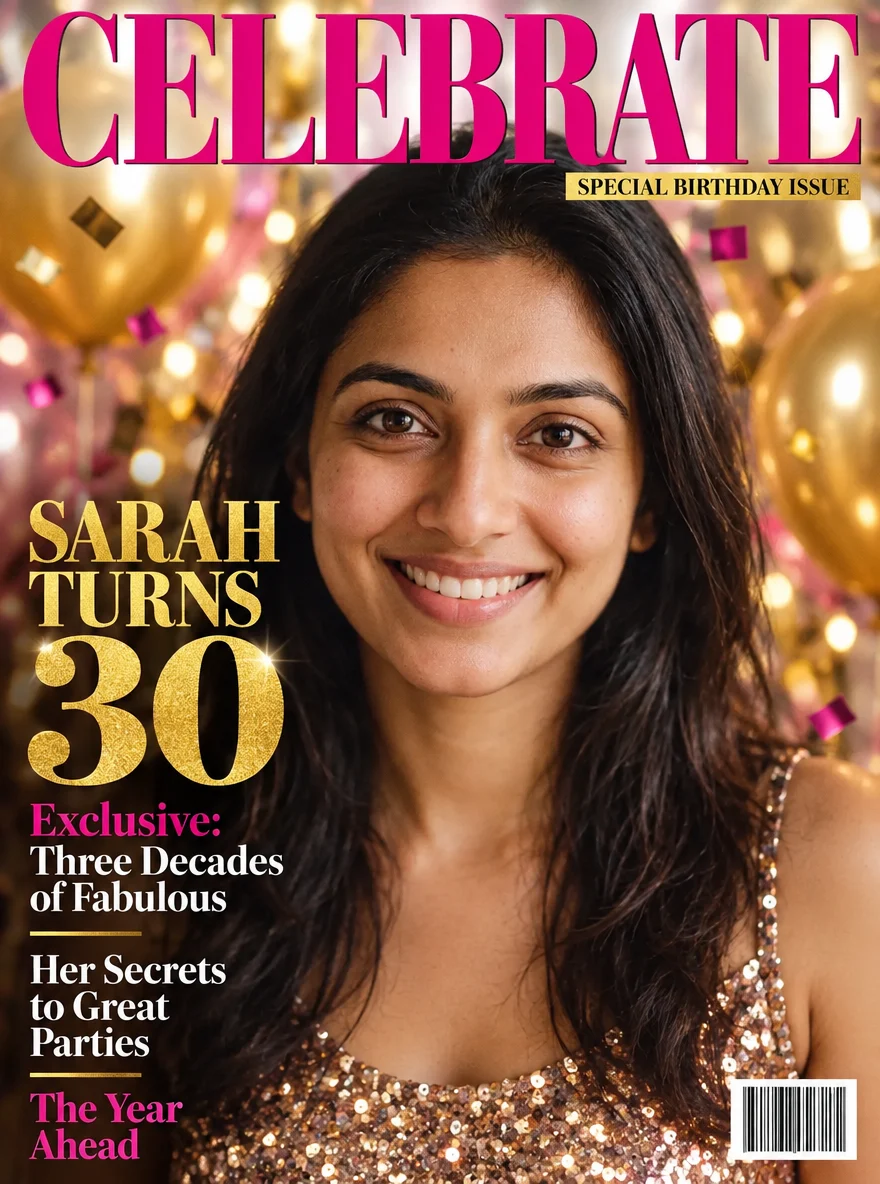
Two test photos in, two covers out. Faces, hair and the t-shirt badge carried over; the masthead, cover lines, date strip and barcode came from the prompt.
PromptTurn this photo into a glossy outdoor-adventure magazine cover. Keep the man's face, curly dark hair, stubble, smile and black t-shirt exactly as in the photo, on the same forest trail, framed waist-up as the cover star. Add a bold white masthead across the top reading "WANDER". Cover lines in clean sans-serif: large lead line "THE TRAIL ISSUE" on the left, smaller lines "48 Hours in the Mountains", "Pack Light, Go Far" and "Coffee at the Summit". Small date strip under the masthead "OCTOBER 2026 · ISSUE 12" and a small barcode in the bottom-right corner. Professional editorial magazine layout, sharp text, no other logos.
 PhotoInput
 Travel coverGPT Image 2.5 Sunburst
 PhotoInput
 Birthday coverGPT Image 2.5 Sunburst
How to
How to use the AI magazine cover maker
- Time needed
- Steps
- 4 steps
Step 1
Upload your photo
In /app/image, add a clear photo as a reference and pick the 3:4 shape. Sign in free for starter credits.
Step 2
Pick GPT Image 2.5 Sunburst
It spelled every cover line right in all three of our tests.
Step 3
Write the cover
Magazine name, lead line, two or three cover lines, a date strip, the style and where each goes.
Step 4
Download
Regenerate if a line or the framing is off, then download without a watermark.
See it in the app

Open Image Studio and type what you want to see — subject, style, lighting and mood.


Watch the tour · 1:23
Prompts, styles, references, edit, Arena & chat
Chapters
Tips
Prompts that make a cover look like a real issue
What worked in our tests.
Start with “Turn this photo into a … magazine cover” and attach one clear photo of the cover star.
Put every word in quotes: the masthead, the lead line and each cover line. The model copies quoted text exactly.
Say where each block goes: masthead across the top, lead line on the left, small lines down the right, barcode bottom-right.
Name the genre — outdoor, fashion, celebrity, business — and the type: bold sans-serif, elegant serif, italic.
Ask for the framing you want: “waist-up as the cover star”. Our fashion prompt didn't, and came back full-length with a small face.
Invent your own magazine name. Real mastheads are trademarks — keep them off anything you print or post.
Models
Models for magazine covers
What each model is good at. Open any one straight in the generator.
OpenAI
GPT Image 2.5 Sunburst
- Reference images
- Up to 16
- Output
- 1K–4K
Open GPT Image 2.5 SunburstBest for
Made every cover on this page
Google
Nano Banana 2.1
- Reference images
- Up to 14
- Output
- Up to 4K
Open Nano Banana 2.1Best for
Same face across a series of covers
- Free plan
FAQ
AI Magazine Cover Maker questions
9 questions
How do I put my photo on a magazine cover?
Upload the photo in Kenerate's Image Studio, pick GPT Image 2.5 Sunburst and the 3:4 shape, then write the cover: “Turn this photo into a glossy outdoor magazine cover, masthead "WANDER" across the top, lead line "THE TRAIL ISSUE", a small barcode bottom-right.” Our trail photo came back as a full cover with every line spelled right on the first try.
Link to this answerWill the text on the cover be spelled correctly?
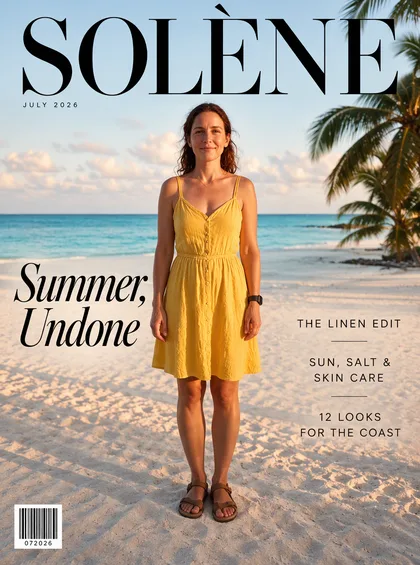
With GPT Image 2.5 Sunburst it was in our tests: all three mastheads and all twelve cover lines came out exactly as typed, including the accent in SOLÈNE. Put each line in quotes and keep lines short; if one slips, regenerate or fix it with the change-text-in-image tool.
Link to this answerWhat size is a magazine cover?
A US magazine is usually 8.5 × 11 inches, close to a 3:4 shape, which is what our covers use (880 × 1184 at 1K). For a story or reel use 9:16, for an Instagram post 4:5. GPT Image 2.5 Sunburst goes up to 4K for print.
Link to this answerCan I make a birthday or anniversary magazine cover?
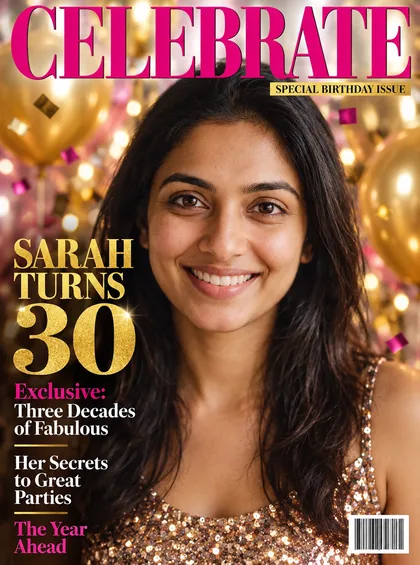
Yes — it's one of the most popular gifts. Write the name and age as the lead line, add a few playful cover lines and a “special birthday issue” strip. Our CELEBRATE cover put “SARAH TURNS 30” in gold with balloons and confetti behind her.
Link to this answerCan I make a fake Vogue or Time cover?
Make the look, not the logo. Ask for “a high-fashion cover with an elegant black serif masthead” or “a news-magazine cover with a red border”, and use your own magazine name. Real mastheads are trademarks, so a copied logo isn't something to print, sell or post as real.
Link to this answerIs the AI magazine cover maker free?
Free to start. A new Kenerate account gets starter credits on sign-up, and Qwen Image 3.0 is a free-plan model. GPT Image 2.5 Sunburst, used on this page, costs 11.7 credits a cover from a photo and 7.2 from text, from one-time credit packs that never expire. Downloads carry no watermark.
Link to this answerCan I make a cover without a photo?
Yes. Leave the reference empty and describe the cover star, outfit, setting and every line of text. The model invents the person; use a photo when the cover needs to be you.
Link to this answerIs the barcode real?
No. The barcodes on our covers are decorative and won't scan. If a printed cover needs a working barcode or QR code, add it in a design tool afterwards.
Link to this answerCan I upload a photo of someone else?
Only photos of yourself or of adults who agreed — a friend for a birthday cover, for example. Don't upload celebrities, other real people without consent or anyone under 18. Switch on Private to keep your results out of public view.
Link to this answerIn depth
AI Magazine Cover Maker, explained
What works, what to avoid, and how to pick a model.
On this page
The parts of a magazine cover
Every newsstand cover is built from the same few blocks, and naming them in the prompt is what makes the result read as a magazine rather than a poster:
- Masthead: the magazine's name, big, across the top — often partly behind the cover star's head.
- Lead line: the main story, the largest text after the masthead.
- Cover lines: two to five shorter teasers down one side.
- Date strip: month, year and issue number under the masthead.
- Barcode: a small box in a bottom corner.
Template editors vs AI covers
Template tools give you a fixed layout and editable text layers; you drop your photo in and type over the placeholders. An AI cover maker redraws the whole page around your photo — the lighting, the background, the outfit and the type style all change together, so the photo looks shot for the cover.
The trade-off: text lives inside the image. If you need to edit a word later, regenerate or use a text-editing tool rather than a layer panel.
What we got
Three photo edits, one try each, on GPT Image 2.5 Sunburst:
- Travel (WANDER): face, curls and the STAY WILD badge kept; every cover line right; mountains added behind the trail.
- Fashion (SOLÈNE): elegant serif masthead with the accent right and clean thin cover lines — but framed full-length, so her face is small.
- Birthday (CELEBRATE): sequin top, gold balloons and the gold “SARAH TURNS 30” exactly as asked.