Angel · fairy · dragon · pet memorial wings
Angel Wings Filter — add wings to your own photo
Upload a photo of yourself or your pet, describe the wings — white feathered angel wings, shimmering fairy wings, dark dragon wings — and get the same photo back with the wings behind your shoulders. No brush, no sticker to line up.
- Keeps your face
- Angel, fairy or dragon wings
- Copy-ready prompts
- No watermark
Updated by the Kenerate AI team




On this page
Quick answer

How do you add angel wings to a photo with AI?
To add angel wings to a photo with AI, upload the photo as a reference in an image editor and describe the wings and what must stay the same — for example “add large white feathered angel wings behind her shoulders; keep her face, smile and hair exactly the same”. On Kenerate AI that edit costs 3 credits with Kenerate Flash or 11.7 credits with GPT Image 2.5 Sunburst, which gave the most natural feathers in our test. New accounts get 25 free credits, and downloads have no watermark.
Key facts
- Wings shown
- Angel · fairy (butterfly) · dragon · pet angel with halo
- Face kept
- Yes, in all four edits below
- Works on pets
- Yes — see the cat with wings and a halo
- Who it's for
- Adults and pets — children's photos are blocked
- Watermark
- None
Gallery
Four photos, four kinds of wings
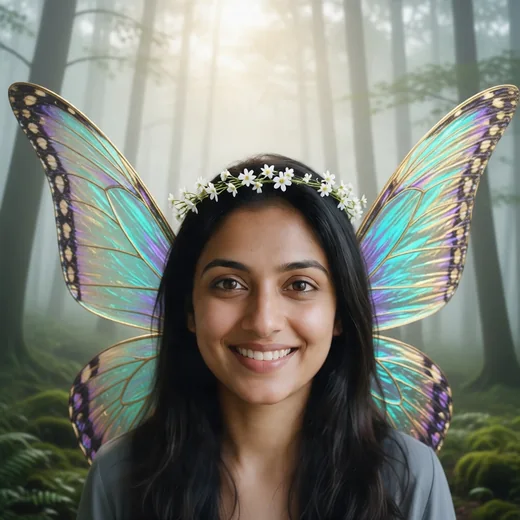
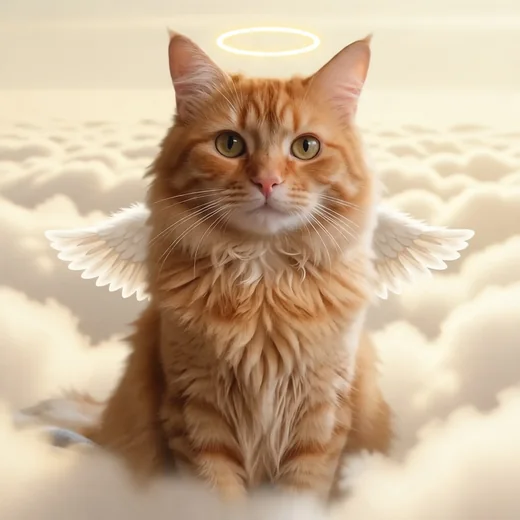
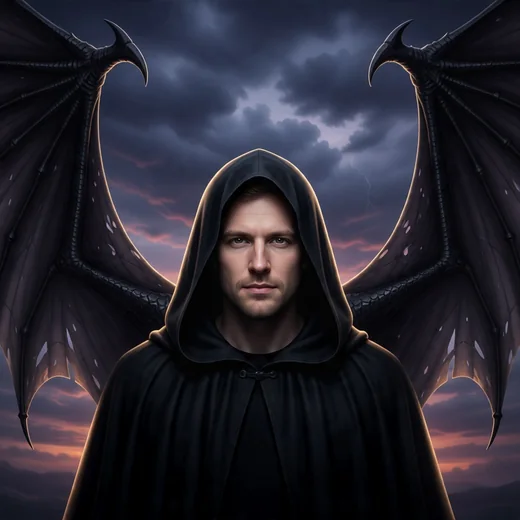
Real Kenerate edits, one try each — angel, fairy and dragon wings on three test portraits and a halo on a cat. Open any one to copy the prompt.
Same prompt
The photo, then the angel
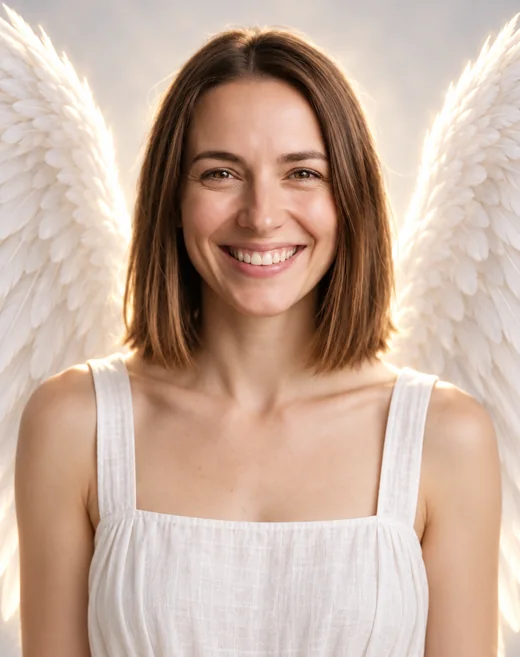
One AI-made test photo in, one GPT Image 2.5 Sunburst edit out for 11.7 credits. Her smile, eyes and hair carried through; the wings, the white dress and the glow came from the prompt.
PromptAdd large white feathered angel wings to this same woman, rising from behind her shoulders and spreading wide … Change her top to a simple white linen dress. Keep her face, smile, eyes and shoulder-length brown hair exactly the same.
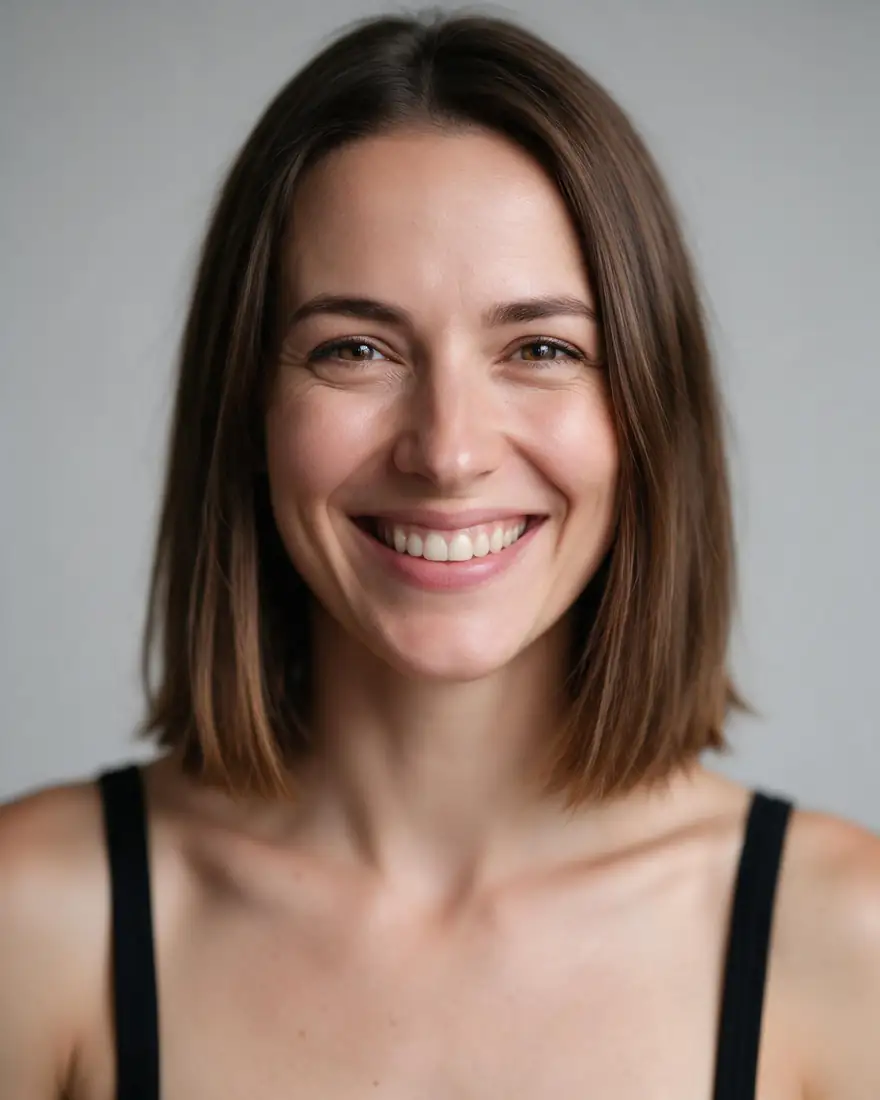 PhotoInput
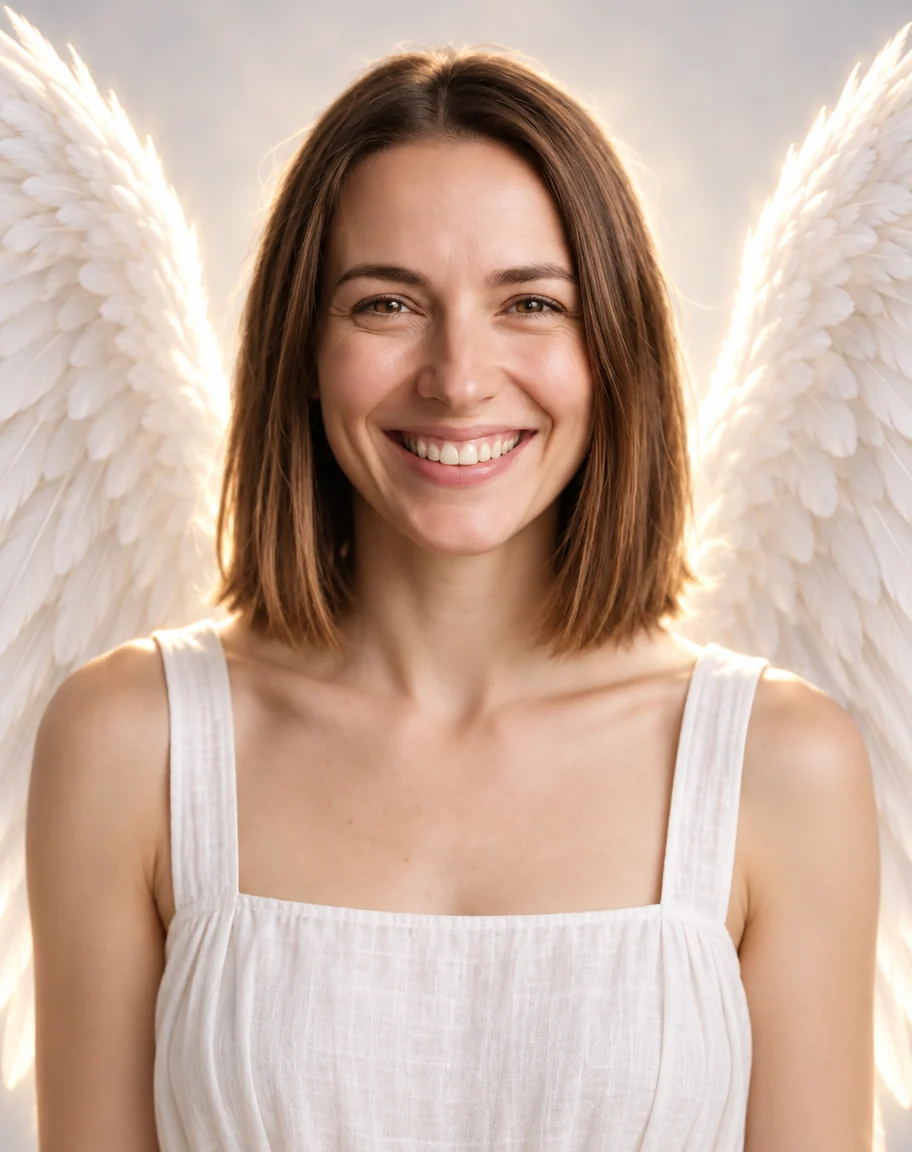 Angel wingsGPT Image 2.5 Sunburst edit
How to
How to use the angel wings filter
- Time needed
- Steps
- 4 steps
Step 1
Open Image Studio
Go to /app/image and pick Kenerate Flash for a 3-credit edit, or GPT Image 2.5 Sunburst for the most natural feathers. Sign in free for 25 starter credits.
Step 2
Add your photo
Upload one clear photo of yourself or your pet as the reference — JPG, PNG or WebP. Leave some room around the shoulders.
Step 3
Describe the wings
Paste a prompt from the examples and change the wing type, colour and background: white angel wings, fairy wings, dragon wings, a halo.
Step 4
Download or tweak
Download it with no watermark, or change one detail and run it again. Upscale the keeper for a print or a memorial frame.
See it in the app

Open Image Studio and type what you want to see — subject, style, lighting and mood.


Watch the tour · 1:23
Prompts, styles, references, edit, Arena & chat
Chapters
Tips
Getting wings that look like they belong
What to write so the wings sit behind you, not pasted on top.
Say where the wings start: “rising from behind her shoulders” put them behind the body in every test above.
Describe the wing, not just the word: feathered or leathery, white or iridescent, small or spreading wide.
End with “keep the face, eyes and hair exactly the same” — that line is why all four faces stayed recognisable.
Change the background in the same prompt (soft backlight, clouds, a forest, a dusk sky) so the light on the wings matches the scene.
Use a photo with some space above and beside your shoulders; a tight headshot leaves the wings no room.
Write “no halo” or “add a thin golden halo” on purpose — models often add one to angel wings unasked.
Only edit photos of yourself, of adults who agreed, or of your own pet.
Models
Which model is best for adding wings to a photo?
What each model is good at. Open any one straight in the generator.
Kenerate AI
Kenerate Flash
- Reference images
- Up to 5
- Output
- 1K
Open Kenerate FlashBest for
Cheapest; kept faces in our fairy, dragon and cat tests

OpenAI
GPT Image 2.5 Sunburst
- Reference images
- Up to 16
- Output
- 1K–4K
Open GPT Image 2.5 SunburstBest for
Softest feathers; kept the 4:5 shape we asked for

ByteDance
Seedream 5.0 Pro
- Reference images
- Up to 10
- Output
- Up to 2K
Open Seedream 5.0 ProBest for
Illustrated or painted angel portraits
- Free plan

FAQ
Angel Wings Filter questions
9 questions

How do I add angel wings to a photo?
Upload the photo to Kenerate's Image Studio as a reference, pick an image model and describe the wings and what must stay the same — for example “add large white feathered angel wings rising from behind her shoulders; keep her face, smile and hair exactly the same”. Kenerate Flash returns it for 3 credits; GPT Image 2.5 Sunburst for 11.7 with softer, more natural feathers.
Link to this answerCan I add angel wings to a photo for free?
You can start free. A new Kenerate account gets 25 starter credits — about eight Kenerate Flash edits at 3 credits each — and Qwen Image 3.0 is on the free plan. After that, credits come in one-time packs with no subscription. Downloads have no watermark.
Link to this answerWill it still look like me?
In all four of our tests the face stayed recognisable — same smile, eyes and hair. Say “keep the face, eyes and hair exactly the same” in the prompt and use a clear photo in good light. If a face drifts, run it again or switch to GPT Image 2.5 Sunburst.
Link to this answerCan I add other wings — fairy, butterfly, dragon, black wings?
Yes. It's a text prompt, not a sticker pack, so any wing you can describe works: iridescent fairy or butterfly wings, dark leathery dragon wings, black feathered wings, golden wings. The examples above show angel, fairy and dragon wings with the exact prompts.
Link to this answerCan I put angel wings on a photo of my pet who passed away?
Yes — the cat example above is that kind of edit: small white wings, a golden halo and soft clouds, with the cat's face and fur kept. Use a clear photo where your pet's face is visible, and add “keep the face, fur colour and eyes exactly the same”. Many people print the result for a memorial frame.
Link to this answerCan I make a memorial angel photo of a person who died?
We'd suggest care. Only upload photos you have the right to use, and remember an AI edit changes a real photo — some families find that comforting, others don't. A gentler option is to keep the original photo unchanged and add wings, clouds or a soft light around it, and to ask close family first. Photos of children are blocked.
Link to this answerHow do I keep the wings behind me, not in front?
Say where they start — “rising from behind her shoulders” or “spreading from behind his back” — and leave some space around your shoulders in the photo. In our tests that put the wings behind the body every time. A tight headshot gives the model no room, so crop wider.
Link to this answerWhy did it add a halo I didn't ask for?
Models link angel wings with halos. Write “no halo” to stop it, or “a thin glowing golden halo just above the head” if you want one. Our angel edit used “no halo” and didn't get one; the cat edit asked for a halo and did.
Link to this answerWhat size and format do I get?
Our GPT Image 2.5 Sunburst edit came back at 912 × 1152 (4:5, as asked); the three Kenerate Flash edits came back square at 1024 × 1024 even though we asked for 4:5. You can download PNG or WebP and upscale the keeper to 4K for printing.
Link to this answerIn depth
Angel Wings Filter, explained
What works, what to avoid, and how to pick a model.
On this page
Prompt edit vs brush inpainting vs wing stickers
Three ways tools add wings to a photo, and what each one is good at:
- Prompt edit (this page): you upload the photo and describe the wings in words. The model redraws the whole picture, so light and shadows match, and it can change the background and outfit in the same step. Faces can drift slightly, which is why the prompt says what must stay the same.
- Brush inpainting (OpenArt and similar): you paint over the area where the wings should go and the model fills only that area. Good when you want everything else pixel-identical; it takes more clicks and the wings can look cut off at the edge of the brush.
- Wing stickers (most phone apps): a ready-made PNG of wings you drag behind you. Fast and free, but the lighting and angle rarely match your photo.
More wing ideas to try (untested prompts)
Starting points we haven't run yet — add your photo as the reference, paste one and adjust:
- Black wings: “add large black feathered wings behind this same person's shoulders, moody grey sky, keep the face and hair exactly the same”.
- Golden wings: “add shining golden metallic wings, warm sunset light, keep the face exactly the same”.
- Dog angel: “add small white angel wings and a soft halo to this same dog, rainbow and clouds behind, keep the face and fur exactly the same”.
- Couple: “add white angel wings behind both of these people, same faces, soft backlight, wedding-day mood”.
- Painted angel: “redraw this same person as a Renaissance oil painting of an angel with white wings, keep the face recognisable”.
- Wings only, background kept: “add white angel wings behind this same person and change nothing else in the photo”.
What we got
The four edits above, one try each:
- Angel wings (GPT Image 2.5 Sunburst, 11.7 credits): face, smile and hair kept; soft layered feathers with a glow, the white dress as asked, and no halo because we said “no halo”. Came back 4:5 as asked.
- Fairy wings (Kenerate Flash, 3 credits): face and hair kept; the wings came out as a bold butterfly pattern with dark edges — more butterfly than translucent fairy. Square, not 4:5.
- Pet angel (Kenerate Flash, 3 credits): the cat's face, fur and pose kept; the wings came out small and sit a little high, at the shoulders. Square.
- Dragon wings (Kenerate Flash, 3 credits): face and expression kept and the wings are dramatic, but the hood we asked for covers his hair — leave the hood out if you want your hair to show. Square.
By the Kenerate AI teamLast updated and reviewed
We build and run the Kenerate generator. Every example is a real output of the model named under it; models and presets were checked against the app's code.
Sources: OpenArt — Add Angel Wings To Your Photos (inpainting tool, checked 31 Oct 2026) · Kenerate Image Studio · Kenerate pricing — credit packs