

Halloween: Sunday 31 October 2027
Happy Halloween images, cute, funny and spooky greetings
Nine Happy Halloween images made with AI — glowing jack-o'-lanterns, a cute ghost, a funny skeleton, a watercolor black cat, a vintage postcard and a party table — each with the prompt that made it. Save one, describe your own greeting, or put your pet in a Halloween scene from one photo.
- Nine real images with prompts
- “Happy Halloween” lettered in
- Sizes for chats, posts and stories
- Your pet in a Halloween scene
Updated by the Kenerate AI team




Made with Kenerate
On this page
Quick answer

How do I make Happy Halloween images with AI?
Save one of the nine Happy Halloween images on this page — glowing jack-o'-lanterns, a cute ghost, a funny skeleton, a vintage postcard — or make your own in Kenerate's Image Studio: describe the scene, put “Happy Halloween” in quotes and pick 1:1, 4:5 or 9:16. GPT Image 2.6 Sunburst lettered the greetings here, at 15 credits an image. Halloween 2027 is Sunday 31 October.
Key facts
- Images on this page
- Nine, with the prompt for each
- Best for lettering
- GPT Image 2.6 Sunburst
- Your pet
- Nano Banana 2.1 keeps the face
- Free plan
- Qwen Image 3.0, with starter credits on sign-up
- Shapes
- 1:1 chats, 4:5 posts, 9:16 stories
- Halloween 2027
- Sunday 31 October
Two ways
Two ways to make a Happy Halloween image
Start from words when you want pumpkins, ghosts, cats or text art. Start from a photo when you want your pet or yourself in the picture.
From words: text to image
Describe the scene and put the greeting in quotes: “three glowing jack-o'-lanterns on porch steps, the words ‘Happy Halloween’ in orange script across the top”. Best for pumpkins, ghosts, black cats and text art.
From one photo: your pet or you in a Halloween scene
Upload one clear photo and describe the scene around it: “put my dog in a pumpkin patch wearing a small witch hat, keep the same dog”. Use a photo of your pet, of yourself, or one photo that already shows everyone.
Size guide
Which shape for which screen
Image Studio opens on Square 1:1, so pick the shape before you press Create. Then say in the prompt where the greeting goes, and keep that area plain.
| Where it goes | Shape to pick | Where the words go |
|---|---|---|
| WhatsApp chat or a group | 1:1 | Big and centred. People see a small preview first, so short words read best |
| WhatsApp status, Instagram or Facebook story | 9:16 | In the middle third. The app's name, buttons and reply bar cover the top and bottom edges |
| Instagram feed post | 4:5 or 1:1 | Across the top third. 4:5 fills more of the screen as people scroll |
| Facebook post | 1:1, or 16:9 for a wide scene | On a plain part of the sky or background. Edit Studio can resize it to its 1200 × 630 Facebook canvas |
| Party invitation | 4:5 or 9:16 | Leave a plain band for the date and place, and type them in Edit Studio |
| Office or shop notice | 4:5 or 16:9 | Keep the greeting short and add opening hours or a costume-day note as typed text |
Prompts
Happy Halloween prompts to copy
The exact prompts behind the gallery. Each names the scene, puts the greeting in quotes and says where it goes. The last one needs a photo of your pet: upload it in Image Studio first.
- Scene
- Jack-o'-lanterns, a ghost, a black cat, a full moon
- Greeting in quotes
- “Happy Halloween”, or a two-word speech bubble
- Where it goes
- Across the top, below the cat, on a chalkboard sign
- A plain area
- Dark sky or a plain background, so the words stay clean
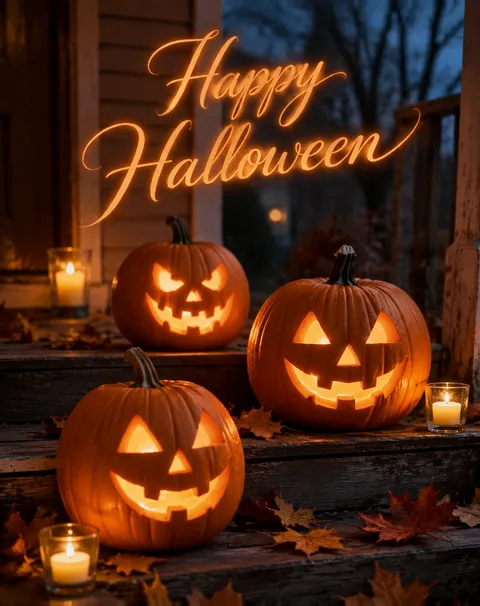
Jack-o'-lanterns on the porch
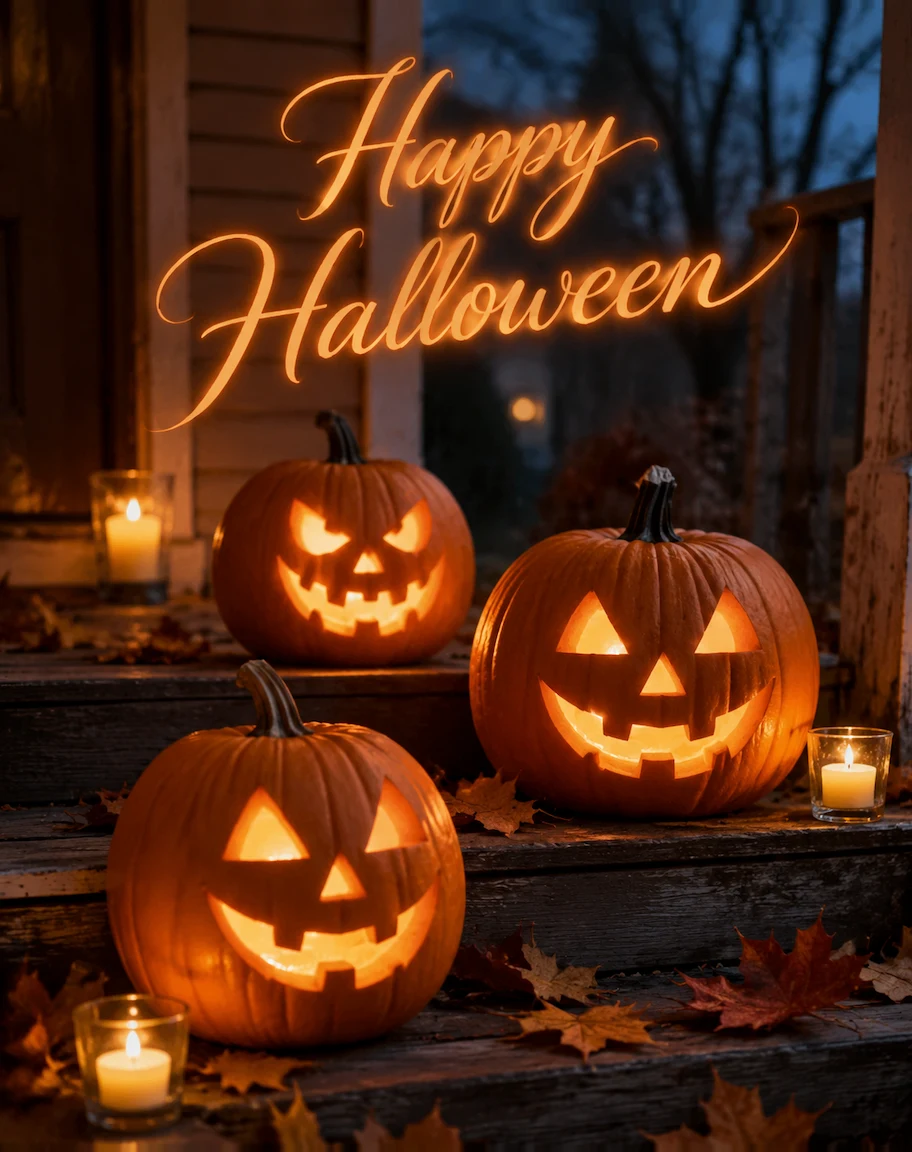
Real photograph, three glowing carved jack-o'-lanterns on old wooden porch steps at dusk with fallen autumn leaves and a few lit candles, soft blue twilight and warm candlelight, shallow depth of field. The words "Happy Halloween" in elegant glowing orange script across the softly blurred upper part of the image, spelled exactly. No other text.
Cute ghost with a candy bucket
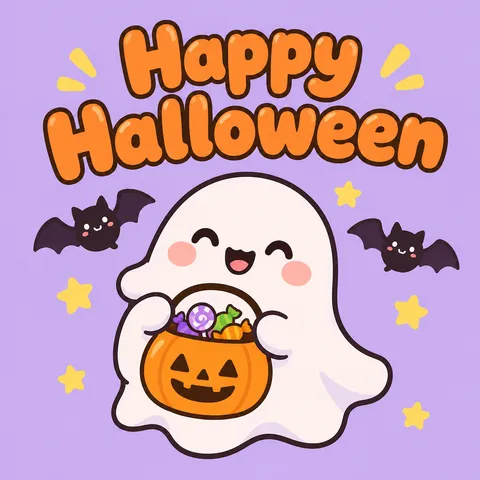
Cute Halloween cartoon: a small round smiling white ghost with rosy cheeks holding a little pumpkin bucket full of candy, two tiny bats and stars around it, soft lavender background, flat illustration with clean outlines. The words "Happy Halloween" in large rounded orange bubble letters above the ghost, spelled exactly. No other text.
Purple and orange text art
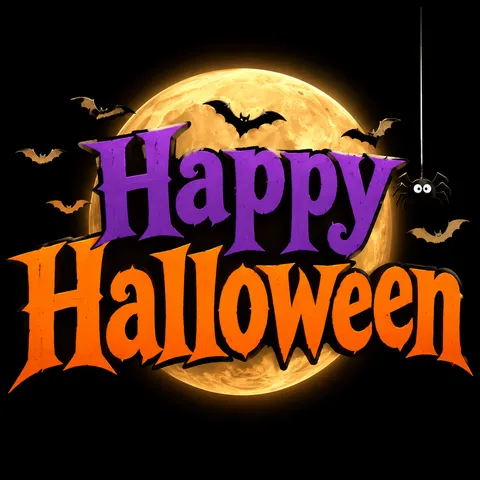
Halloween text art: the words "Happy Halloween" in large bold vintage letters, "Happy" in purple and "Halloween" in bright orange, centred on a black background, a full moon behind the letters, small bats flying out of the letters, a spider hanging from a thin thread on one side. Clean graphic greeting card style. No other text.
Funny skeleton in a hammock
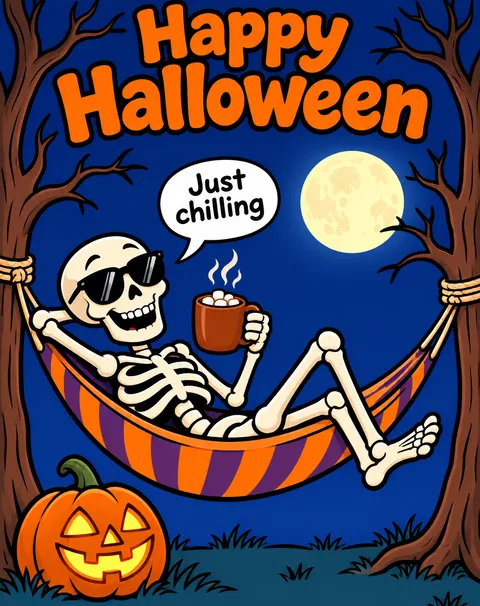
Funny Halloween cartoon: a friendly cartoon skeleton relaxing in a striped hammock between two bare trees under a full moon, wearing sunglasses and holding a mug of hot cocoa, a jack-o'-lantern on the ground beside it. A small speech bubble from the skeleton says "Just chilling". The words "Happy Halloween" in bold playful orange letters at the top. Bold clean cartoon style, deep blue night background, not scary. No other text.
More prompts (5)
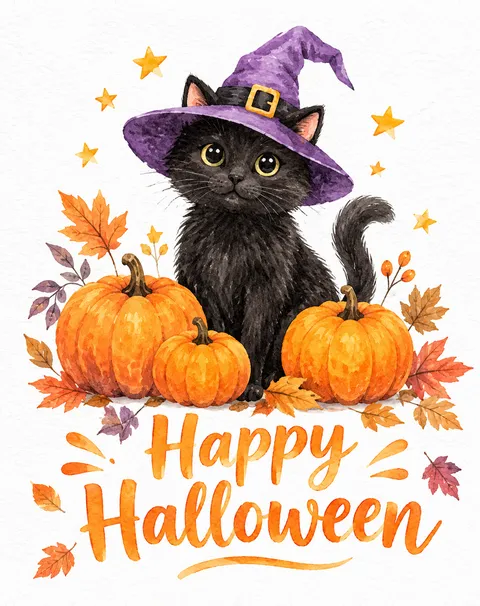
Watercolor black cat in a witch hat
Soft watercolor illustration: a black cat wearing a small purple witch hat sitting between three pumpkins with autumn leaves and a few stars, loose watercolor washes on white textured paper. The words "Happy Halloween" in hand-painted orange brush lettering below the cat. Gentle, cosy greeting card style. No other text.
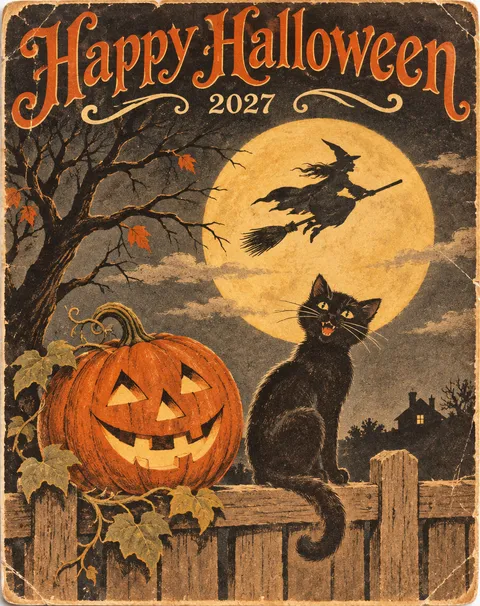
Vintage Halloween postcard 2027
Vintage 1920s Halloween postcard illustration: a grinning jack-o'-lantern and a black cat on a fence under a big yellow moon, a witch silhouette flying on a broom across the moon, aged paper texture, muted orange, black and cream palette. The words "Happy Halloween" in ornate retro lettering across the top and a small "2027" beneath them. No other text.
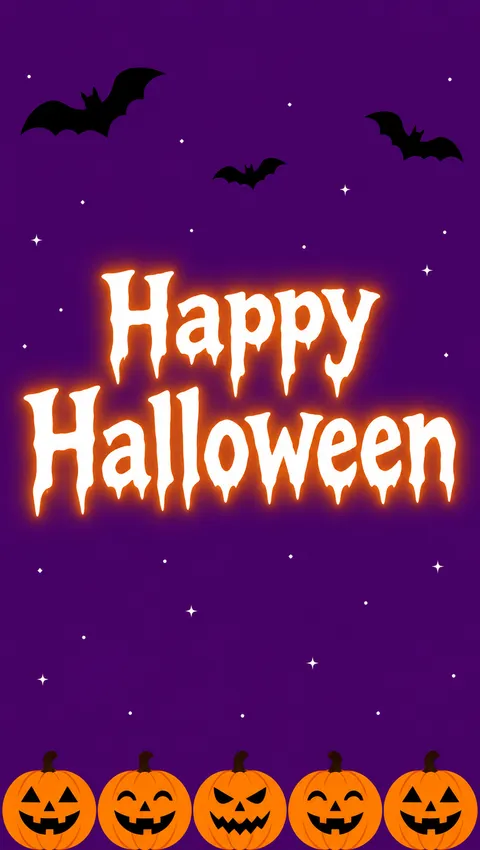
Halloween phone story
A tall phone story Halloween greeting, vertical layout. Deep purple background with tiny stars. A row of small jack-o'-lanterns along the bottom edge and three black bats flying near the top corners. In the middle third, the words "Happy Halloween" in large white spooky letters with a soft orange glow. Keep the top edge plain. Flat illustration. No other text.
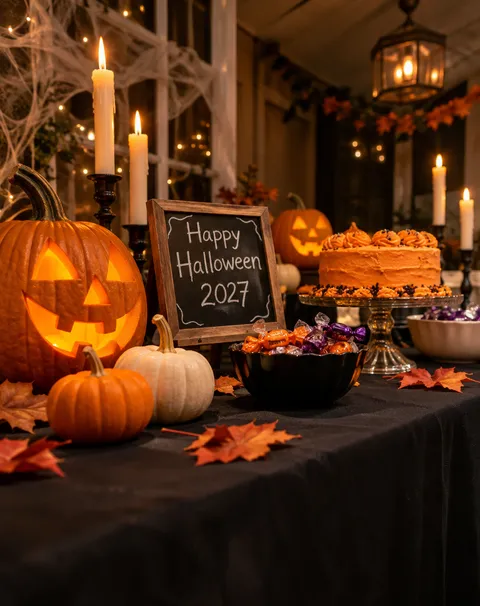
Halloween party table 2027
Real photograph, a Halloween party table seen from a low angle: a black tablecloth, carved jack-o'-lanterns, white and orange pumpkins, tall candles, bowls of wrapped candy and a cake with orange icing, soft warm light. A small chalkboard sign on the table reads "Happy Halloween 2027" in white hand-written letters. No other text, no brand names.
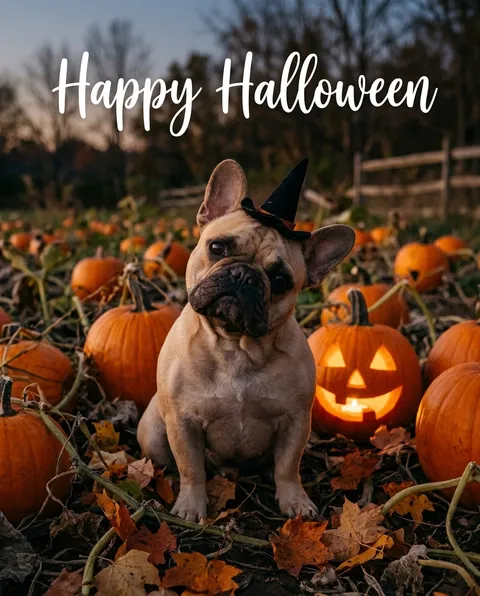
Your dog in a pumpkin patch (from a photo)
Put this same dog in a Halloween scene: sitting in a pumpkin patch at dusk among orange pumpkins and one glowing jack-o-lantern, wearing a small black witch hat, autumn leaves on the ground, warm golden light. Add the words "Happy Halloween" in white script across the top. Keep the same dog, its face, fawn fur, dark muzzle and ears exactly the same. Real photograph. No other text.
Gallery
Happy Halloween images, made with AI
Nine Happy Halloween images: eight single GPT Image 2.6 Sunburst runs from the prompt under each, and one Nano Banana 2.1 edit that put a dog photo in a pumpkin patch. Save one to share, or copy a prompt and change the words.
How to
How to make a Happy Halloween image
- Time needed
- Steps
- 4 steps
Step 1
Open the generator
Press “Make my Halloween image”. Image Studio opens with GPT Image 2.6 Sunburst and the porch-pumpkin prompt. Sign in with Google, GitHub or Discord, no card needed.
Step 2
Pick a prompt and a shape
Keep the pumpkins or paste a prompt from the guide: a cute ghost, text art, a funny skeleton, a vintage postcard. Set the shape: 1:1, 4:5 or 9:16.
Step 3
Add one photo (optional)
For your pet in the picture, upload one clear photo and end the prompt with “keep the same dog” or “keep the same cat”.
Step 4
Create, check the words, share
Press Create and read every letter of the greeting. Run it again, or fix a letter in Edit Studio, then download it and send it.
See it in the app

Open Image Studio and type what you want to see — subject, style, lighting and mood.


Watch the tour · 1:23
Prompts, styles, references, edit, Arena & chat
Chapters
Tips
Get a Halloween greeting that reads right
Most Halloween images go wrong on the words. These habits got every greeting in the gallery right.
Leave room for the words. Say where they go and keep that part plain: “across the softly blurred upper part”, “centred on a black background”.
Keep the greeting short. “Happy Halloween” and a two-word speech bubble render cleanly; put a longer wish in the message you send with the image.
Put the exact words in quotes and add “no other text”, then read every letter before you share.
Want the spelling guaranteed? Make the picture with “no text” and type the greeting in Edit Studio's text tool.
Describe your own ghost, cat or skeleton rather than naming a film character or mask, which is someone else's trademark.
Add “not scary” or “cute” for chats and workplaces; the skeleton here stays friendly with sunglasses and a mug of cocoa.
Models
Models for Happy Halloween images
What each model is good at. Open any one straight in the generator.
OpenAI
GPT Image 2.6 Sunburst
- Reference images
- Up to 16
- Output
- 1K to 4K
Open GPT Image 2.6 SunburstBest for
Made the eight text-to-image greetings · tagged for text rendering
Google
Nano Banana 2.1
- Reference images
- Up to 14
- Output
- 1K to 4K
Open Nano Banana 2.1Best for
Made the pet edit · keeps a pet's face the same
- Free plan

Alibaba
Qwen Image 3.0
- Reference images
- Up to 3
- Output
- 1K or 2K
Open Qwen Image 3.0Best for
Free plan · pumpkins, ghosts and backgrounds without text

ByteDance
Seedream 5.0 Pro
- Reference images
- Up to 10
- Output
- Up to 2K
Open Seedream 5.0 ProBest for
Illustrated and painterly Halloween scenes
FAQ
Happy Halloween image questions
9 questions

Where can I get Happy Halloween images?
Save any of the nine on this page: glowing jack-o'-lanterns on a porch, a cute ghost with a candy bucket, purple and orange text art, a funny skeleton in a hammock, a watercolor black cat, a vintage postcard and more. Open the image and save it, or copy its prompt and change the words.
Link to this answerHow do I make a Happy Halloween image with AI?
Describe the picture in Image Studio and put the greeting in quotes, for example “three glowing jack-o'-lanterns on porch steps, the words ‘Happy Halloween’ in orange script across the top”. Pick the shape for where it's going, press Create and read every letter before you share.
Link to this answerAre these Happy Halloween images free?
Yes, the nine images here cost nothing to save. Making your own is free to start: sign in with Google, GitHub or Discord, with no card, and a new account gets 25 credits. Qwen Image 3.0 is on the free plan at 9 credits an image; GPT Image 2.6 Sunburst costs 15 credits at 1K and Nano Banana 2.1 costs 21.
Link to this answerWhere can I find funny Happy Halloween images?
The skeleton in a striped hammock with sunglasses, a mug of cocoa and a “Just chilling” speech bubble is the funny one here. For more, describe a harmless joke — a ghost who forgot its costume, a cat stuck in a candy bowl — keep any speech bubble to two or three words, and add “not scary”.
Link to this answerWhen is Halloween 2027?
Halloween 2027 is on Sunday 31 October. Halloween is always 31 October; in 2026 it fell on a Saturday. Make the greeting a few days ahead so it's ready for the group chat that morning.
Link to this answerCan I put my dog or cat in a Halloween picture?
Yes. Upload one clear photo of your pet, describe the Halloween scene and say what must stay, such as “keep the same dog, fur colour and markings”. Our test put a French bulldog photo into a pumpkin patch with Nano Banana 2.1. Use a photo of your pet or yourself; don't combine separate photos of other people.
Link to this answerWhy does AI misspell “Happy Halloween”, and how do I fix it?
Image models draw letters as shapes, and “Halloween” has a double l and a double e to get wrong. Keep the greeting short, put it in quotes and use GPT Image 2.6 Sunburst, the model tagged for text rendering; every greeting on this page came out right first time. If a letter slips, run it again or fix it in Edit Studio.
Link to this answerCan I use these Halloween images for my shop or office?
Yes. Kenerate's Terms say Kenerate claims no ownership of what you generate and you may use it commercially, subject to the Terms and the law. Don't ask for film characters, masks or brand logos — describe your own ghost, cat or pumpkin instead.
Link to this answerWhy was my prompt blocked?
Usually an age word. The prompt filter blocks words that point to minors, and it catches some everyday phrases too, such as colour names built on them. Describe the scene and the look instead — “cute”, “small”, “pale pink” — and keep people in Halloween images adults.
Link to this answerIn depth
Happy Halloween images, explained
What works, what to avoid, and how to pick a model.
On this page
Happy Halloween image ideas by style
Pick the style for who's getting it:
- Spooky but friendly: glowing jack-o'-lanterns on a porch, a full moon, candles.
- Cute: a smiling ghost with a candy bucket, a watercolor black cat in a witch hat.
- Funny: a skeleton in a hammock that's “Just chilling”, a ghost that forgot its costume.
- Text art: “Happy Halloween” in big purple and orange letters in front of the moon.
- Vintage: a 1920s-style postcard with a jack-o'-lantern, a black cat and a witch on a broom.
- Your own: your dog in a pumpkin patch in a witch hat, from one photo.
Making your own Halloween images vs downloading them
Most “happy halloween images” results are galleries of ready-made pictures, many reused year after year and each with its own licence to read. Making your own takes about a minute: the image is new, it can say 2027 or your name, it's in the shape you need, and Kenerate claims no ownership of it.
One caveat: the US Copyright Office's 2025 report ties copyright to human authorship, so an image made entirely from a prompt may not be protected against others copying it.
What we got
Nine images: eight GPT Image 2.6 Sunburst greetings at 15 credits each and one Nano Banana 2.1 pet edit at 21.
- Every “Happy Halloween”, “Just chilling” and “2027” was spelled right first time, including the double l and double e.
- No film characters or masks: every ghost, cat, skeleton and witch is described in the prompt, not named.
- The pet edit kept the dog's face, ears and fawn coat and added the pumpkin patch, the jack-o'-lantern and a small witch hat.
- Two details we didn't ask for: the story's letters came out dripping, and the party table added cobwebs and a lantern.
By the Kenerate AI teamLast updated and reviewed
We build and run the Kenerate generator. Every example is a real output of the model named under it; models and presets were checked against the app's code.
Sources: US Copyright Office — Copyright and Artificial Intelligence (Part 2: Copyrightability, 29 January 2025) · Kenerate AI — Terms of Service · Kenerate Image Studio · Kenerate Edit Studio (text, resize and Edit Text in Image)

Make your Happy Halloween image
Free to start. Sign in with Google, GitHub or Discord, no card needed.
Tried it? Tell us how it went