

Tongyi-MAI/Z-Image · 6B · Apache 2.0
Z-Image Base vs Chroma vs Flux 2 Dev
Z-Image is the 6-billion-parameter open image model from Tongyi-MAI, whose repository points to Alibaba. Kenerate runs the undistilled Z-Image Base. We put it against two other open-weight models on Kenerate, Chroma and Flux 2 Dev, on the same three prompts.
- Publisher
- Tongyi-MAI, the Z-Image Team; the GitHub repo points to Alibaba (Alibaba AI Arena results, an Alibaba hiring contact)
- Model
- A 6B single-stream diffusion transformer (S3-DiT) that feeds text, image tokens and VAE tokens as one sequence
- Z-Image vs Turbo
- Z-Image (27 Jan 2026) is the undistilled foundation model: full CFG, 28–50 steps, negative prompts, high diversity, fine-tunable for LoRAs. Z-Image-Turbo (26 Nov 2025) is distilled to 8 steps
- Text
- Bilingual English and Chinese text rendering, per the maker
- On Kenerate
- Z Image Base: 8 size presets up to 1536 × 1536, seed, PNG / JPEG / WebP output, one image remix with a strength slider; no negative prompt box
- Licence
- Apache 2.0 open weights — you can also run it yourself
- Real outputs
- Official sources
- Free to start
- No watermark
Updated by the Kenerate AI team




Made with Kenerate
On this page
What is Z-Image Base?

What is Z-Image Base?
Z-Image Base is the undistilled 6B open model from Tongyi-MAI's Z-Image family (Apache 2.0), and Kenerate AI runs it as Z Image Base. It makes 8 sizes up to 1536 × 1536 and can remix one uploaded image with a strength slider. Pick it in /app/image, choose a size, write a prompt and generate; it costs 3 credits per image.
Key facts
- Publisher
- Tongyi-MAI (Z-Image Team)
- Parameters
- 6B, single-stream DiT
- Licence
- Apache 2.0
- Variants
- Z-Image (Base) · Z-Image-Turbo
- On Kenerate
- Z Image Base · 8 sizes up to 1536 px
- Image input
- 1 image + strength slider
- Free plan
- No
Gallery
Z-Image Base examples
Real outputs made on Kenerate. Open any image to copy its prompt and run it yourself.
Same prompt, three open models
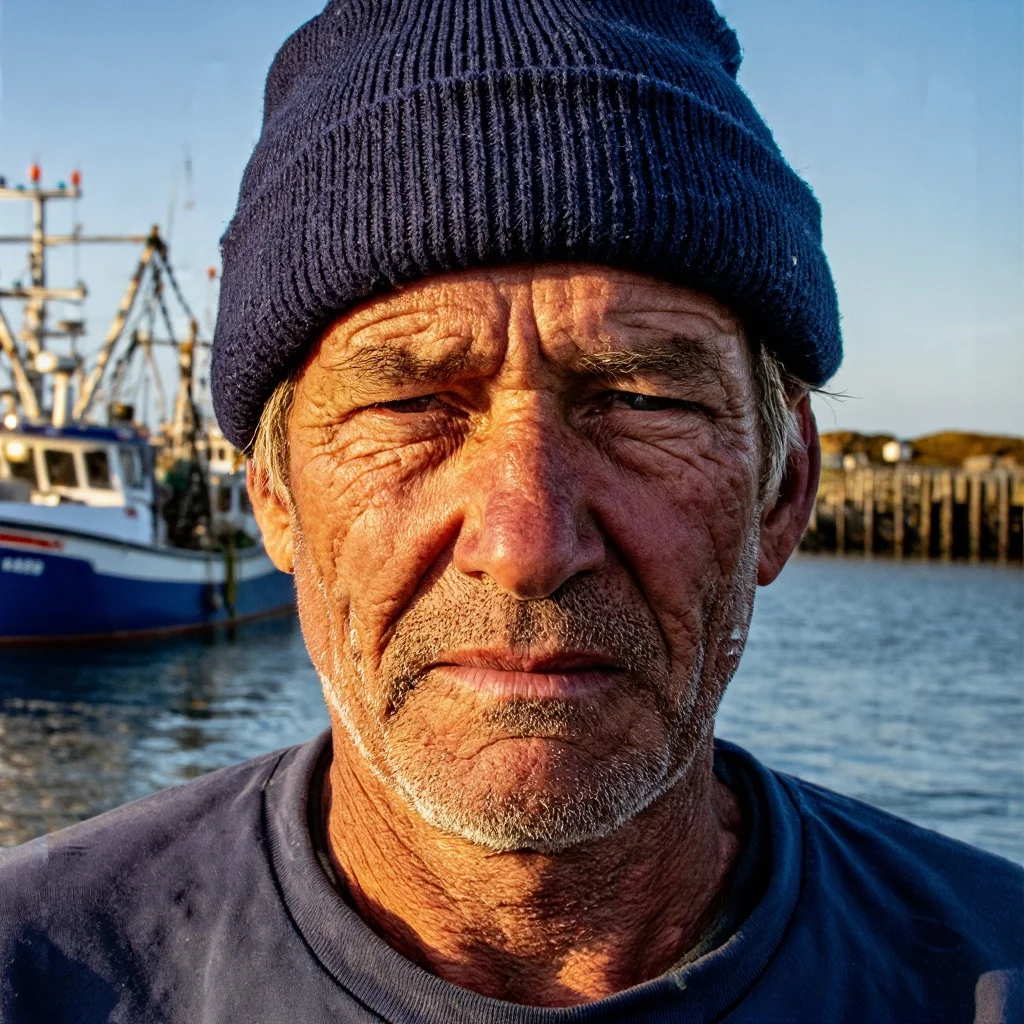
Portrait test: the harbour fisherman
A close-up of a fictional man in his 60s with beard, cap, light and lens named. Square, studio defaults, one try each.
PromptClose-up portrait photo of a fisherman in his 60s with a weathered face and a white stubble beard, wearing a navy knit cap, standing on a harbor at golden hour, fishing boats out of focus behind, 85mm lens, natural skin texture
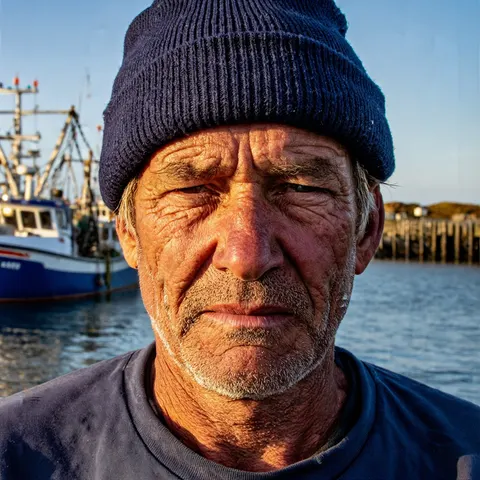 Z-Image BaseMost skin texture, true stubble; cooler light
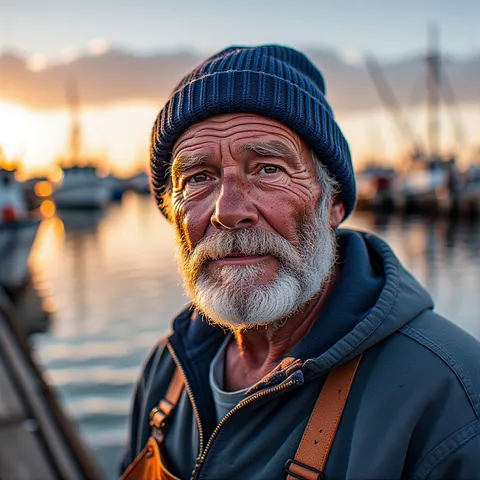 ChromaStrongest golden hour; drew a full beard
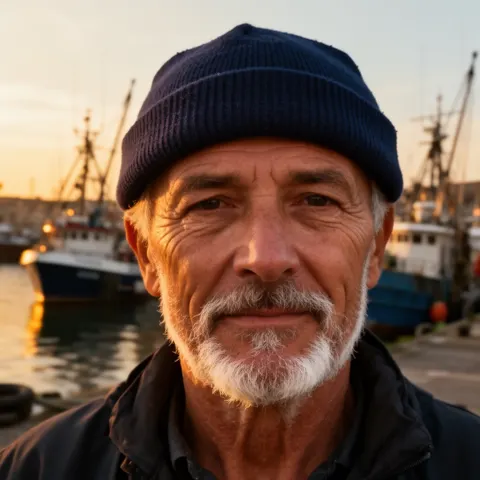 Flux 2 DevWarm and even; smoother skin
Same prompt, three open models
Text test: the soup-of-the-day window
Two quoted lines painted on glass. All three spelled both lines right on the first try.
PromptPhoto of a small cafe window with a hand-painted sign in white letters that reads "SOUP OF THE DAY" and below it "TOMATO BASIL", a steaming bowl of soup on the sill, morning street reflections in the glass, no other text
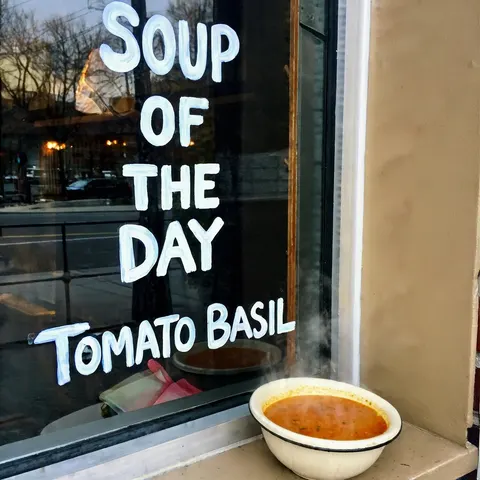 Z-Image BaseCorrect; the most hand-painted look
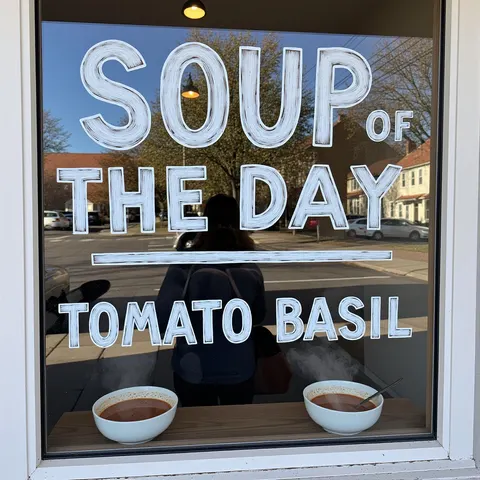 ChromaCorrect, but drew two bowls
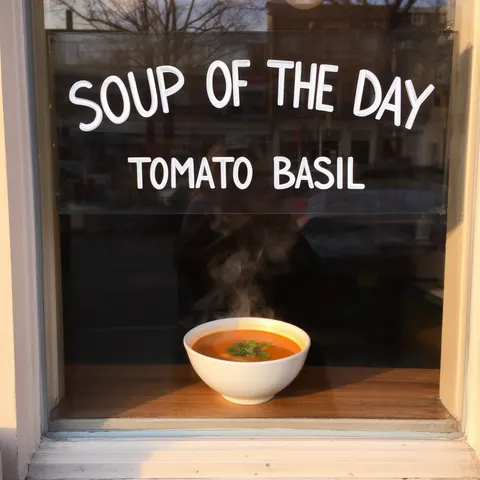 Flux 2 DevCorrect; neatest, simplest frame
Same prompt, three open models
Illustration test: the sleeping fox
A watercolour that asks for a muted palette and lots of empty space.
PromptWatercolor illustration of a red fox curled up asleep under a maple tree in autumn, falling orange leaves, soft paper texture, muted palette, lots of empty space around the fox
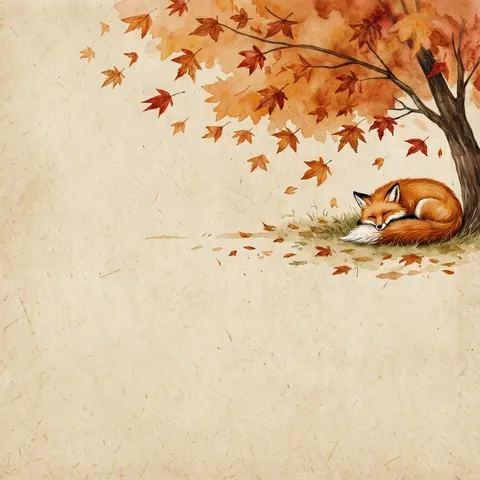 Z-Image BaseMost empty space and the most muted
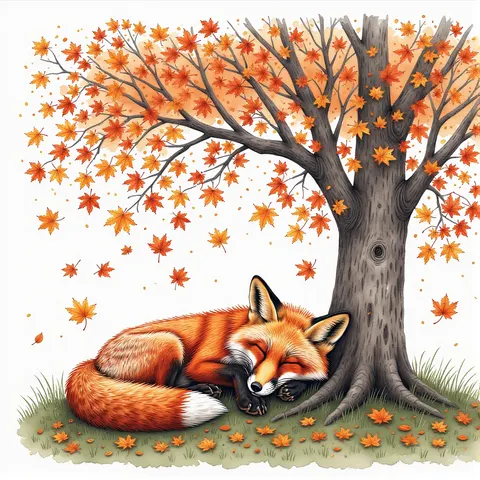 ChromaBold and detailed; not muted, little space
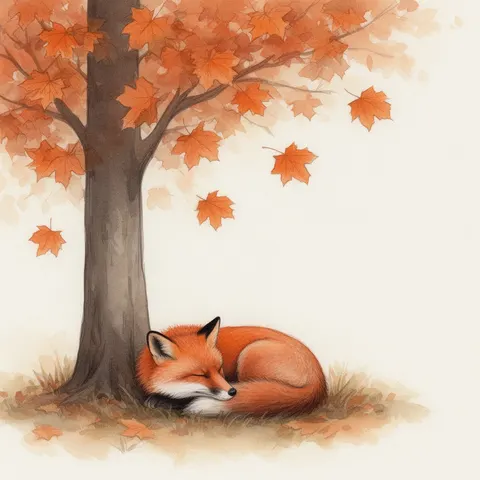 Flux 2 DevSoft and balanced; space on one side
Models
Z-Image Base on Kenerate
Every version in the generator, and what each is good at.
Tongyi-MAI
Z-Image Base
- Reference images
- 1 (remix)
- Output
- 8 presets, up to 1536 px
Open Z-Image BaseBest for
Best prompt-following of the three
lodestones
Chroma
- Reference images
- Text only
- Output
- 8 presets, up to 1536 px
Open ChromaBest for
Bold colour and light; drifts on details
- Free plan
Black Forest Labs
Flux 2 Dev
- Reference images
- 1–3 (edit)
- Output
- 11 presets, up to 2048 px
Open Flux 2 DevBest for
Even, safe results; on the free plan
From our tests
Strengths and limits
Good at
- Follows the brief closely: Z-Image drew real white stubble and the muted, mostly empty watercolour the prompts asked for.
- Short text holds: SOUP OF THE DAY and TOMATO BASIL came out right, in a convincing hand-painted style.
- The most natural skin texture of the three portraits.
- Apache 2.0 weights at 6B; the maker says the Turbo version runs in under 16 GB of VRAM if you want to run it yourself.
Limits
- Not the warmest light: the fisherman's golden hour came out closer to late afternoon.
- No negative prompt box on Kenerate, although the model supports negative prompting.
- Image input is a single remix with a strength slider, not an instruction edit; for edits use Flux 2 Dev or Wan 2.7.
- Tops out at 1536 px on Kenerate, and it is not on the free plan (Flux 2 Dev is).
How to
How to use Z-Image Base on Kenerate
Step 1
Pick Z-Image Base
Open /app/image and choose Z Image Base (the button on this page).
Step 2
Choose a size
Pick one of 8 presets, from 1024 × 1024 to 1536 × 1536, and PNG, JPEG or WebP output.
Step 3
Write a precise prompt
Name subject, age, details, light and style plainly — Z-Image Base follows small details like stubble and empty space.
Step 4
Remix an image (optional)
Upload one image and set the strength: low keeps it close, high lets the prompt take over. Then generate and download.
See it in the app

Open Image Studio and type what you want to see — subject, style, lighting and mood.


Watch the tour · 1:23
Prompts, styles, references, edit, Arena & chat
Chapters
FAQ
Z-Image Base questions
9 questions

What is Z-Image Base?
Z-Image Base is the undistilled foundation model in the Z-Image family, released on 27 January 2026 by Tongyi-MAI. It is a 6-billion-parameter single-stream diffusion transformer under Apache 2.0, with full classifier-free guidance, 28–50 sampling steps and support for negative prompts and LoRA fine-tuning. Kenerate runs it as Z Image Base.
Link to this answerZ-Image Base vs Z-Image-Turbo — what is the difference?
Turbo is the distilled, faster version: 8 steps instead of 28–50, released in November 2025. The maker rates Base higher on diversity and fine-tuning and Turbo higher on visual polish; Base supports CFG and negative prompts, Turbo does not. Kenerate's Z-Image entry is the Base model.
Link to this answerWho makes Z-Image?
Tongyi-MAI, credited as the Z-Image Team. Its GitHub repository reports results on Alibaba AI Arena and gives an Alibaba hiring contact. The paper (arXiv 2511.22699) was first posted on 27 November 2025.
Link to this answerIs Z-Image open source?
Yes. The Z-Image weights are released under the Apache 2.0 licence, and the maker says the Turbo version runs in under 16 GB of VRAM. On Kenerate you can run Z Image Base in the browser without a GPU.
Link to this answerHow much does Z-Image cost on Kenerate?
3 credits per image. Chroma costs 4 and Flux 2 Dev costs 3. Credits come in one-time packs that never expire, and the cost is shown before you generate.
Link to this answerIs Z-Image free on Kenerate?
No, Z Image Base is not on the free plan. Flux 2 Dev is, so the 25 sign-up credits can run it; any credit pack unlocks Z-Image and Chroma.
Link to this answerZ-Image vs Chroma vs Flux 2 Dev — which is best?
Z-Image Base followed our prompts most closely: real stubble, the most hand-painted sign and the muted, empty watercolour we asked for. Chroma gave the boldest golden-hour light but drew a full beard and two soup bowls. Flux 2 Dev was the most even and safe, and it adds edits with up to 3 references and 2048 px output.
Link to this answerCan Z-Image write text?
Short text, yes. Z-Image Base spelled SOUP OF THE DAY and TOMATO BASIL correctly on a cafe window on the first try, and so did Chroma and Flux 2 Dev. The maker says it renders both English and Chinese text.
Link to this answerCan Z-Image edit images on Kenerate?
Not with instructions. You can upload one image and remix it with a strength slider, which redraws the picture guided by your prompt. For instruction edits that keep the rest of the photo, use Flux 2 Dev or Wan 2.7 on Kenerate.
Link to this answerIn depth
Z-Image Base, in depth
Background, how to prompt it, and when to pick something else.
On this page
What Z-Image Base is
Z-Image is a 6B-parameter open image model from Tongyi-MAI, built as a single-stream diffusion transformer [1]. The maker's paper says it reaches results that rival 20B–80B models, with a full training run of 314K H800 GPU hours [3]. There are two released versions [1][2]:
- Z-Image (Base) — released 27 January 2026; undistilled, full CFG, 28–50 steps, negative prompts, high diversity, a base for LoRA training [2]. This is what Kenerate runs.
- Z-Image-Turbo — released 26 November 2025; distilled to 8 steps for speed, under 16 GB of VRAM [1][3].
- Omni-Base and Edit — listed by the maker as to be released [1].
- Peers on this page — Chroma, 8.9B and based on FLUX.1-schnell, Apache 2.0 [4]; Flux 2 Dev, Black Forest Labs' 32B open-weight model under a non-commercial licence [5].
What our tests showed
We ran a portrait, a painted window sign and a watercolour on all three at 1024 × 1024. Z-Image Base was the most literal: it drew true white stubble, the deepest skin texture and the muted, mostly empty watercolour the prompt asked for, though its golden hour looked more like late afternoon. Chroma had the best light — a real golden-hour backlight — but gave the fisherman a full beard, put two bowls on the sill and painted a bold, crowded fox. Flux 2 Dev sat between them: warm, smooth and tidy every time.
All three spelled SOUP OF THE DAY and TOMATO BASIL correctly. Z-Image's lettering looked the most hand-painted; Flux's was the neatest.
Which open model to run
At 3 credits, Z-Image Base is the pick when the details in your prompt matter. Chroma (4 credits, text only) is for bold colour and dramatic light. Flux 2 Dev (3 credits, and on the free plan) is the safe default and the only one of the three with instruction edits, 3 references and 2048 px output.
By the Kenerate AI teamLast updated and reviewed
We run these models in the Kenerate generator. Model facts come from the makers' own pages; specs and limits were checked against our code; the examples are our own outputs.
Sources: Z-Image — Tongyi-MAI (GitHub) · Z-Image model card — Hugging Face · Z-Image: An Efficient Image Generation Foundation Model — arXiv 2511.22699 · Chroma1-HD — lodestones (Hugging Face) · FLUX.2 — Black Forest Labs
