Photo to fall portrait · pumpkin patch · golden forest · leaf piles
AI Fall Photo Generator — your photo, an autumn photoshoot
Upload a photo and get an autumn photoshoot that still looks like you — holding a pumpkin in a sunlit patch or lit by golden hour on a forest path — the fall version of the Gemini photo-prompt trend, with the prompts shown so you can copy them.
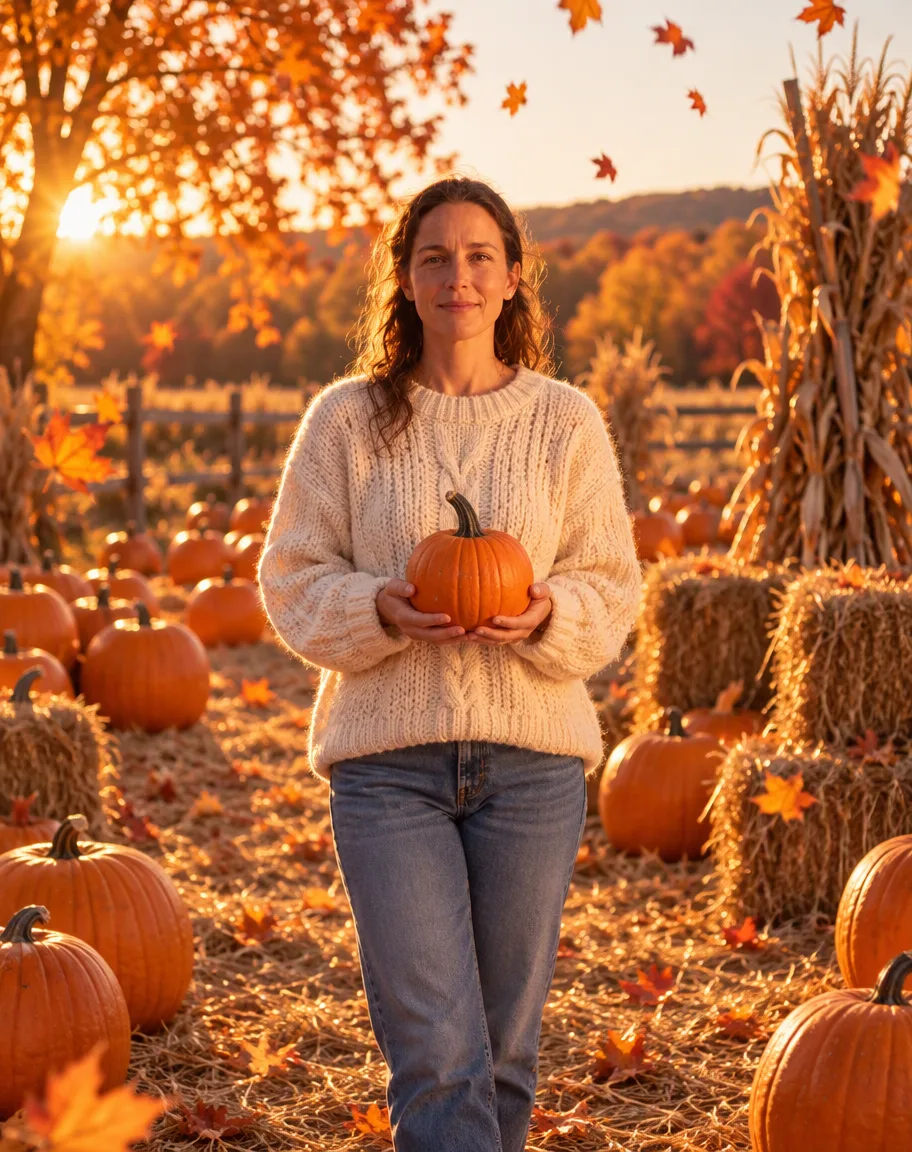
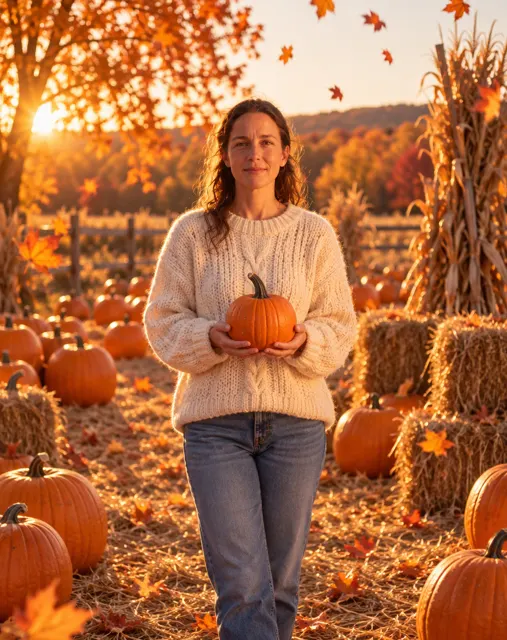
- Keeps your face
- Pumpkin patch, forest, leaf piles
- Copy-ready prompts
- No watermark
Updated by the Kenerate AI team




On this page
Quick answer

How do you turn a selfie into a fall photoshoot with AI?
An AI fall photo generator redraws your photo as an autumn portrait: same face, new scene — a pumpkin patch at golden hour, a maple forest path, a cosy knit sweater. On Kenerate AI you upload a photo in Image Studio, describe the scene, and GPT Image 2.5 Sunburst edits it for 11.7 credits; both of our photo tests below kept the face, one try each. Scenes without a person, like a leaf-covered park, start at 1.5 credits with Kenerate Flash, and a new account gets 25 free credits — two fall portraits free.
Key facts
- Examples made
- 3 (pumpkin patch · forest · leaf piles)
- Face kept
- Yes, in both photo edits
- Tries per look
- One — no cherry-picking below
- Watermark
- None
Gallery
Two photo edits and a park full of leaves
Real Kenerate outputs, one try each — two photo edits that kept the face and a leaf-covered park scene from text. Open any one to copy the prompt.
Same prompt
The photo, then the fall version
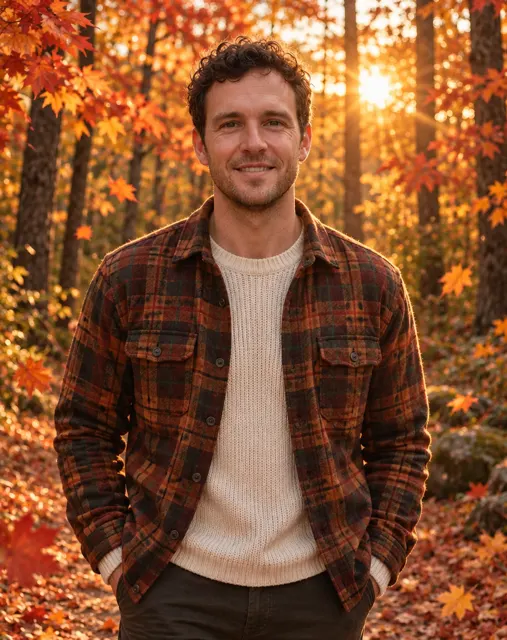
One AI-made test photo in, one GPT Image 2.5 Sunburst edit out for 11.7 credits. His curls, stubble and face shape carried through; the flannel, maple forest and sun flare came from the prompt.
PromptTurn this photo into a golden-hour autumn forest portrait of the same man. Keep his face recognisable — same curly dark hair, stubble, eyes and face shape. Rust-and-brown flannel over a cream knit, a forest path of orange and red maples, leaves drifting down, low golden sun behind him.
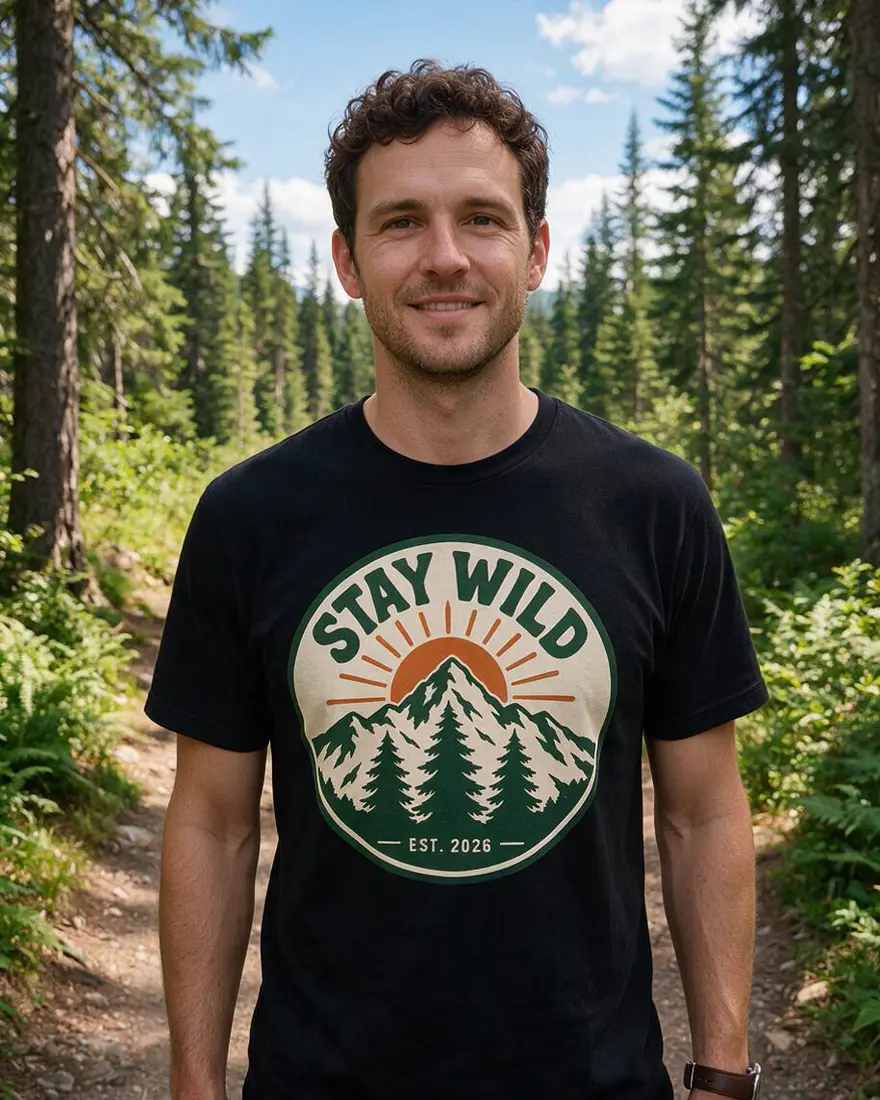 PhotoInput
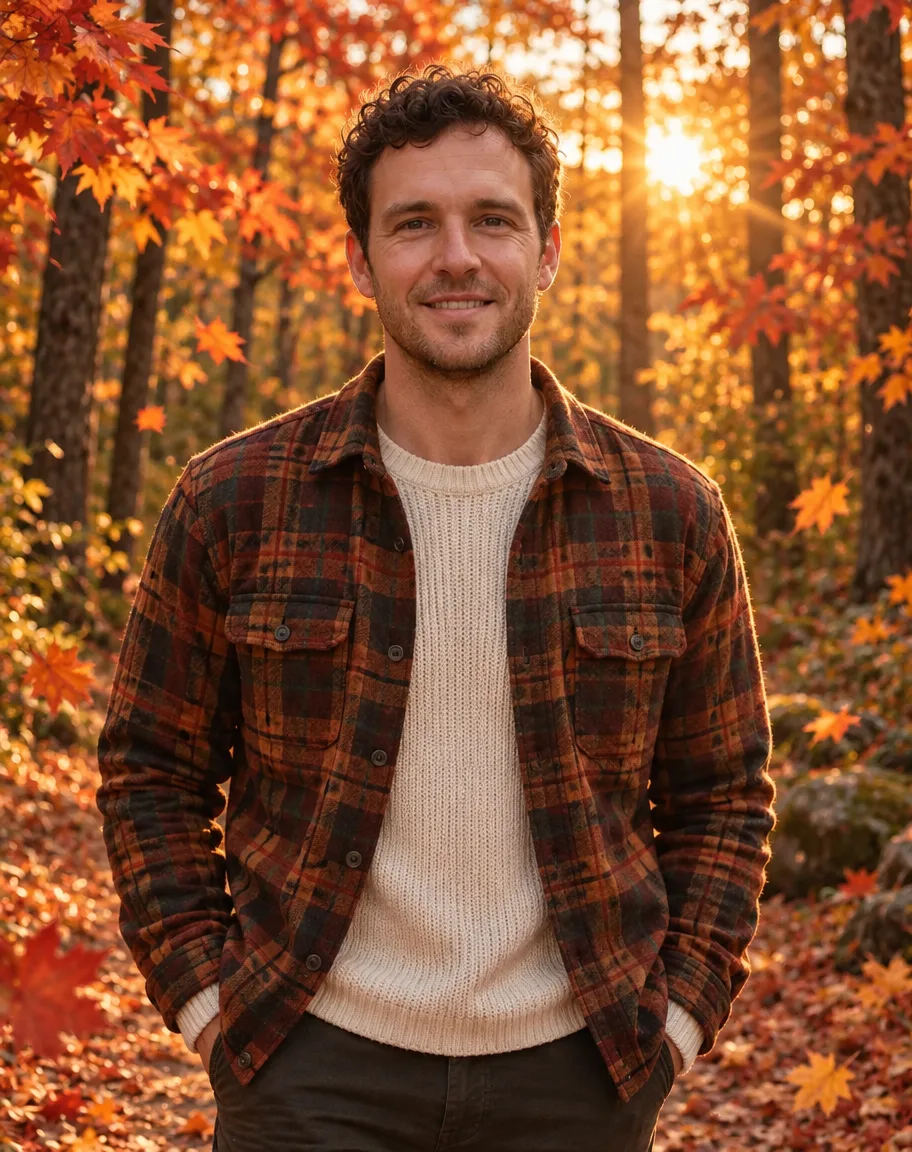 Fall portraitGPT Image 2.5 Sunburst
How to
How to use the AI fall photo generator
- Time needed
- Steps
- 4 steps
Step 1
Upload your photo
In /app/image, add a clear photo as the reference. Sign in free for 25 starter credits.
Step 2
Pick GPT Image 2.5 Sunburst
It kept the face in both of our fall tests. Kenerate Flash makes text-only scenes for 1.5 credits.
Step 3
Describe the scene
Outfit, setting and light — or paste a prompt from the gallery and swap the details.
Step 4
Download or go again
Download with no watermark, or change one detail and rerun. Send the keeper to the card maker or image-to-video.
See it in the app

Open Image Studio and type what you want to see — subject, style, lighting and mood.


Watch the tour · 1:23
Prompts, styles, references, edit, Arena & chat
Chapters
Tips
Get a fall photo that still looks like you
What worked in our two photo tests.
Start with “turn this photo into … of the same person” and name what to keep: hair, beard, glasses, smile.
Describe three things: the outfit (a chunky knit, a flannel, a scarf), the scene (pumpkin patch, forest path, leaf pile) and the light — fall photos live on golden hour, so name it every time.
Name real autumn props — pumpkins, hay bales, corn stalks, maple leaves, a thermos of cider — instead of “fall vibes”.
Use a clear, front-facing photo in good light; the face is what the model copies.
Say “no text” so lettering doesn't creep onto signs or benches.
Expect small drifts: our pumpkin-patch portrait came back full-length in jeans rather than the input's crop. Regenerate or name the framing you want (“head-and-shoulders crop”).
Only edit photos of yourself or of adults who agreed — prompts about children are blocked.
Models
Models for fall photos
What each model is good at. Open any one straight in the generator.

OpenAI
GPT Image 2.5 Sunburst
- Reference images
- Up to 16
- Output
- 1K–4K
Open GPT Image 2.5 SunburstBest for
Made both photo edits above
Kenerate AI
Kenerate Flash
Google
Nano Banana 2.1
- Reference images
- Up to 14
- Output
- Up to 4K
Open Nano Banana 2.1Best for
The model family behind the Gemini photo trend

ByteDance
Seedream 5.0 Pro
- Reference images
- Up to 10
- Output
- Up to 2K
Open Seedream 5.0 ProBest for
Painterly autumn art and illustration
FAQ
AI Fall Photo Generator questions
9 questions

How do I turn a selfie into a fall photoshoot with AI?
Upload a clear photo in Kenerate's Image Studio, pick GPT Image 2.5 Sunburst and describe the scene: “Turn this photo into an autumn portrait of the same person, keep the face recognisable, chunky cream knit, holding a pumpkin in a sunlit pumpkin patch, golden hour.” Our test photo came back with the same hair, smile and features for 11.7 credits.
Link to this answerWhat is the Gemini fall photo trend?
People have been running their photos through Gemini-style prompt trends — 3D figurines, vintage AI polaroids, decade looks — and the fall version is the same move with autumn scenes: pumpkin patches, leaf piles, golden-hour forests. The prompts on this page do exactly that, and Nano Banana 2.1, the Google model family behind the trend, is available in the studio alongside GPT Image 2.5 Sunburst.
Link to this answerCan I make fall pictures without a photo of myself?
Yes. Describe the scene from scratch — a leaf-covered park, a porch with pumpkins, a misty orchard — and skip the reference photo. Kenerate Flash made the park scene above for 1.5 credits.
Link to this answerIs there a free AI fall photo generator?
You can start free: a new Kenerate account gets 25 starter credits — two Sunburst photo edits, or over sixteen Kenerate Flash scenes at 1.5 credits. After that, credits come in one-time packs with no subscription, and downloads have no watermark.
Link to this answerCan I do a fall couple or family photoshoot with AI?
Yes, if everyone in the photo is an adult who agreed. Upload the photo, describe the scene once — “same people, cosy knits, walking a leaf-covered path at golden hour” — and name what to keep. GPT Image 2.5 Sunburst takes up to 16 reference images. Prompts about children are blocked, so keep it to the grown-ups.
Link to this answerWill it still look like me?
In both of our photo tests, yes — his curls and stubble, her hair and smile all carried over. One drift to expect: framing can change (our pumpkin-patch portrait came back full-length in jeans). Say “keep the face recognisable”, name the crop you want, and regenerate if something is off.
Link to this answerCan I add a fall background to an existing photo?
Yes. Describe only the backdrop and say what must stay: “Keep this person exactly as they are, replace the background with an autumn park covered in orange maple leaves at golden hour.” The park scene above works as a plain backdrop too.
Link to this answerWhat should I wear in a fall photoshoot prompt?
Name one or two pieces and a colour family: a chunky cream knit, a rust flannel over a sweater, a mustard scarf. Earth tones photograph best against orange leaves — both outfits above came straight from the prompt.
Link to this answerCan I animate my fall photo?
Yes. Send the finished picture to Image to video in the studio to add drifting leaves, swaying branches or golden-hour flicker. Video uses credits from a paid pack.
Link to this answerIn depth
AI Fall Photo Generator, explained
What works, what to avoid, and how to pick a model.
On this page
Fall photoshoot prompts you can copy
The first three are the prompts behind the gallery above, shortened (open any image for the full one); the rest are untested starting points — add your photo and swap the details:
- Pumpkin patch: “Turn this photo into an autumn portrait of the same person. Keep the face recognisable. Chunky cream knit sweater, holding a small pumpkin in a sunlit patch with hay bales and corn stalks, golden hour, falling leaves.”
- Golden-hour forest: “Turn this photo into a golden-hour autumn portrait of the same person: rust flannel over a cream knit, a forest path of orange and red maples, leaves drifting down, low sun flaring behind.”
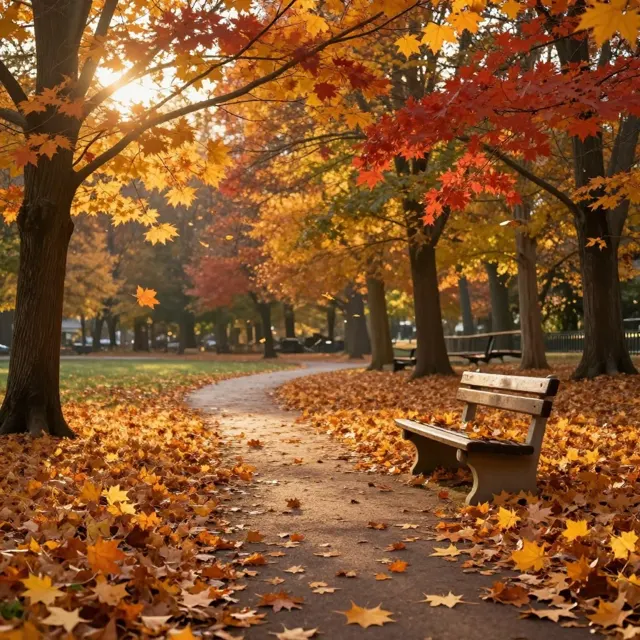
- Leaf-pile park (no photo): “An autumn park at golden hour: a winding path covered in fallen maple leaves, leaf piles beside a wooden bench, red and amber trees overhead. No people, no text.”
- Leaf-pile portrait: “Same person, face recognisable, sitting in a pile of raked orange leaves laughing, knit beanie and scarf, low afternoon sun, candid.”
- Cozy porch: “Keep this person exactly as they are; put them on a wooden porch with pumpkins on the steps, a plaid blanket over their shoulders and late-afternoon sun.”
- Apple orchard: “Same person, face recognisable, reaching for an apple in a sunlit orchard, wicker basket in the other hand, golden hour, warm amber tones.”
- Rainy café window: “Same person, face recognisable, holding a mug by a café window streaked with rain, orange trees blurred outside, soft warm light, cosy.”
- Vintage fall polaroid: “Redraw this photo as a vintage polaroid: white border, slight overexposure, muted retro autumn colours, soft focus, light film grain, no text.”
What makes a good fall photo
The model needs three things: a clear photo to copy the face from, an outfit and props it can draw, and a place for it all to happen. Fall pictures live on light — golden hour, low sun, amber tones — so name the light every time; both portraits above asked for it and got it.
Earth-tone outfits do the heavy lifting: cream knits, rust flannel, mustard scarves read as autumn even before the leaves do. Name one or two pieces and let the scene carry the rest.
What we got
Three pictures, one try each:
- Pumpkin patch (GPT Image 2.5 Sunburst edit, 11.7 credits): her face and hair kept; sweater, pumpkin, hay bales and corn stalks as asked — but full-length in jeans rather than the input's crop.
- Forest (GPT Image 2.5 Sunburst edit, 11.7 credits): curls, stubble and face shape kept; flannel, maple path and sun flare landed exactly as described.
- Park scene (Kenerate Flash from text, 1.5 credits): convincing leaf-covered path and bench, though the “raked leaf piles” read as a leaf-blanketed lawn and a second bench floats in the mid-distance.
By the Kenerate AI teamLast updated and reviewed
We build and run the Kenerate generator. Every example is a real output of the model named under it; models and presets were checked against the app's code.
Sources: Kenerate Image Studio