

Tags · throw-ups · wildstyle · stencils · murals
Graffiti Name Generator — an AI graffiti generator for your name
Type your name and pick the style — a quick tag, a two-colour throw-up, a readable blockbuster or a full 3D wildstyle piece on a brick wall — and get a sketch you can print, post or take to a legal wall.
- Names spelled in graffiti letters
- Wildstyle to blockbuster
- Wall, sketchbook or sticker
- No watermark
Updated by the Kenerate AI team




Made with Kenerate
On this page
Quick answer
How do you write your name in graffiti with AI?
A graffiti name generator writes your name in graffiti letters; an AI graffiti generator draws words and pictures in street-art styles — tags, throw-ups, bubble letters, wildstyle pieces, stencils and murals — from a text prompt. On Kenerate AI you put the word in quotes, name the style and the surface, and a text-capable model such as GPT Image 2.5 Sunburst, Ideogram v4 or Nano Banana 2.1 paints it. Short names come out cleanest; the wilder the letters, the more you need to check the spelling. The six names below are real outputs, one try each, with what went wrong.
Key facts
- Best for
- Names, crew logos, sketchbook ideas, mural mock-ups, stickers, shirts
- Default model
- GPT Image 2.5 Sunburst — text rendering, 1K to 4K
- Text specialists
- Ideogram v4, Recraft V4.1, Nano Banana 2.1
- Free-plan model
- Qwen Image 3.0
- Photo to graffiti
- AI Filter → Graffiti look
- Wide walls
- 21:9 and 3:1 ratios on GPT Image 2.5
- Watermark
- None
Graffiti name generator
Type your name, pick a style
Your name goes into the same prompts that made the six examples, then Image Studio opens with it filled in. Up to 12 letters; 3 to 8 come out cleanest.
4 / 12 letters
Style
Prompt
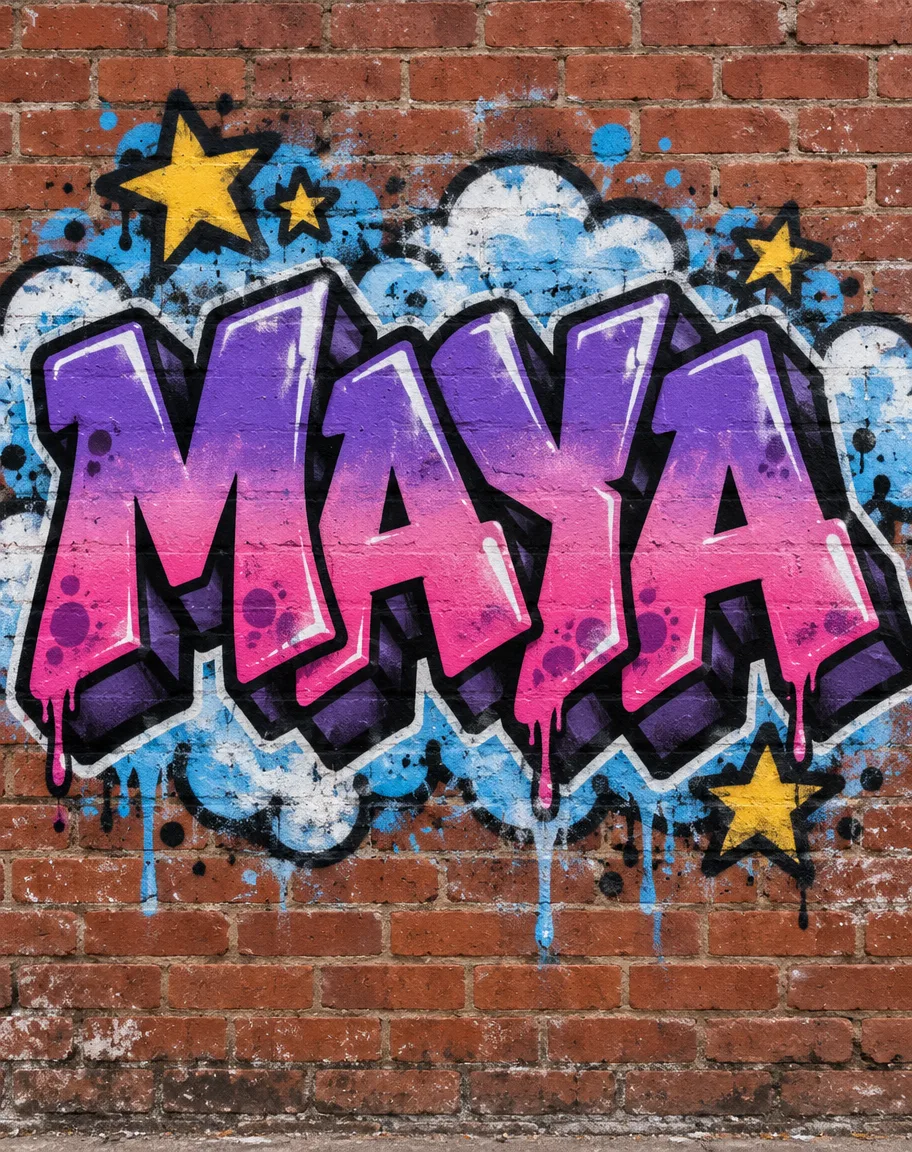
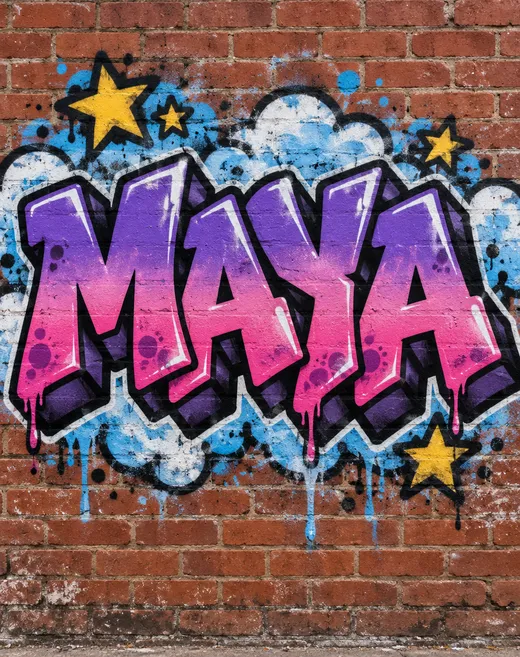
The word "MAYA" as a graffiti piece on a red brick wall: full-colour purple-to-pink fades, white highlights, a deep 3D block shadow, a thick black outline, stars and clouds behind the letters, spray-paint texture and a few drips. Spell MAYA exactly, M-A-Y-A, 4 letters.
Make MAYA in graffitiGallery
Six names in six graffiti styles
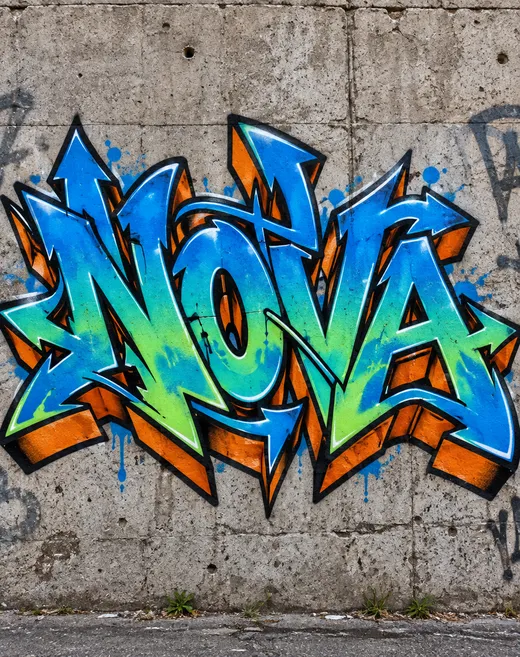
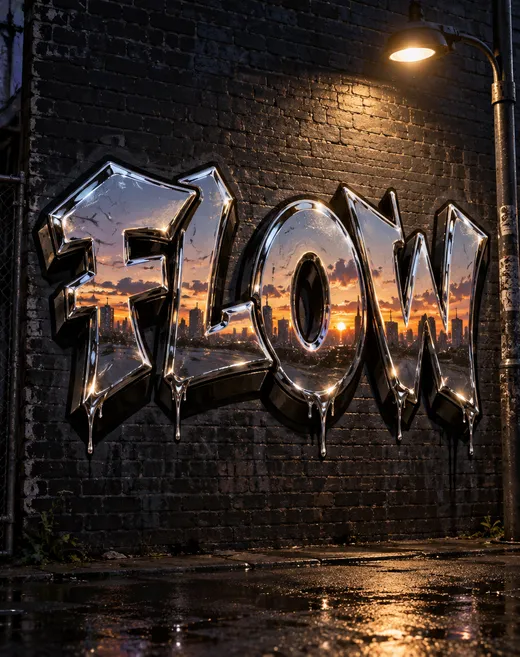
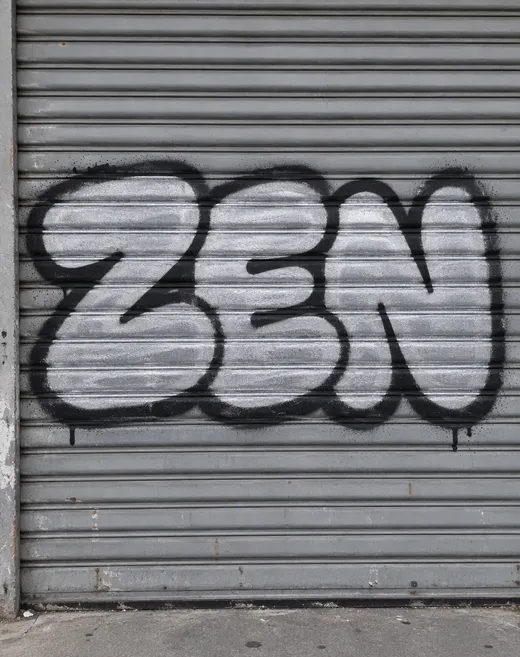
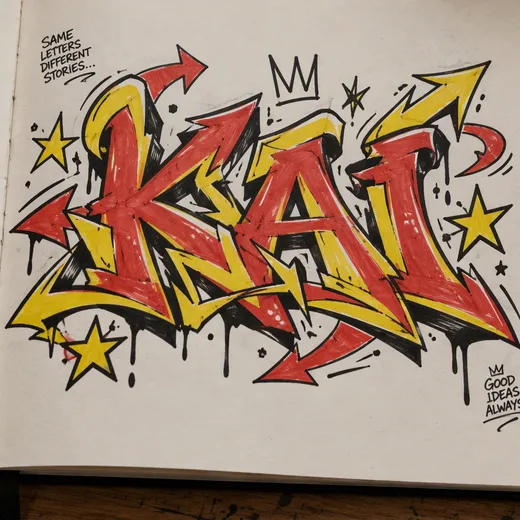
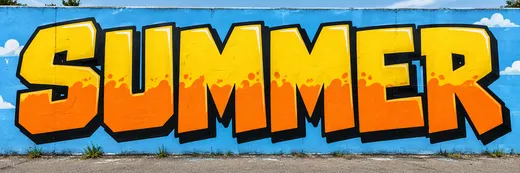
Real GPT Image 2.5 Sunburst outputs, one try each, from the exact prompts further down. MAYA, NOVA and SUMMER came out spelled right. ZEN's E is drawn as a backwards 3, a common throw-up E, but it reads Z3N at a glance. FLOW's L is a thin hook, the weakest letter. KAI is right; we cropped it to the sketchbook page because the model also drew branded markers on the desk.
Graffiti styles
Which graffiti style do you want, and what do you type?
Readability falls as you go down the list — and so does how reliably an AI model spells the word. Add the prompt words after your word in quotes.
| Style | Looks like | Readable? | Prompt words |
|---|---|---|---|
| Tag | A fast one-colour signature — a stylised monogram — in marker or spray | Yes, if short | graffiti tag, one-colour handstyle signature, fast flowing strokes, marker on a wall |
| Throw-up | Quick bubble letters: one fill colour and one outline, done in minutes | Yes | graffiti throw-up, two colours, rounded bubble letters, thick outline, quick spray paint |
| Bubble letters | Soft, inflated letters overlapping each other | Yes | graffiti bubble letters, puffy overlapping letters, highlights, bright fill |
| Blockbuster | Huge square block letters, made to read from a distance | Very | blockbuster graffiti letters, big square blocky letters, two-tone fill, long wall |
| Piece | A full-colour painting: fades, highlights, 3D shadow and a background | Mostly | graffiti piece, full colour fades, 3D block shadow, highlights, background clouds and stars |
| Wildstyle | Interlocking letters with arrows, spikes and connections | Hard | wildstyle graffiti, interlocking letters, arrows, spikes, connections, still legible |
| 3D / chrome | Chrome or metallic fill, black outline, deep 3D extrusion | Yes | 3D chrome graffiti letters, silver fill, black outline, deep extrusion, drips |
| Stencil | Sharp cut-out shapes in one or two colours, sprayed through a stencil | Yes | stencil street art, sharp cut-out shapes, one colour black on a concrete wall, slight overspray |
| Character mural | A big picture wall: characters and scenery, letters optional | Pictures | large street-art mural, cartoon character, bold outlines, spray-paint texture, whole wall |
Prompts
Graffiti prompts to copy
The last prompt is an edit: upload a photo of your wall first. The rest work from text alone. Each one opens Image Studio with the prompt filled in — swap in your own word.
- Word
- In quotes, 3–8 letters
- Style
- Tag, throw-up, piece, wildstyle
- Colour
- Fill, fade, outline, shadow
- Surface
- Brick, shutter, concrete, book
Name in a 3D piece
The word "MAYA" as a graffiti piece on a red brick wall: full-colour purple-to-pink fades, white highlights, a deep 3D block shadow, a thick black outline, stars and clouds behind the letters, spray-paint texture and a few drips. Spell MAYA exactly, four letters.
Throw-up
The word "ZEN" as a quick graffiti throw-up on a grey roller shutter: rounded bubble letters, silver fill, thick black outline, slight overspray, daylight. Spell ZEN exactly.
Wildstyle
The word "NOVA" in wildstyle graffiti on a concrete wall: interlocking letters with arrows, spikes and connections, electric blue to green fades, orange 3D shadow, thick black outline — still legible as N-O-V-A.
Blockbuster wall
The word "SUMMER" in huge blockbuster graffiti letters along a long wall: big square blocky letters, yellow fill with an orange bottom half, black outline, simple sky-blue background. Spell SUMMER exactly. Wide 3:1 view.
More prompts (5)
Chrome letters
The word "FLOW" in 3D chrome graffiti letters: shiny silver fill reflecting a sunset, black outline, deep extrusion, paint drips, on a dark brick wall at night under a street lamp. Spell FLOW exactly.
Blackbook sketch
A graffiti blackbook sketch of the word "KAI" in wildstyle letters on a page of a sketchbook: black fineliner outlines, marker colour fills in red and yellow, arrows and stars around it, the open book lying on a desk. Spell KAI exactly.
Stencil art
Stencil street art of a fox sitting and looking up at a balloon, sprayed in black with one red balloon on a pale concrete wall, sharp cut-out edges, slight overspray, no text.
Character mural
A large colourful street-art mural on the side of a two-storey building: a friendly cartoon astronaut floating among planets, bold black outlines, bright flat colours, spray-paint texture, a ladder and paint cans at the bottom, daylight. No text.
Mural on my wall (edit)
This is a photo of a wall. Paint a graffiti mural on it of the word "HELLO" in bright 3D bubble letters with a blue sky and clouds behind them. Keep the wall's shape, bricks, windows, ground and lighting exactly as they are, and follow the wall's perspective. Spell HELLO exactly.
How to
How to use the AI graffiti generator
- Time needed
- Steps
- 4 steps
Step 1
Open Image Studio
Press “Make graffiti”. Image Studio opens on GPT Image 2.5 Sunburst. Sign in free for starter credits.
Step 2
Write the word and the style
Put your word in quotes, pick a style from the table — tag, throw-up, blockbuster, piece, wildstyle — and add the colours.
Step 3
Set the wall
Name the surface and the ratio: Square for a sticker, Landscape 16:9 for a wall, 21:9 or 3:1 for a long blockbuster.
Step 4
Check the spelling
Zoom in on each letter. If one is wrong, regenerate, shorten the word or switch to Ideogram v4.
See it in the app

Open Image Studio and type what you want to see — subject, style, lighting and mood.


Watch the tour · 1:23
Prompts, styles, references, edit, Arena & chat
Chapters
Tips
Get graffiti letters that spell your word
Lettering is the hard part for image models. What helps them get it right.
Put the word in quotes and in capitals, then repeat it: “Spell MAYA exactly, four letters.”
Keep it short. One word of 3 to 8 letters comes out far more reliably than a sentence.
Start readable — throw-up, bubble or blockbuster — and push to wildstyle once the spelling holds.
For wildstyle, add “still legible” and spell the letters out: N-O-V-A.
Name the surface and light: red brick, roller shutter, concrete, train-yard wall, night street lamp.
Zoom in on every letter before you use it, and regenerate if one is wrong or doubled.
Models
Models for graffiti lettering
What each model is good at. Open any one straight in the generator.

OpenAI
GPT Image 2.5 Sunburst
- Reference images
- Up to 16
- Output
- 1K to 4K
Open GPT Image 2.5 SunburstBest for
Default here · text rendering · wide wall ratios · mural edits on your own photo
Ideogram
Ideogram v4
- Output
- 1K · 5 ratios
Open Ideogram v4Best for
Built for accurate text in images — a second opinion on tricky names
Google
Nano Banana 2.1
- Reference images
- Up to 14
- Output
- 1K to 4K
Open Nano Banana 2.1Best for
Cleaner text · match a reference wall or style
Recraft
Recraft V4.1
Open Recraft V4.1Best for
Sharp, flat lettering for stickers, shirts and crew logos
- Free plan
Alibaba
Qwen Image 3.0
- Reference images
- Up to 3
- Output
- 1K or 2K
Open Qwen Image 3.0Best for
Free plan · try ideas, then check the spelling
FAQ
AI Graffiti Generator questions
10 questions

What is an AI graffiti generator?
A tool that turns a prompt into graffiti-style art: a word or name in tag, throw-up, bubble, blockbuster or wildstyle letters, or a stencil or mural picture, usually on a wall. On Kenerate AI you write the word in quotes, name the style and the surface, and a text-capable image model paints it.
Link to this answerWhat is a graffiti name generator?
Two things go by that name: a tool that draws your name in graffiti letters, and one that suggests a tag name. This page does the first with AI: type your name in the box, pick a style (3D piece, wildstyle, chrome, throw-up, blackbook, blockbuster) and Image Studio opens with the prompt filled in. For the second, see how to pick a tag name further down. It's quicker to choose one yourself than to take a random list.
Link to this answerHow do I write my name in graffiti letters?
Open Image Studio on GPT Image 2.5 Sunburst and type, for example: The word "MAYA" as a graffiti piece on a red brick wall, purple-to-pink fades, 3D block shadow, thick black outline — spell MAYA exactly, four letters. Start with bubble or blockbuster letters for the cleanest spelling, then try wildstyle.
Link to this answerWhich AI model is best for graffiti text?
Pick one built for text. On Kenerate that is GPT Image 2.5 Sunburst (the default here, with wide wall ratios up to 3:1), Ideogram v4 (made for accurate text in images), Nano Banana 2.1 and Recraft V4.1 for flat, sticker-style letters. If one model keeps misspelling a name, try the same prompt on another — they fail on different letters.
Link to this answerWhy does AI misspell graffiti letters?
Graffiti bends letters on purpose — wildstyle hides them in arrows and connections — and an image model draws shapes, not a font. The more a style distorts the letters, the more often a model adds, drops or merges one. Keep words short, put them in quotes, spell them out, and check every letter before you use the image.
Link to this answerCan I turn a photo into graffiti?
Yes. In Kenerate's AI Filter, the Graffiti look repaints your photo as a spray-painted mural on a brick wall, with wildstyle lettering around the subject, drips and chrome and neon fills. It keeps the subject and pose. Use photos of yourself or of people who agreed.
Link to this answerIs it legal to paint graffiti?
Only with permission. Painting on someone else's property without the owner's consent is illegal in most places — New York City's Administrative Code, for example, bans any mark on public or private property without the express permission of the owner. Paint on legal walls, commissioned murals or your own boards and canvases, and check your local rules. This is general information, not legal advice.
Link to this answerHow much does it cost?
GPT Image 2.5 Sunburst at medium quality is 7.2 credits at 1K, 12 at 2K and 21 at 4K; an edit on your own wall photo adds 4.5 credits per reference. Ideogram v4 is 15 credits, Recraft V4.1 12, Nano Banana 2.1 21 at 1K, and the AI Filter's Graffiti look 10 credits on its default engine. Qwen Image 3.0 is a free-plan model at 9 credits. New accounts get starter credits; packs are one-time and never expire.
Link to this answerIs an AI graffiti generator the same as a graffiti font?
No. A graffiti font gives every letter the same fixed shape, so you can type anything and it's always spelled right. An AI graffiti generator paints the whole word as one picture: letters can overlap, connect and sit on a wall with light and drips, but it can get a letter wrong, so you check it. Use a font for long text; use the generator for a name or one word.
Link to this answerCan I use AI graffiti on shirts and stickers?
Yes — downloads have no watermark. Make it on a plain or white background for printing (or remove the background after), and keep the design your own: don't copy a real writer's name, tag or signature piece, or a brand's logo.
Link to this answerIn depth
AI Graffiti Generator, explained
What works, what to avoid, and how to pick a model.
On this page
How to pick a graffiti tag name
Writers choose a tag for how it paints, not only what it means. A good tag is short, fast to write and has letters that connect well. Some rules of thumb before you type it into the generator:
- 3 to 5 letters. Short tags are quicker to paint and the AI spells them more reliably.
- Pick letters you like drawing: R, S, E, K, A and M bend into arrows and connections; I and L give you little to work with (our FLOW's weakest letter was the L).
- Say it out loud. A tag that sounds good is easier to remember.
- Make it yours: don't copy a known writer's tag or a brand name. Search it first.
- Try it in two or three styles in the name box; keep the one that still reads as a throw-up and as a piece.
Why short words work best
An image model doesn't type letters the way a font does — it paints shapes that look like them. A clean throw-up of a four-letter name is usually right; a ten-letter wildstyle piece is where letters double, merge or vanish. Keep the word short, repeat it in the prompt, spell it out letter by letter for wildstyle, and switch models when one keeps getting a letter wrong.
Where can you paint graffiti legally?
With the owner's permission — that's the line in almost every city. New York City's Administrative Code § 10-117 bans writing, painting or drawing any mark on public or private property without the express permission of the owner or operator. Legal walls, commissioned murals, your own garage door, boards and canvases are where an AI sketch becomes paint. A mock-up on a photo of the wall is a good way to ask an owner for a yes.
What it costs on Kenerate
GPT Image 2.5 Sunburst at medium quality: 7.2 credits at 1K, 12 at 2K, 21 at 4K; edits add 4.5 credits per reference image, so a mural mock-up on one wall photo is 11.7 credits at 1K. Ideogram v4: 15 credits. Recraft V4.1: 12. Nano Banana 2.1: 21, 31.5 or 42 at 1K, 2K or 4K. AI Filter Graffiti look: 10 credits on the default engine. Qwen Image 3.0, a free-plan model: 9 credits.
By the Kenerate AI teamLast updated and reviewed
We build and run the Kenerate generator. Every example is a real output of the model named under it; models and presets were checked against the app's code.
Sources: Tate — Art Term: Graffiti art · NYC — Anti-graffiti legislation, Administrative Code § 10-117 · Kenerate Image Studio · Kenerate AI Filter — Graffiti look
