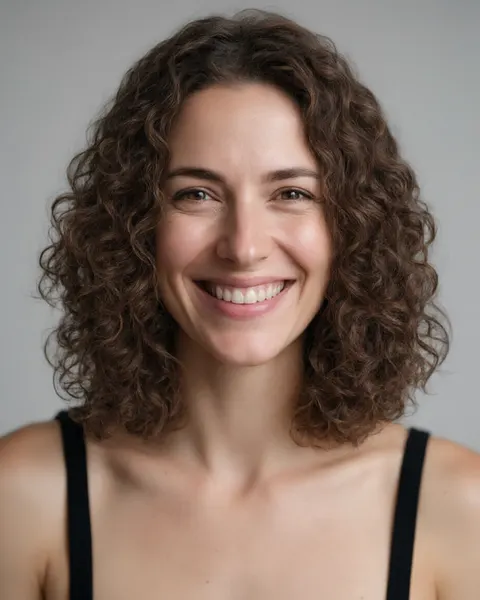
Your own photo · waves, ringlets, tight curls
Curly hair filter — see yourself with curls
Upload a photo of yourself and an AI edit turns straight hair into the curls you describe: loose waves, bouncy ringlets or tight springy curls. Your face, hair colour, length and background stay as they are.
- Your own photo
- Waves to tight curls
- Same face, colour and length
- No watermark
Updated by the Kenerate AI team




On this page
Quick answer

What would I look like with curly hair?
To see what you would look like with curly hair, upload a clear, front-facing photo of yourself to an AI image editor and name the curl: "defined, bouncy medium ringlets, same length and colour". Kenerate's curly hair filter opens the editor with that instruction filled in, so you add your photo and press Create. Our three before/afters below took one try each on Qwen Image 3.0, the free-plan model.
Key facts
- Works on
- Your own photo, or one you have permission to edit
- What changes
- Hair texture only: waves, curls or ringlets
- Keeps
- Face · hair colour · length · background
- Curl types to try
- 2A–2C waves · 3A–3C curls · 4A–4C coils
- Default model
- Qwen Image 3.0 (free plan)
- Examples below
- 3 fictional adults, 1 try each
- Watermark
- None
Curl types
Curl types to try, and the words that get them
Name the curl pattern and the size. Those words decide whether you get soft waves or real ringlets.
| Curl type | What it looks like | Prompt words |
|---|---|---|
| 2A–2B loose waves | A soft S-bend, flat at the roots | soft loose beach waves from the mid-lengths, natural volume |
| 2C defined waves | Deeper S-waves with a few curls | deep defined waves with some loose curls, frizz-free |
| 3A loose curls | Big, shiny spiral curls the size of a sidewalk-chalk stick | big loose spiral curls, shiny and defined, from the roots |
| 3B ringlets | Bouncy, springy ringlets the size of a marker | defined, bouncy medium ringlet curls with real volume |
| 3C tight curls | Dense corkscrew curls the size of a pencil | tight dense corkscrew curls, lots of volume |
| 4A–4C coils | Very tight coils and zigzags (see the afro hair filter) | tight defined coils, natural volume, picked out from the scalp |
| Perm look | Uniform salon curls, often shorter | a fresh body perm, even medium curls all over |
| Short curly crop | Curls on top, short sides | short natural curly hair on top, short sides, tight springy curls |
Gallery
Curly hair filter before and after
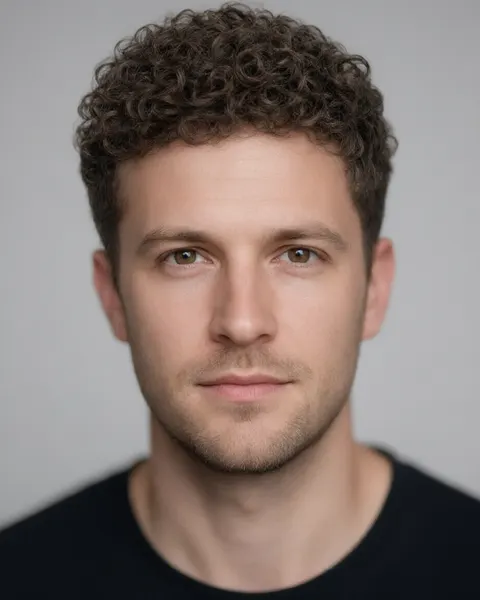
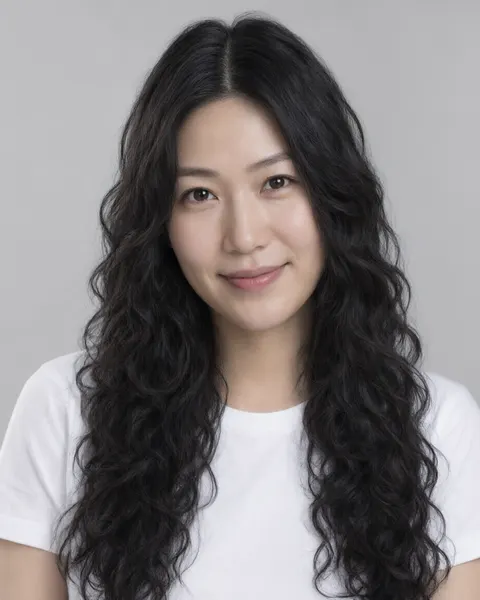
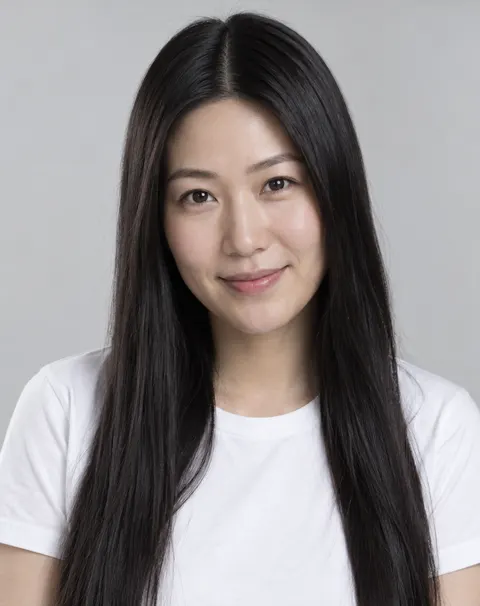
Three fictional adults, three starting hair types, one Qwen Image 3.0 edit each. The long-hair edit came out as loose waves and curls rather than tight spirals; ask for “3B ringlets” or “tight corkscrew curls” to push it further.
Same prompt
Straight hair to curly hair, same photo
The originals next to the curly edits. Hair colour, length, face and background didn't change; only the texture did.
PromptChange my hair to natural curly hair: defined, bouncy medium ringlet curls with real volume, same length and same hair colour. Keep my face, expression, skin, clothing, the background and the lighting exactly the same.
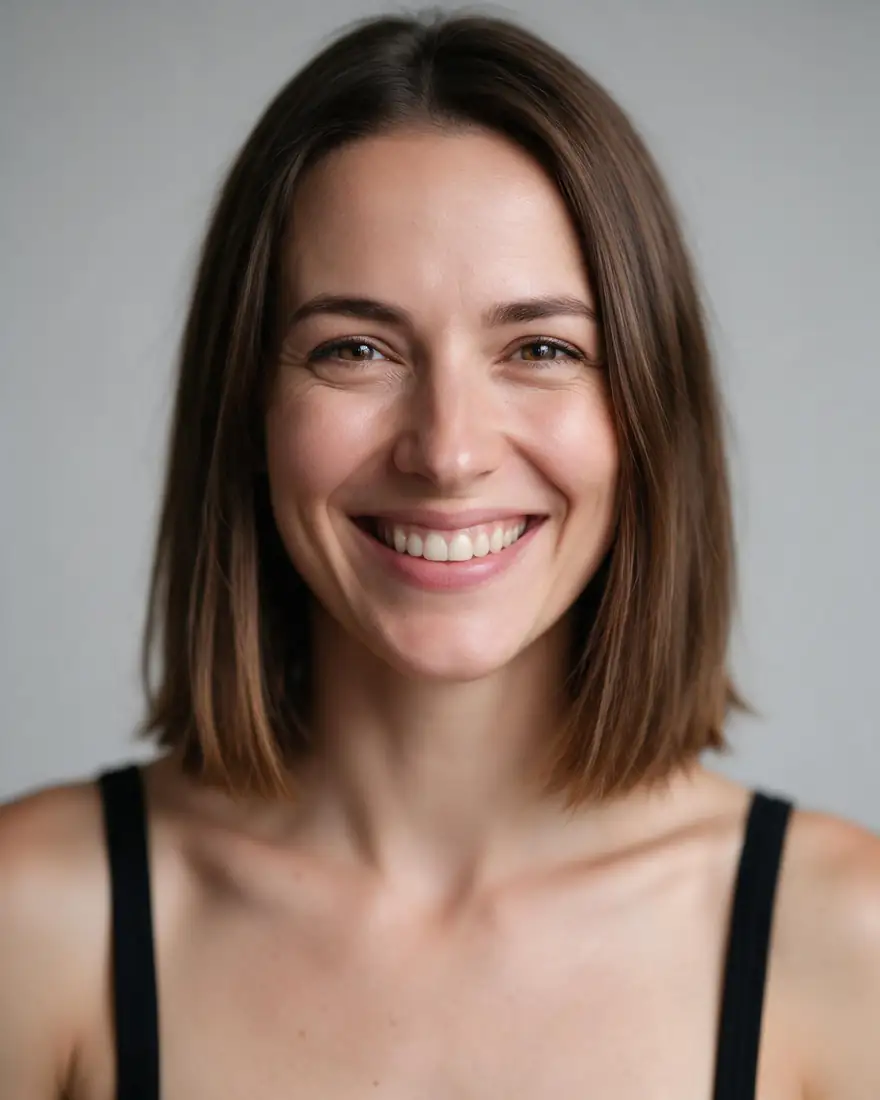 BeforeStraight bob
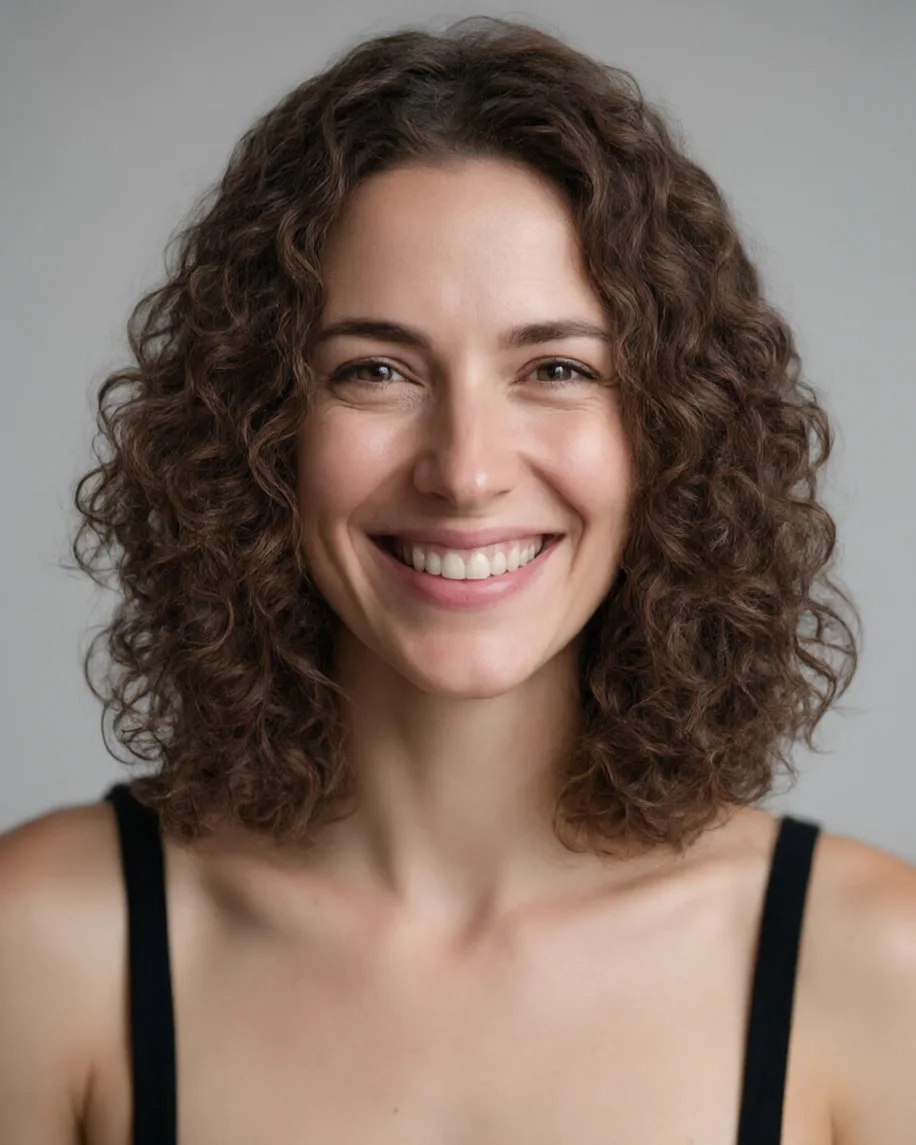 AfterMedium ringlets
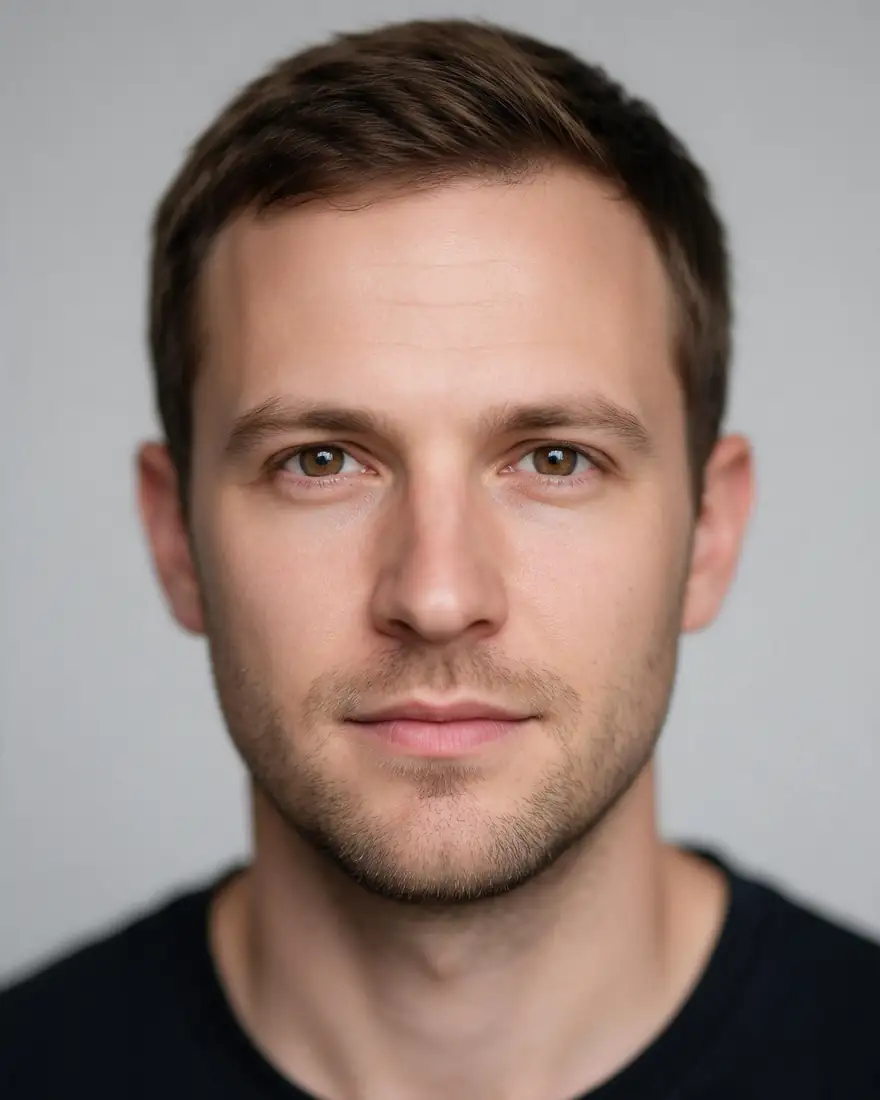 BeforeShort and straight
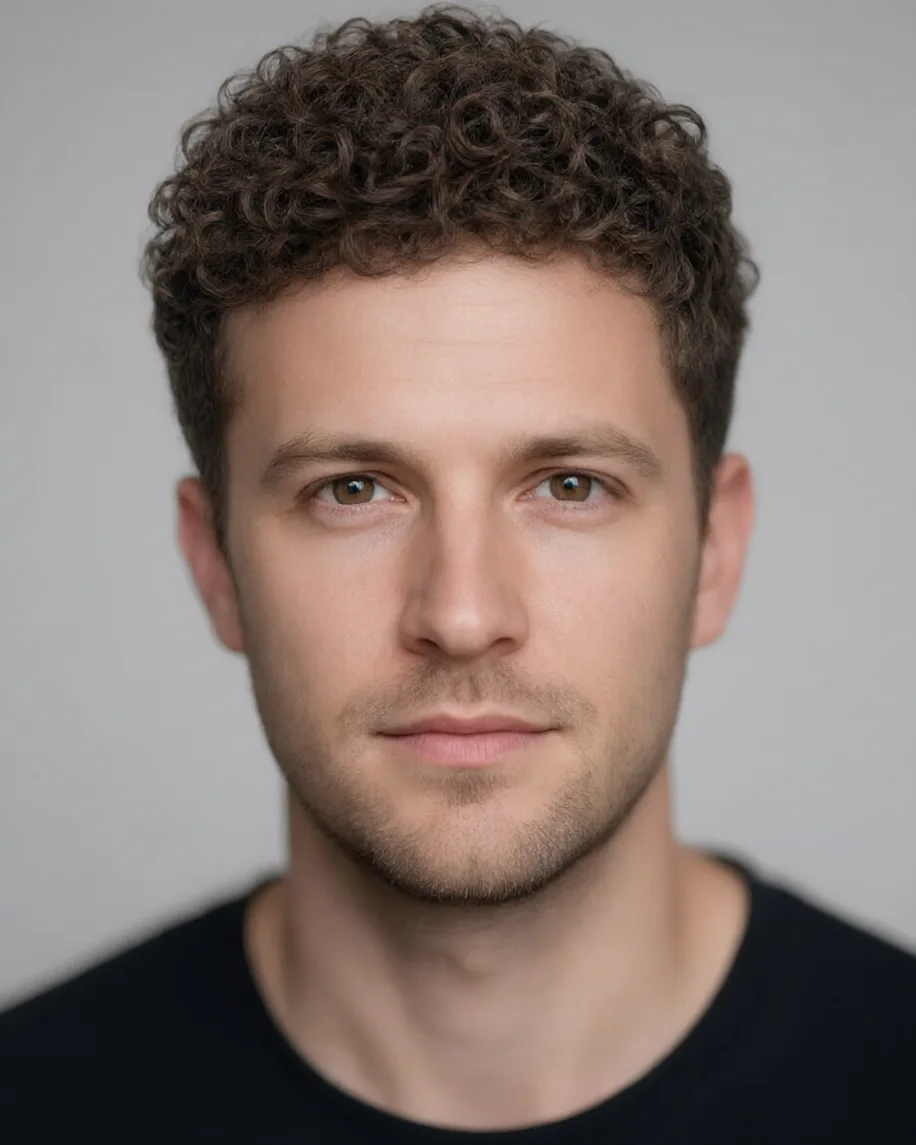 AfterTight curls on top
How to
How to use the curly hair filter
- Time needed
- Steps
- 4 steps
Step 1
Open the curly hair filter
Press “Add your photo”. Image Studio opens with the curly hair instruction in the prompt box. Sign in free for starter credits.
Step 2
Upload your photo
Add a clear, front-facing photo of yourself with your hair visible from the roots to the ends.
Step 3
Pick the curl
Keep the medium ringlets or swap in the prompt words for waves, tight curls or a perm from the table above.
Step 4
Create and compare
Press Create, run it again for a second take, try another curl type, and download the one you like without a watermark.
See it in the app

Open Image Studio and type what you want to see — subject, style, lighting and mood.


Watch the tour · 1:23
Prompts, styles, references, edit, Arena & chat
Chapters
Tips
Get a curly preview that looks like your own hair
What made the difference in our runs.
Name the curl: “loose waves”, “bouncy ringlets” or “tight corkscrew curls”. “Curly” alone often comes back as waves.
Say “same length and same hair colour”, or the model may shorten or darken it.
Curls shrink: real curly hair looks shorter than the same hair straight, so ask for “a little shorter” if you want realism.
Use a front-facing photo with your hairline and ends in frame and nothing on your head.
Keep the line about your face, expression and background so only the hair changes.
Run it twice. Curl size varies from run to run; pick the one closest to the curl you could really get.
Models
Models for curly hair edits
What each model is good at. Open any one straight in the generator.
- Free plan

Alibaba
Qwen Image 3.0
- Reference images
- Up to 3
- Output
- 1K or 2K
Open Qwen Image 3.0Best for
Default here · free plan · made the examples

ByteDance
Seedream 5.0 Pro
- Reference images
- Up to 10
- Output
- Up to 2K
Open Seedream 5.0 ProBest for
The model behind our other hair-filter examples
Google
Nano Banana 2.1

OpenAI
GPT Image 2.5 Sunburst
- Reference images
- Up to 16
- Output
- 1K to 4K
Open GPT Image 2.5 SunburstBest for
Fine strand detail
FAQ
Curly Hair Filter questions
8 questions

What would I look like with curly hair?
Upload a clear, front-facing photo of yourself to the curly hair filter and press Create to find out. The editor opens with a medium-ringlet instruction filled in, and the model curls your hair while your face, hair colour, length and background stay the same. Swap the curl words to compare loose waves, ringlets and tight curls on the same photo.
Link to this answerIs there a free curly hair filter?
Yes, to start. A new Kenerate account gets 25 free starter credits, and Qwen Image 3.0, the default model here and the one that made every example on this page, is on the free plan. Seedream 5.0 Pro, Nano Banana 2.1 and GPT Image 2.5 Sunburst use credits from a one-time pack; there's no subscription. Results download without a watermark.
Link to this answerCan a filter make straight hair look curly?
Yes. The three examples on this page all started straight: a brown bob, a short men's cut and long black hair. Each became curly in one edit, with the same face and colour. For tighter curls, name them, for example “3C tight corkscrew curls”; for something softer, ask for “loose beach waves”.
Link to this answerWhat curl type should I ask for?
Pick by size. Waves (2A–2C) bend in an S-shape, loose curls (3A) are big spirals, ringlets (3B) are springy and marker-sized, tight curls (3C) are pencil-sized and coils (4A–4C) are very tight. The table above gives the prompt words for each. For afro and coily styles, use the afro hair filter.
Link to this answerWill my real hair look like this if I get a perm?
Not exactly. The filter draws the curl you describe; a perm's result depends on your hair's thickness, length, condition and the rod size your stylist uses. Use the preview to choose the curl size and length you like, then show it to your stylist as a reference rather than a promise.
Link to this answerWhy did the filter give me waves instead of curls?
Most image models drift towards loose waves when the prompt only says “curly”. Name the pattern (“defined ringlets”, “tight corkscrew curls”), the size and where the curl starts (“from the roots”), then run it again. In our long-hair example the first run came out as loose waves and curls.
Link to this answerDoes the curly hair filter work on men's short hair?
Yes. The second example on this page is a short straight men's cut turned into tight springy curls on top with short sides. Say how long the top should be (“a little longer than now”) and keep “short at the sides”, so the cut stays recognisable.
Link to this answerCan I use someone else's photo?
Only your own photo, or one the person has agreed to. Changing someone's hair edits their likeness, so share the result only with their consent. Don't upload photos of anyone under 18, and don't combine photos of different people. Kenerate's content rules apply to every edit.
Link to this answerIn depth
Curly Hair Filter, explained
What works, what to avoid, and how to pick a model.
On this page
How does an AI curly hair filter work?
It's an instruction edit. Your photo and one sentence go to an image model's edit endpoint; the model redraws the strands in the curl pattern you name, keeps their colour and shine, and leaves your face and background alone. Older app filters laid a fixed curly wig over your head, which is why they rarely matched your hairline or lighting.
What do the curl-type numbers mean?
Hair charts sort hair by shape: type 1 is straight, type 2 wavy, type 3 curly and type 4 coily, with letters for how loose or tight the pattern is. The system was popularised by hairstylist Andre Walker in the 1990s; later charts added 3C and 4C. The letters are a handy shorthand for a prompt, not a measurement.
How do I write a curly hair prompt?
Four parts are enough:
- The pattern: “loose waves”, “spiral curls”, “ringlets”, “tight corkscrew curls”.
- The size and volume: “medium ringlets with real volume”, “big loose curls”.
- What stays: “same length, same hair colour, same parting”.
- What must not change: “keep my face, expression, skin, clothing and background exactly the same”.
By the Kenerate AI teamLast updated and reviewed
We build and run the Kenerate generator. Every example is a real output of the model named under it; models and presets were checked against the app's code.
Sources: Wikipedia — Hair type (Andre Walker hair typing system) · Kenerate Image Studio