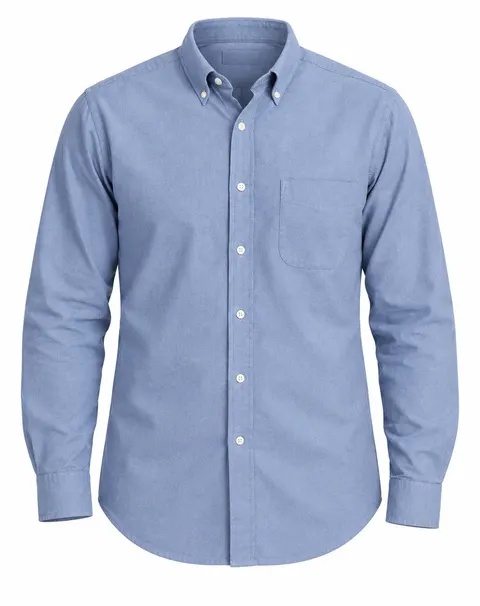
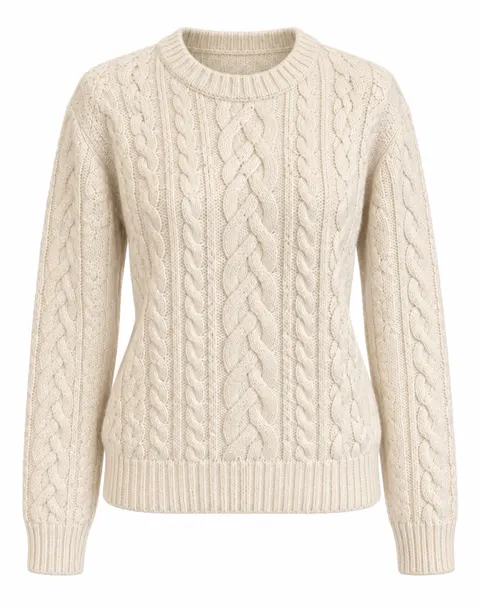
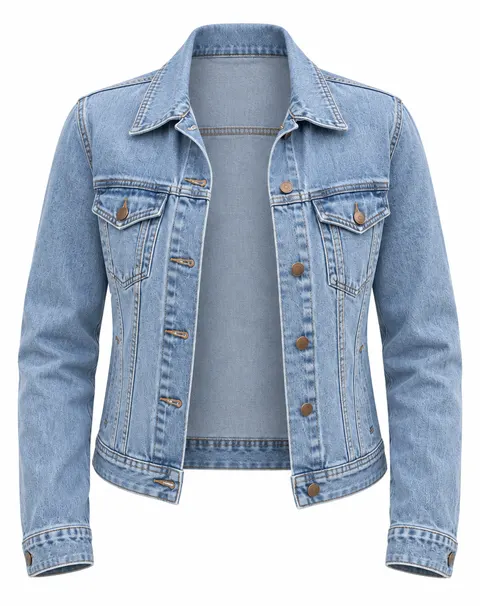
On a model · on a mannequin · open jackets
Ghost Mannequin AI
Upload a photo of a garment on a model, a mannequin or a dress form. The AI removes the body and the stand, keeps the garment's 3D shape and shows the inside of the collar — the invisible-mannequin look, on pure white.
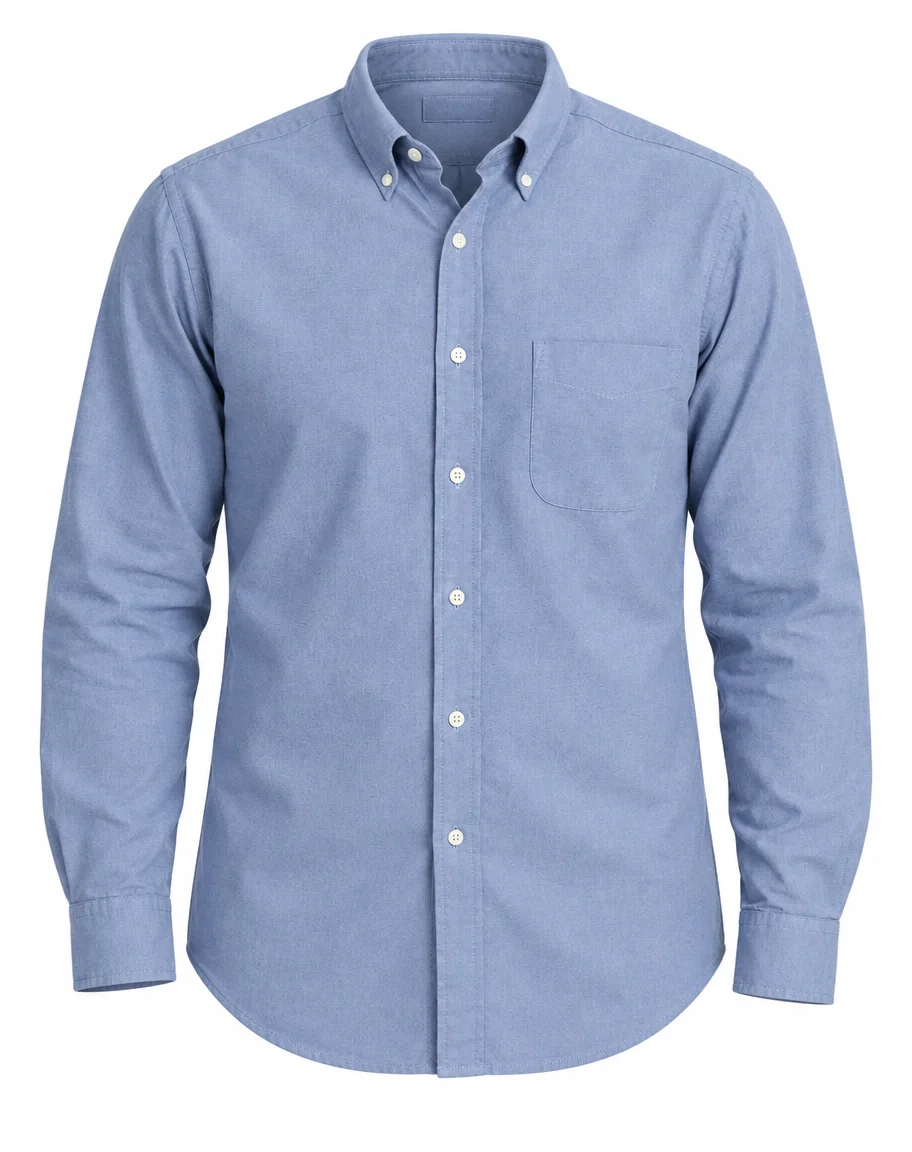
- Body and stand removed
- Inside collar shown
- Pure white background
- No watermark
Updated by the Kenerate AI team




On this page
Quick answer

How do I make a ghost mannequin photo with AI?
Ghost mannequin AI turns a photo of clothing on a model or mannequin into a hollow “invisible mannequin” packshot. On Kenerate, upload the photo with GPT Image 2.5 Sunburst and the ghost-mannequin prompt: it removes the body and stand, draws the inside of the collar and returns a pure-white (RGB 254–255) background for 11.7 credits. It worked first try on a shirt, a sweater and a denim jacket.
Key facts
- Starts from
- A garment worn by a model, on a mannequin or a dress form
- Removes
- Person, skin, hair, dress form, neck cap, stand
- Adds
- Inside back of the collar or neckline
- Best model in our test
- GPT Image 2.5 Sunburst
- Background
- Pure white (RGB 254–255) with Sunburst
- Garments tested
- Oxford shirt · cable-knit sweater · open denim jacket
- Batch and marketplace sizes
- Fashion Studio · Ghost mannequin shoot
Before / after
Ghost mannequin AI: real before and after
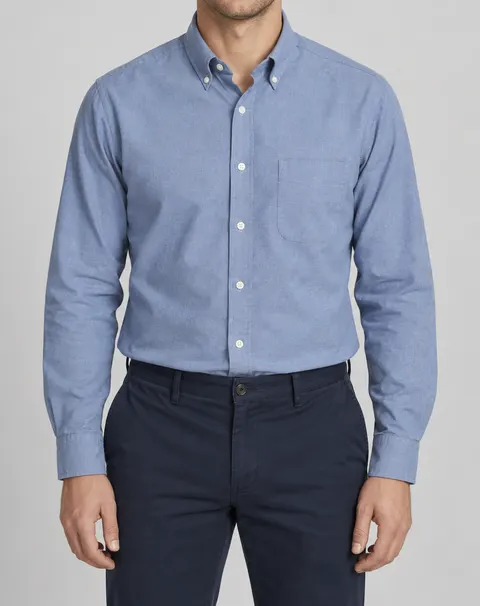
A shirt worn by a model, a sweater on a dress form and an open denim jacket from a street photo, each on GPT Image 2.5 Sunburst, one try each. Drag the slider to compare.
Same prompt
Same shirt, two models
The model photo, then the same ghost-mannequin prompt on GPT Image 2.5 Sunburst and on Nano Banana 2.1.
PromptTurn this photo into a ghost-mannequin (invisible mannequin) packshot of the shirt only: the garment shown with a natural 3D body shape as if worn, but no person, mannequin, hanger or stand visible — no skin, no neck, no hands, no trousers. The inside back of the collar is visible through the neck opening. Show the whole shirt untucked with its complete curved hem, sleeves hanging naturally with the cuffs. Keep the shirt exactly the same: the dusty blue oxford cotton, the button-down collar points with their small buttons, the white front buttons, the chest pocket on the wearer's left, the stitching and the fabric texture. Pure white seamless background, soft even light, centered, the whole garment in frame.
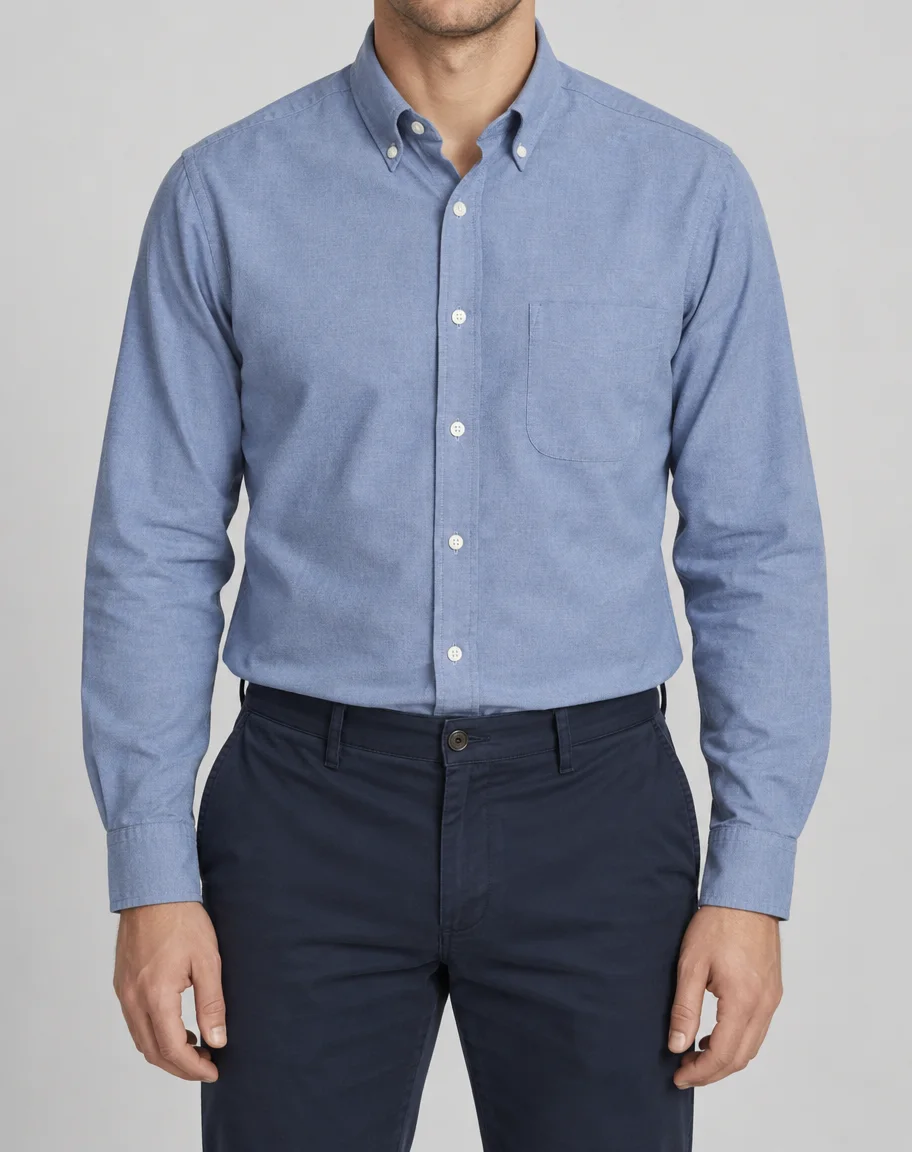 InputShirt worn by a model
- GPT Image 2.5 SunburstPure white, collar opening drawn
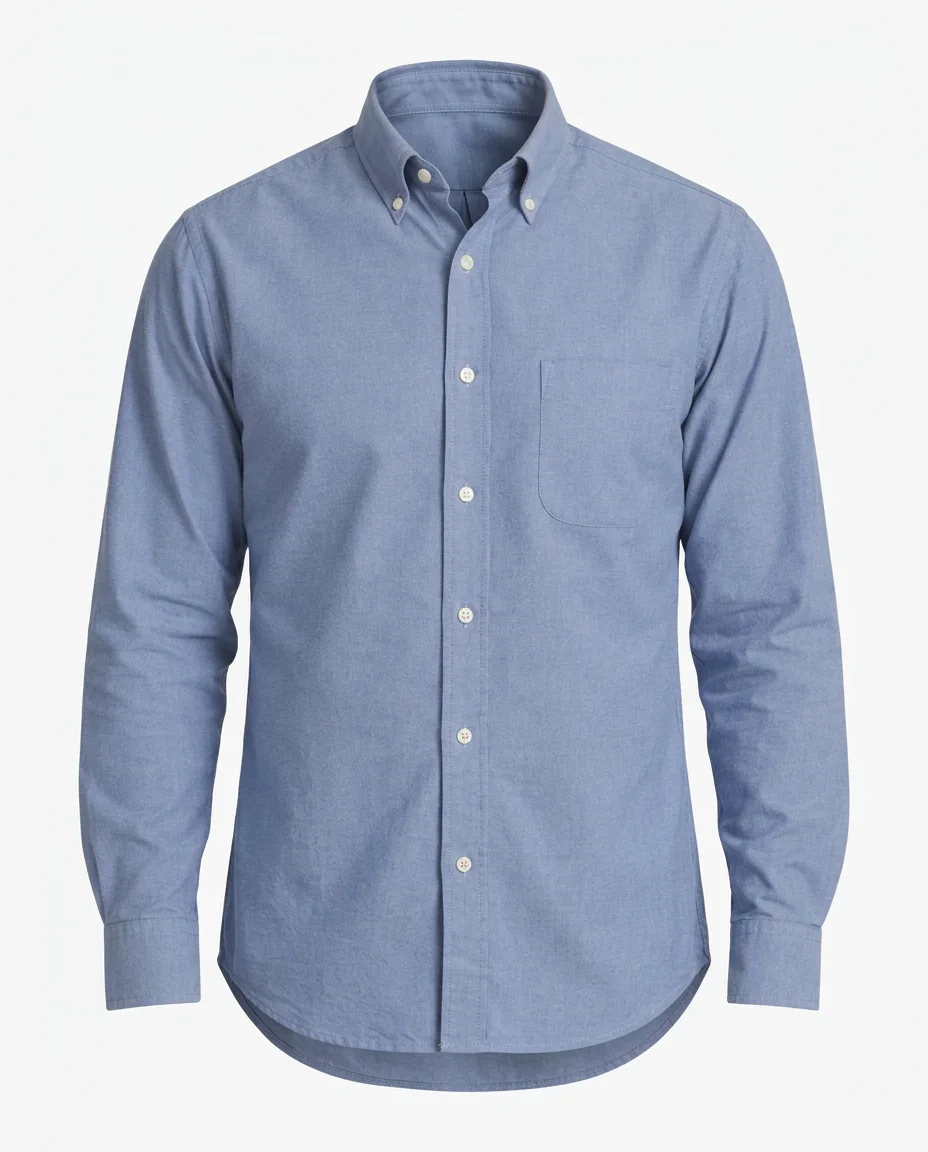 Nano Banana 2.1Clean, but light grey-white
How to
How to use the ghost mannequin AI
- Time needed
- Steps
- 4 steps
Step 1
Open the ghost mannequin tool
Press “Add your photo”: Image Studio opens with GPT Image 2.5 Sunburst and the ghost-mannequin instruction filled in.
Step 2
Upload the garment photo
On a model, on a mannequin or on a dress form, front view, whole garment in frame. JPG, PNG or WebP.
Step 3
Name what to keep
Add the collar, buttons, pockets and any print to the prompt, and say if it should be open or closed. Then press Create.
Step 4
Check and download
Compare with the real garment, check the background corners are white, then download. No watermark.
See it in the app

Open Image Studio and type what you want to see — subject, style, lighting and mood.


Watch the tour · 1:23
Prompts, styles, references, edit, Arena & chat
Chapters
Tips
Ghost mannequin photos that pass a product-page check
What made the difference in our three tests.
Shoot the garment straight on, the whole thing in frame, in even light. The AI keeps what it sees and invents what it can't.
Untuck shirts and close jackets the way you want them shown; a tucked hem or a hidden pocket will be guessed.
Name the details to keep: collar type, buttons, pockets, print, stitching. Named details came back right.
Say “no person, mannequin, hanger or stand visible” and “the inside back of the collar is visible” — that is what makes it a ghost mannequin.
Ask for a pure white seamless background and check the corners; Amazon's main image wants pure white.
Compare it with the real garment before you list it, especially knit patterns, prints and the hem.
Models
Which model makes the best ghost mannequin photos?
What each model is good at. Open any one straight in the generator.

OpenAI
GPT Image 2.5 Sunburst
- Reference images
- Up to 16
- Output
- 1K–4K
Open GPT Image 2.5 SunburstBest for
Won our shirt test · pure white · Fashion Studio's ghost default
Google
Nano Banana 2.1
- Reference images
- Up to 14
- Output
- 1K–4K
Open Nano Banana 2.1Best for
Clean result, light grey-white background
Kenerate
Fashion Studio · Ghost mannequin
- Reference images
- 1–3 garment photos
- Output
- 1:1 · marketplace sizes
Open Fashion Studio · Ghost mannequinBest for
Front and back views, batch and marketplace exports
FAQ
Ghost Mannequin AI questions
8 questions

What is a ghost mannequin photo?
A ghost mannequin (or invisible mannequin) photo shows a garment with the 3D shape it has when worn, but with no person or mannequin visible, so you see the inside back of the collar through the neck opening. Photographers make it by shooting on a mannequin and combining shots in Photoshop; AI does it from one photo.
Link to this answerHow do I make a ghost mannequin photo with AI?
Upload a front photo of the garment on a model, a mannequin or a dress form, pick GPT Image 2.5 Sunburst in Kenerate's Image Studio and use the ghost-mannequin instruction: no person, mannequin or stand visible, the inside back of the collar showing, pure white background. Name the details to keep. The three examples above were made that way, one try each.
Link to this answerWhich AI is best for ghost mannequin photos?
In our test on one oxford shirt, GPT Image 2.5 Sunburst gave a pure white background (RGB 254–255) and drew the collar opening with a label patch; Nano Banana 2.1 was also clean but left a light grey-white background (RGB 246) that needs whitening for a marketplace. Sunburst is also the default for Fashion Studio's Ghost mannequin shoot.
Link to this answerHow much does ghost mannequin AI cost?
One GPT Image 2.5 Sunburst edit with one photo costs 11.7 credits at 1K; Nano Banana 2.1 costs 21. A new Kenerate account gets 25 credits, enough for two Sunburst edits. Credits come in one-time packs with no subscription, and downloads have no watermark. Fashion Studio, for batches and marketplace exports, is part of the premium plans.
Link to this answerCan I use a photo of clothes worn by a person?
Yes. Our shirt and denim jacket were both worn by models, and the AI removed the skin, hair, hands and the other clothes. Hidden parts are invented: a tucked-in hem or a pocket under a hand will be drawn from a guess, so untuck and show the garment fully when you shoot. Only use photos you have the right to edit.
Link to this answerDoes it work with a mannequin or dress form?
Yes, and that is the easiest case. Our cable-knit sweater was on a white dress form with a metal neck cap and a black pole in a busy shop; the form, the cap, the pole and the shop all disappeared in one try.
Link to this answerIs an AI ghost mannequin photo accurate enough for my store?
Usually for the shape and colour, but check the details. The model redraws the garment, so knit patterns, small prints and hems can shift; ours kept every pocket, button and seam, while the sweater's cables were redrawn rather than copied. Compare each result with the real item before you list it.
Link to this answerCan I make the back view too?
Yes. Photograph the back of the garment and run the same instruction, asking for “the back view, the inside front of the neckline visible”. Fashion Studio's Ghost mannequin shoot takes up to three garment photos, so front and back views can go in together.
Link to this answerIn depth
Ghost Mannequin AI, explained
What works, what to avoid, and how to pick a model.
On this page
Ghost mannequin photography vs ghost mannequin AI
In ghost mannequin photography the garment is shot on a mannequin with removable panels, then shot again inside out or from the back, and the two pictures are combined in Photoshop so the inside of the collar fills the neck hole. It needs a mannequin, a studio and editing time for every item.
Ghost mannequin AI starts from one photo, even a phone picture of the garment on a model, and draws the hollow inside itself. The trade-off: the inside of the collar and anything hidden in the photo are invented, not photographed.
Ghost mannequin prompts to copy
Upload the garment photo, then use the instruction from the tool and add one of these lines:
- Shirt: keep the collar type and its buttons, the front buttons and the chest pocket; show it untucked with the full hem.
- Knitwear: keep the knit pattern, the ribbed neckline, cuffs and hem; remove the dress form, neck cap and pole.
- Jacket open: keep it open so the inside of the back panel shows; keep the pockets, buttons and seams.
- Dress: show the full skirt with its natural drape and the inside back of the neckline; keep the print.
- Back view: show the back of the garment with the inside front of the neckline visible.
What it doesn't do
It doesn't photograph what wasn't in your picture. The inside of the collar, a hidden hem or a pocket behind a hand are drawn from a guess. Garments with logos or small text should be checked letter by letter, and every result should be compared with the real item before it goes on a product page.
By the Kenerate AI teamLast updated and reviewed
We build and run the Kenerate generator. Every example is a real output of the model named under it; models and presets were checked against the app's code.
Sources: Kenerate Fashion Studio — Ghost mannequin shoot · Kenerate Image Studio