

Quote · first gen · nursing · thank you · travel · teacher · funny · glam
Graduation cap ideas — 8 decorated cap designs, and a preview on your own cap
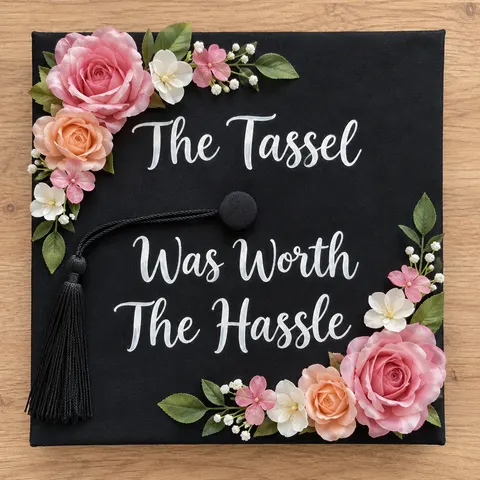
Eight graduation cap designs you can copy, from a flower-framed quote to a nursing stethoscope heart, each made with AI from the prompt shown. Make your own with your words lettered in, print it as a square topper, or upload a photo of your plain cap and see the design on it before you glue anything.
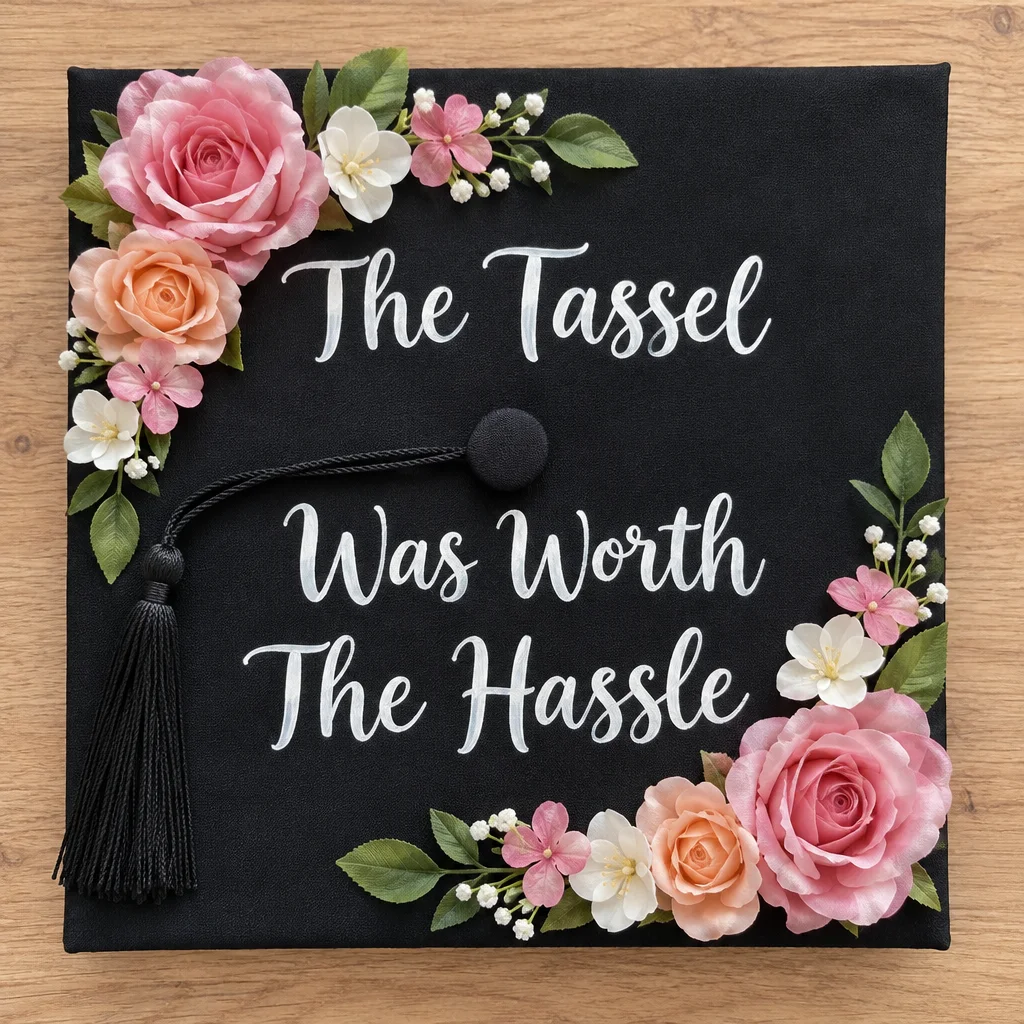
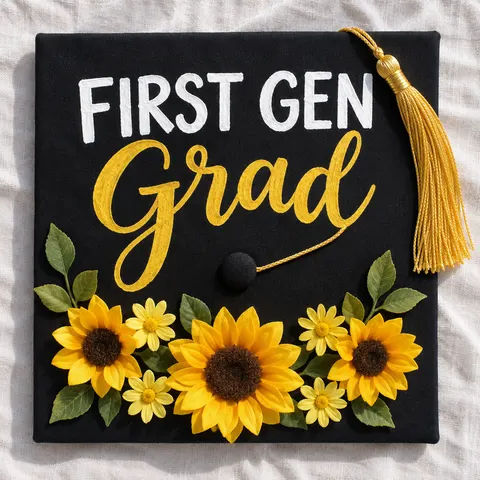
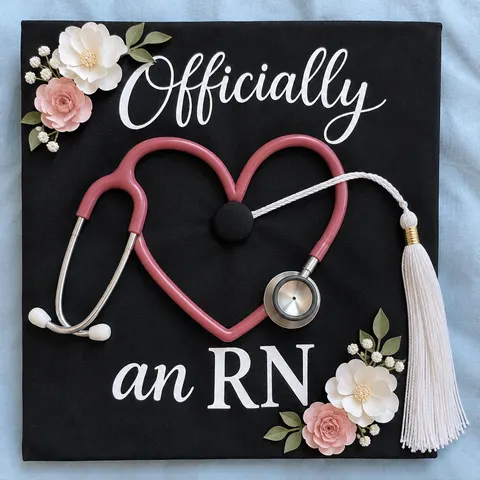
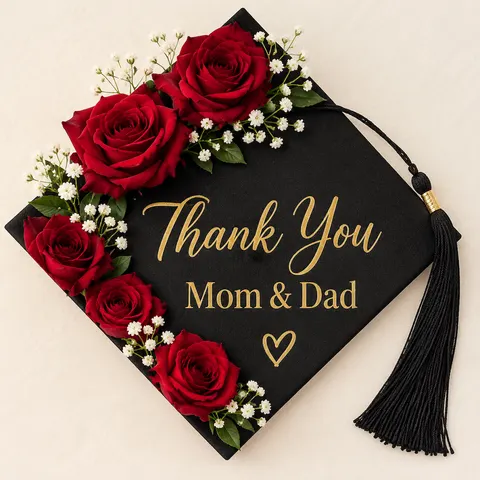
- 8 cap designs with prompts
- Your own words lettered in
- Preview on a photo of your cap
- Square, printable output
Updated by the Kenerate AI team




Made with Kenerate
On this page
Quick answer

What are good graduation cap ideas?
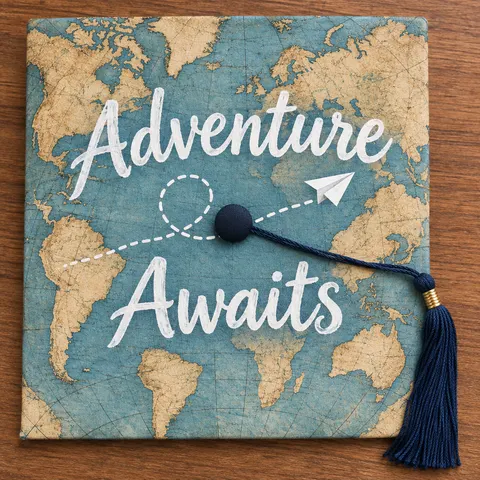
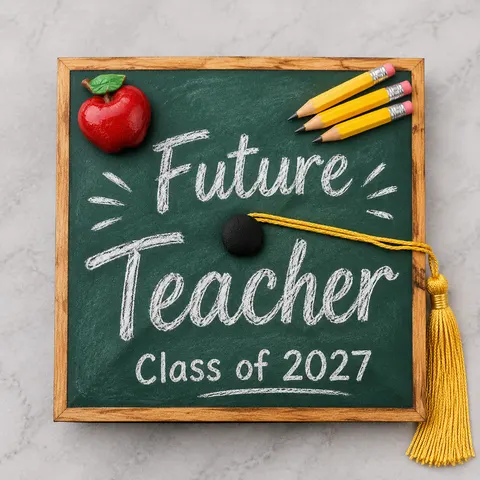
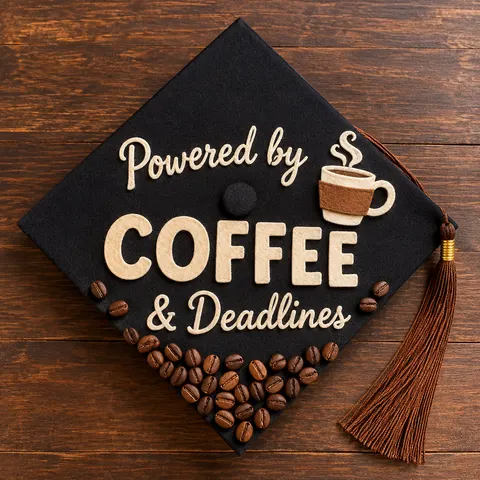
Eight graduation cap ideas: “The Tassel Was Worth The Hassle” with flowers, “First Gen Grad” with sunflowers, a nursing stethoscope heart, “Thank You Mom & Dad” with roses, a map, a chalkboard, a funny coffee cap and pearls with butterflies. On Kenerate AI, describe the cap with your words in quotes; GPT Image 2.6 Sunburst returns a square 1024 × 1024 design for 15 credits.
Key facts
- Ideas shown
- 8 cap designs, one image each
- Made with
- GPT Image 2.6 Sunburst (designs) · Nano Banana 2.1 (your cap)
- Shape
- 1:1 square, 1024 × 1024 px at 1K
- Lettering
- Every word spelled right in our 8 designs
- Preview on your cap
- Yes — upload a top-down photo
- Free-plan option
- Qwen Image 3.0
- Watermark
- None
Gallery
Graduation cap ideas, made with AI
Eight graduation cap designs, each one a single GPT Image 2.6 Sunburst run from the prompt under it, with every word lettered by the model. All designs are original: no characters, logos or school crests. Copy a prompt, swap in your own words, and print it as a topper or use it as a guide.
Same prompt
See a design on your own cap before you glue anything
Left: a phone photo of a plain black cap (made with GPT Image 2.6 Sunburst). Right: the same photo edited with Nano Banana 2.1, adding paper flowers and “Next Chapter / Loading...” in one try. The board, button, tassel, carpet and camera angle stayed; the flowers, lettering and book doodle are new.
PromptDecorate the top of this graduation cap: add lavender and white paper flowers with green leaves along the top edge and the bottom left corner, and white hand-painted lettering in two lines, "Next Chapter" above the centre button and "Loading..." below it, with a small white book drawing beside the words. Keep the cap's shape, the centre button, the black tassel, the beige carpet and the camera angle exactly the same. Real photograph. No logos, no other text.
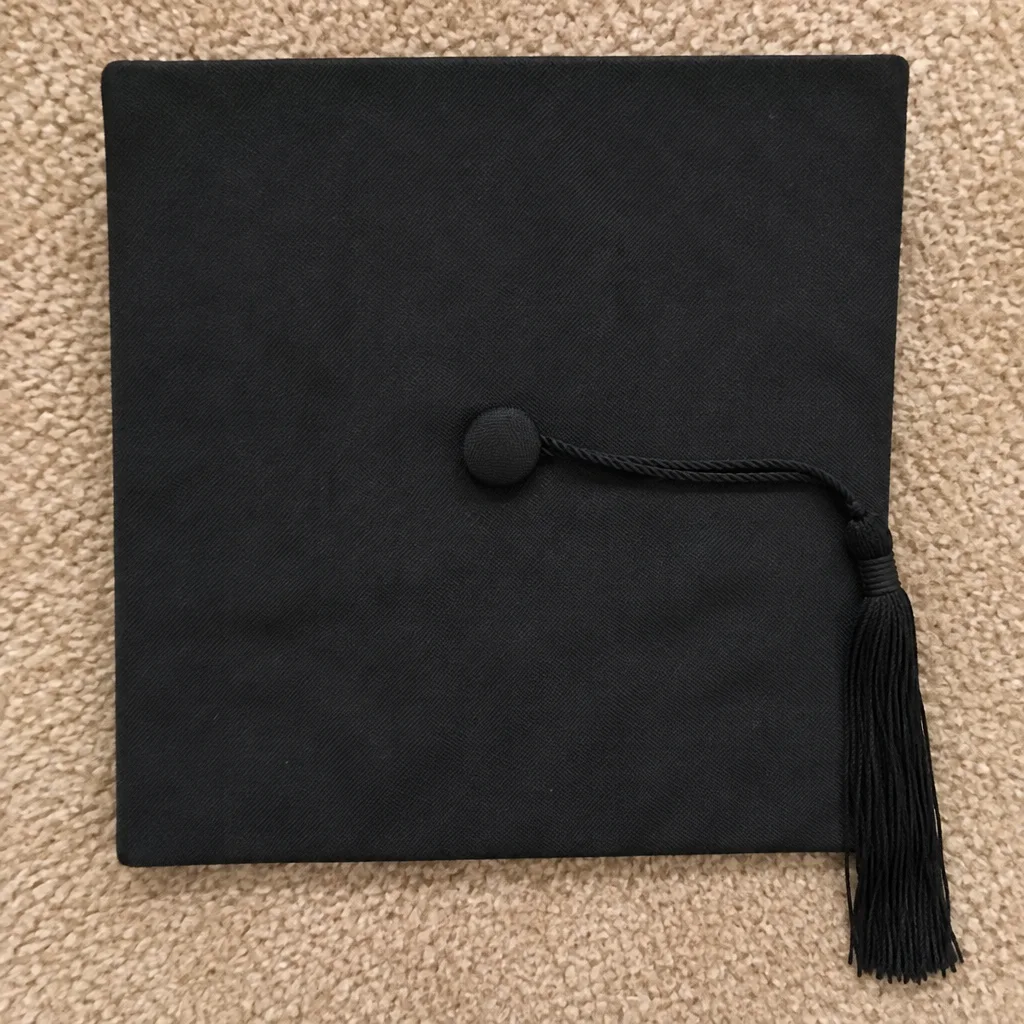 BeforePlain cap, phone photo
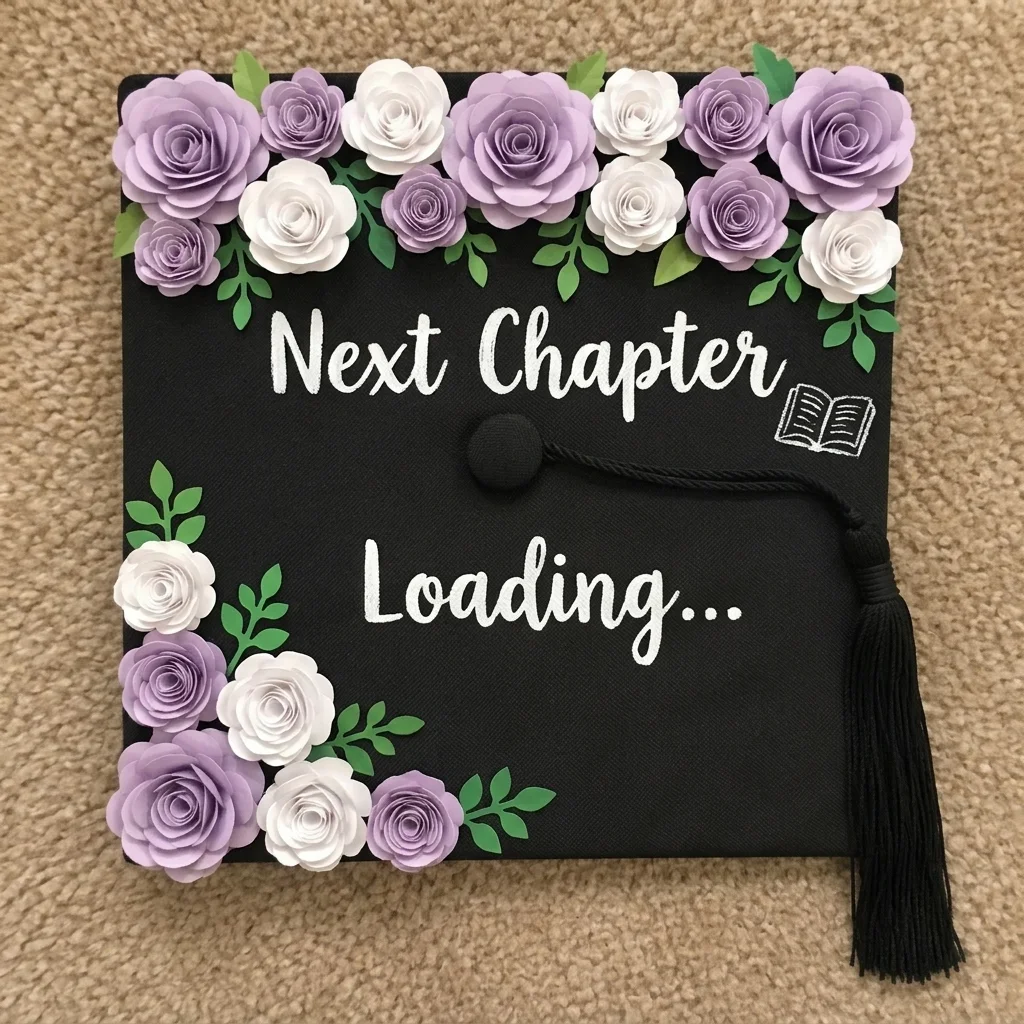 AfterNano Banana 2.1 edit, one try
How to
How to use the graduation cap ideas
- Time needed
- Steps
- 4 steps
Step 1
Pick an idea
Choose a cap design above and copy its prompt, or open Image Studio with “Design my cap”.
Step 2
Write your words
Swap in your own quote, degree or thank-you in quotes. Keep it to three short lines so it reads from the stage.
Step 3
Make it square
Set 1:1 and press Create, or upload a top-down photo of your own cap and pick Nano Banana 2.1 to preview the design on it.
Step 4
Print or copy it
Print the design at the size of your board as a topper, or use it as a guide while you paint, glue and letter the real cap.
See it in the app

Open Image Studio and type what you want to see — subject, style, lighting and mood.


Watch the tour · 1:23
Prompts, styles, references, edit, Arena & chat
Chapters
Tips
Make a cap that reads from the stage
What worked across our ten images, and what to keep in mind for the real board.
Three short lines at most. A quote like “The Tassel Was Worth The Hassle” fits; a full paragraph won't read from the seats.
Leave the centre button clear. The tassel hangs from it, so plan the lettering above and below, as every design here does.
Put every word in quotes and name the style: “white hand-lettering in elegant script”, “gold serif capitals”.
Ask for “top-down flat-lay, the whole square board in frame” so the design comes back square and printable.
Check your university's rules first: some ban decorated caps or anything that sticks up or out.
Avoid characters, team logos and your school's crest in the prompt; they are trademarks, and the model will get them wrong.
Models
Models for graduation cap designs
What each model is good at. Open any one straight in the generator.
OpenAI
GPT Image 2.6 Sunburst
- Reference images
- Up to 16
- Output
- 1K–4K
Open GPT Image 2.6 SunburstBest for
Made the 8 cap tops; lettered every quote
Google
Nano Banana 2.1
- Reference images
- Up to 14
- Output
- Up to 4K
Open Nano Banana 2.1Best for
Put a design on a photo of a plain cap
- Free plan

FAQ
Graduation Cap Ideas questions
8 questions

What are good graduation cap ideas?
Eight that work: a flower-framed quote such as “The Tassel Was Worth The Hassle”, a “First Gen Grad” cap with sunflowers, a nursing cap with a stethoscope heart, a “Thank You Mom & Dad” cap with roses, a world-map “Adventure Awaits” cap, a chalkboard “Future Teacher” cap, a funny line and a glam pearl-and-butterfly design. Each is shown above with the exact prompt that made it.
Link to this answerHow do I decorate my graduation cap?
Plan the design on paper or with AI first, then cut a piece of cardstock to the size of your board, decorate it with paint, paper flowers, glitter or stickers, and attach it with double-sided tape or removable glue dots so the cap itself stays clean. Leave the centre button free for the tassel, and keep the words to three short lines.
Link to this answerCan AI design my graduation cap?
Yes. In Image Studio, describe the cap top-down with your words in quotes and set 1:1; GPT Image 2.6 Sunburst lettered all eight designs on this page correctly. Upload a top-down photo of your own cap with Nano Banana 2.1 to preview the design on it, as in the before-and-after above.
Link to this answerCan I print an AI design as a cap topper?
Yes. Make it at 1:1, measure your board edge to edge, and print the design at that size on cardstock or sticker paper; make it at 2K or 4K so it stays sharp. Glue the printed topper on, and add real flowers or gems on top if you want texture.
Link to this answerHow much does it cost to design a graduation cap with AI?
Free to start: a new Kenerate account gets 25 free credits. A cap design costs 15 credits on GPT Image 2.6 Sunburst at 1K (30 at 2K for print), a preview on a photo of your own cap costs 21 on Nano Banana 2.1, and Qwen Image 3.0 works on the free plan at 9 credits. Credits come in one-time packs, with no subscription and no watermark.
Link to this answerWhat should I write on my graduation cap?
A short quote, a thank-you or what comes next. Lines that fit a cap: “The Tassel Was Worth The Hassle”, “First Gen Grad”, “Officially an RN”, “Thank You Mom & Dad”, “Adventure Awaits”, “Future Teacher”, or your degree and “Class of 2027”. Write the words in quotes in the prompt and read every letter of the result.
Link to this answerAm I allowed to decorate my graduation cap?
It depends on your university. Many allow it, some ban it, and some limit height or ban anything political or offensive. Check the commencement page or ask your registrar before you glue anything on.
Link to this answerCan I use a character or logo on my cap?
Don't ask the model for one. Cartoon characters, team logos and your school's crest are trademarks, and a generated copy will come out wrong. Every design here is original: flowers, sunflowers, a stethoscope, a map, a chalkboard, pearls and butterflies.
Link to this answerIn depth
Graduation Cap Ideas, explained
What works, what to avoid, and how to pick a model.
On this page
Graduation cap ideas by theme
Pick the message first, then the decoration:
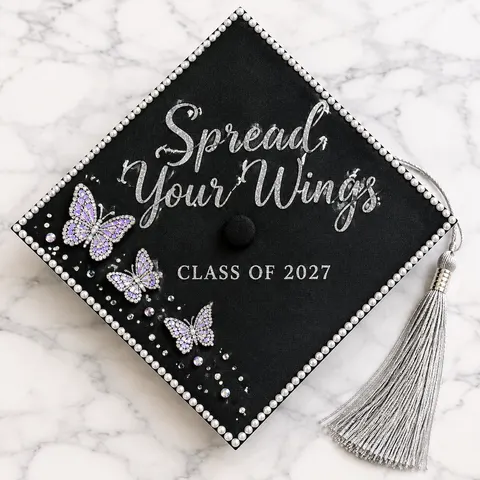
- Quotes: “The Tassel Was Worth The Hassle”, “Spread Your Wings”, “Next Chapter Loading...”, framed with flowers or pearls.
- Thank-yous: “Thank You Mom & Dad”, or a line for a grandparent, a partner or a mentor, with roses or a small photo.
- Your field: a stethoscope heart for nursing, a chalkboard for teaching, a circuit board for engineering, a scale for law.
- What's next: a world map for travel, a city skyline for a new job, the name of your graduate program.
- Funny: “Powered by Coffee & Deadlines”, or a joke about loans, naps or group projects.
- Pride in where you come from: “First Gen Grad”, a flag or flowers from home, a line in your family's language.
How to decorate the real cap
Cut a square of cardstock to the size of your board, with a small hole in the centre for the button. Decorate the cardstock, not the cap: paint or print the background, add the lettering, then glue on paper flowers, gems or pearls. Attach it with double-sided tape or removable glue dots, so the cap stays clean and you can fix mistakes.
An AI design helps in two ways: print it straight onto cardstock or sticker paper as the topper, or keep it on your phone as the plan while you paint. A design costs 15 credits on GPT Image 2.6 Sunburst at 1K, or 30 at 2K for a sharper print.
What we got
Ten images, made on 15 November 2026:
- All eight cap designs came back with every word spelled right on the first run, including “& Deadlines” and “Mom & Dad”.
- Five came back square-on; three (“Thank You Mom & Dad”, the coffee cap and the butterflies) came back turned at an angle like a diamond. Add “square-on, edges parallel to the frame” if you need it straight for printing.
- The glitter script on “Spread Your Wings” has a few loose sparkle strokes around the letters, which read as glitter at cap size.
- The Nano Banana 2.1 edit kept the board, button, tassel and carpet and added the flowers and lettering where we asked.
By the Kenerate AI teamLast updated and reviewed
We build and run the Kenerate generator. Every example is a real output of the model named under it; models and presets were checked against the app's code.
Sources: Kenerate Image Studio · Kenerate terms of service
