

Class of 2027 · cards, photo announcements and party invitations
Graduation announcements, your name, degree and photo included
Pick a design, put your name, degree, school and date in quotes, and get a graduation announcement card with the words already set. Add your cap-and-gown photo to make a photo announcement, or make the design with a plain space and type the details yourself. Print it as a 5 × 7 card or post it.
- Your name, degree and date in the design
- Photo announcements from your own picture
- Eight real designs with prompts
- Or type the details with the free text tool
Updated by the Kenerate AI team




Made with Kenerate
On this page
Quick answer

How do I make a graduation announcement?
To make a graduation announcement, open Image Studio with GPT Image 2.6 Sunburst, describe the card and put each line in quotes: “Class of 2027”, your name, your degree, your school and the date. Pick 2:3 for a printed card; it costs 15 credits at 1K. For a photo announcement, upload your picture and use Nano Banana 2.1.
Key facts
- Best for lettering
- GPT Image 2.6 Sunburst · made 7 of the 8 designs here
- Photo announcements
- Nano Banana 2.1 · puts your photo on the card
- Free plan
- Qwen Image 3.0 · design-only backgrounds to type on
- 5 × 7 card
- Make it at 2:3 or 3:4, crop to 5 × 7
- Party invitation
- Same designs, with the party date, time and place
- Wording templates
- Bachelor's, master's, nursing, photo card, party
- School marks
- Keep real crests and seals off the design
Three ways
Three ways to make your announcement
A name, a degree and a date can go straight into the prompt. Your own photo goes in as a reference. A long address or a list of names is safer typed by you.
Let the model letter it
Put “Class of 2027”, your name, degree, school and date in quotes and say where each goes. GPT Image 2.6 Sunburst set them into seven designs on this page. Best for up to five short lines.
Put your photo on it
Upload your cap-and-gown photo, pick Nano Banana 2.1 and describe the card around it with the words in quotes. Add “keep the photo exactly the same”. Our photo announcement came back in one try.
Make the design, type the details
Make the design with a plain space and “no text”, open it in Edit Studio and add the words with the free Text tool, in your fonts and colours. Best for an address, an RSVP line or a long degree title.
Wording templates
Graduation announcement wording to copy
Swap the [brackets] for your own details. Put the name, degree, school and date in the image, and anything longer in the message you send with it.
| Announcement | Wording | Tip |
|---|---|---|
| Classic card | “Class of [year]” · [Full name] · [Degree, e.g. Bachelor of Arts in Psychology] · [University] · [Day, date of commencement] | Spell the degree exactly as it will appear on your diploma; check it on your university's registrar page |
| From your family | “With joy we announce the graduation of” · [Full name] · [Degree] · [University] · “Class of [year]” | Parents often send these; keep the same five lines and change only the opening |
| Photo announcement | “Proudly Announcing” · [Full name] · “[University] · Class of [year]” | Three short lines are enough when the photo does the talking |
| Graduation party | “Grad Party” · “Join us to celebrate” · [Full name] · [Day, date · time] · [Address] | Add an RSVP line (“Text [name] by [date]”) in the message rather than on the card |
| Master's or doctorate | “Class of [year]” · [Full name] · [Master of … / Doctor of …] · [University] · “Commencement · [date]” | Write the full degree title; abbreviations like MBA or PhD fit a story post better than a card |
| Social post | “Officially a Grad!” · [Name] · [Degree abbreviation] · “[University] · Class of [year]” | Make it at 9:16 for a story or 4:5 for a feed post |
Prompts
Graduation announcement prompts to copy
The exact prompts behind the eight designs in the gallery. Each sets the style and puts every line in quotes; the photo card needs your photo uploaded first, and the last is design only, for typing your own details. Swap in your own name, degree and date before you press Create.
- Style
- Navy and gold, florals, minimal, retro, party
- Lines in quotes
- “Class of 2027”, your name, degree, school
- One date line
- “Saturday, May 22, 2027”
- No marks
- “No crest, no seal, no logos, no other text”
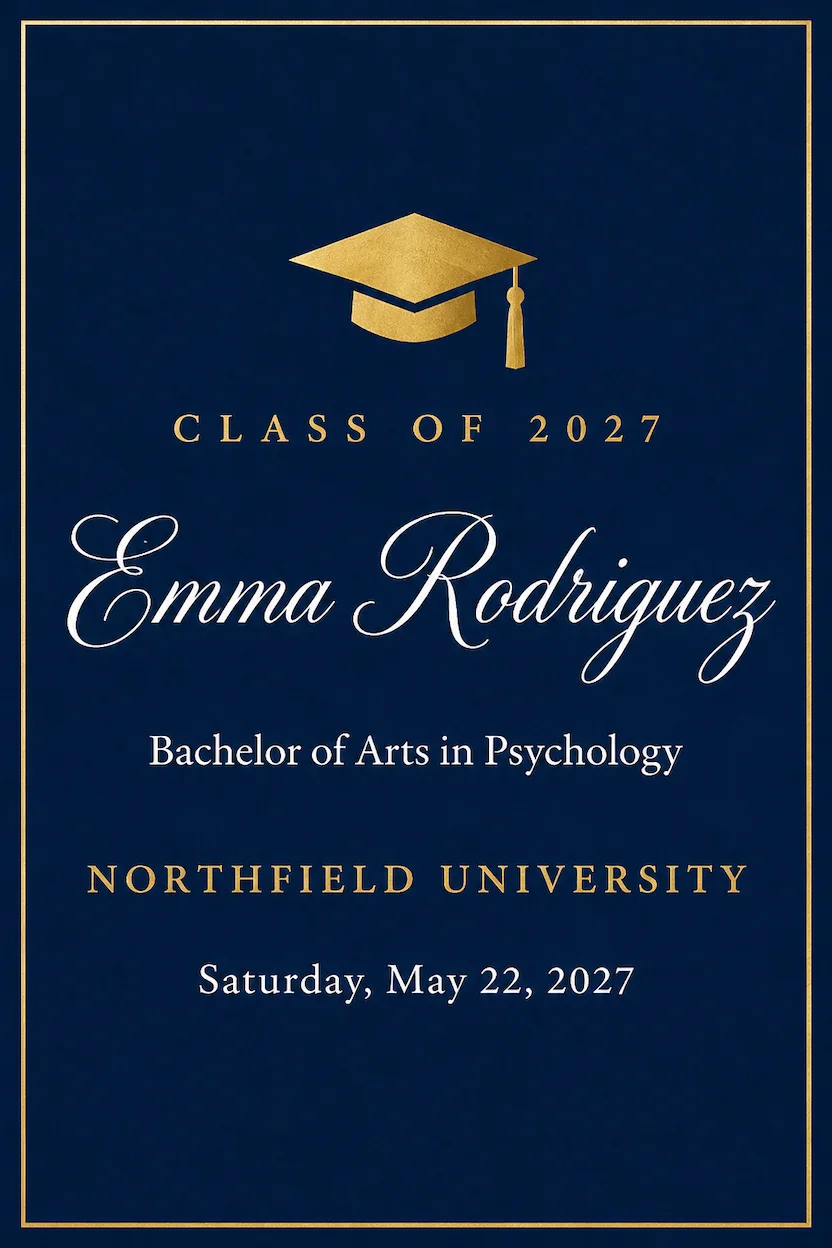
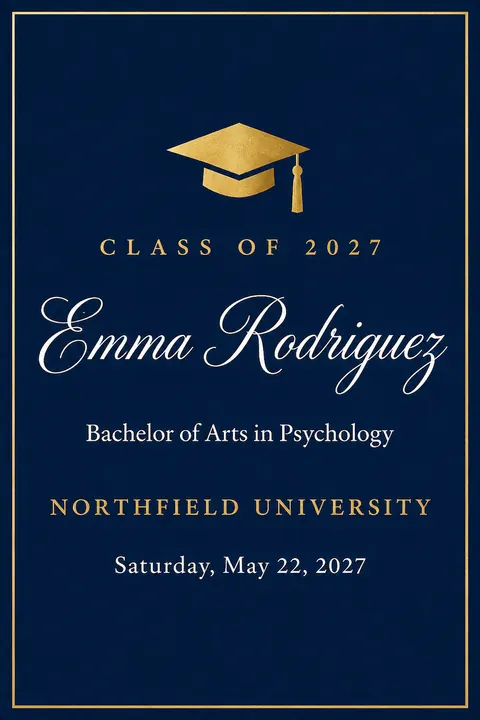
Classic navy and gold
A classic college graduation announcement card, portrait, flat front view filling the frame. Deep navy background with a thin gold foil border and a small gold mortarboard cap with a tassel at the top. Centred gold and white lettering, in this order: "CLASS OF 2027" in small spaced gold capitals, then the name "Emma Rodriguez" in large elegant white script, then "Bachelor of Arts in Psychology" in small white serif, then "Northfield University" in gold serif capitals, then "Saturday, May 22, 2027" in small white letters. Plenty of plain navy space around the words, elegant print design. No crest, no seal, no logos, no other text.
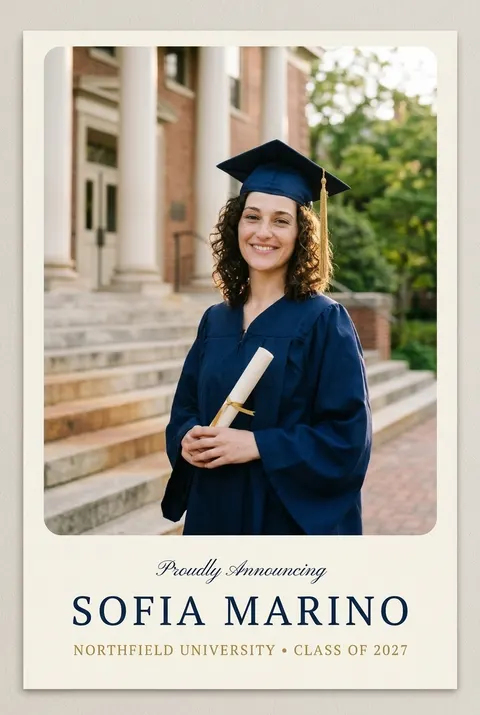
Photo announcement
Make a printed photo graduation announcement card, portrait, flat front view filling the frame, using this photo. The photo of the same woman fills the top two thirds of the card, unchanged, with rounded corners. Below it on a cream panel, centred lettering in this order: "Proudly Announcing" in small navy script, then "Sofia Marino" in large navy serif capitals, then "Northfield University · Class of 2027" in small gold capitals. Clean modern print layout. Keep her face, hair, gown and the photo exactly the same. No crest, no logos, no other text.
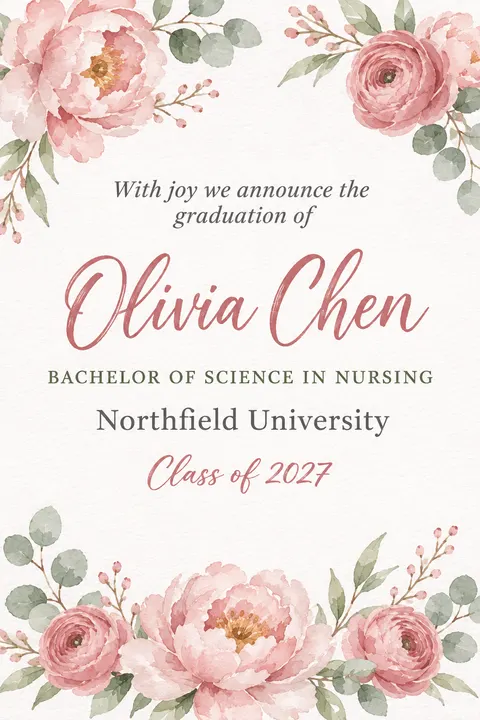
Watercolor florals
A floral watercolor college graduation announcement card, portrait, flat front view filling the frame. Soft white watercolor paper, loose blush-pink peonies, dusty-rose ranunculus and sage-green eucalyptus painted in the top corners and along the bottom edge. Centred lettering in this order: "With joy we announce the graduation of" in small grey italic serif, then the name "Olivia Chen" in large dusty-rose brush script, then "Bachelor of Science in Nursing" in small sage-green capitals, then "Northfield University" in grey serif, then "Class of 2027" in small dusty-rose script. Plenty of white space around the words, delicate stationery look. No crest, no seal, no logos, no other text.
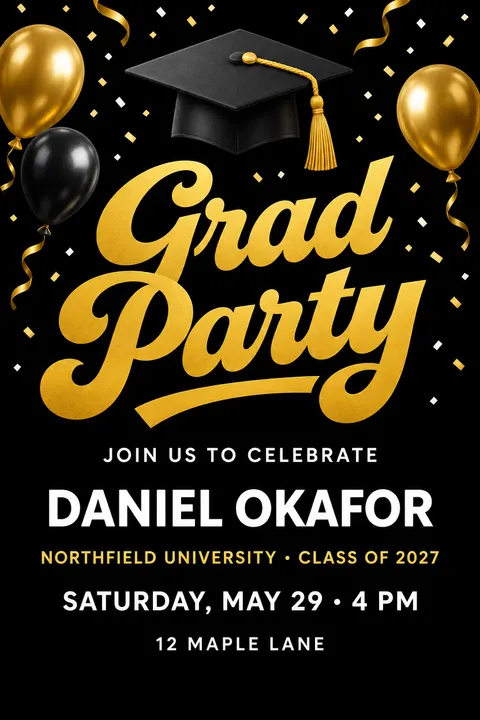
Grad party invitation
A graduation party announcement card, portrait, flat front view filling the frame. Black background with bursts of gold and white confetti, a few gold and black balloons and a black mortarboard cap with a gold tassel at the top. Centred lettering in this order: "Grad Party" in huge bold gold retro script, then "Join us to celebrate" in small white capitals, then the name "Daniel Okafor" in large white bold sans-serif capitals, then "Northfield University · Class of 2027" in small gold capitals, then "SATURDAY, MAY 29 · 4 PM" in white capitals, then "12 Maple Lane" in small white letters. Plenty of plain black space around the words, festive modern print design. No crest, no logos, no other text.
More prompts (4)
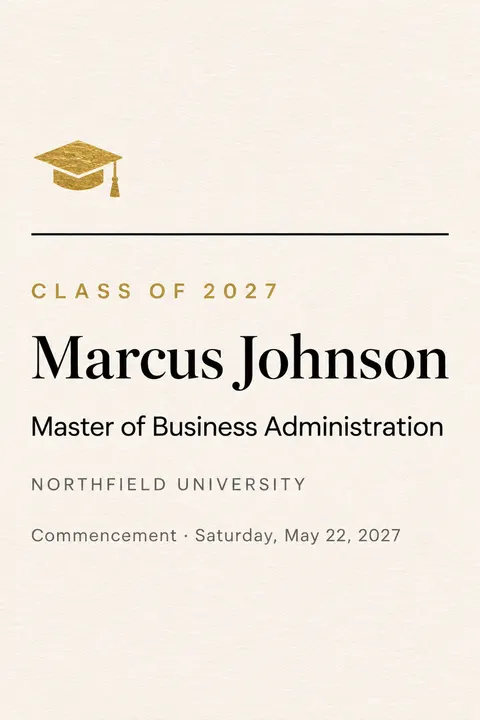
Modern minimal (master's)
A modern minimalist graduate school announcement card, portrait, flat front view filling the frame. Warm white heavy cotton paper, one thin black horizontal rule, a tiny gold foil mortarboard icon near the top. Left-aligned black lettering with lots of white space, in this order: "Class of 2027" in small spaced gold capitals, then the name "Marcus Johnson" in large black modern serif, then "Master of Business Administration" in black sans-serif, then "Northfield University" in small grey capitals, then "Commencement · Saturday, May 22, 2027" in small grey letters at the bottom. Clean contemporary stationery design. No crest, no seal, no logos, no other text.
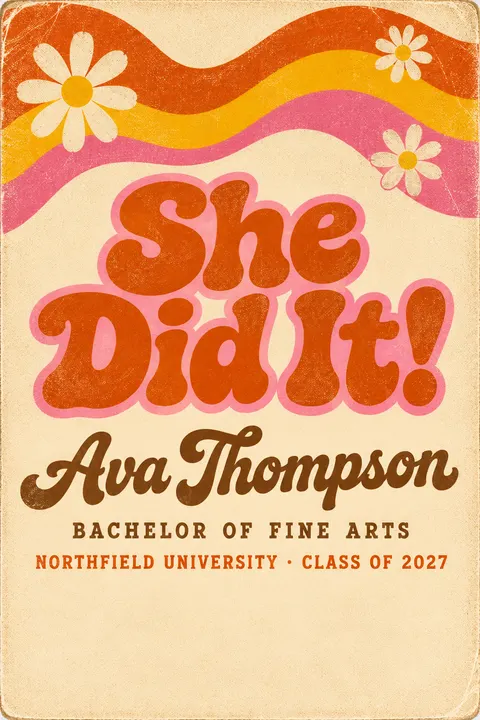
Retro “She Did It!”
A fun retro 1970s college graduation announcement card, portrait, flat front view filling the frame. Cream paper with faded halftone texture, bold wavy stripes in burnt orange, mustard yellow and pink across the top, a few daisies. Centred lettering in this order: "She Did It!" in big chunky retro bubble letters in burnt orange with a pink outline, then the name "Ava Thompson" in brown script, then "Bachelor of Fine Arts" in small brown capitals, then "Northfield University · Class of 2027" in small orange capitals. Plenty of plain cream space around the words, slightly worn screen-print look. No crest, no logos, no other text.
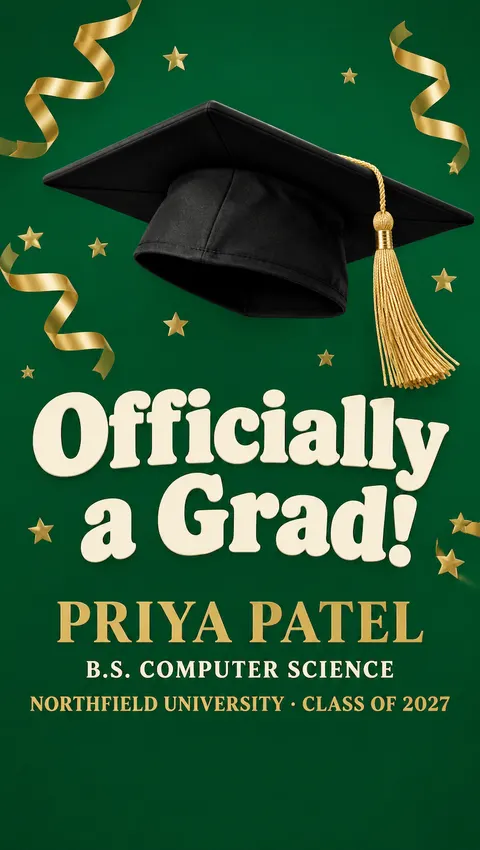
“Officially a Grad!” story
A phone story graduation announcement, tall vertical layout. A deep emerald green background with a large black mortarboard cap with a gold tassel tilted in the upper third, gold streamers and small gold stars. In the middle third, the headline "Officially a Grad!" in huge bold cream retro letters, then the name "PRIYA PATEL" in gold bold serif capitals, then "B.S. Computer Science" in small cream capitals, then "Northfield University · Class of 2027" in small gold capitals. Keep the top and bottom edges free of words. Bold modern social media design. No crest, no logos, no other text.
Design only, type your own
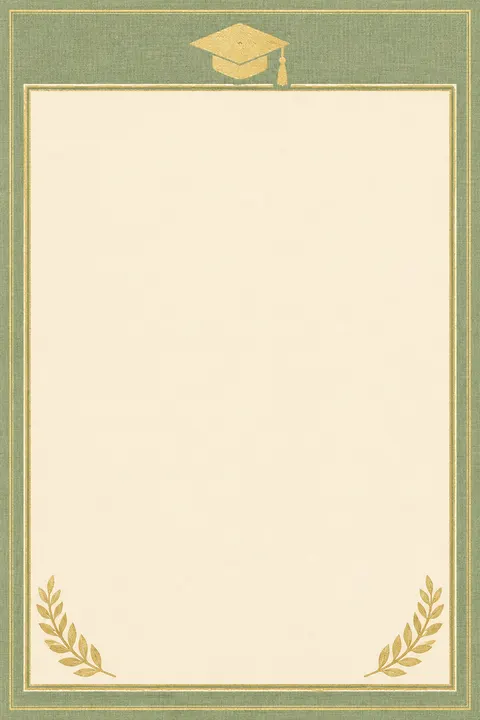
A graduation announcement card background to type on, portrait, flat front view filling the frame. Soft sage-green linen paper texture, a small gold foil mortarboard cap with a tassel at the top centre, a thin gold double border, delicate gold laurel sprigs in the bottom corners, and a large plain cream panel in the middle for the graduate's details. Clean elegant flat design. No text, no letters, no numbers, no crest, no logos.
Print and share sizes
Sizes for printing and posting
Image Studio opens on Square 1:1, so set the shape before you press Create. No model offers 5:7, so make a print card a little taller and crop it.
| Use | Shape to pick | Then |
|---|---|---|
| Printed 5 × 7 card | 2:3 or 3:4, at 2K or 4K | Crop to 5 × 7 in Edit Studio. At 300 dpi a 5 × 7 card is 1500 × 2100 pixels, so skip 1K for print |
| 4 × 6 photo card | 2:3 | Already the right shape: print it as it is |
| Instagram feed post | 4:5 | Keep your name big, since people see a small preview first |
| Story or a phone | 9:16 | Keep the words in the middle third, clear of the app's buttons |
| Group chat or email | 1:1 or 2:3 | Put the party address and RSVP in the message, where they can be copied |
| Poster at the party | 3:4 | Resize it onto Edit Studio's Poster (A4) canvas, 1240 × 1754. A US letter page at 300 dpi is 2550 × 3300 pixels, so make it at 4K |
Gallery
Graduation announcement examples
Eight graduation announcements, each one a single run from the prompt under it, with every word lettered by the model: seven from GPT Image 2.6 Sunburst and one photo card from Nano Banana 2.1. The graduates and Northfield University are made up; no real school marks. Copy a prompt and swap in your own name, degree and date.
How to
How to make a graduation announcement
- Time needed
- Steps
- 4 steps
Step 1
Write the wording
Copy a template from the wording table and fill in your name, degree, school and date.
Step 2
Open the maker
Press “Make my announcement”. Image Studio opens with GPT Image 2.6 Sunburst and an announcement prompt. Sign in free with Google, GitHub or Discord, no card needed.
Step 3
Set the shape and create
Paste your prompt with the words in quotes, pick 2:3 for a card, 4:5 for a post or 9:16 for a story, then press Create. For a photo card, upload your photo and pick Nano Banana 2.1.
Step 4
Check, fix and send
Read every letter and the date. Fix a word or add details with Edit Studio's free text tool, crop to 5 × 7 for print, then download, print or post.
See it in the app

Open Image Studio and type what you want to see — subject, style, lighting and mood.


Watch the tour · 1:23
Prompts, styles, references, edit, Arena & chat
Chapters
Tips
Get an announcement people can read at a glance
An announcement has one job: who graduated, from where, and when. These habits got all eight designs here right first time.
Write the wording first, then put only five short lines in the prompt: year, name, degree, school, date.
Put every word in quotes and say where it goes: “the name in large white script, the school in gold capitals below”.
Add “no crest, no seal, no logos, no other text”. Your university's crest is its trademark, and the line also stops stray words.
Check the weekday: 22 May 2027 is a Saturday. Copy your commencement date from your university's website, not from memory.
For a photo announcement, use a photo you already like and add “keep the photo exactly the same”.
For print, make it at 2K or 4K and keep the words away from the edges, which printers can trim.
Models
Models for graduation announcements
What each model is good at. Open any one straight in the generator.
OpenAI
GPT Image 2.6 Sunburst
- Reference images
- Up to 16
- Output
- 1K to 4K · 2:3, 3:4, 4:5, 9:16 and more
Open GPT Image 2.6 SunburstBest for
Made seven designs here · tagged for text rendering
Google
Nano Banana 2.1
- Reference images
- Up to 14
- Output
- 1K to 4K
Open Nano Banana 2.1Best for
Made the photo announcement from a cap-and-gown photo
Recraft
Recraft V4.1
- Output
- 1:1, 3:4, 9:16, 4:3, 16:9
Open Recraft V4.1Best for
Design model · flat, poster-like layouts
- Free plan

Alibaba
Qwen Image 3.0
- Reference images
- Up to 3
- Output
- 1K or 2K
Open Qwen Image 3.0Best for
Free plan · design-only backgrounds to type on
FAQ
Graduation announcement questions
9 questions

How do I make a graduation announcement?
Write the wording, then describe the card in Image Studio with each line in quotes: “Class of 2027”, your name, your degree, your school and the date. Pick 2:3 for a printed card, 4:5 for a post or 9:16 for a story, and press Create. The button on this page opens GPT Image 2.6 Sunburst with an announcement prompt filled in; it lettered seven of the eight designs on this page.
Link to this answerCan I put my own photo on a graduation announcement?
Yes. Upload your cap-and-gown photo in Image Studio, pick Nano Banana 2.1 and describe the card around it, with the words in quotes and “keep the photo exactly the same”. Our photo announcement for “Sofia Marino” came back in one try with the photo, the face and all three lines intact. Need the photo first? See our graduation picture ideas.
Link to this answerWhat should a graduation announcement say?
Five things: the year (“Class of 2027”), your full name, your degree (“Bachelor of Arts in Psychology”), your university and the commencement date. A family announcement can open with “With joy we announce the graduation of”. The wording table on this page has templates for a classic card, a family card, a photo card, a party, a master's degree and a social post.
Link to this answerWhat is the difference between a graduation announcement and an invitation?
An announcement shares the news: who graduated, from where and when. An invitation asks people to come to something, usually a party, so it adds a time, an address and an RSVP. The “Grad Party” design on this page is the invitation version, with “Saturday, May 29 · 4 PM” and an address.
Link to this answerIs this graduation announcement maker free?
Free to start. Sign in with Google, GitHub or Discord, with no card, and a new account gets 25 credits. Qwen Image 3.0 is on the free plan at 9 credits an image, and Edit Studio's text and crop tools are free, so you can make a design and type your details on it without buying anything. GPT Image 2.6 Sunburst costs 15 credits at 1K (30 at 2K for print) and a Nano Banana 2.1 photo card costs 21, from one-time packs; the Starter pack is $15 for 1,300 credits.
Link to this answerCan AI spell my name and degree correctly?
Short lines, usually. Seven of our eight designs came back with every word right on the first try; the first story design put a stray mark under one letter of the name, so we re-ran it with the name in capitals. Read every letter before you print. For a long name or degree title, type it with Edit Studio's free text tool, where the spelling is exactly what you type.
Link to this answerWhen should I send graduation announcements?
Two to four weeks before the ceremony if you want people to come to a party, or within a few weeks after it if you are only sharing the news. Graduation season runs from mid-May to mid-June, so order prints or start designing in March or April.
Link to this answerWhat size are graduation announcement cards?
5 × 7 inches is the usual card; 4 × 6 is a photo card. No model offers 5:7, so make the design at 2:3 or 3:4 and crop it with Edit Studio's free crop. At 300 dpi a 5 × 7 card is 1500 × 2100 pixels, so make print designs at 2K or 4K. A 4 × 6 print is exactly 2:3 and needs no crop.
Link to this answerCan I use my university's name, crest or colours?
Your university's name in the text is fine for a personal announcement, but don't ask the model for its crest, seal or logo: those are the school's trademarks, and a generated copy will be wrong anyway. Every design here uses a made-up “Northfield University” and ends the prompt with “no crest, no seal, no logos”.
Link to this answerIn depth
Graduation announcements, explained
What works, what to avoid, and how to pick a model.
On this page
What to put on a graduation announcement
Five lines, in this order. Everything else belongs in the message you send with it:
- The year: “Class of 2027”.
- Your full name, spelled as you want it remembered.
- Your degree, as it will appear on your diploma: “Bachelor of Science in Nursing”, “Master of Business Administration”.
- Your university's name. Leave its crest and seal off the design.
- The commencement date, or for a party, the date, time and place.
Announcement cards, photo cards and party invitations
A text card is the classic: navy and gold, florals or a modern minimal layout, sent by post or as an image. A photo card puts your cap-and-gown picture on top, which is what most people order from print shops; Nano Banana 2.1 does this from your own photo. A party announcement is really an invitation, so it adds the time, the address and how to reply.
Make the design here, then print it at home, at a local print shop or with any online print service; download it at 2K or 4K for a sharp 5 × 7.
What we got
Nine runs, made on 15 November 2026:
- Seven of the eight designs came back with every word right first time, including “Bachelor of Arts in Psychology”, “Master of Business Administration” and “SATURDAY, MAY 29 · 4 PM”.
- The first phone-story design put a stray mark under the “t” in the script name “Priya Patel”. We re-ran it with the name in serif capitals and kept the second one.
- The Nano Banana 2.1 photo card kept the photo and the face unchanged and lettered all three lines.
- No design added a crest, seal or logo; every prompt ended with “no crest, no logos, no other text”.
By the Kenerate AI teamLast updated and reviewed
We build and run the Kenerate generator. Every example is a real output of the model named under it; models and presets were checked against the app's code.
Sources: Kenerate AI — Terms of Service · Kenerate Image Studio · Kenerate Edit Studio (text, crop and resize)

Make your graduation announcement
Free to start. Sign in with Google, GitHub or Discord, no card needed.
Tried it? Tell us how it went