Picture in, picture out · 20 languages
Image Translator — translate the words in a picture, keep the picture
Upload a menu, poster, sign or screenshot, pick a language, and get the same image back with the words re-lettered in that language. No retyping, no text pasted over the top. We tested it on small print and script lettering, and show what it got wrong.
- The translated words sit in the picture
- 20 target languages
- No source language to pick
- No watermark
Updated by the Kenerate AI team




On this page
Quick answer

How do you translate text in a picture?
To translate text in a picture, open it in Kenerate's Edit Studio, choose Edit Text in Image → Translate, pick one of 20 languages and run it. You get a new image with every visible word re-lettered in that language, not a block of text. In our tests GPT Image 2, the default, translated a Spanish menu and a Japanese sign into English, small print included, for 21 credits a run. It made two small slips on the menu, so read the result before you use it. To simply read a sign on your phone, the free Google Translate camera is the quicker tool.
Key facts
- Tool
- Edit Studio → Edit Text in Image → Translate
- You get
- A new image, not copyable text
- Target languages
- 20
- Source language
- Not asked for; tested on Spanish, Japanese and English
- Takes per run
- 1, 2 or 4
- Uploads
- JPG · PNG · WebP, up to 50 MB
Compare
Three ways to translate a picture
Pick by what you need at the end: something to read, or an image to use.
| Kenerate Image Translator | Google Translate | Other online image translators | |
|---|---|---|---|
| Best for | A finished image to post or print | Reading a sign or menu right now | Quick one-off images |
| What you get | A new image with the words re-lettered | Translation shown over the photo | Varies by tool |
| Languages | 20 target languages | Varies by feature | Fotor claims 30+, insMind 130+ |
| Live camera | No | Yes, in the phone app | Varies by tool |
| Cost | 21 credits per run on GPT Image 2 | Free | Fotor and insMind advertise free use |
Gallery
Real translations, including the one that failed
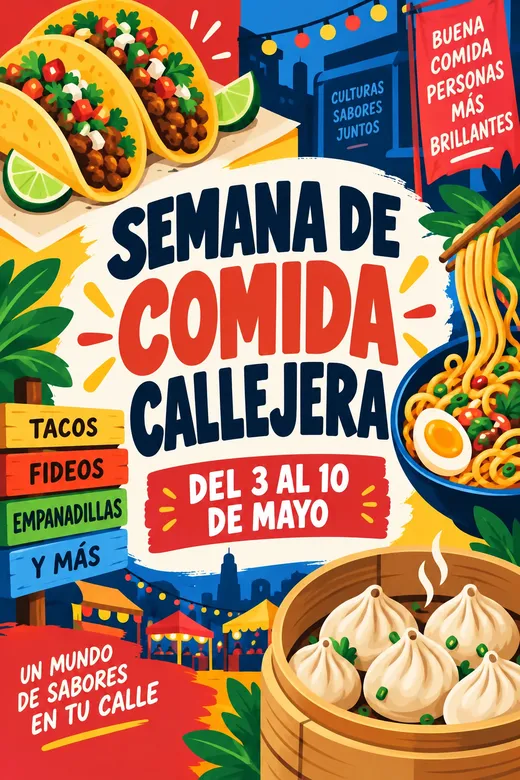
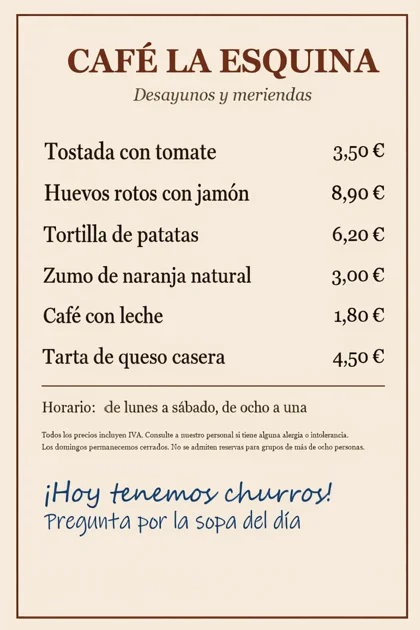
One try each with the exact prompt Edit Studio sends. The menu and the sign are fictional images we made for the test; the poster comes from our edit text page. Qwen Image 3.0, the free-plan model, returned the menu still in Spanish, so it's shown here too.
Same prompt
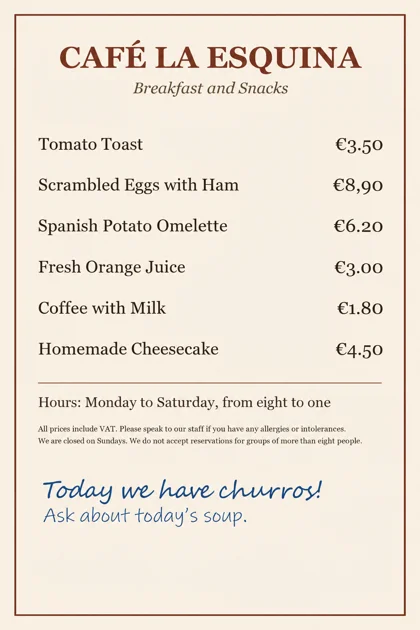
Before and after: a Spanish menu in English
GPT Image 2 in Translate mode, one try. Everything came back in English, including the 15-pixel small print and the two script lines. Two slips: “Huevos rotos” became “Scrambled Eggs”, and €8,90 kept its comma while the other five prices switched to a point.
PromptTranslate every piece of visible text in this image into English. Re-letter it naturally in English, keeping exactly the same typography style, weight, colours, sizes, effects, layout and positions. Do not change anything else in the image.
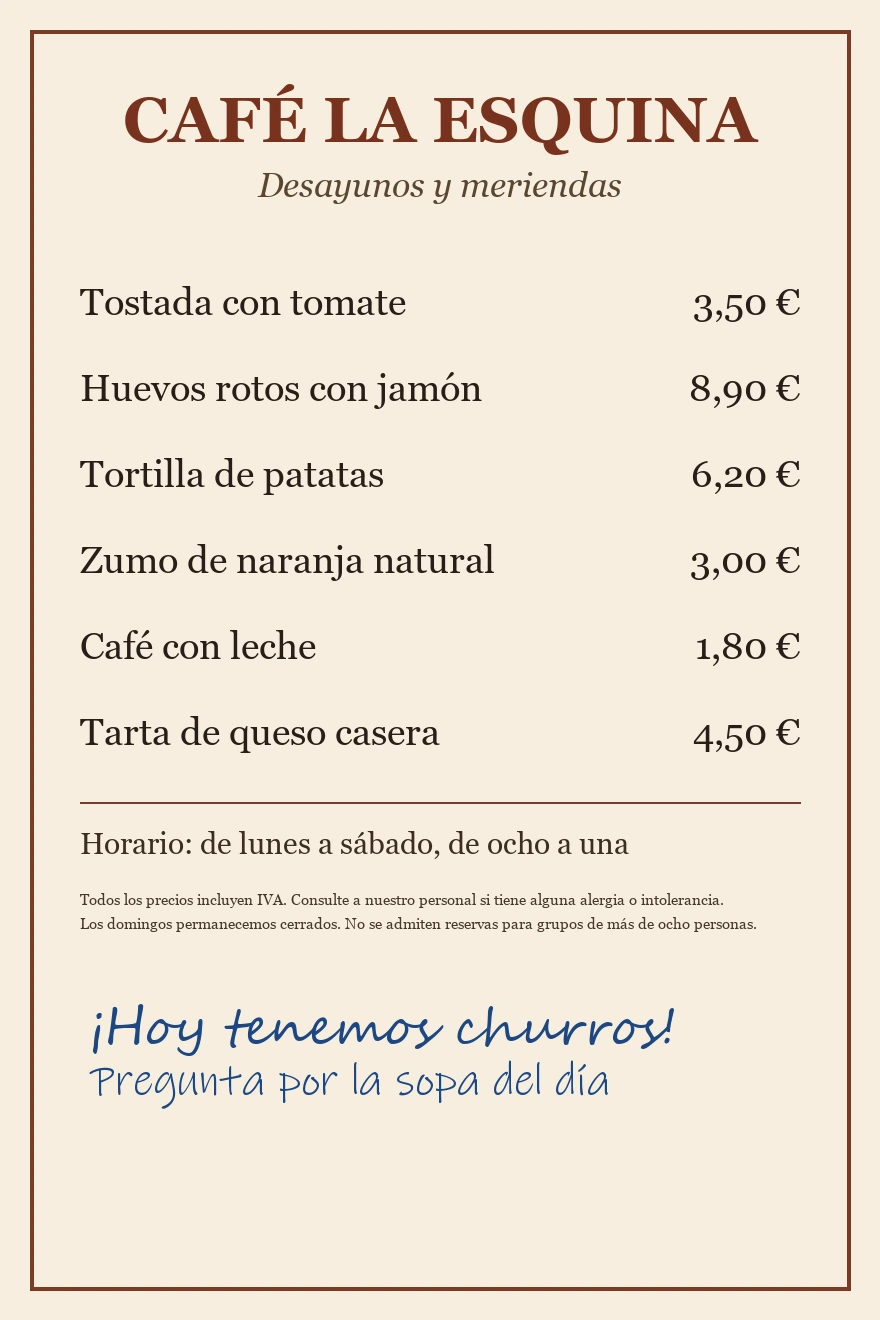 OriginalSpanish
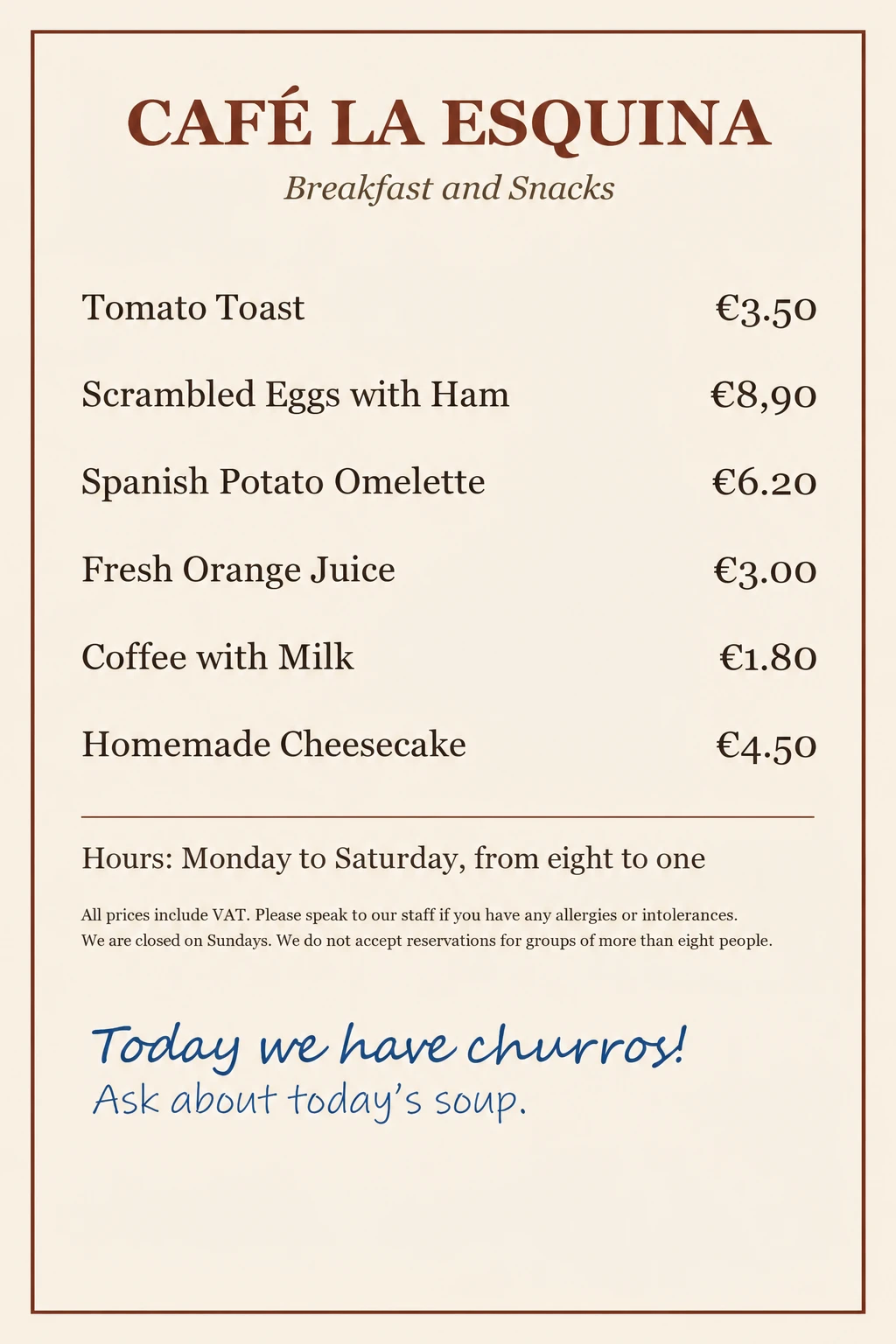 TranslatedGPT Image 2 · English
How to
How to use the image translator
- Time needed
- Steps
- 4 steps
Step 1
Open the image in Edit Studio
Upload your picture at /app/edit: JPG, PNG or WebP up to 50 MB. A free account is needed to load your own image.
Step 2
Choose Edit Text in Image → Translate
Pick the target language from the 20 listed. There is no source language to set.
Step 3
Keep GPT Image 2 and pick the takes
It is the default, at 21 credits a run. Choose 1, 2 or 4 takes.
Step 4
Read it, then download
Compare it with the original, check names and numbers, then download without a watermark.
See it in the app

Open Edit Studio and upload an image, or pick one from your history.


Watch the tour · 2:01
AI Edit, Magic Eraser, Change Region, light, style, expand, camera angle & chat edits
Chapters
Tips
Get a translation you can use
What helped in our tests, and what to check.
Use GPT Image 2 for translation. Qwen Image 3.0 left our menu in Spanish.
Check every price, date and phone number against the original. Our menu kept the digits, but one price kept its comma.
Have someone who knows the language read dish names and slogans. They are the likeliest to come out wrong.
Expect some movement. The Japanese sign came back with its list in two columns.
Run 2 or 4 takes when the layout matters, and keep the best.
Upload the sharpest copy you have, cropped to the text.
Models
Models for translating images
What each model is good at. Open any one straight in the generator.
OpenAI
GPT Image 2
- Reference images
- Up to 16
- Output
- Up to 4K
Open GPT Image 2Best for
Default. Translated both test images
Google
Nano Banana 2
- Reference images
- Up to 14
- Output
- 1K
Open Nano Banana 2Best for
In the picker, not tested for translation
- Free plan
Alibaba
Qwen Image 3.0
- Reference images
- Up to 3
- Output
- 1K · 2K
Open Qwen Image 3.0Best for
Free plan. Did not translate in our one test
FAQ
Image Translator questions
10 questions

How do I translate an image to English?
Open the image in Kenerate's Edit Studio, choose Edit Text in Image, switch to Translate, pick English and run it. You get the same picture back with the words in English. Our Spanish menu and Japanese sign both came back fully in English on the first try with GPT Image 2.
Link to this answerWhat languages can it translate into?
Twenty: Hindi, English, Spanish, French, German, Portuguese, Arabic, Japanese, Korean, Chinese (Simplified), Russian, Italian, Turkish, Indonesian, Bengali, Tamil, Telugu, Marathi, Gujarati and Urdu. We tested English and Spanish as targets. Read the result with extra care in any other language.
Link to this answerWhich languages can it translate from?
You don't pick a source language: the model reads whatever text is in the picture. We tested Spanish, Japanese and English as sources, so we can't promise results for others.
Link to this answerCan it translate English to Spanish in an image?
Yes. Pick Spanish as the target. Our English street food poster came back in Spanish with the layout kept, though one slogan was translated word for word, so read it before you print. Traductor de inglés a español para imágenes: elige Spanish en Translate.
Link to this answerIs the image translator free?
It's free to start, but the model that worked for us isn't on the free plan. GPT Image 2 costs 21 credits a run and needs a credit pack. Qwen Image 3.0 is on the free plan at 9.9 credits, but it left our test menu untranslated. For a free translation you only need to read, use Google Translate.
Link to this answerCan it read small text?
In our tests, yes. GPT Image 2 translated 15-pixel small print on an 880-pixel-wide menu and a 20-pixel line on a Japanese sign, both correctly. That was clean, flat type, so blurry phone photos may do worse.
Link to this answerCan it translate handwriting?
We tested two script fonts that look like handwriting, and both came back right with their look kept. We haven't tested real pen handwriting, so treat that as unproven and check the result against the original.
Link to this answerCan I copy the translated text?
No. The result is an image, and this tool doesn't give you editable text. If you want text to copy and paste, Google Translate or an OCR tool is the better fit.
Link to this answerWill the layout stay the same?
Mostly. The menu kept its layout closely. The Japanese sign kept its order and colours, but its centred list became two columns and the type changed. The size can change too: 880×1320 came back at 1024×1536, the same shape.
Link to this answerCan I use it for official documents?
No. The letters are redrawn by an AI model, and it can make mistakes, so it isn't a certified translation. Don't use it on passports, certificates, contracts or medical papers, and only translate images you have the right to edit.
Link to this answerIn depth
Image Translator, explained
What works, what to avoid, and how to pick a model.
On this page
What we tested, and what happened
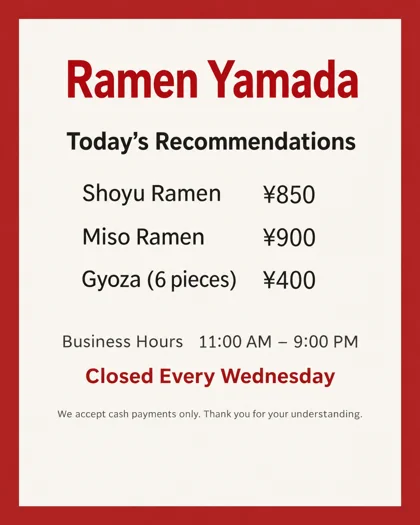
We made two fictional images so we could check every word: a Spanish cafe menu with 15-pixel small print and two script-font lines, and a Japanese ramen sign with a 20-pixel notice. Each ran once with the exact prompt Edit Studio sends.
GPT Image 2 translated both in full. The cafe name stayed as it was, the sign's shop name became “Ramen Yamada”, and the Japanese opening hours became 11:00 AM – 9:00 PM. The errors were small but real, and they are the sort a quick glance misses.
- Dish name: “Huevos rotos” became “Scrambled Eggs”. Huevos rotos are fried eggs broken over potatoes, so an English reader gets the wrong idea.
- Number format: one of six prices stayed “€8,90” while the rest became “€3.50”.
- Layout: the sign's centred list became two columns, and the type looks different.
- Model choice: Qwen Image 3.0 returned the menu in Spanish, with softer letters.
Why a picture translator isn't the same as OCR
An OCR translator reads the letters, translates them and hands you text, or lays it over the photo. That's fast and good for reading, and the words stay exact. Kenerate's Translate mode asks an image model to redraw the picture with new words, so the result looks finished and you can post it as it is.
The trade-off is that every letter is drawn rather than typed. Words and numbers can drift, which is why reading the result matters more here than in a text translator.
Good jobs for it
It saves the most time when the image itself has to go out in another language:
- Menus and price boards for visitors, once a speaker has checked them.
- Posters and flyers for a second market.
- Social graphics and banners when you only have the exported file.
- Product images and slides with short labels.
When to use a different tool
If the job is any of these, this page isn't the right tool:
- Reading something on the spot: Google Translate's camera is free and live.
- Copying text out of a picture: use an OCR tool.
- Changing a few chosen words: use Replace mode, covered on our change text in image page.
- Translating speech: use the audio or video translator pages.
- Anything legal, medical or official: use a qualified human translator.
By the Kenerate AI teamLast updated and reviewed
We build and run the Kenerate generator. Every example is a real output of the model named under it; models and presets were checked against the app's code.
Sources: Kenerate Edit Studio · PetaPixel — Google can now translate text in photos from your browser · Fotor — Image translator · insMind — AI image translator