

Alibaba's Qwen team. Qwen-Image-2.0 was introduced on 10 February 2026 as one model for generation and editing
Qwen Image 2.0 vs 2.0 Pro vs Qwen Image 3.0
Qwen Image 2.0 is Alibaba's February 2026 image model: native 2K, long prompts, generation and editing in one model. Kenerate runs it beside Qwen Image 2.0 Pro and the newer 3.0, all three on the free plan. Same three prompts on each, two of them with lettering.
- Launch claims
- Native 2K (2048 × 2048), instructions of up to about 1,000 tokens, and a lighter architecture than the first Qwen-Image
- Qwen Image 2.0 on Kenerate
- 11 presets from 1024 × 1024 to 2048 × 2048 (1K, 1.5K and 2K, square, portrait and landscape), seed, edits with 1–3 references
- Qwen Image 2.0 Pro
- The same 11 presets, seed and 3 references at a higher price
- Qwen Image 3.0
- The July 2026 successor: 15 aspect ratios at 1K or 2K, seed, edits with 1–3 references
- Prompt box
- Up to 800 characters on all three
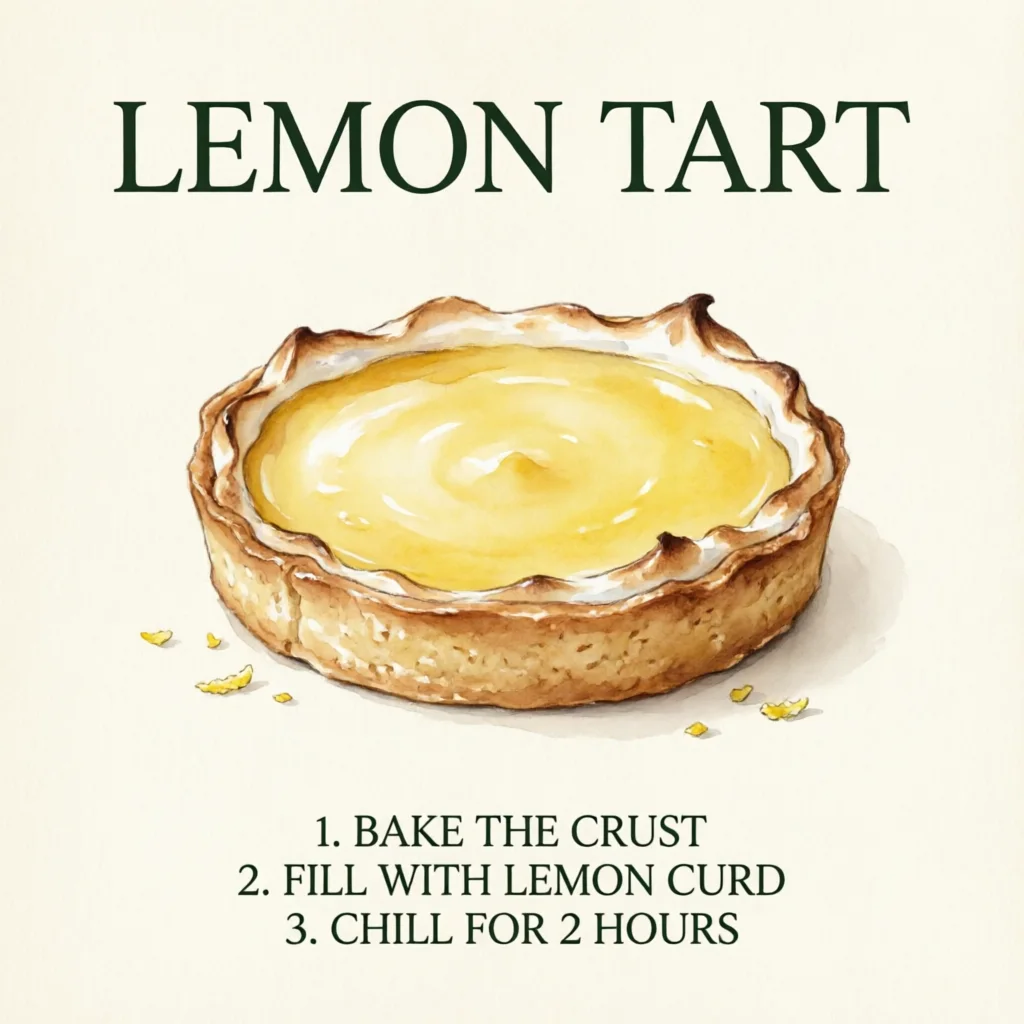
- Real outputs
- Official sources
- Free to start
- No watermark
Updated by the Kenerate AI team




Made with Kenerate
On this page
What is Qwen Image 2.0?

What is Qwen Image 2.0?
Qwen Image 2.0 is Alibaba's February 2026 text-to-image and editing model, built for clean text and native 2K. On Kenerate AI it makes sizes from 1024 × 1024 to 2048 × 2048 and edits with up to 3 references: pick it in /app/image, write a prompt and generate. It is on the free plan at 9 credits an image; 2.0 Pro costs 21 and Qwen Image 3.0 costs 9.
Key facts
- Maker
- Alibaba (Qwen team)
- Released
- February 2026
- Sizes on Kenerate
- 11 presets, up to 2048 × 2048
- References
- Up to 3 (edit)
- Prompt length
- Up to 800 characters
- Free plan
- Yes (2.0, 2.0 Pro and 3.0)
Gallery
Qwen Image 2.0 examples
Real outputs made on Kenerate. Open any image to copy its prompt and run it yourself.
Same prompt, three Qwen models
Text test: the lemon tart recipe card
A title and three numbered lines, eleven words to spell. All three got every word right on the first try.
PromptRecipe card illustration on cream paper: the title "LEMON TART" in large dark green serif letters at the top, a watercolour lemon tart in the middle, and three numbered lines at the bottom: "1. BAKE THE CRUST", "2. FILL WITH LEMON CURD", "3. CHILL FOR 2 HOURS". Clean layout, no other text
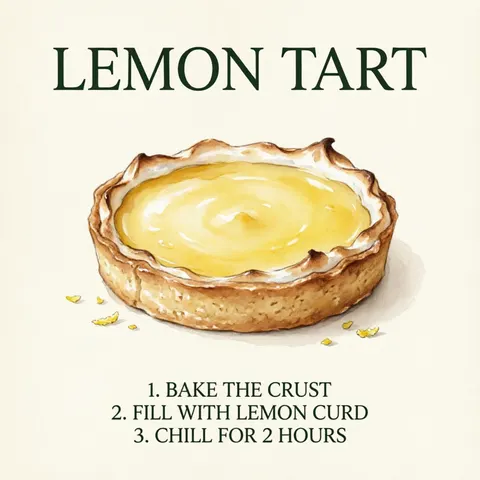 Qwen Image 2.0All correct; serif throughout; a lot of empty paper
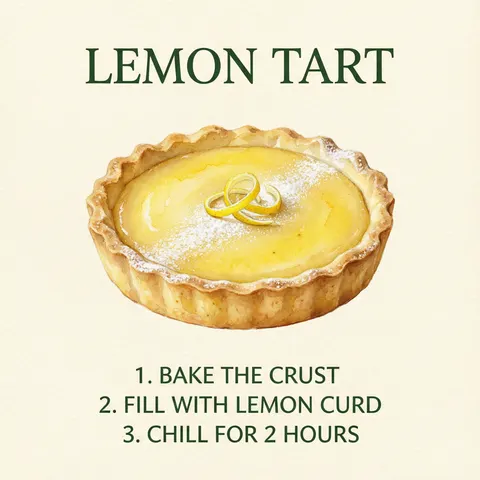 Qwen Image 2.0 ProAll correct; steps switch to sans; richest tart
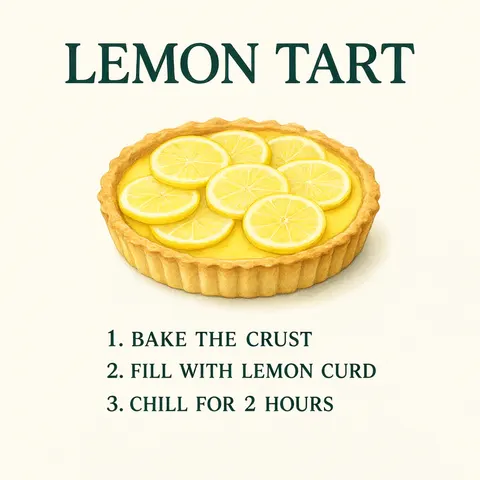 Qwen Image 3.0All correct; serif throughout; less watercolour
Same prompt, three Qwen models
Bilingual test: the tea house sign
Two Chinese characters and two English words. All three wrote 茶馆 and TEA HOUSE correctly.
PromptBilingual shop sign photo: a dark wooden signboard above a tea house door with the Chinese characters "茶馆" in large gold brush calligraphy and the English words "TEA HOUSE" in small gold letters underneath, red paper lanterns on both sides, evening light, no other text
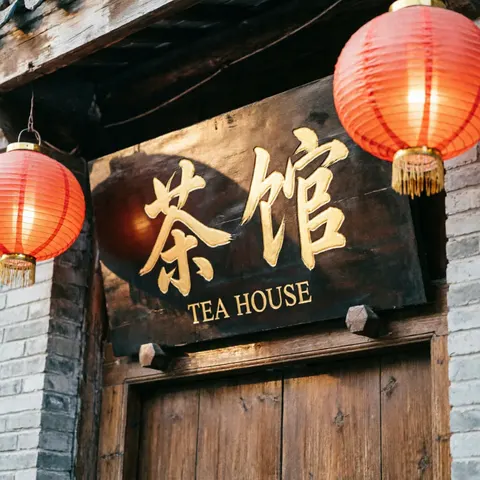 Qwen Image 2.0Correct; a dark lantern-shaped shadow on the board
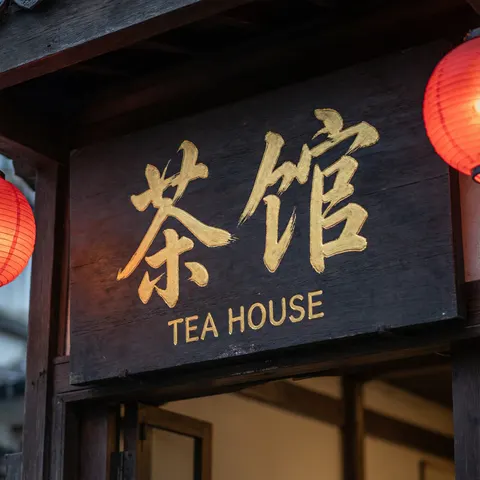 Qwen Image 2.0 ProCorrect; loosest brushwork; lanterns cropped
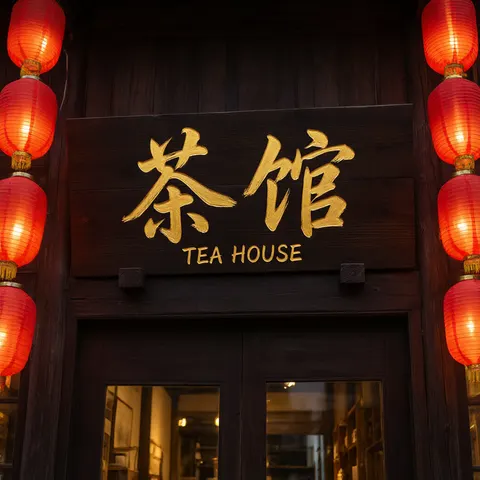 Qwen Image 3.0Correct; cleanest, symmetric shop front
Same prompt, three Qwen models
Photo test: the rainy-night courier
A street photo with hair, vest, bag, bike and weather named. Only Qwen Image 3.0 drew all of them.
PromptStreet photo of a bicycle courier in her 30s with braided black hair, a reflective orange vest and a canvas messenger bag, waiting at a rainy crosswalk at night, neon shop lights reflected in puddles, light rain, 35mm lens, natural skin texture
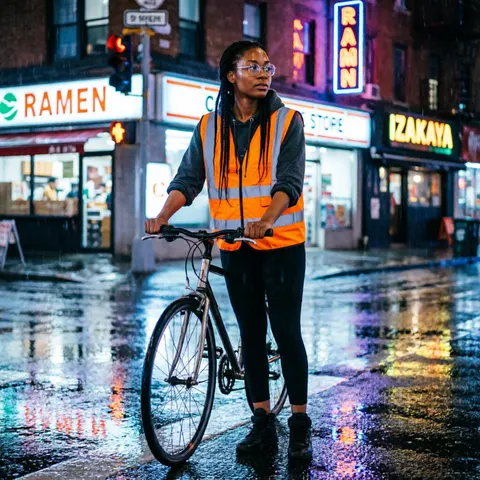 Qwen Image 2.0No bag; invents signs, one misspelt RAMN
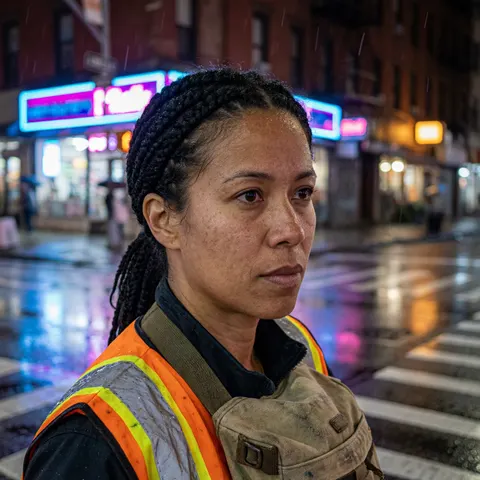 Qwen Image 2.0 ProMost real skin; close crop, no bike
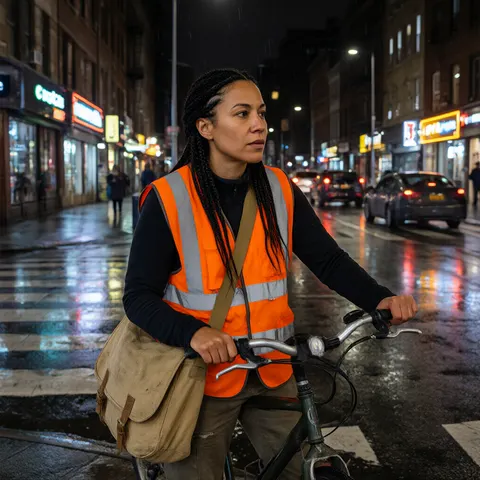 Qwen Image 3.0Every item: bag, bike, crosswalk, rain
Models
Qwen Image 2.0 on Kenerate
Every version in the generator, and what each is good at.
- Free plan
Alibaba
Qwen Image 2.0
- Reference images
- 1–3 (edit)
- Output
- 11 presets, up to 2048 px
Open Qwen Image 2.0Best for
Text right; loose on photo details
- Free plan
Alibaba
Qwen Image 2.0 Pro
- Reference images
- 1–3 (edit)
- Output
- 11 presets, up to 2048 px
Open Qwen Image 2.0 ProBest for
Most real skin; richest detail
- Free plan

Alibaba
Qwen Image 3.0
- Reference images
- 1–3 (edit)
- Output
- 15 ratios, 1K or 2K
Open Qwen Image 3.0Best for
Followed every prompt item
From our tests
Strengths and limits
Good at
- Text is the strength: all three spelled the eleven-word recipe card and the bilingual 茶馆 / TEA HOUSE sign correctly on the first try.
- Qwen Image 2.0 Pro drew the most real skin of the three, with pores and freckles in a close-up portrait.
- Qwen Image 3.0 drew every item in the photo prompt — braids, vest, canvas bag, bike, crosswalk and rain.
- All three are on the free plan and edit with up to 3 reference images.
Limits
- Qwen Image 2.0 left out the messenger bag and filled the street with signs nobody asked for, one of them misspelt RAMN.
- Qwen Image 2.0 Pro cropped the courier so tight that the bicycle is out of frame, and she reads older than 30s.
- Qwen Image 2.0 put a dark lantern-shaped shadow on the signboard; 2.0 Pro switched the recipe steps from serif to sans.
- Pro costs more than twice as much as 2.0 or 3.0, and the prompt box stops at 800 characters on all three.
How to
How to use Qwen Image 2.0 on Kenerate
Step 1
Pick Qwen Image 2.0
Open /app/image and choose Qwen Image 2.0 (the button on this page), 2.0 Pro or Qwen Image 3.0.
Step 2
Write the prompt
Put every word that must appear in quotes, in English or Chinese, and say where each line goes; stay under 800 characters.
Step 3
Choose a size
Pick a preset from 1024 × 1024 to 2048 × 2048 on 2.0 and 2.0 Pro, or a ratio and 1K / 2K on 3.0; fix the seed to repeat a result.
Step 4
Edit with references
Upload 1–3 images, describe only the change, then generate and download.
See it in the app

Open Image Studio and type what you want to see — subject, style, lighting and mood.


Watch the tour · 1:23
Prompts, styles, references, edit, Arena & chat
Chapters
FAQ
Qwen Image 2.0 questions
8 questions

What is Qwen Image 2.0?
Qwen Image 2.0 is an image generation and editing model from Alibaba's Qwen team, introduced on 10 February 2026. Launch coverage describes native 2K output, instructions of up to about 1,000 tokens and a lighter model than the first Qwen-Image. On Kenerate it makes 11 sizes up to 2048 × 2048 and edits with up to 3 references.
Link to this answerIs Qwen Image 2.0 free?
Yes, it is on Kenerate's free plan, so the 25 sign-up credits can run it at 9 credits an image — about two images. Qwen Image 2.0 Pro (21 credits) and Qwen Image 3.0 (9 credits) are on the free plan too. The cost is shown before you generate.
Link to this answerQwen Image 2.0 vs 2.0 Pro — what is the difference?
On Kenerate both have the same 11 sizes, 3 references and seed; Pro costs 21 credits against 9. In our test Pro drew richer detail and the most real skin, but it also cropped the courier's bike out of frame and switched the recipe steps from serif to sans. Both spelled every word right.
Link to this answerQwen Image 2.0 vs 3.0 — should I upgrade?
For photos, yes: Qwen Image 3.0 was the only one of the three to draw every item in our street-photo prompt, at the same 9 credits. For text, both were perfect on a recipe card and a bilingual sign. 3.0 uses 15 aspect ratios at 1K or 2K; 2.0 uses 11 fixed presets up to 2048 × 2048.
Link to this answerCan Qwen Image 2.0 write Chinese text?
Yes. All three Qwen models wrote the two characters 茶馆 in gold brush calligraphy with TEA HOUSE underneath, correctly, on the first try. Put the characters in quotes and say where they go.
Link to this answerCan Qwen Image 2.0 edit images?
Yes. Qwen Image 2.0 and 2.0 Pro edit with 1–3 reference images at the same price as generating (9 and 21 credits); Qwen Image 3.0 adds 0.9 credits per reference. Describe only the change and what must stay.
Link to this answerWhat resolution does Qwen Image 2.0 make?
Up to 2048 × 2048 on Kenerate. The 11 presets are 1024 × 1024, 768 × 1024, 1024 × 768, 1280 × 720, 720 × 1280, 1536 × 1536, 1024 × 1536, 1536 × 1024, 2048 × 2048, 1536 × 2048 and 2048 × 1536, all at one price.
Link to this answerHow long can a Qwen Image 2.0 prompt be?
Up to 800 characters in Kenerate's prompt box, on 2.0, 2.0 Pro and 3.0 alike. The launch coverage mentions instructions of up to about 1,000 tokens for the model itself, but Kenerate caps the box at 800 characters.
Link to this answerIn depth
Qwen Image 2.0, in depth
Background, how to prompt it, and when to pick something else.
On this page
Qwen Image 2.0, 2.0 Pro and 3.0
Alibaba's Qwen team introduced Qwen-Image-2.0 on 10 February 2026 as one model for generation and editing, with native 2K output and instructions of up to about 1,000 tokens [1][2]. Qwen Image 3.0 followed in July 2026 [3]. Kenerate runs three of them, all on the free plan:
- Qwen Image 2.0 — 11 presets up to 2048 × 2048, seed, edits with 1–3 references. 9 credits, edit included.
- Qwen Image 2.0 Pro — the same presets, seed and references. 21 credits.
- Qwen Image 3.0 — 15 aspect ratios at 1K or 2K, seed, 1–3 references. 9 credits, plus 0.9 per reference when editing.
What our tests showed
We ran a recipe card, a bilingual shop sign and a street photo on all three, square, one try each. Lettering was flawless across the board: LEMON TART, the three numbered steps, 茶馆 and TEA HOUSE were all spelled right by all three models. The differences were in the photo. Qwen Image 2.0 skipped the messenger bag and invented a street of shop signs, one misspelt RAMN; 2.0 Pro gave the most real skin but cropped the bike out; Qwen Image 3.0 drew every item we named.
Layout quirks were small: 2.0 left a dark lantern shadow on the tea house board, and 2.0 Pro switched the recipe steps to a sans-serif although the prompt only asked for a serif title.
Which one to run
Qwen Image 3.0 is the default: same 9 credits as 2.0 and the best prompt following in our photo test. Keep Qwen Image 2.0 for its fixed 2K presets (2048 × 2048, 1536 × 2048, 2048 × 1536) and edits at no extra cost per reference, and use 2.0 Pro (21 credits) for close-up portraits where skin detail matters. For dense layouts beyond a few lines, see Qwen Image Max or GPT Image 2.6.
By the Kenerate AI teamLast updated and reviewed
We run these models in the Kenerate generator. Model facts come from the makers' own pages; specs and limits were checked against our code; the examples are our own outputs.
Sources: Qwen-Image-2.0 is here — Analytics Vidhya · Alibaba launches Qwen-Image-2.0 — AlternativeTo · Alibaba's Qwen Image 3 — Decrypt
