

Alibaba — the Wan model family, which also covers Wan video models
Wan 2.7 Image vs Wan 2.6 and 2.5
Alibaba's Wan family makes still images as well as video. Kenerate runs four Wan image models: Wan 2.7 Pro (4K presets), Wan 2.7 (thinking mode, 9 references), Wan 2.6 and Wan 2.5. Same two prompts on all four, plus one Wan 2.7 edit.
- Wan 2.7
- Thinking mode (on by default), 11 size presets from 1024 × 1024 to 2048 × 2048, seed, edits with 1–9 references
- Wan 2.7 Pro
- The professional tier: the same thinking mode and 9 references, plus 4K presets (4096 × 4096, 2048 × 4096, 4096 × 2048); edits up to 2K
- Wan 2.6
- 8 presets up to 1440 × 1440, seed, edits with 1–3 references
- Wan 2.5
- 8 presets up to 1440 × 1440, negative prompt, seed, edits with 1–2 references
- Thinking mode
- Per Alibaba's API docs, a reasoning step before generation that improves composition and detail and takes longer; text-to-image only
- Real outputs
- Official sources
- Free to start
- No watermark
Updated by the Kenerate AI team




Made with Kenerate
On this page
What is Wan Image?

What is Wan Image?
Wan 2.7 Image is Alibaba's newest Wan image model, and Kenerate AI runs it beside Wan 2.7 Pro, Wan 2.6 and Wan 2.5. Wan 2.7 has thinking mode, presets up to 2048 × 2048 and edits with up to 9 references; Pro adds 4096 × 4096. Pick one in /app/image, write a prompt and generate — 9 credits on Wan 2.7, 2.6 or 2.5, 22.5 on Pro.
Key facts
- Maker
- Alibaba (Wan / Tongyi)
- Models on Kenerate
- 2.7 Pro · 2.7 · 2.6 · 2.5
- Wan 2.7 sizes
- 11 presets, up to 2048 × 2048
- Wan 2.7 Pro sizes
- 14 presets, up to 4096 × 4096
- References
- 9 (2.7 / Pro) · 3 (2.6) · 2 (2.5)
- Thinking mode
- Wan 2.7 and Pro, on by default
- Free plan
- No
Gallery
Wan Image examples
Real outputs made on Kenerate. Open any image to copy its prompt and run it yourself.
Same prompt, four Wan models
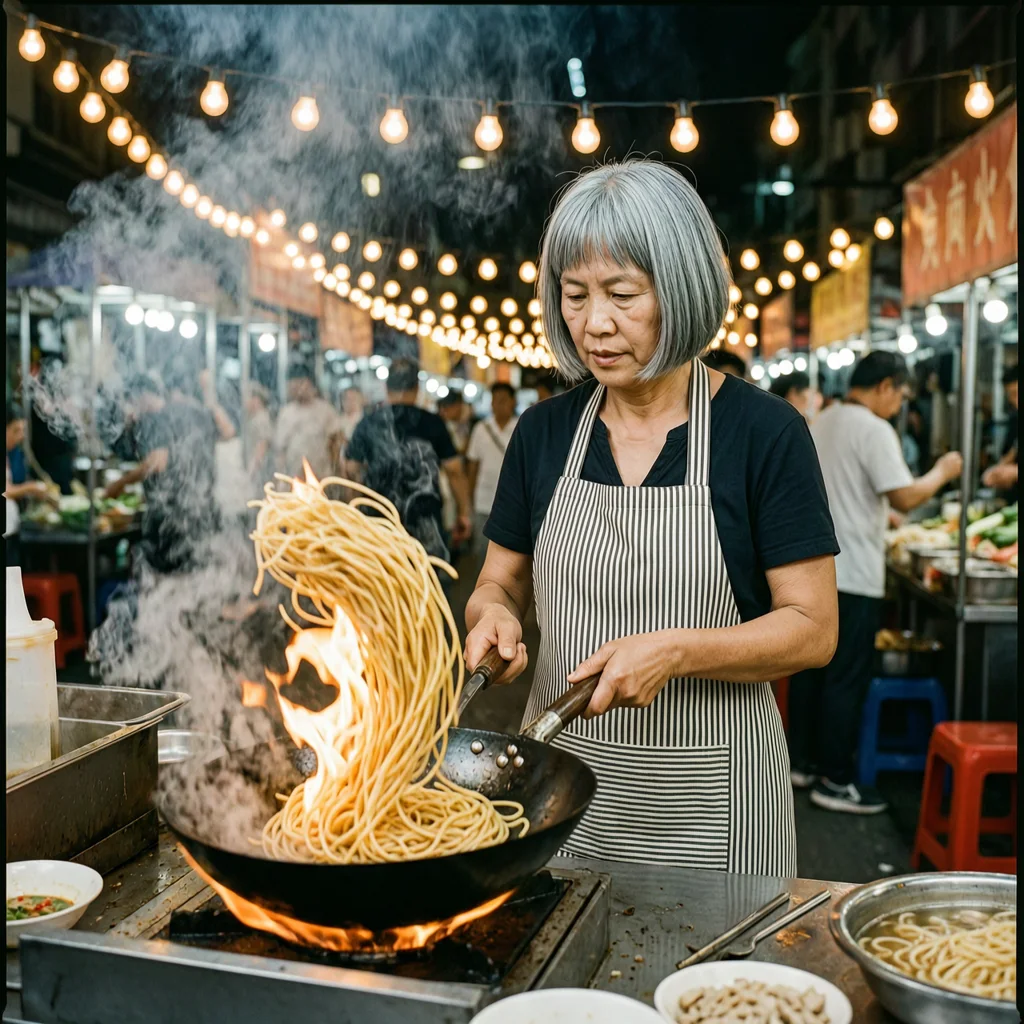
Photo test: the night-market cook
An editorial photo of a fictional cook with age, hair, apron, light and lens named. Square, studio defaults, one try each.
PromptEditorial photo of a street-food cook in her 40s with a short grey bob and a striped apron, tossing noodles in a flaming wok at a night market stall, steam and orange flame light, strings of hanging bulbs behind, 35mm lens, natural skin texture
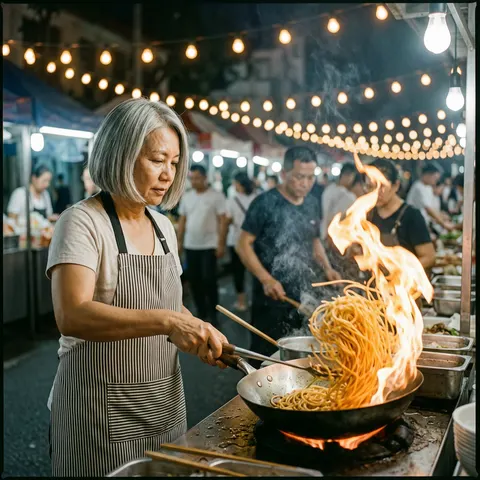 Wan 2.7 ProTallest flame, busiest crowd; a bit older than 40s
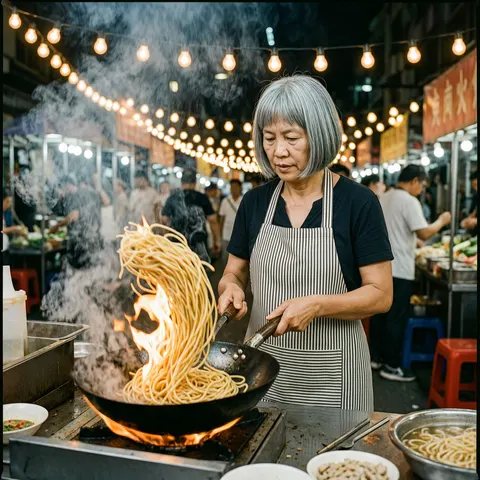 Wan 2.7Sharpest frame and steam; sign behind is unreadable
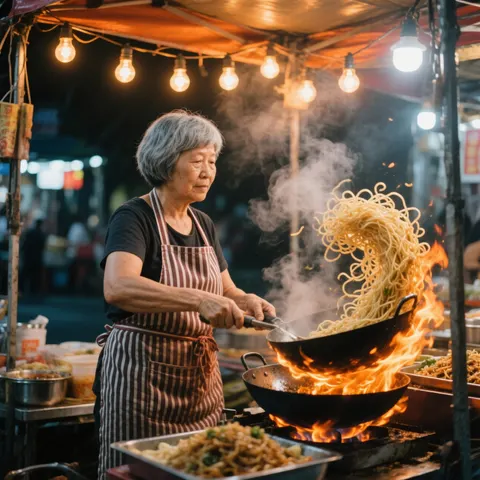 Wan 2.6Cook looks 60s; a second wok floats above the first
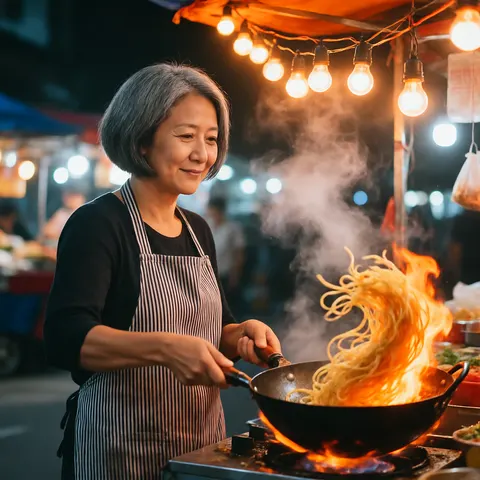 Wan 2.5Closest to the asked age; softer, glossier light
Same prompt, four Wan models
Text test: the lantern festival poster
Two lines in quotes and a flat print style. All four spelled both lines right on the first try.
PromptPoster for a riverside lantern festival: a calm river at dusk lined with red and gold paper lanterns, a wooden footbridge, the title "LANTERN NIGHT" in large cream letters at the top and "RIVERSIDE · 14 OCTOBER" in small letters at the bottom, flat graphic print style, no other text
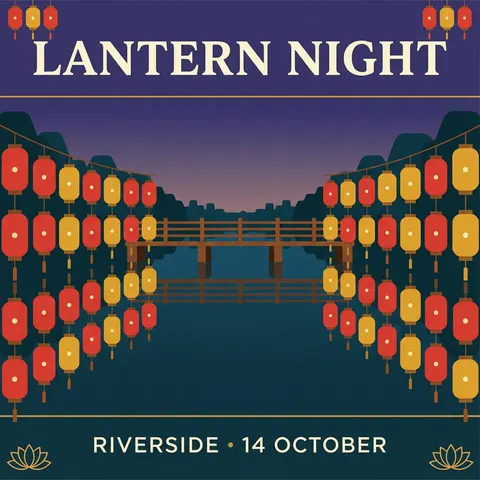 Wan 2.7 ProCorrect; near-twin of the 2.7 layout
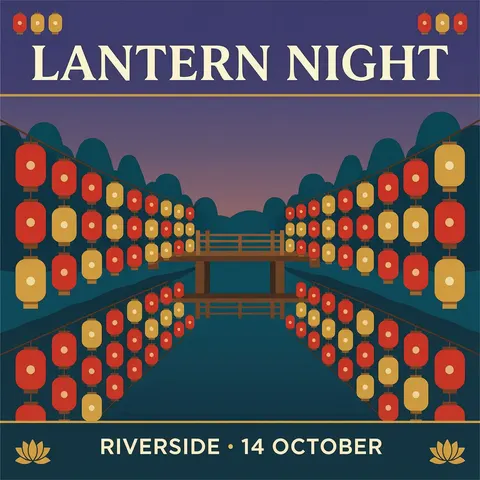 Wan 2.7Correct; the flattest print look
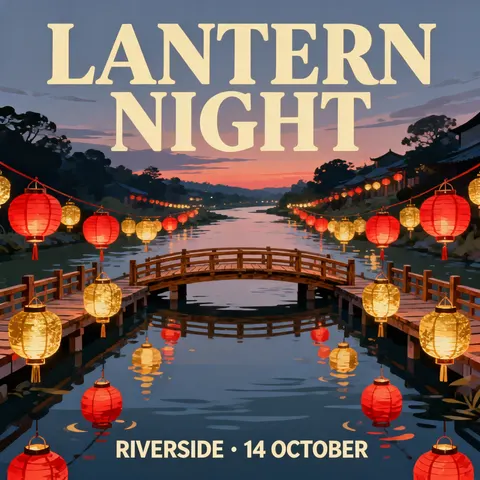 Wan 2.6Correct; painterly, not flat; some lanterns float
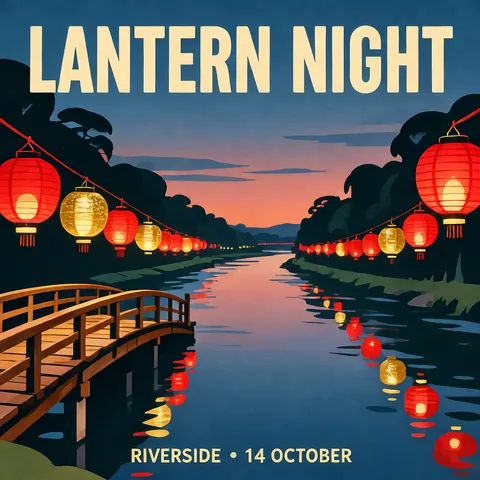 Wan 2.5Correct; flat colour, bridge cropped at the edge
One photo, one edit
Edit test: Wan 2.7 changes one thing
The Wan 2.7 cook went back in as the reference with a one-line change. Wan 2.7 takes up to 9 references.
PromptChange her striped apron to a plain mustard-yellow apron. Keep her face, her grey bob, the wok, the flying noodles, the flame, the hanging bulbs and the market behind exactly the same.
- Before (Wan 2.7)The original generation
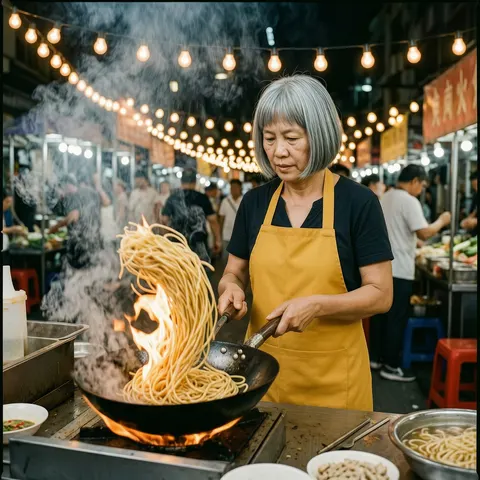 After (Wan 2.7 edit)Mustard apron; face, wok and noodles unchanged
Models
Wan Image on Kenerate
Every version in the generator, and what each is good at.
Alibaba
Wan 2.7 Pro
- Reference images
- 1–9 (edit)
- Output
- 14 presets, up to 4096 px
Open Wan 2.7 ProBest for
4K files; thinking mode
Alibaba
Wan 2.7
- Reference images
- 1–9 (edit)
- Output
- 11 presets, up to 2048 px
Open Wan 2.7Best for
The default pick; clean edits
Alibaba
Wan 2.6
- Reference images
- 1–3 (edit)
- Output
- 8 presets, up to 1440 px
Open Wan 2.6Best for
Painterly look; drifted on age
Alibaba
Wan 2.5
- Reference images
- 1–2 (edit)
- Output
- 8 presets, up to 1440 px
Open Wan 2.5Best for
Negative prompt; softer light
From our tests
Strengths and limits
Good at
- Short text holds across the family: all four spelled LANTERN NIGHT and RIVERSIDE · 14 OCTOBER right on the first try.
- Wan 2.7 edits change only what you ask: the apron swap left the cook's face, the wok, the noodles and the bowls in place.
- Up to 9 references on Wan 2.7 and Pro, and 4K presets on Pro.
- Wan 2.5 keeps a negative prompt box, which the newer models drop.
Limits
- Pro is not a different look: at 1024 px the Wan 2.7 Pro poster was a near-twin of the Wan 2.7 one, at 2.5× the price.
- Ages drift up: three of four cooks read older than the 40s we asked for.
- Physics slips: Wan 2.6 drew a second wok floating over the first, and some of its lanterns hang from nothing.
- Background signs come out as unreadable pseudo-lettering, and none of the four is on the free plan.
How to
How to use Wan Image on Kenerate
Step 1
Pick a Wan model
Open /app/image and choose Wan 2.7 (the button on this page), Wan 2.7 Pro, Wan 2.6 or Wan 2.5.
Step 2
Write the prompt
Name subject, age, clothing, light, lens and background in separate clauses; put words that must appear in quotes.
Step 3
Set size and options
Pick a size preset (Pro goes to 4096 × 4096). Leave thinking mode on for complex scenes on Wan 2.7; Wan 2.5 also takes a negative prompt.
Step 4
Edit with references
Upload 1–9 images on Wan 2.7 or Pro (3 on 2.6, 2 on 2.5), describe only the change, then generate and download.
See it in the app

Open Image Studio and type what you want to see — subject, style, lighting and mood.


Watch the tour · 1:23
Prompts, styles, references, edit, Arena & chat
Chapters
FAQ
Wan Image questions
9 questions

What is Wan 2.7 Image?
Wan 2.7 Image is the still-image model in Alibaba's Wan 2.7 release, which Alibaba's API docs call the most capable in the Wan family. It adds a thinking mode that plans composition before drawing. On Kenerate it generates at presets up to 2048 × 2048 and edits with up to 9 reference images; Wan 2.7 Pro goes to 4096 × 4096.
Link to this answerWan 2.7 vs Wan 2.7 Pro — what is the difference?
Pro adds 4K presets (4096 × 4096, 2048 × 4096, 4096 × 2048) and costs more; both have thinking mode and take 9 references, and both edit up to 2K. At the 1024 px default our two posters were almost identical, so pay for Pro only when you need the 4K file.
Link to this answerHow much does Wan cost on Kenerate?
Wan 2.7, Wan 2.6 and Wan 2.5 cost 9 credits per image; Wan 2.7 Pro costs 22.5. An edit costs the same on Wan 2.7 and Pro, and 10.5 credits on Wan 2.6 and 2.5. Credits come in one-time packs that never expire, and the cost is shown before you generate.
Link to this answerIs Wan image free?
Not on Kenerate: none of the four Wan image models is on the free plan, so the 25 sign-up credits go to the free models (such as Flux 2 Dev and Qwen Image 3.0), and any credit pack unlocks Wan. The cost is shown before you generate.
Link to this answerCan Wan edit images?
Yes, all four can. Wan 2.7 and Wan 2.7 Pro take up to 9 reference images, Wan 2.6 up to 3 and Wan 2.5 up to 2. In our test Wan 2.7 changed a striped apron to mustard yellow and kept the cook's face, hair, wok, noodles and the market behind exactly as they were.
Link to this answerCan Wan write text in images?
Short text, yes. All four Wan models spelled LANTERN NIGHT and RIVERSIDE · 14 OCTOBER correctly on a poster on the first try. Small signs in the background of photos came out as unreadable lettering, so quote every word you need and keep it short; for long text, GPT Image 2.6 is the stronger pick.
Link to this answerWhat does thinking mode do on Wan 2.7?
It adds a reasoning step before the image is drawn, which Alibaba's API docs say improves composition and detail at the cost of a longer wait. It is on by default for Wan 2.7 and Wan 2.7 Pro on Kenerate, and you can turn it off in the advanced settings; it applies to text-to-image, not edits.
Link to this answerIs Wan 2.7 Image the same as Wan 2.7 video?
No. They share the Wan 2.7 name and maker, but the image model makes stills in /app/image and the video model makes 2–15 second clips in /app/video. See the Wan 2.7 video page for clips, start and end frames and audio input.
Link to this answerWhich Wan image model should I use?
Start with Wan 2.7: same price as 2.6 and 2.5, the most references and thinking mode, and the sharpest cook in our test. Use Wan 2.7 Pro for 4K files, and Wan 2.5 when you need a negative prompt to keep something out of frame.
Link to this answerIn depth
Wan Image, in depth
Background, how to prompt it, and when to pick something else.
On this page
The four Wan image models
Wan is Alibaba's model family for video and images. Each release since 2.5 has shipped an image model next to the video one [3], and Kenerate runs four of them:
- Wan 2.7 Pro — the professional tier with output up to 4K (4096 × 4096) and thinking mode built in [2]; 9 references, edits up to 2K. 22.5 credits.
- Wan 2.7 — thinking mode for better composition, on by default [1]; presets up to 2048 × 2048, 9 references. 9 credits.
- Wan 2.6 — part of the Wan 2.6 series released in December 2025 [3]; presets up to 1440 × 1440, 3 references. 9 credits, 10.5 for an edit.
- Wan 2.5 — presets up to 1440 × 1440, a negative prompt and 2 references. 9 credits, 10.5 for an edit.
What our tests showed
We ran an editorial photo and a two-line poster on all four at the 1024 × 1024 default, then edited the Wan 2.7 photo. Text was solid everywhere: every poster spelled both lines right. The photos split more. Wan 2.7 gave the crispest frame, Wan 2.7 Pro the most dramatic flame and crowd, Wan 2.6 aged the cook into her 60s and drew a second wok floating over the first, and Wan 2.5 was the only one that looked close to 40 — with softer, glossier light.
Wan 2.7 and Wan 2.7 Pro produced almost the same poster layout, so at default size Pro buys you the 4K option, not a different picture. The Wan 2.7 edit was clean: only the apron changed.
Which one to run
Wan 2.7, 2.6 and 2.5 all cost 9 credits, so Wan 2.7 is the default — it has the most references and thinking mode. Move to Wan 2.7 Pro (22.5 credits) only for 4K prints or large crops, and to Wan 2.5 when a negative prompt matters. For long text or exact layouts, GPT Image 2.6 does better; for cheaper drafts, Seedream 5.5.
By the Kenerate AI teamLast updated and reviewed
We run these models in the Kenerate generator. Model facts come from the makers' own pages; specs and limits were checked against our code; the examples are our own outputs.
Sources: Wan 2.7 — Prodia API docs · Wan 2.7 Text-to-Image Pro — WaveSpeed · Wan 2.6 series — Alibaba Cloud
