Action · sitting · hands · re-angle with Camera Angle
Pose Reference Generator — figure drawing poses from a sentence, from any angle
Describe the pose you need to draw — a lunging punch, someone perched on a stool, a hand holding a pencil — and get a clean, clothed reference on a plain background. Then turn the camera around the same figure to see the pose from the side, above or below.
- Pose from a sentence
- Plain background, even light
- Re-angle the same pose
- No watermark
Updated by the Kenerate AI team




On this page
Quick answer

How do you generate a pose reference with AI?
A pose reference generator draws a figure in the pose you describe so you can draw from it. On Kenerate AI you write the pose in Image Studio — the body position, where the weight sits, what the hands do, “plain light grey background, even light” — and Flux 2 Dev returns a clothed reference for 3 credits on the free plan. To see the same pose from another side, open it in Camera Angle (7.5 credits a view), which moves the camera in 45° steps and up or down. It is an image generator, not an interactive 3D mannequin: you can't drag the joints, and hands and hidden limbs are drawn by the AI, so check them before you rely on them.
Key facts
- What you get
- A picture of a clothed figure in your pose
- What it isn't
- A 3D mannequin with joints you drag
- Copy a pose from a picture
- Add it as a reference image (up to 3 on Flux 2 Dev)
- Watch out for
- Hands, props and the exact pose you asked for
- Watermark
- None
Gallery
Four pose references, one try each
Real outputs from 1 November 2026: three Flux 2 Dev poses from text and one Camera Angle re-angle. Open any one to copy the prompt.
Same prompt
One pose, two camera positions
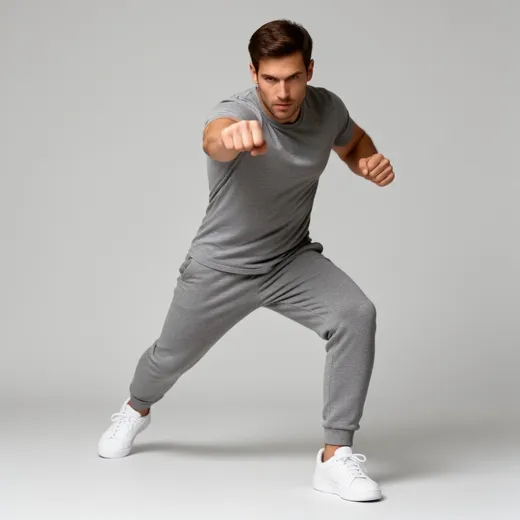
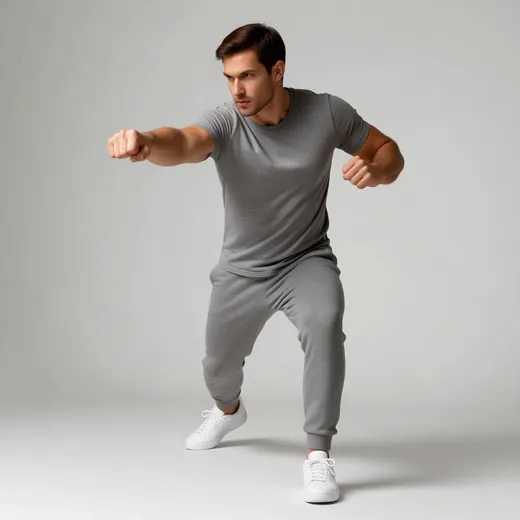
Camera Angle kept the face, the grey t-shirt and joggers and both fists, and the punch now crosses the frame as it should from 45° to the right. The lunge got shallower in the new view — compare the legs before you draw from both.
PromptCamera Angle → 45° right (one view, 7.5 credits). Original: lunging forward mid-punch, right fist toward the camera, weight on the bent front leg, plain light grey background.
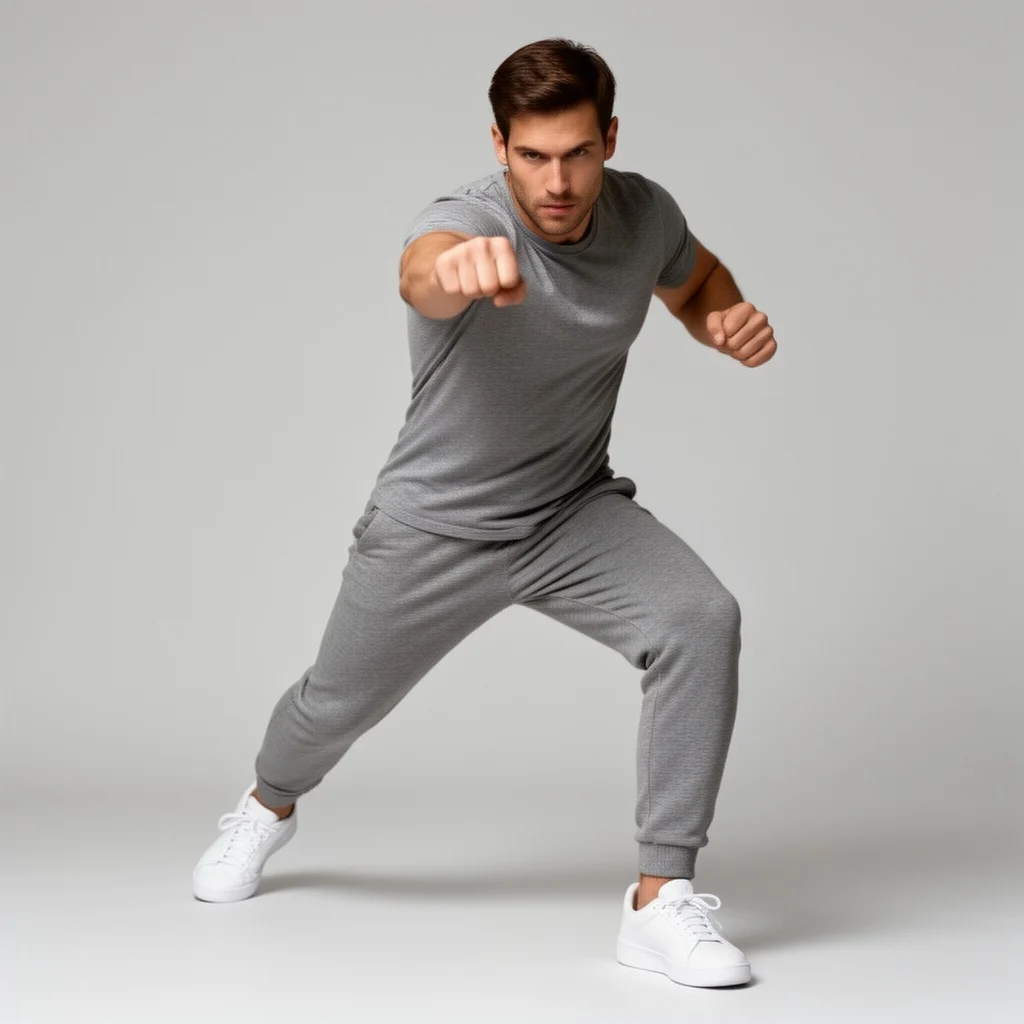 FrontFlux 2 Dev · from text
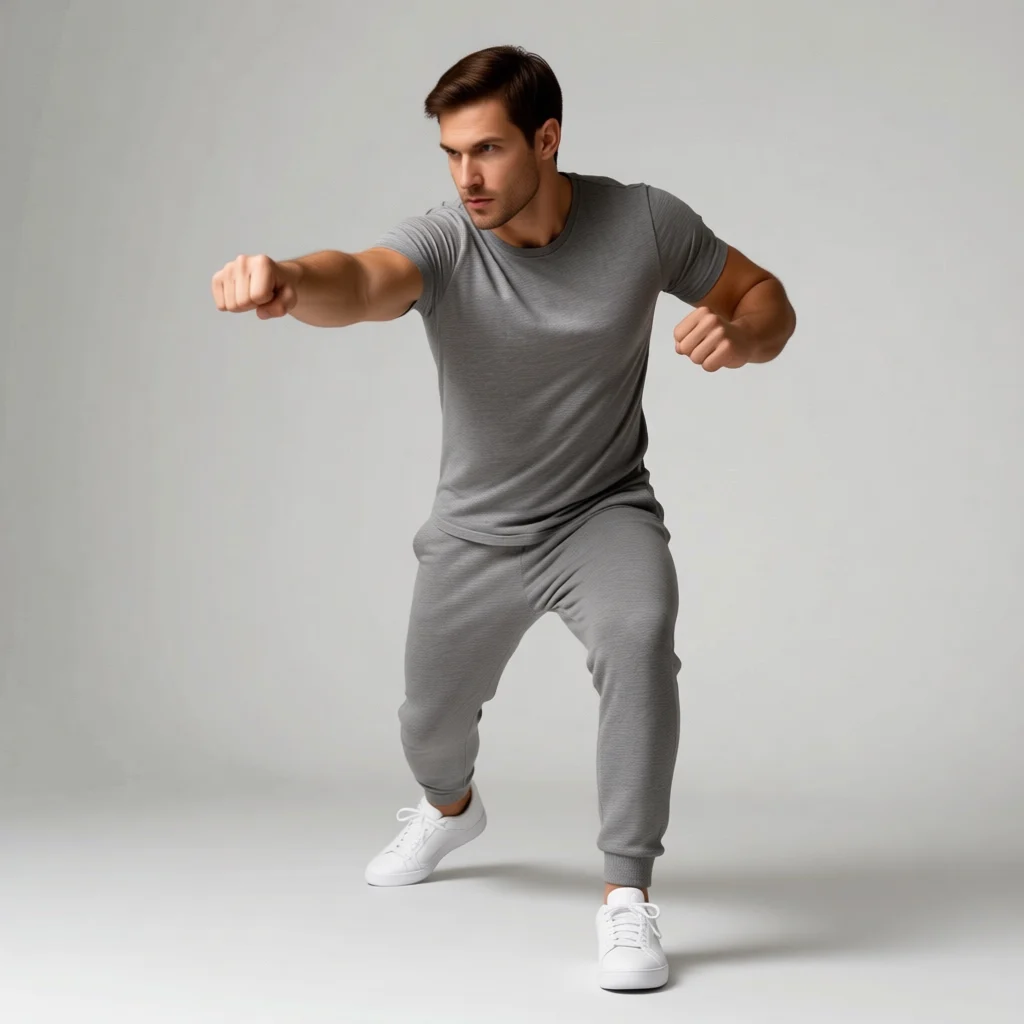 45° rightCamera Angle
How to
How to use the pose reference generator
- Time needed
- Steps
- 4 steps
Step 1
Describe the pose
In /app/image, pick Flux 2 Dev and write the pose: body position, weight, arms and hands, a plain background and even light.
Step 2
Check it
Compare the result to your description — limbs, hands, props — and regenerate if the pose drifted.
Step 3
Turn the camera
Open the keeper in Camera Angle and pick a view — 45° left or right, profile, back, from above or below — up to 4 views a run.
Step 4
Draw from it
Download without a watermark and use it as your reference; keep the prompt to make variations.
See it in the app

Open Image Studio and type what you want to see — subject, style, lighting and mood.


Watch the tour · 1:23
Prompts, styles, references, edit, Arena & chat
Chapters
Tips
Prompts that give you a usable pose reference
What worked in our tests, and what didn't.
Say where the weight is — “weight on the bent front leg” — not just the action; that is what makes a pose read.
Ask for “plain light grey background, even soft lighting, whole body in frame from head to feet” so nothing is cropped or lost in shadow.
Dress the figure in plain fitted clothes (a grey t-shirt and joggers) so the body's shape stays readable.
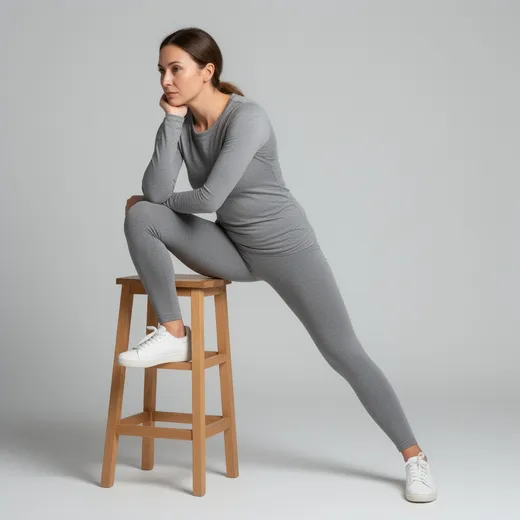
Check the pose against what you asked: our “sitting on a stool” came back standing with a foot on the stool.
Hands and props are the weak spot — look at every finger, and regenerate rather than draw from a mangled one.
To see the same pose from another side, use Camera Angle instead of writing a new prompt; a new prompt gives you a different person and pose.
Models
Models and tools for pose references
What each model is good at. Open any one straight in the generator.
- Free plan

Black Forest Labs
Flux 2 Dev
- Reference images
- Up to 3
- Output
- 2048 px
Open Flux 2 DevBest for
Made our three poses · free plan
- Free plan

Alibaba
Qwen Image 3.0
- Reference images
- Up to 3
- Output
- 1K or 2K
Open Qwen Image 3.0Best for
Free plan · copy a pose from a picture

OpenAI
GPT Image 2.5 Sunburst
- Reference images
- Up to 16
- Output
- 1K–4K
Open GPT Image 2.5 SunburstBest for
Follows long, exact pose descriptions
Multiple Angles
Camera Angle
- Reference images
- 1 image
- Output
- Same as input
Open Camera AngleBest for
Same pose from another side or height
FAQ
Pose Reference Generator questions
9 questions

How do I generate a pose reference with AI?
Open Kenerate's Image Studio, pick Flux 2 Dev and describe the pose in plain words — the body position, where the weight is, what the arms and hands do — and add “plain light grey background, even soft lighting, whole body in frame”. Each pose costs 3 credits. Our lunging-punch prompt came back with the fist toward the camera and the torso twisted, as written.
Link to this answerIs this a 3D poser?
No. It makes pictures, not a 3D mannequin: there are no joints to drag and no model to spin freely. What it does instead is draw the pose from a sentence and, with Camera Angle, show that same picture from another side or height. If you need a figure you can pose joint by joint, use a 3D poser app or Blender.
Link to this answerCan I see the same pose from a different angle?
Yes. Open the reference in Camera Angle and pick a view: eight positions around the figure in 45° steps, four heights from below to overhead, and three distances. Each view is 7.5 credits, up to four per run. Our 45° right view kept the face, outfit and fists; the lunge got a little shallower, so check the legs.
Link to this answerCan I turn a pose reference into a 3D model I can pose?
Partly. Kenerate's 3D Studio turns an image into a textured 3D mesh, and Meshy's Auto-rig adds a skeleton for 72 extra credits; some engines have a T / A-pose switch for characters you will rig. You then pose the rigged GLB or FBX in Blender or a game engine. 3D needs a paid plan or credit pack, and it's a separate step from the pose references here.
Link to this answerIs the pose reference generator free?
Free to start. New accounts get 25 credits on sign-up, and Flux 2 Dev — the model behind our three poses — is on the free plan at 3 credits a pose. Qwen Image 3.0 is on the free plan too, at 9 credits. Camera Angle views use 7.5 credits each. Downloads carry no watermark.
Link to this answerHow do I get good hand references?
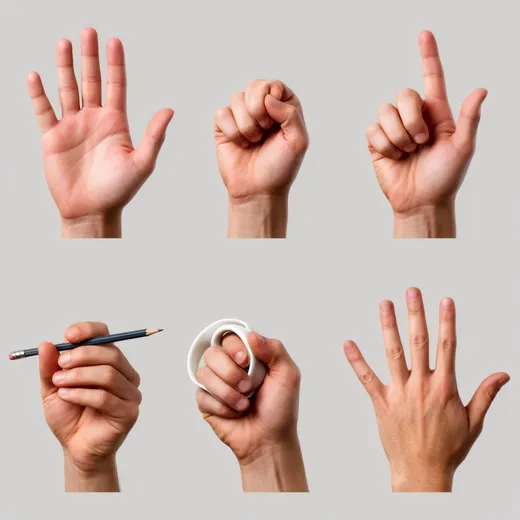
Ask for one hand per panel on a plain background and name each gesture: “open palm”, “loose fist”, “holding a pencil”. Then check every finger. In our six-hand sheet the palm, fist and spread hand were usable, but the cup turned into a bent ring and the pointing hand looked awkward. Regenerate the panels you need rather than drawing from a bad one.
Link to this answerCan I copy a pose from a photo?
Yes. Add the photo as a reference image and write “the figure takes the exact pose of the person in the image; plain grey t-shirt and joggers, plain light grey background”. Flux 2 Dev takes up to 3 reference images and Qwen Image 3.0 up to 3. Only use photos you're allowed to use. To change the pose of someone in your own photo instead, use the AI pose changer.
Link to this answerWhy didn't I get exactly the pose I asked for?
Image models follow the gist and guess the details. Our “sitting on a stool” prompt came back with the woman standing and one foot up on the stool — a usable lean, but not what we asked for. Put the most important part first, say it plainly (“seated on the stool, both hips on the seat”), and regenerate; each try is 3 credits on Flux 2 Dev.
Link to this answerCan I use the references for my art?
Yes, you can download them and draw from them, with no watermark. They're generated people, not photos of real models. Keep figures clothed and adult here — this tool is for figure drawing, not for pictures of real people.
Link to this answerIn depth
Pose Reference Generator, explained
What works, what to avoid, and how to pick a model.
On this page
Pose reference generator or 3D poser?
Both answer “I need to see a body in this pose to draw it”, in different ways. A 3D poser gives you a mannequin you move joint by joint and orbit freely; it's exact, but slow to set up and the figure looks like a mannequin.
A pose reference generator works from words: describe the pose and get a picture of a clothed person in it in seconds, with real folds, weight and light. You give up joint-by-joint control, and the AI makes mistakes you have to catch. Camera Angle closes part of the gap by showing the same picture from other sides.
How to write a pose prompt
The structure behind our action pose — reuse it for any pose:
- Who and what they wear: “an adult man in a plain fitted grey t-shirt, grey joggers and white sneakers”.
- The action: “lunging forward mid-punch”.
- Each limb: “right fist extended toward the camera, left arm pulled back”.
- Weight and balance: “weight on the bent front leg, back leg straight, strong twist through the torso”.
- Framing and light: “plain light grey studio background, even soft lighting, whole body in frame from head to feet”.
Pose ideas to try
Swap these into the action part of the prompt:
- Action: sprinting mid-stride, leaping with both feet off the ground, swinging a bat, throwing a ball overhand, landing from a jump in a crouch.
- Sitting: cross-legged on the floor, slouched sideways in an armchair, sitting on stairs with elbows on the knees.
- Standing: contrapposto with the weight on one hip, arms crossed leaning on a wall, looking back over the shoulder.
- Hands: holding a phone, tying a shoelace, a hand resting on a table, two hands shaking.
- Foreshortening: “seen from below, the fist close to the camera” — or take a normal pose and use Camera Angle's low view.
Re-angling a pose with Camera Angle
A new prompt for the same pose from the side gives you a different person in a slightly different pose. Camera Angle starts from your picture instead: it keeps the figure and moves the camera — eight positions around, from below, eye level, raised or overhead, close-up to wide.
It infers what was hidden, so expect drift. Our 45° right view kept the face, clothes and fists but shortened the lunge. Use the re-angled view to understand the volume of the pose, and the original for the exact limb positions.
What we got
Four pictures, one try each, 16.5 credits in total:
- Lunging punch (Flux 2 Dev): fist toward the camera and twisted torso as asked; a strong, clear action reference.
- Perched on a stool (Flux 2 Dev): chin on hand as asked, but standing with one foot on the stool instead of sitting on it.
- Hand sheet (Flux 2 Dev): palm, fist, pencil grip and spread hand usable; the cup came out as a bent ring and the pointing hand is awkward.
- 45° right (Camera Angle): same man, outfit and fists from a new side; the lunge got shallower.
By the Kenerate AI teamLast updated and reviewed
We build and run the Kenerate generator. Every example is a real output of the model named under it; models and presets were checked against the app's code.
Sources: Kenerate Image Studio · Kenerate Camera Angle