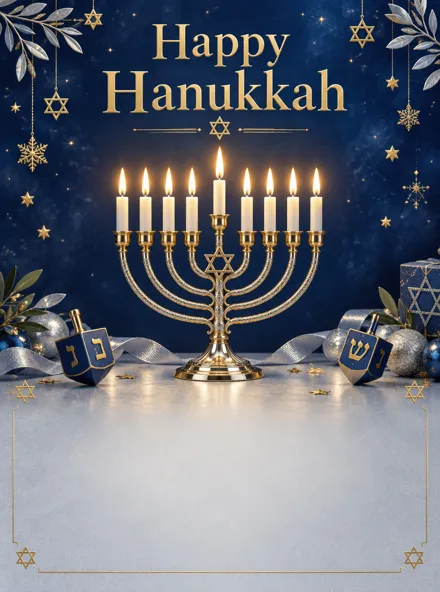
Greeting in the design · print sizes · blue, silver and gold
AI Hanukkah Card Generator — design the card, greeting included
Describe the card — a nine-branch menorah, dreidels, blue and silver — and put your greeting in quotes. You get a finished front with the words lettered in, sized for a 5×7 print or sent as an e-card.
- Greeting lettered in
- Print sizes explained
- Free credits to start
- No watermark
Updated by the Kenerate AI team




On this page
Quick answer
How do you make a Hanukkah card with AI?
An AI Hanukkah card generator designs the whole card — menorah, dreidels, colours and your greeting lettered in — from a short description. On Kenerate AI, GPT Image 2.5 Sunburst letters the words you put in quotes at 7.2 credits a design at 1K (12 at 2K); Recraft V4.1 and Ideogram v4 are the alternatives for type-led designs. A printed 5×7 card needs about 1500×2100 pixels, so render at 2K or upscale to 4K. Check every letter, especially Hebrew, before you print.
Key facts
- Best for lettering
- GPT Image 2.5 Sunburst, 1K to 4K
- Type-led alternatives
- Recraft V4.1 · Ideogram v4
- 5×7 print
- ≈ 1500×2100 px at 300 DPI, + 0.125 in bleed
- Ratios to pick
- 3:4 for 5×7 · 2:3 for 4×6 · 1:1 square
- Fix a word
- Edit Text in Image in Edit Studio
- Free start
- Starter credits · Qwen Image 3.0 on the free plan
- Watermark
- None
Gallery
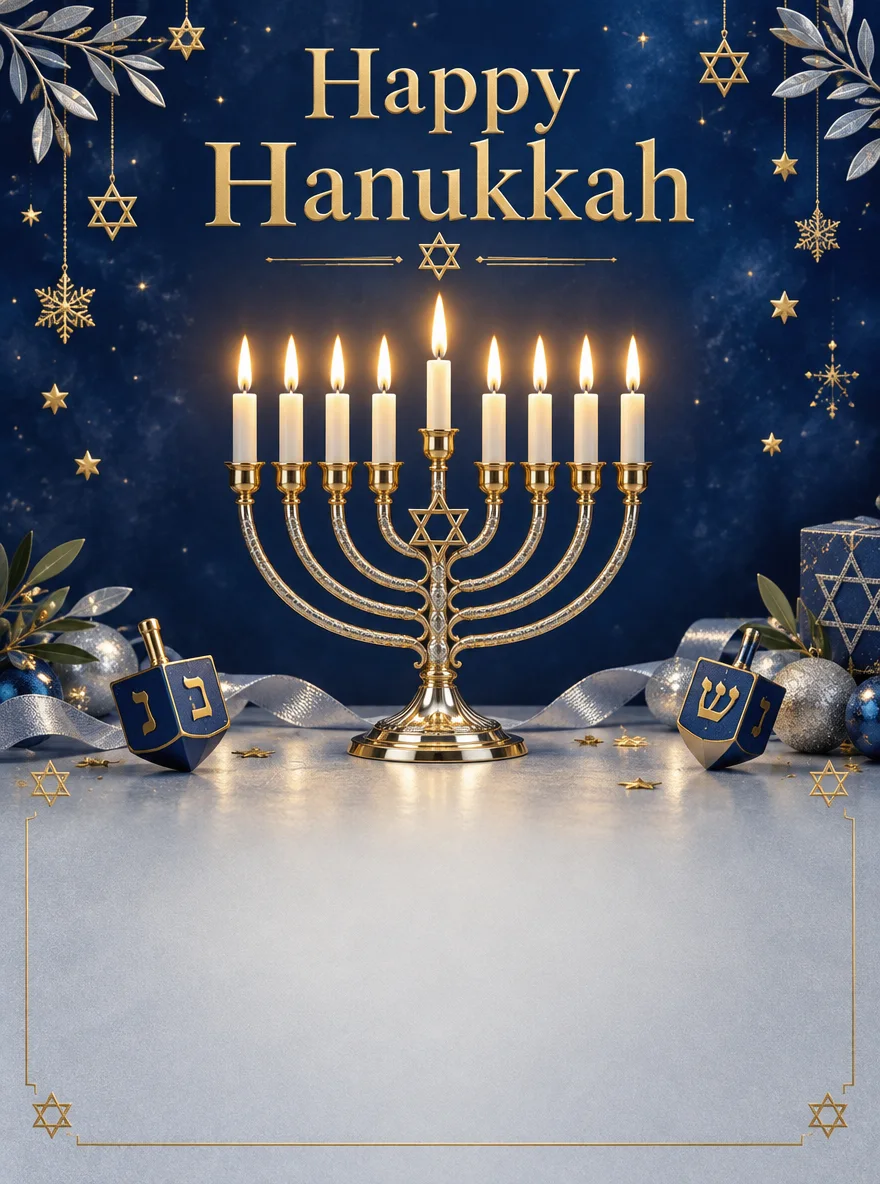
A real Hanukkah card from Kenerate AI
One GPT Image 2.5 Sunburst card at 1K and 3:4, first try: “Happy Hanukkah” came out spelled right in the gold serif we asked for, with the menorah, dreidels and a clear space for a message. Open it to copy the prompt.
How to
How to use the AI hanukkah card generator
- Time needed
- Steps
- 4 steps
Step 1
Open the Image Studio
Go to /app/image and pick GPT Image 2.5 Sunburst (credit pack), or Qwen Image 3.0 on the free plan. Sign in free for 25 starter credits.
Step 2
Choose the ratio
3:4 for a 5×7 card, 2:3 for 4×6, 1:1 for square — and 2K if you'll print.
Step 3
Describe the card
Menorah, dreidels, candles or a blue-and-silver style, plus the greeting in quotes with its position. Add a logo or photo as a reference if you want one in the design.
Step 4
Check, fix, download
Zoom in on the lettering, fix any word with Edit Text in Image, upscale to 4K for print, then download without a watermark.
See it in the app

Open Image Studio and type what you want to see — subject, style, lighting and mood.


Watch the tour · 1:23
Prompts, styles, references, edit, Arena & chat
Chapters
Tips
Get a card you can actually print
Lettering is where AI cards go wrong, and Hebrew is harder than English. This avoids most of it.
Put every word in quotes and say where it goes: “Happy Hanukkah” in gold serif across the top, the family name small at the bottom.
For Hebrew, keep it to one short word or phrase, and type the exact letters in quotes. Check each letter: image models can draw Hebrew letters that look right but are not.
Leave space: say “plain blue area in the lower third for text” if you'll add a personal message in a card editor.
Pick the ratio for the print: 3:4 for a 5×7 (trim the sides a little), 2:3 for a 4×6, 1:1 for a square card.
Render at 2K or upscale to 4K, and keep names and dates a quarter inch away from the edges.
Zoom in on every letter before printing; if one word is off, fix it with Edit Text in Image instead of regenerating.
Models
Models for Hanukkah cards
What each model is good at. Open any one straight in the generator.
OpenAI
GPT Image 2.5 Sunburst
- Reference images
- Up to 16
- Output
- 1K–4K
Open GPT Image 2.5 SunburstBest for
Greetings lettered in; photo or logo as reference
Recraft
Recraft V4.1
- Output
- 5 ratios
Open Recraft V4.1Best for
Flat, graphic and typographic card designs
- Free plan
FAQ
AI Hanukkah Card Generator questions
8 questions

How do I make a Hanukkah card with AI?
Open Kenerate's Image Studio, pick GPT Image 2.5 Sunburst and a 3:4 ratio, and describe the card: the menorah or dreidels, the colours, and the greeting in quotes with where it goes — “Happy Hanukkah” in gold serif across the top. Generate, zoom in on the lettering, then download. A design costs 7.2 credits at 1K or 12 at 2K.
Link to this answerIs the AI Hanukkah card generator free?
Free to start. A new Kenerate account gets 25 credits on sign-up — enough for two Qwen Image 3.0 card designs at 9 credits each, which works on the free plan. GPT Image 2.5 Sunburst unlocks once you buy a credit pack. Credits come in one-time packs that never expire, with no subscription. Downloads have no watermark.
Link to this answerCan the AI write a Hebrew greeting on the card?
It can try, but check it carefully. Put the exact Hebrew letters in quotes and name a clear style, such as “gold serif”. GPT Image 2.5 Sunburst gives the best lettering on Kenerate, but image models can draw Hebrew letters that look right and are wrong, and a missing niqqud or a swapped letter is easy to miss. Have a fluent reader check the card before you print it, or add the Hebrew in a card editor.
Link to this answerWhat size should a printed Hanukkah card be?
The standard greeting card is 5×7 inches with an A7 envelope (5.25×7.25 in). Vistaprint asks for at least 300 DPI at the final size — about 1500×2100 pixels for a 5×7. Print shops usually want 0.125 in of bleed on each side, so keep text away from the edges. Generate at 3:4 and crop slightly, or 2:3 for a 4×6 card.
Link to this answerWhich model should I use for a Hanukkah card?
GPT Image 2.5 Sunburst for the greeting and the lettering, because it handles short phrases in quotes best on Kenerate. Recraft V4.1 at 12 credits suits flat, graphic designs with a simple menorah. Ideogram v4 at 15 credits is the choice for text-heavy designs with several lines of type.
Link to this answerCan I add my logo or a photo to the card?
Yes. Add the image as a reference and describe the card around it, for example “place this logo small and centred at the bottom, unchanged”. A GPT Image 2.5 Sunburst edit with one reference costs 11.7 credits at 1K. Models can redraw logos slightly, so for brand-critical cards place the original logo in a card editor afterwards.
Link to this answerCan I write a long message inside the card?
Keep long text out of the image. AI lettering is reliable for a few words, not paragraphs. Print the personal message from a card editor or word processor, or write it by hand — it reads warmer anyway.
Link to this answerCan I send a Hanukkah card as an e-card?
Yes. Download the image and send it by email or messaging, or post it on social media. A 4:5 or 1:1 version fits feeds, and 9:16 fits stories. To make it move, open the card in the Video Studio; video needs a one-time credit pack.
Link to this answerIn depth
AI Hanukkah Card Generator, explained
What works, what to avoid, and how to pick a model.
On this page
Card sizes, ratios and pixels
Pick the ratio before you generate, so nothing important gets cropped:
- 5×7 in (A7 envelope, 5.25×7.25 in): generate at 3:4, crop a little off the sides; about 1500×2100 px at 300 DPI.
- 4×6 in photo card: 2:3 fits exactly; about 1200×1800 px.
- 5.5×5.5 in square: 1:1; about 1650×1650 px.
- With 0.125 in bleed on each side, a 5×7 file is 5.25×7.25 in — about 1575×2175 px. A 4K upscale covers it.
Hanukkah card prompt ideas
Put the greeting in quotes and say where it goes:
- Nine-branch menorah with lit candles on deep blue, gold foil, “Happy Hanukkah” in gold serif across the top.
- Blue and silver dreidels on a white table with bokeh lights, “Chag Sameach” in clean sans-serif.
- Watercolour menorah in a sunlit window, soft blues and gold, “Wishing you light and joy”.
- Papercut style menorah in white on navy, layered paper look, “Happy Hanukkah”.
- Flat graphic card: oil jar icon, eight flames in a row, mustard and teal, “Eight Nights of Light”.
- Vintage 1950s greeting-card look, gold menorah and blue ribbon, “Season of Lights”.
- Minimal line-art menorah on cream paper, thin gold lines, “Happy Hanukkah from the Levy family”.
- Snowless winter scene with a glowing menorah in a cosy window, warm amber light, “Chag Urim Sameach”.
- Stars of David and gold confetti on midnight blue, “Happy Hanukkah” in brush script.
- Business card: clean blue and silver geometric pattern, a small menorah, “Season's Greetings from Northfield Studio”.
Lettering, Hebrew and what to check
Image models draw letters as shapes, so they slip on long or unusual words, and Hebrew letters are the hardest. Short greetings in quotes, a named font style (“gold serif”, “brush script”) and a clear position help most. Hebrew text needs a human check: confirm every letter and the vowel marks against a trusted source before printing. When one word is wrong, Edit Studio's Edit Text in Image changes just that text and keeps the design.
By the Kenerate AI teamLast updated and reviewed
We build and run the Kenerate generator. Every example is a real output of the model named under it; models and presets were checked against the app's code.
Sources: Vistaprint — Christmas card sizes (same 5×7 standard) · 4OVER4 — file size for a 5×7 greeting card · Kenerate Image Studio