Start frame · end frame · image to video
AI Werewolf Transformation Video — your photo, then the full moon
Turn your own photo into a werewolf transformation clip for Halloween. Make two frames from one picture — you under the full moon, then the same shot as a werewolf — and let an image-to-video model fill in the change between them.
- Starts from your photo
- Start + end frame morph
- 9:16 or 16:9
- No gore, no watermark
Updated by the Kenerate AI team




On this page
Quick answer

How do you make an AI werewolf transformation video?
An AI werewolf transformation video is a short clip where a person turns into a werewolf on screen — fur spreading, ears rising, eyes turning amber under a full moon. The most reliable way to make one from your own photo on Kenerate AI is a two-frame morph: edit your photo into a moonlit start frame, edit that start frame into the same shot as a werewolf (the end frame), then give both to an image-to-video model that accepts an end frame — Wan 3.0 (2–30 s), Kling 3.0 (3–15 s) or Seedance 2.5 (4–30 s) — with a prompt that describes the transformation.
Key facts
- Input
- One clear photo of yourself
- Frames
- GPT Image 2.5 Sunburst edits
- Morph models
- Wan 3.0 · Kling 3.0 · Seedance 2.5
- Clip length
- 2–30 s (Wan 3.0)
- Start frame only
- Sora 2 Pro · 4–20 s
- Video needs
- A paid credit pack
Gallery
Werewolf frames, made on Kenerate
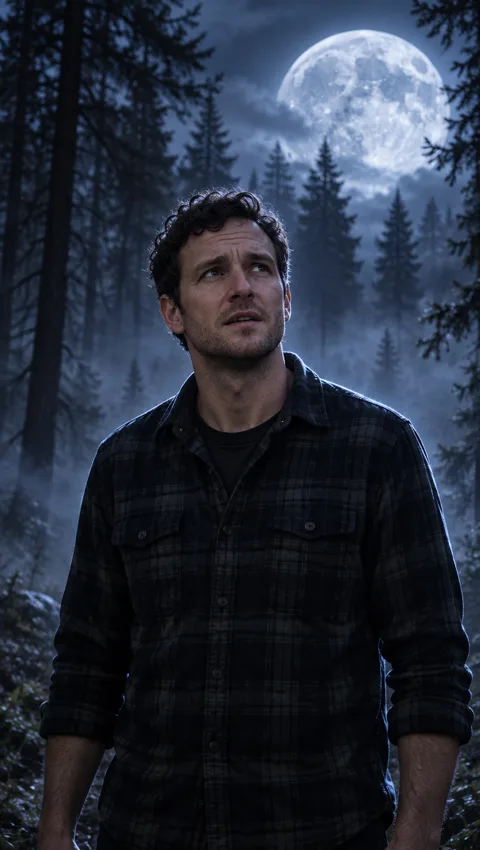
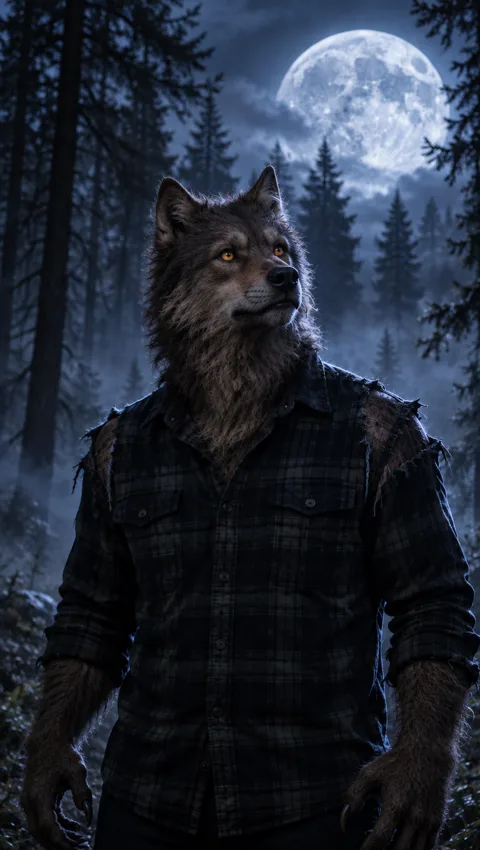
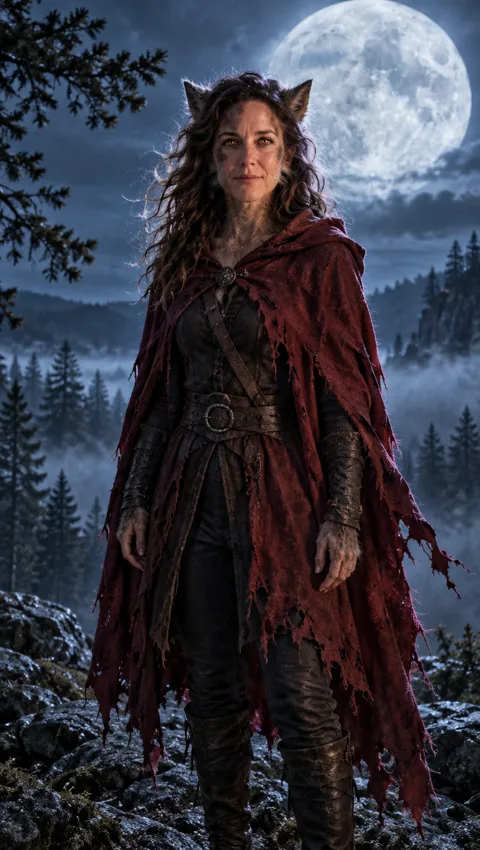
Three real GPT Image 2.5 Sunburst edits of our test photos, one try each, 9:16. The first two are a matched pair — the start and end frame of one transformation. Open any one to copy the prompt.
Same prompt
One photo, two frames, one morph
Our test photo became the start frame, and the start frame became the end frame. Because the second edit was told “same shot, same camera”, the trees, the moon, the pose and the flannel shirt stayed put — which is exactly what a video model needs to make a smooth transformation instead of a jump cut.
PromptSame shot, same camera, same misty pine forest, same full moon and same lighting — but the man has fully turned into a werewolf. Keep the same pose, framing and the same dark flannel shirt, now torn at the shoulders.
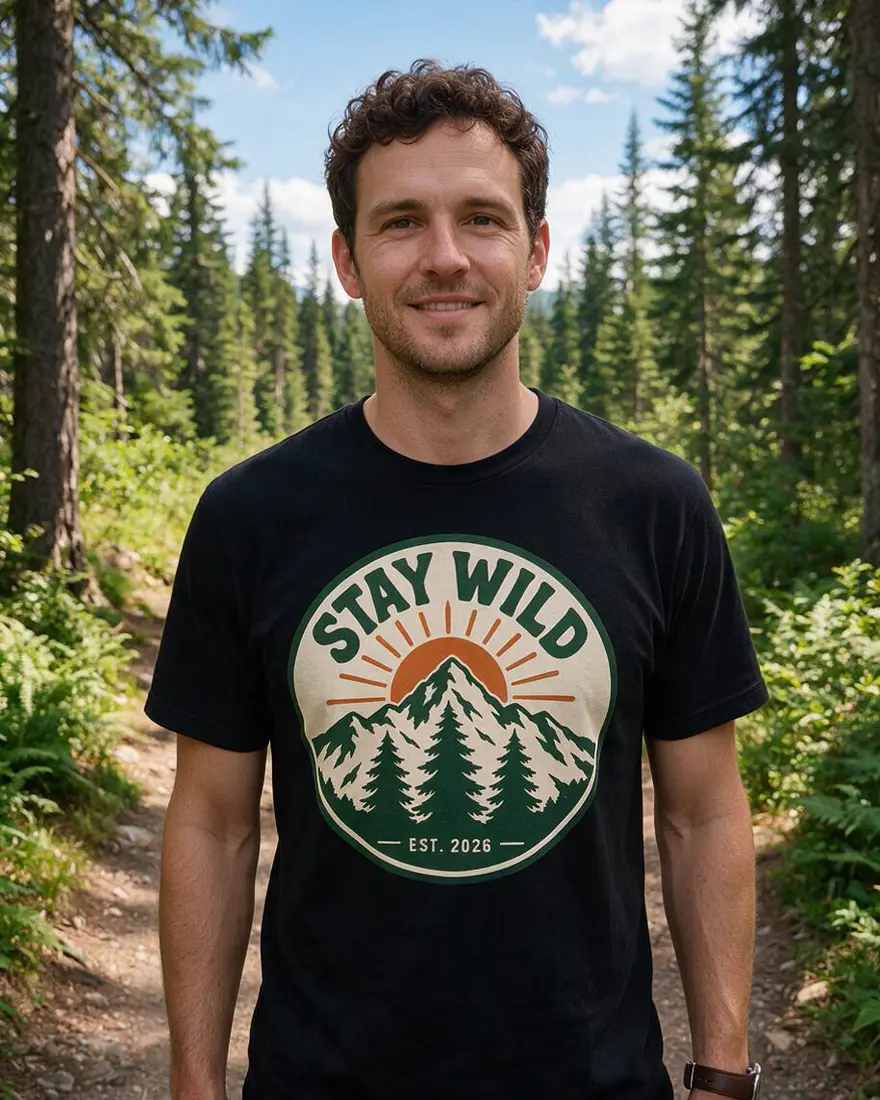 PhotoInput
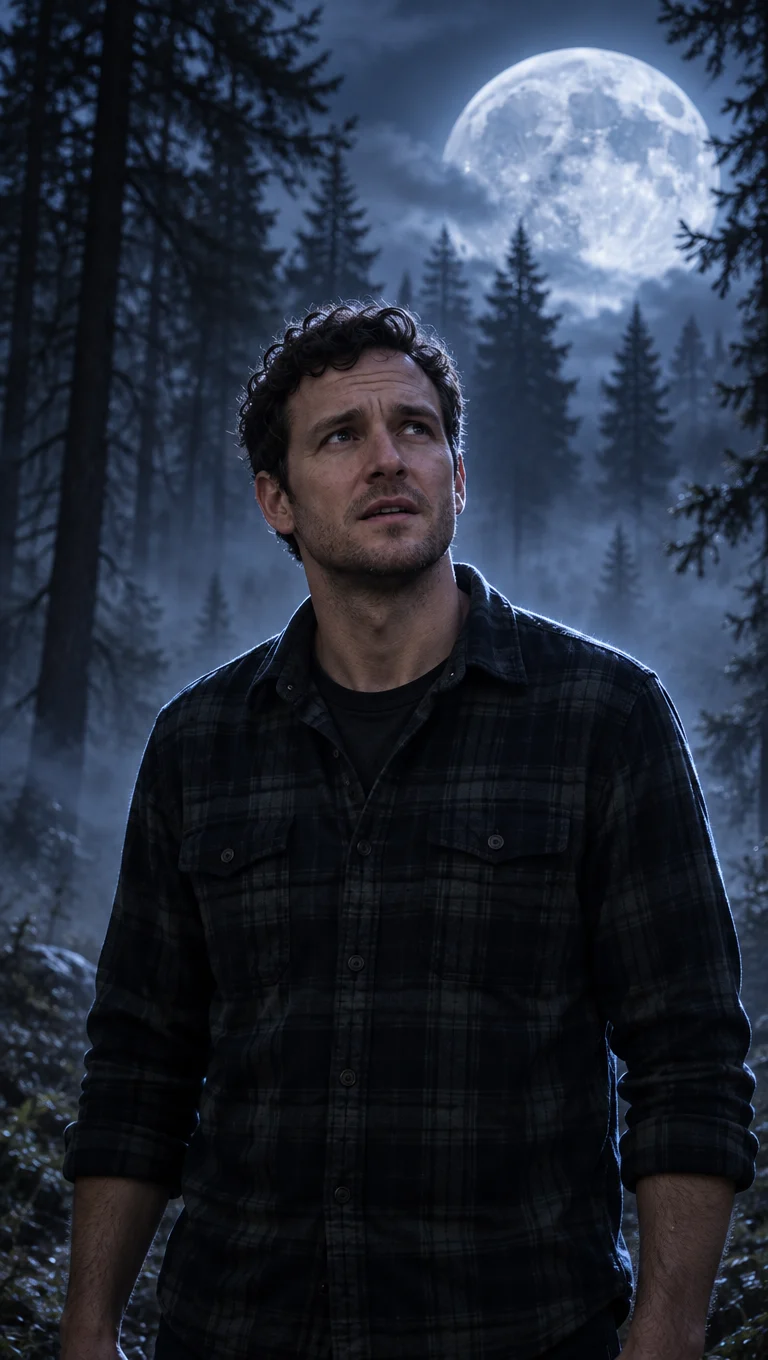 Start frameGPT Image 2.5 Sunburst
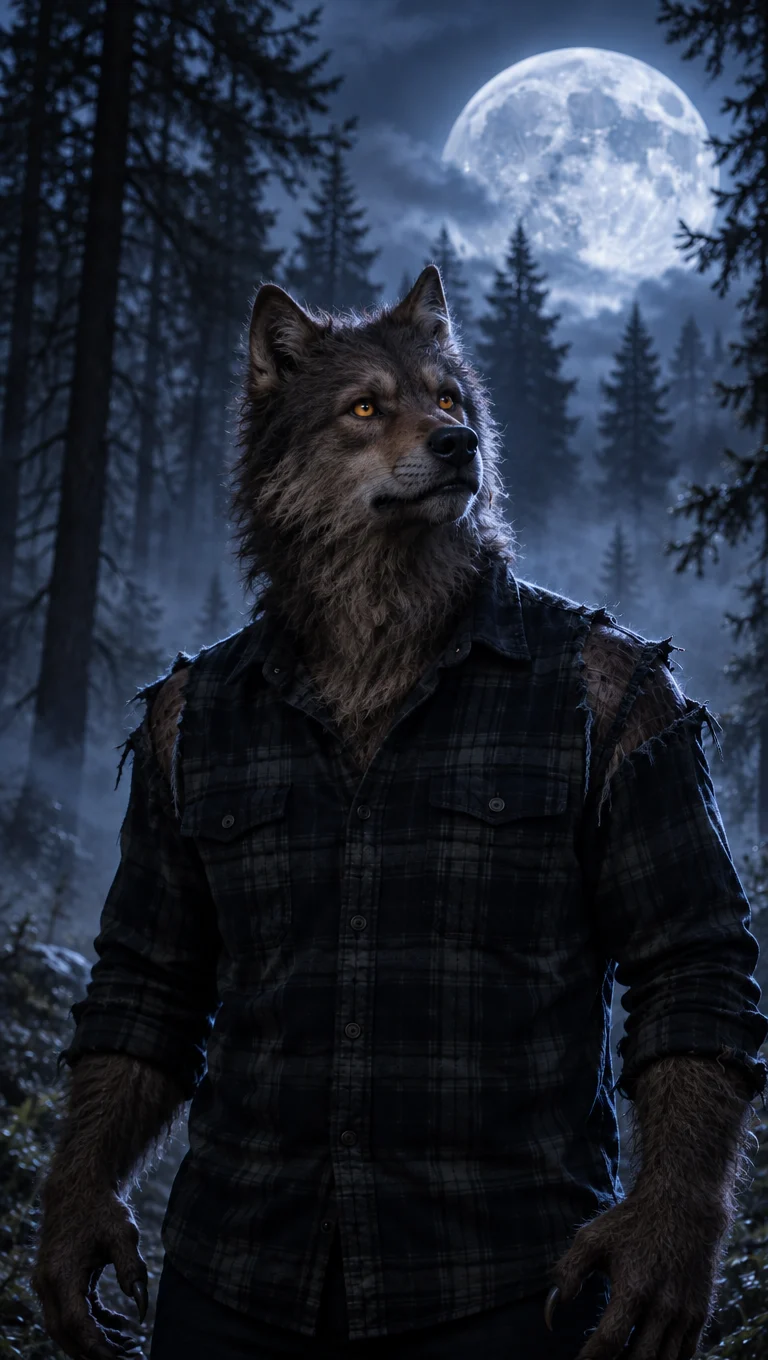 End frameGPT Image 2.5 Sunburst
How to
How to use the AI werewolf transformation video
- Time needed
- Steps
- 4 steps
Step 1
Make the start frame
In /app/image, upload a clear photo, pick GPT Image 2.5 Sunburst and place yourself under a full moon. Set 9:16 for Shorts or 16:9 for YouTube. Sign in free for starter credits.
Step 2
Make the end frame
Use that start frame as the reference and ask for the same shot, same camera and lighting — but as a werewolf.
Step 3
Animate between them
In /app/video pick Wan 3.0, Kling 3.0 or Seedance 2.5, add the start frame and the end frame, and describe the change: “his hands grow claws, fur spreads up his neck, his face stretches into a wolf snout, he howls at the moon.”
Step 4
Draft cheap, then finish
Try 5 seconds at 480p first, keep sound on for a howl, then re-run the best version longer or at higher resolution and add captions or music in your editor.
See it in the app

Open Video Studio in Text to Video mode and write the shot — subject, action, camera move and light.


Watch the tour · 1:19
Text, image & reference to video, models, edit, extend & chat
Chapters
Tips
Werewolf transformations that don't fall apart
What made our frames line up, plus the advice the top guides agree on.
Make the end frame from the start frame, not from your original photo, and say “same shot, same camera, same lighting” — matching frames give the smoothest morph.
Keep the outfit in both frames (a torn shirt reads as “he changed”, a new costume reads as a cut).
Describe the change in order in the video prompt: hands first, then fur up the neck, then the face, then the howl.
Use one light source — a full moon behind the subject — and avoid thick fog over the face, so you can see the change.
Add “no gore, no blood” to every prompt. The classic look is fur, ears and amber eyes, not torn skin.
Use your own photo or an original character. Don't upload someone else's face or a famous film werewolf.
Models
Tools for werewolf transformation videos
What each model is good at. Open any one straight in the generator.

OpenAI
GPT Image 2.5 Sunburst
- Reference images
- Up to 16
- Output
- 9:16 · 16:9 · 1K–4K
Open GPT Image 2.5 SunburstBest for
Made both frames and kept the face and the scene
Alibaba
Wan 3.0
- Reference images
- Start + end frame
- Output
- 2–30 s · 480p–1080p
Open Wan 3.0Best for
Cheap drafts of the morph, with native sound
Kuaishou
Kling 3.0
- Reference images
- Start + end frame
- Output
- 3–15 s · 16:9 · 9:16 · 1:1
Open Kling 3.0Best for
Strong body motion for the transformation itself
ByteDance
Seedance 2.5
- Reference images
- Start + end frame
- Output
- 4–30 s · 480p–4K
Open Seedance 2.5Best for
Long single takes, cinematic camera moves
FAQ
AI Werewolf Transformation Video questions
9 questions

What is an AI werewolf transformation video?
It's a short clip where a person changes into a werewolf on camera — claws, fur, ears, a wolf snout and amber eyes, usually under a full moon. AI makes it from a photo and a prompt instead of practical effects, which is why it's a popular Halloween format on TikTok, Reels and Shorts.
Link to this answerHow do I make a werewolf transformation video of myself?
Upload a clear photo to Kenerate's Image Studio and use GPT Image 2.5 Sunburst to place yourself under a full moon — that's your start frame. Edit the start frame into the same shot as a werewolf for the end frame. Then open Video Studio, pick Wan 3.0, Kling 3.0 or Seedance 2.5, add both frames and describe the transformation.
Link to this answerWhy use a start frame and an end frame?
With only a start frame, the video model has to invent what the werewolf looks like and often drifts — the face changes, the background shifts or the change never finishes. Giving it the end frame too pins down both ends of the clip, so the model only has to animate the transformation between two pictures you already like.
Link to this answerWhich AI model is best for a werewolf transformation?
For a morph between two frames, use a model that accepts an end frame: Wan 3.0 for cheap drafts from 2 to 30 seconds, Kling 3.0 for strong body motion in 3 to 15 seconds, or Seedance 2.5 for long cinematic takes up to 30 seconds. Sora 2 Pro takes a start frame only, so it suits a prompt-only reveal rather than a controlled morph.
Link to this answerCan I make a Sora AI werewolf transformation?
Yes, Sora 2 Pro is in Kenerate's Video Studio for image-to-video from 4 to 20 seconds, and it always generates sound. It doesn't accept an end frame, so describe the whole change in the prompt and expect more variation between tries than a two-frame morph.
Link to this answerCan I make a female werewolf transformation video?
Yes — the same steps work with any photo you're allowed to use. Describe the look you want, such as amber eyes, pointed ears, light fur along the cheeks and a wild mane, and keep the outfit in both frames. The third example on this page is a female werewolf frame made from our test photo.
Link to this answerHow long can the transformation be?
One Wan 3.0 or Seedance 2.5 clip runs up to 30 seconds, Kling 3.0 up to 15 and Sora 2 Pro up to 20. Most transformation clips work best at 5–10 seconds; for a longer sequence, make several stages and join them in your own editor — Kenerate doesn't stitch clips together for you.
Link to this answerIs the werewolf transformation generator free?
Free to start: a new account gets starter credits, enough to make werewolf frames in Image Studio. Turning them into video needs a paid credit pack; credits never expire and downloads have no watermark. Drafting at 480p keeps each try cheap.
Link to this answerCan I turn a celebrity or someone else into a werewolf?
No. Use your own photo, a photo of someone who has agreed, or an original character. Don't upload celebrities or other real people without consent, and don't copy a werewolf from a film or game. Kenerate's content rules apply to every generation.
Link to this answerIn depth
AI Werewolf Transformation Video, explained
What works, what to avoid, and how to pick a model.
On this page
Why the two-frame method works
A transformation is the hardest kind of motion for a video model: the subject has to change shape while staying the same person in the same place. Prompt-only tools leave the model to guess both the werewolf and the path to it, which is why their guides warn that your likeness isn't guaranteed.
A start frame and an end frame remove most of the guessing. You approve what the person looks like at second zero and what the werewolf looks like at the last second; the model only fills in the middle. Making the end frame from the start frame — same shot, same camera — keeps the background and the pose aligned so the change reads as one take.
Motion prompts to try
Untested motion prompts for the frames above — 5–10 seconds, sound on:
- Matched pair (start → end): he grips his head, his hands stretch into furry claws, fur spreads up his neck and over his face, his face pushes forward into a wolf snout, he looks up and howls at the moon. Slow push-in, wind in the trees, a low growl turning into a howl.
- Slow reveal: the camera holds on his face in moonlight, his eyes flick to glowing amber, pointed ears rise through his hair, he exhales and smiles. Crickets, a distant howl.
- Female werewolf (start frame only): she pulls back her red hood, her eyes glow amber, the wind lifts her mane, she turns toward the moon. Wind, a single distant howl.
- Hands only: close-up of a hand in moonlight, the knuckles stretch, fur grows over the back of the hand, claws slide out. Cracking twigs, heavy breathing.
- Shadow version: his shadow on a cabin wall stretches and grows ears and a snout while he stays still in the foreground. Creaking wood, wind.
Plan a full Halloween short
A 20–40 second transformation short is usually three to five clips. Plan them before you spend credits:
- A calm opener: you, normal, as the moon comes out from behind clouds (start frame only).
- The change: a two-frame morph from the start frame to the end frame.
- A detail shot: hands or eyes changing, as its own clip.
- The payoff: the werewolf howling at the moon (end frame as the start of a new clip).
- Captions or music added in your editor, then the clips joined in order.
By the Kenerate AI teamLast updated and reviewed
We build and run the Kenerate generator. Every example is a real output of the model named under it; models and presets were checked against the app's code.
Sources: Kenerate Video Studio · Kenerate Image Studio · Morphic — werewolf transformation videos · Dreamina — AI werewolf transformation