

Krea (krea.ai)
Krea 2
Krea's own image model, announced on 12 May 2026 and built for aesthetics. Kenerate runs all four versions — Large, Medium, Medium Turbo and Turbo — and we put the same three prompts through each so you can see where the extra cost goes.
- Announced
- 12 May 2026 — Krea's first foundation image model built from scratch
- Versions
- Large — photorealism and the richest output; Medium — illustration, anime, painting; Turbo — fast, low-cost iteration
- Creativity
- How far the model expands your prompt: raw (none), low, medium (default) or high — on Large and Medium Turbo
- References
- Large and Medium Turbo take up to 10 style references; Turbo takes one image to remix with a strength slider; Medium is text only
- Sizes on Kenerate
- Large and Medium Turbo 8 ratios incl. 2.35:1; Medium 5 ratios, PNG or JPG; Turbo 15 ratios at 1K or 2K
- Open source
- Krea 2 RAW (undistilled, for fine-tuning and LoRAs) and Krea 2 Turbo (8-step distilled) on GitHub and Hugging Face; 12B DiT backbone
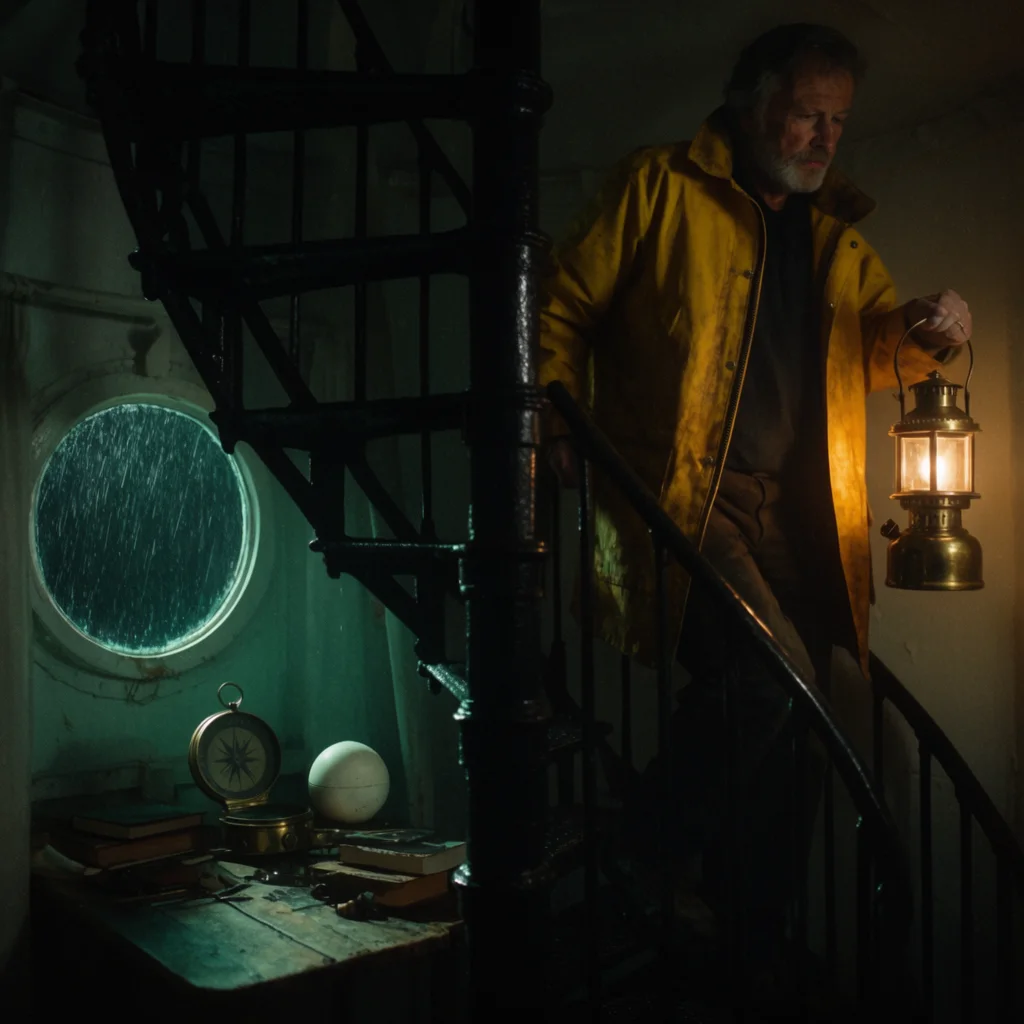
- Real outputs
- Official sources
- Free to start
- No watermark
Updated by the Kenerate AI team




Made with Kenerate
On this page
What is Krea 2?

What is Krea 2?
Krea 2 is Krea's own text-to-image model, announced on 12 May 2026 as its first foundation model built from scratch and tuned for aesthetics. Krea's docs describe Large for photorealism and the richest output, Medium for illustration, anime and painting, and Turbo for fast, low-cost drafts. Kenerate AI runs all four in the browser: Large (18 credits), Medium (9), Medium Turbo (4.5) and Turbo (3.6).
Key facts
- Maker
- Krea
- Announced
- 12 May 2026
- Versions on Kenerate
- Large · Medium · Medium Turbo · Turbo
- Creativity
- Raw · low · medium · high (Large, Medium Turbo)
- Style references
- Up to 10 (Large, Medium Turbo)
- Turbo output
- 1K or 2K · 15 ratios
- Open weights
- Krea 2 RAW · Krea 2 Turbo
- Free plan
- No
Gallery
Krea 2 examples
Real outputs made on Kenerate. Open any image to copy its prompt and run it yourself.
Same prompt, four versions
Photo test: the lighthouse keeper
A moody film still. Same prompt, square, default creativity, one try on each version.
PromptMoody film still of a lighthouse keeper in his 60s with a grey beard and a yellow oilskin coat climbing a cast-iron spiral staircase inside a lighthouse at night, a brass oil lantern in his hand, rain streaking the small round window, 35mm film grain, teal and amber palette
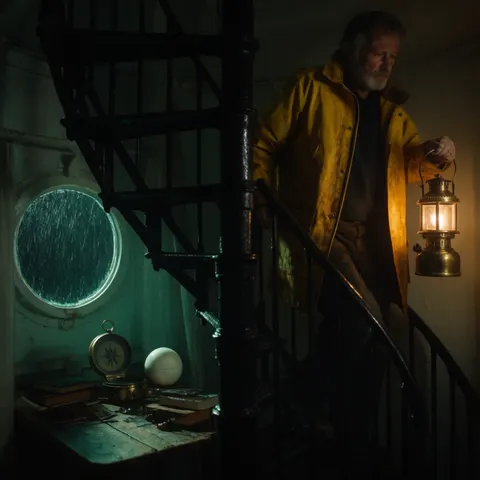 Krea 2 LargeDeepest teal and amber; walked him down the stairs and added a desk
 Krea 2 MediumBeside the stair, not on it; added a beret
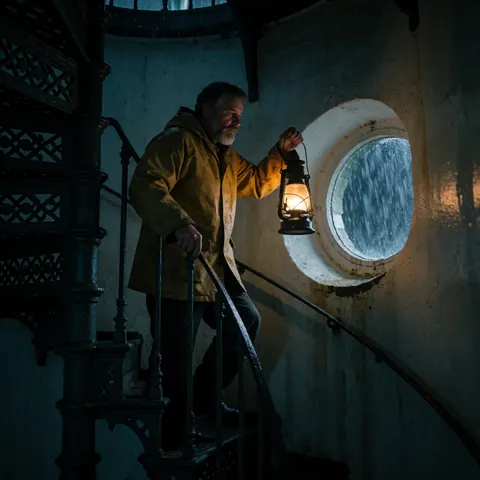 Krea 2 Medium TurboThe only one actually on the stairs; dark hair, grey beard
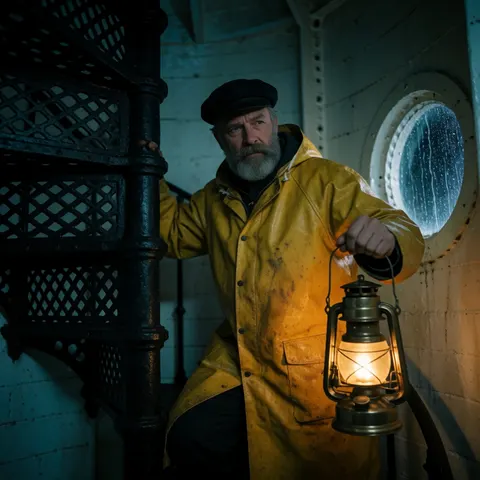 Krea 2 TurboAlmost the same frame as Medium
Same prompt, four versions
Illustration test: the snowy bookshop
Gouache storybook art, the kind Krea says Medium is for.
PromptGouache storybook illustration of a small mountain bookshop at night in winter, warm yellow light in the windows, thick snow on the roof, a red fox asleep on the doorstep, pine trees and distant peaks, muted blues and warm oranges, visible paper texture
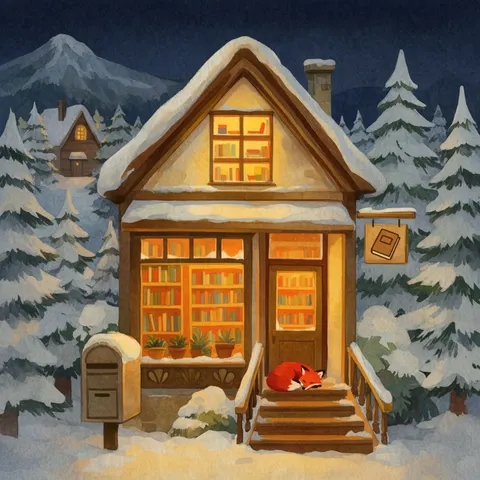 Krea 2 LargeCleanest storybook finish; fox on the steps as asked
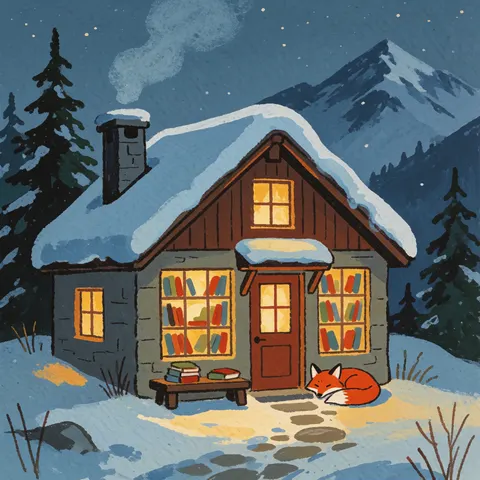 Krea 2 MediumMost like real gouache, with visible brushwork
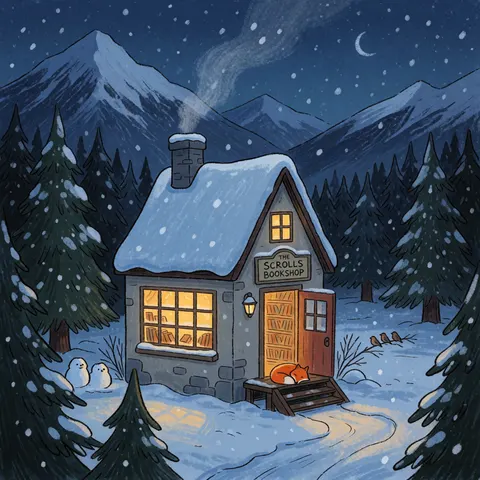 Krea 2 Medium TurboInk-and-crayon look; invented a shop sign and snowmen
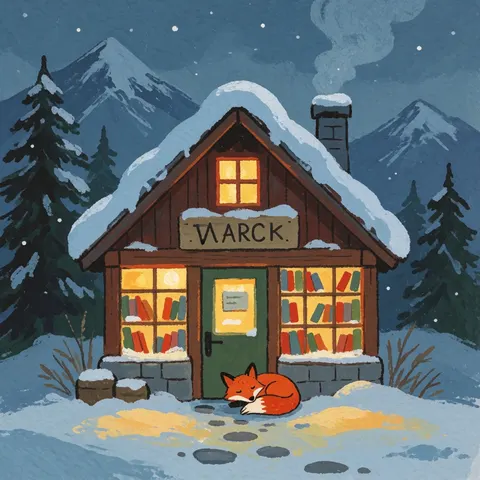 Krea 2 TurboMedium's layout again, but a garbled sign
Same prompt, four versions
Text test: the Lake Como poster
Two short words in quotes. All four spelled LAKE COMO and ITALIA right.
PromptVintage travel poster with the words "LAKE COMO" across the top in bold art deco letters and "ITALIA" in small letters at the bottom, a wooden motorboat crossing deep blue water below green hills and pastel lakeside villas, flat screen-print colours, no other text
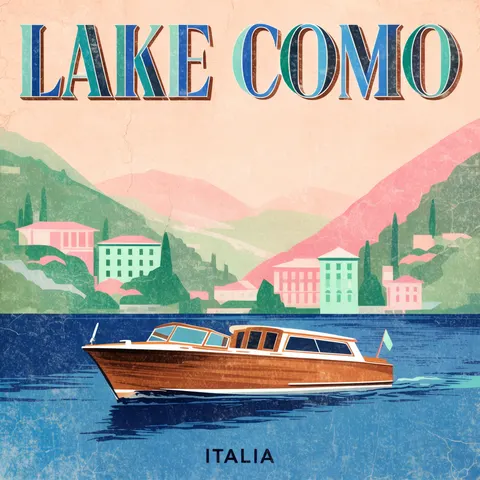 Krea 2 LargeTwo-tone deco letters, aged paper
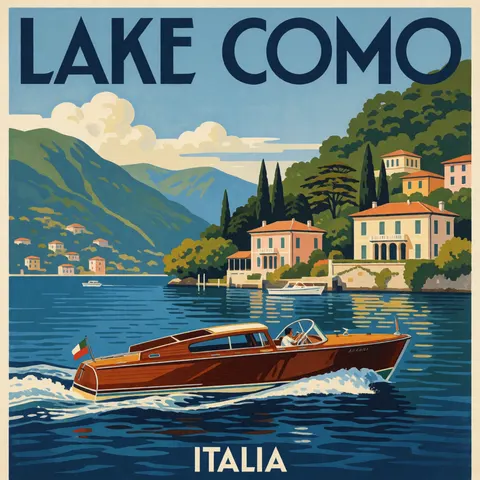 Krea 2 MediumPainted, not flat; tiny unreadable name on the hull
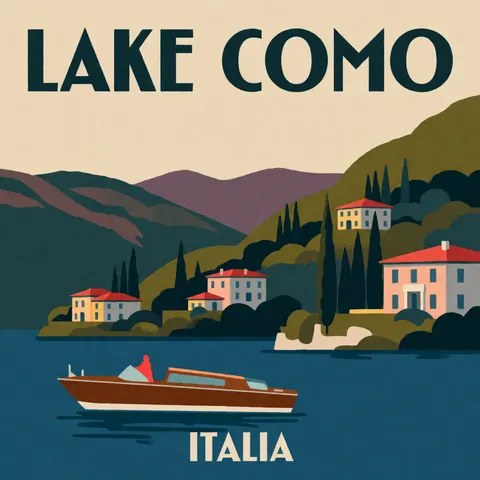 Krea 2 Medium TurboThe truest flat screen-print
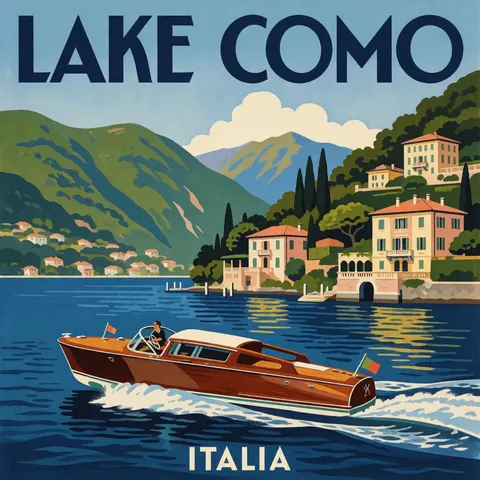 Krea 2 TurboNear-copy of Medium's layout
Models
Krea 2 on Kenerate
Every version in the generator, and what each is good at.
Krea
Krea 2 Large
- Reference images
- Up to 10 style refs
- Output
- 8 ratios, 1K
Open Krea 2 LargeBest for
Richest light and texture; creativity dial
Krea
Krea 2 Medium
- Reference images
- Text only
- Output
- 5 ratios, PNG or JPG
Open Krea 2 MediumBest for
Painterly illustration
Krea
Krea 2 Medium Turbo
- Reference images
- Up to 10 style refs
- Output
- 8 ratios, 1K
Open Krea 2 Medium TurboBest for
Cheap style-reference work; creativity dial
Krea
Krea 2 Turbo
- Reference images
- 1 image + strength
- Output
- 15 ratios, 1K or 2K
Open Krea 2 TurboBest for
Cheapest; 2K and image remix
From our tests
Strengths and limits
Good at
- Mood and light: the lighthouse keeper came out with real film-still colour on every version, and Large added the most depth.
- Short text holds: all four versions spelled LAKE COMO and ITALIA right on the first try.
- Cheap versions that look close: Turbo's frames were near-copies of Medium's on all three prompts, at well under half the cost.
- Style control without long prompts: a creativity dial and up to 10 style references on Large and Medium Turbo.
Limits
- It takes liberties: Large walked the keeper down the stairs and added a desk, Medium Turbo invented a shop name and snowmen.
- Text outside your quotes can come out garbled — Turbo put an unreadable sign on the bookshop.
- Medium takes no reference images and has only five ratios; Turbo takes one image, not a style set.
- Not on the free plan, and no long-text layouts: for menus, infographics or dense posters use GPT Image 2.6.
How to
How to use Krea 2 on Kenerate
Step 1
Pick a version
Open /app/image and choose Krea 2 Large, Medium, Medium Turbo or Turbo (the button on this page selects Large). It needs a one-time credit pack.
Step 2
Describe the mood
Write like a cinematographer or illustrator: medium, light, lens or film stock, palette. Put any words that must appear in quotes.
Step 3
Set creativity and ratio
On Large and Medium Turbo, pick raw, low, medium or high creativity; choose a ratio (Turbo also 1K or 2K).
Step 4
Add style references
Upload up to 10 images whose look you want on Large or Medium Turbo, or one image to remix on Turbo, then generate and download.
See it in the app

Open Image Studio and type what you want to see — subject, style, lighting and mood.


Watch the tour · 1:23
Prompts, styles, references, edit, Arena & chat
Chapters
FAQ
Krea 2 questions
9 questions

What is Krea 2?
Krea 2 is Krea's own text-to-image model, announced on 12 May 2026 as its first foundation image model built completely from scratch. Krea built it around aesthetics: style references, moodboards and a creativity setting. Its docs list Large (photorealism, the richest output), Medium (illustration, anime, painting) and Turbo (fast, low-cost iteration).
Link to this answerKrea 2 Large vs Medium vs Turbo — which should I use?
Use Large for final photo-style images: in our tests it gave the deepest light and texture. Use Medium for painterly illustration — it gave the most convincing gouache. Use Turbo or Medium Turbo to draft: Turbo's frames were near-copies of Medium's on all three of our prompts, and Medium Turbo was the only one to use the flat screen-print look we asked for on the poster.
Link to this answerHow much does Krea 2 cost on Kenerate?
Per image: Krea 2 Large 18 credits (19.5 with style references), Krea 2 Medium 9, Krea 2 Medium Turbo 4.5 (5.4 with references) and Krea 2 Turbo 3.6 at 1K or 7.2 at 2K. Credits come in one-time packs that never expire, and the cost is shown before you generate.
Link to this answerIs Krea 2 free?
Partly. Krea released Krea 2 RAW and Krea 2 Turbo as open checkpoints you can run on your own hardware under Krea's community or enterprise licence. On Kenerate, Krea 2 is not on the free plan: the 25 sign-up credits run the free models (Flux 2 and Qwen Image), and any one-time credit pack unlocks all four Krea 2 versions.
Link to this answerIs Krea 2 open source?
Two checkpoints are. Krea's open-source page lists Krea 2 RAW, the undistilled base for fine-tuning and LoRA training, and Krea 2 Turbo, an 8-step distilled model for fast inference, on GitHub and Hugging Face. It names a 12B dense DiT backbone with a Qwen Image VAE and a Qwen3-VL text encoder, and points to community and enterprise licensing.
Link to this answerWhat does the creativity setting do?
It sets how far Krea 2 expands your prompt. Krea's docs describe raw as no expansion, low as close to the literal prompt, medium as the balanced default and high as strong expansion. On Kenerate it is on Krea 2 Large and Medium Turbo; use raw or low when the model adds things you didn't ask for.
Link to this answerHow many style references can Krea 2 use?
On Kenerate, Krea 2 Large and Krea 2 Medium Turbo take up to 10 reference images; Krea 2 Turbo takes one image with a strength slider to remix it; Krea 2 Medium is text only. Krea's own docs list up to 4 style references in the krea.ai app, each with its own strength slider.
Link to this answerCan Krea 2 write text in images?
Short text, yes: all four versions spelled LAKE COMO and ITALIA correctly on our travel poster. Text you didn't ask for is less reliable — Turbo added a garbled shop sign to the bookshop. For long text such as menus or infographics, GPT Image 2.6 is the better pick on Kenerate.
Link to this answerCan I use Krea 2 without a Krea subscription?
Yes. Kenerate AI runs Krea 2 Large, Medium, Medium Turbo and Turbo in the browser on one-time credits: sign in, pick the version in /app/image and pay per image. There is no Krea account, API key or monthly plan involved, and downloads have no watermark.
Link to this answerIn depth
Krea 2, in depth
Background, how to prompt it, and when to pick something else.
On this page
What Krea 2 is
Krea announced Krea 2 on 12 May 2026 as its first foundation image model built completely from scratch, made "to deeply understand aesthetics" [1][4]. Krea says it returns an image in 15 seconds or less [1], and its docs describe three tiers [3]:
- Large — photorealism, raw textures, motion blur, the richest output; slower.
- Medium — stable, general-purpose output for illustration, anime, painting and expressive styles.
- Turbo — fast, low-cost iteration on illustration and concepts.
- Open checkpoints — Krea 2 RAW for fine-tuning and LoRAs, Krea 2 Turbo (8-step distilled) for fast inference, on a 12B DiT [2].
What our three tests showed
We ran a photo prompt, an illustration prompt and a short-text poster through all four versions on Kenerate, square, default creativity, one try each. Large gave the richest light but rewrote the scene most (the keeper walks down the stairs, and a desk appears). Medium gave the most painterly gouache. Medium Turbo followed the brief most literally on the photo and was the only one to produce a truly flat screen-print poster.
The surprise was Turbo: on all three prompts its framing was almost identical to Medium's — the same beret, the same cabin, the same boat — at 3.6 credits against 9. It slipped on unrequested text, though, painting a garbled sign over the bookshop door.
Which version to run
Draft on Turbo (3.6 credits at 1K) or Medium Turbo (4.5), then re-run the keeper on Large (18) for photo work or Medium (9) for illustration. If you need a look to hold across a series, use Large or Medium Turbo with a set of style references and keep creativity at low or raw so the model sticks to your prompt. Turbo is also the one to pick for 2K output (7.2 credits) or for remixing a single image with the strength slider.
By the Kenerate AI teamLast updated and reviewed
We run these models in the Kenerate generator. Model facts come from the makers' own pages; specs and limits were checked against our code; the examples are our own outputs.
Sources: Krea 2 — Krea · Krea 2 open source — Krea · Krea 2 — Krea docs (versions, creativity, style references) · Krea 2 image model — Krea blog
