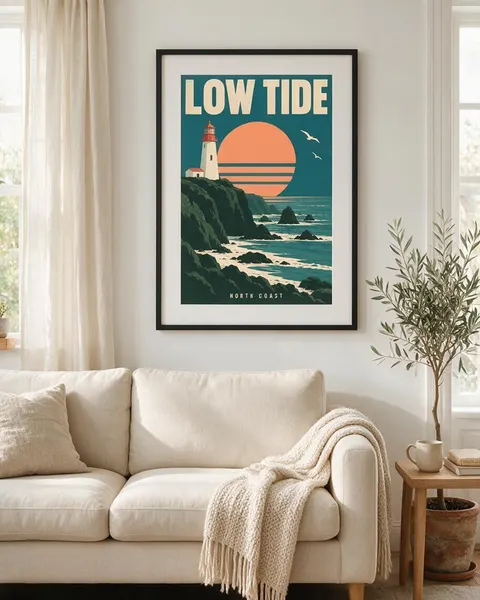
Framed · on a shelf · street wall · hanger
Poster Mockup Generator
Upload your poster or print, say where it should hang, and get a photorealistic poster mockup with your artwork in it — framed in a living room, leaning on a sideboard, pasted on a street wall or clipped to a hanger. No PSD templates or smart objects.
- Your artwork, kept the same
- Any frame and room
- Framed, street or hanger
- No watermark
Updated by the Kenerate AI team




On this page
Quick answer

How do I make a poster mockup?
To make a poster mockup, upload your poster to Kenerate's Image Studio, pick Seedream 5.0 Pro and describe the frame and the room: “in a thin black frame with a white mat above a linen sofa”. It returns a 915 × 1144 px (4:5) photo for 13.5 credits at 1K. In our test the “LOW TIDE” poster kept its lettering in all four scenes.
Key facts
- Input
- Your poster: PNG or JPG, the flat artwork
- Scenes tested
- Framed above a sofa · on a sideboard · street wall · hanger
- Model used
- Seedream 5.0 Pro edit
- Output
- 1K, 1.5K or 2K · 4:5 for shops and Instagram
- Design kept
- Lettering, colours and shapes in 4 of 4 tests
- Templates needed
- None
- Watermark
- None
Gallery
Poster mockups from one design
Real Seedream 5.0 Pro edits, one try each. Every poster mockup started from the same flat “LOW TIDE” travel poster we made for this page.
Before / after
From flat poster to poster mockup
The poster file on one side, the mockup on the other. Drag the slider and check the lettering, the colours and the shapes.
Same prompt
Same prompt, two models
The poster, then the same framed-above-a-sofa prompt run on Seedream 5.0 Pro and on GPT Image 2.5 Sunburst.
PromptPhotorealistic poster mockup: this exact poster printed and hung in a thin black wooden frame with a white mat, on a warm white wall above a beige linen sofa in a bright Scandinavian living room, a potted olive tree to the side, soft afternoon daylight from a window on the left, straight-on view, the frame centered in the upper half of the image. The poster must match the image exactly: same colours, same lighthouse, sun with stripes, seagulls and cliffs, the title "LOW TIDE" and the line "NORTH COAST" spelled exactly as in the image. Do not add any other text or logos.
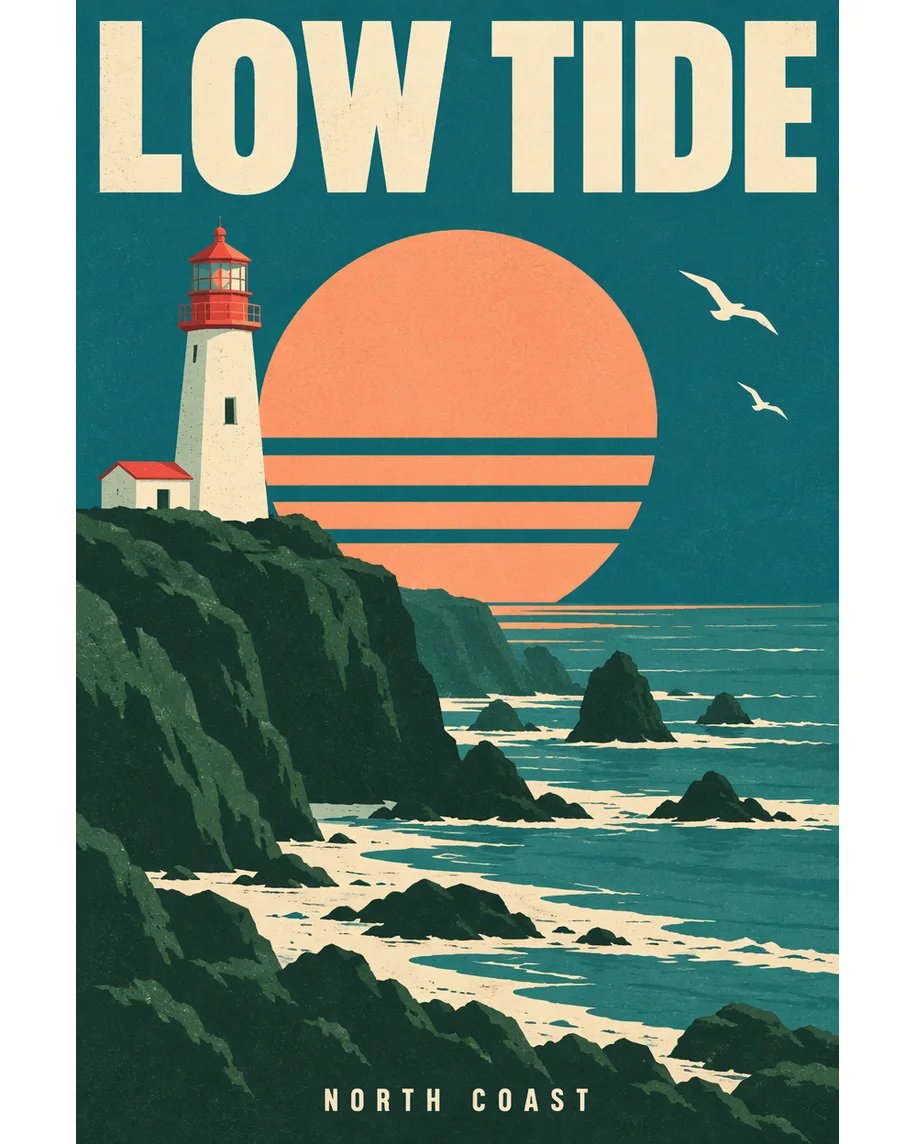 DesignInput · GPT Image 2.5 Sunburst
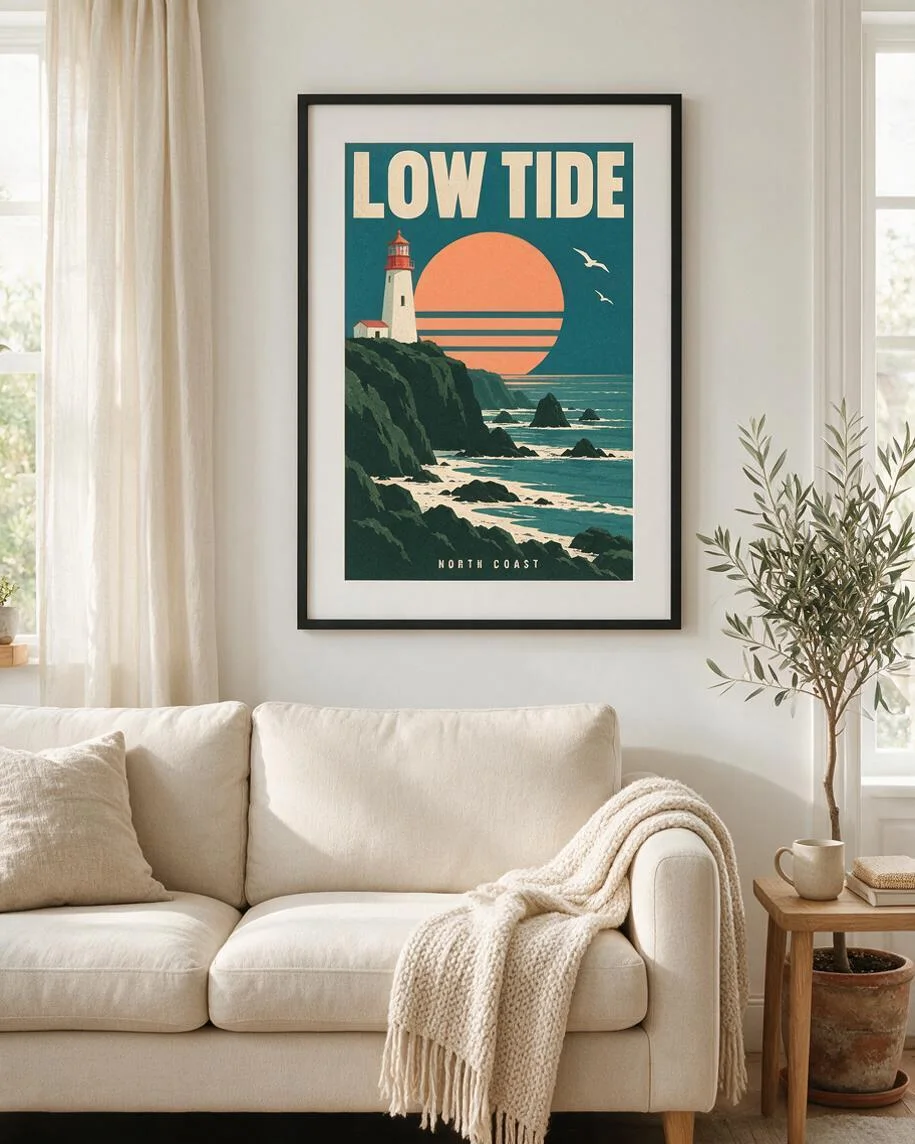 Seedream 5.0 ProWide white mat, plain room
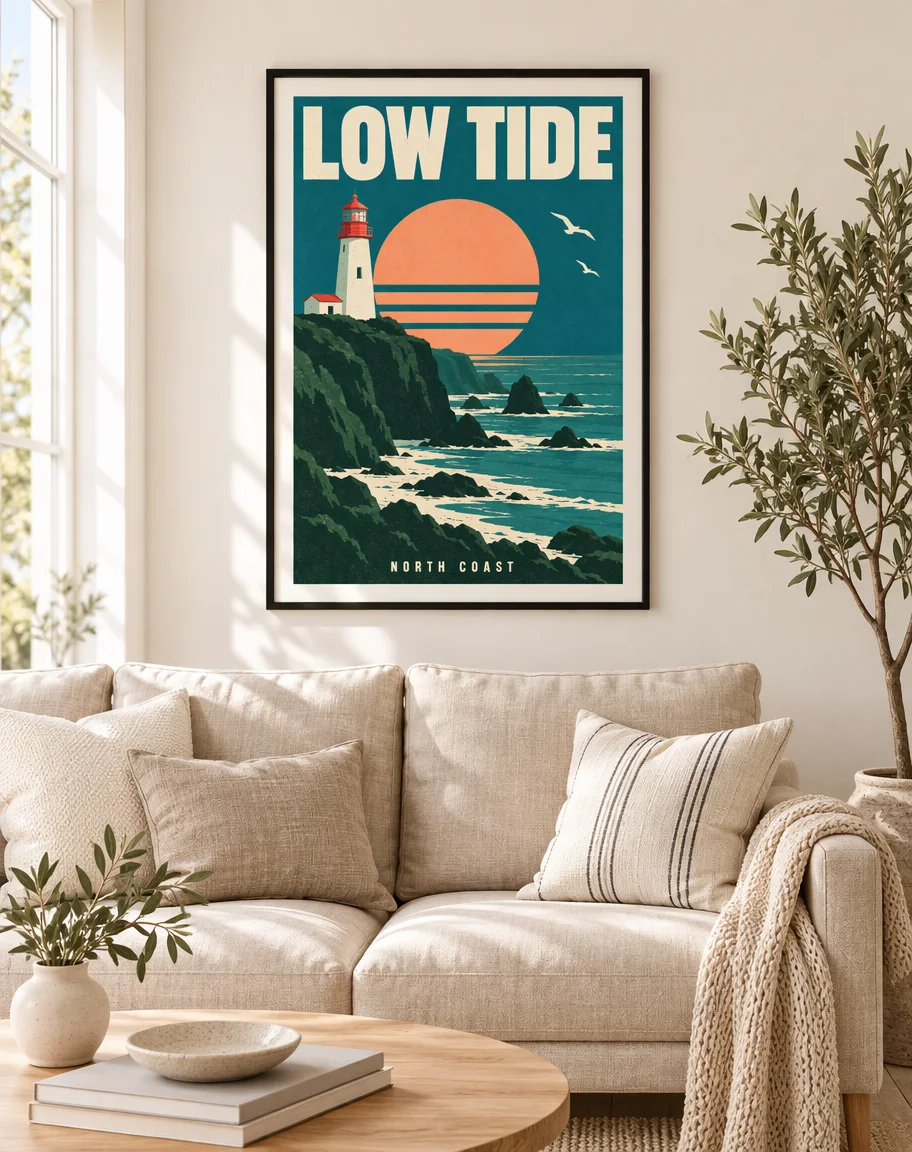 GPT Image 2.5 SunburstThin mat, more styled room
How to
How to use the poster mockup generator
- Time needed
- Steps
- 4 steps
Step 1
Open Image Studio
Press “Make a poster mockup”: Image Studio opens with Seedream 5.0 Pro selected. Sign in with Google, GitHub or Discord.
Step 2
Upload your poster
Add the flat poster file as the reference image: a PNG or JPG of the whole artwork, edge to edge.
Step 3
Describe the frame and the room
Frame and mat, the wall and furniture, the light and the angle, or a street wall or a hanger. Pick 4:5 for product pages.
Step 4
Check and download
Compare the poster with your file, letter by letter, then download. No watermark.
See it in the app

Open Image Studio and type what you want to see — subject, style, lighting and mood.


Watch the tour · 1:23
Prompts, styles, references, edit, Arena & chat
Chapters
Tips
Poster mockups that keep your artwork right
What made the difference in our tests.
Upload the flat artwork, not a photo of a printed poster: the model copies the glare and wrinkles it sees.
Name the frame: material, colour and mat (“thin black frame with a white mat”, “natural oak, no mat”).
Name the room and where the poster sits in it (“above a beige linen sofa, centred in the upper half”).
Add “the title … spelled exactly as in the image” and “do not add any other text or logos”.
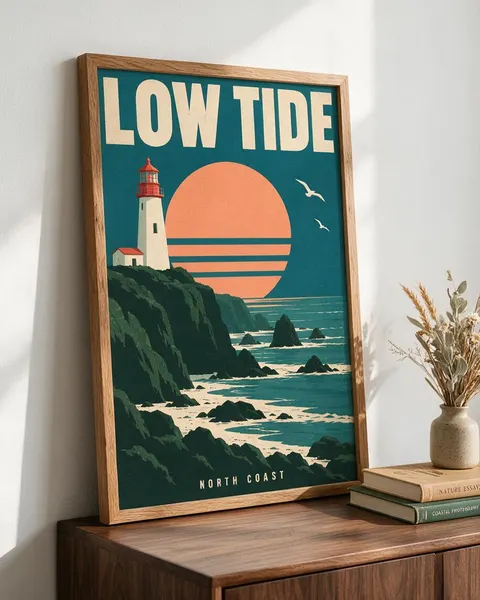
Props can get lettering of their own, such as titles on books. Ask for plain spines or leave the books out.
Pick 4:5 for shop listings and Instagram, 16:9 for a wide room shot with space around the frame.
Zoom in on small text such as a subtitle or a date before you list the print: it is the first thing to slip.
Models
Which model is best for poster mockups?
What each model is good at. Open any one straight in the generator.

ByteDance
Seedream 5.0 Pro
- Reference images
- Up to 10
- Output
- 1K–2K
Open Seedream 5.0 ProBest for
Made every mockup in the gallery: calm rooms, art kept whole

OpenAI
GPT Image 2.5 Sunburst
- Reference images
- Up to 16
- Output
- 1K–4K
Open GPT Image 2.5 SunburstBest for
Crisp lettering; styles the room more
Google
Nano Banana 2.1
- Free plan

Alibaba
Qwen Image 3.0
- Reference images
- Up to 3
- Output
- 1K · 2K
Open Qwen Image 3.0Best for
Free plan · quick drafts
FAQ
Poster Mockup Generator questions
8 questions

How do I make a poster mockup?
Upload your poster in Kenerate's Image Studio, pick Seedream 5.0 Pro and describe the frame and the room, for example “in a thin black frame with a white mat on a warm white wall above a beige linen sofa”. The four mockups in the gallery were made that way from one poster, one try each, and their full prompts are shown.
Link to this answerIs there a free poster mockup generator?
You can start free. A new Kenerate account gets 25 credits, enough for one Seedream 5.0 Pro mockup at 1K (13.5 credits) or two GPT Image 2.5 Sunburst mockups (11.7 credits each with one poster), and Qwen Image 3.0 is on the free plan at 9.9 credits with one reference. After that, credits come in one-time packs with no subscription.
Link to this answerWill the AI change my poster?
It can, so check every result. In our test Seedream 5.0 Pro kept “LOW TIDE”, “NORTH COAST”, the lighthouse, the striped sun and both seagulls in all four scenes. What it added were things around the poster, such as titles on two books on the sideboard. Ask for “no other text” and plain props.
Link to this answerCan I make a framed poster mockup?
Yes. Name the frame and the mat, for example “thin black wooden frame with a white mat” or “natural oak frame, no mat”, and where it hangs. Seedream 5.0 Pro gave the wider mat in our test; GPT Image 2.5 Sunburst made a thinner one from the same prompt.
Link to this answerWhat size should a poster mockup be?
Use 4:5 for Etsy, Shopify and Instagram listings and 16:9 for a banner or a wide room shot. Seedream 5.0 Pro outputs 1K, 1.5K or 2K; our 4:5 mockups came out at 915 × 1144 pixels at 1K. For a bigger file, pick 2K (27 credits) or upscale the result.
Link to this answerWhat ratio should the poster artwork be?
Make the artwork in the ratio you will print. 24 × 36 in and 12 × 18 in are 2:3, 18 × 24 in is 3:4, and the A sizes (A3, A2) are about 1:1.41. Our poster was made at 2:3 and the mockups kept that shape inside the frame.
Link to this answerCan I use the mockup to sell prints?
Yes, as a preview of the product. Send your original artwork file to your printer or print-on-demand service, not the mockup, and check the colours on a test print. Kenerate puts no watermark on downloads.
Link to this answerCan I show the poster on a street wall or in a shop?
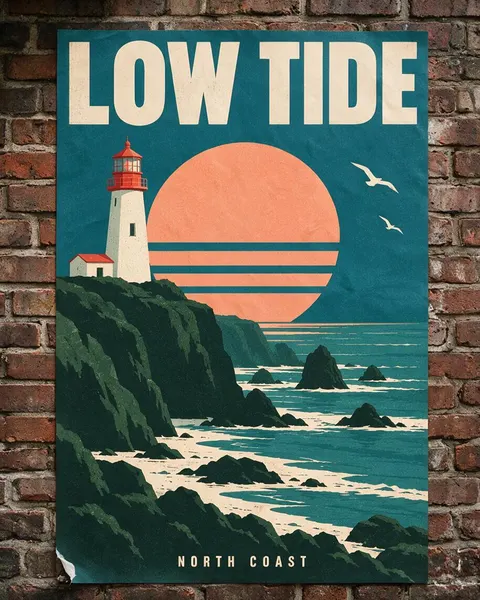
Yes. Describe the place: “pasted on a weathered red brick wall in a city alley, a peeling corner” for a street poster, or a shop window, a bus shelter or a café wall. Add “no graffiti or other text” so the wall stays clean around your design.
Link to this answerIn depth
Poster Mockup Generator, explained
What works, what to avoid, and how to pick a model.
Poster mockup prompts to copy
Upload your poster, then pick one line and add “the poster must match the image exactly, the title … spelled exactly as in the image, no other text or logos”:
- Framed: a thin black frame with a white mat above a beige linen sofa, warm white wall, olive tree to the side, afternoon light.
- Shelf: a natural oak frame leaning on a walnut sideboard, two books with plain spines and a vase of dried grasses, three-quarter angle.
- Street: printed on thin paper and pasted on a weathered red brick wall, a peeling corner, overcast light.
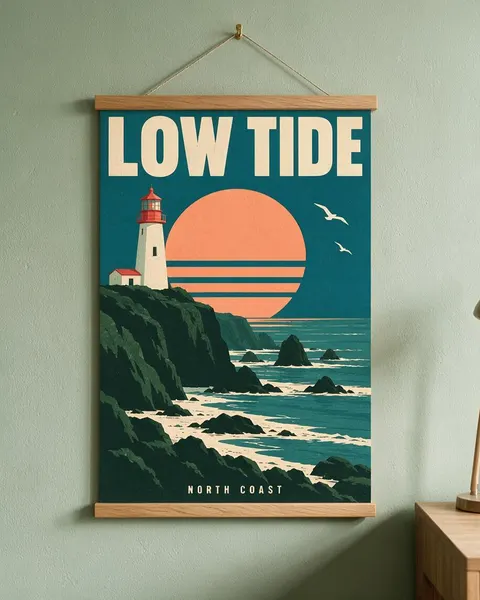
- Hanger: between two oak hanger strips on a cord and brass hook, pale sage green wall, desk corner.
- Gallery wall: one of three frames of different sizes above a dining table, the poster in the largest frame.
- Bedroom: a large white frame above a bed with linen sheets, morning light from the side.
- Shop window: taped inside a café window, seen from the street, soft reflections on the glass.
Mockup template or AI poster mockup?
A template (a PSD with a smart object) pastes your poster into one fixed photo: it keeps the artwork pixel for pixel, but every shop using that template shows the same sofa and the same wall.
An AI poster mockup generator draws a new photo each time, so you choose the frame, the room and the light. The trade-off is that the poster is redrawn, not pasted, which is why the before/after check above matters.
By the Kenerate AI teamLast updated and reviewed
We build and run Kenerate Image Studio. Every mockup here is a real output of the model named under it (one try each, 14 November 2026), made from a poster we generated for this page; models and limits were checked against the app's code.
Sources: Kenerate Image Studio