ByteDance Seedream · new vs previous
Seedream 5.5 vs Seedream 5.0 Pro: what changed, tested
Seedream 5.5 replaced 5.0 Pro as ByteDance's newest image model on 9 November 2026. We ran the same five prompts on both — a poster, a menu, an infographic, a portrait and a product shot — and lined up what's new, what each costs and when 5.0 is still the right pick.
- Seedream 5.5
- 9 Nov 2026 · realism with less gloss, dense small text, pixel-level edit preservation over up to 100 rounds, native RGBA · 1K / 1.5K / 2K, 15 ratios, 10 references
- Seedream 5.0 Pro
- 8 Jul 2026 · information-dense layouts, point / lasso / box / sketch editing, layer separation into 10+ layers · 1K / 1.5K / 2K, 15 ratios, 10 references
- Other 5.0 versions
- 5.0 Lite — 2K to 4K at one price; 5.0 Flash — fast drafts at one flat price
- Real outputs
- Official sources
- Free to start
- No watermark
Updated by the Kenerate AI team




On this page
Quick answer

Should you switch from Seedream 5.0 Pro to 5.5?
Yes, for most work. Seedream 5.5 matched or beat 5.0 Pro in all five of our same-prompt tests (three wins, two ties), adds native transparent PNGs and edits that keep unedited areas pixel-identical across up to 100 rounds, and costs 6 credits at 1K on Kenerate against 13.5. Keep 5.0 Pro for layer separation, and use Seedream 5.0 Lite when you need 4K. ByteDance reports 5.5 ahead of 5.0 Pro on quality and usability in all six use cases it tested.
Key facts
- Released
- 9 Nov 2026 · 8 Jul 2026
- Transparent PNG
- Yes · No
- Multi-round edits
- Pixel-level, up to 100 rounds · Point, lasso, box
- Layer separation
- No · Yes
- Size on Kenerate
- 1K–2K · 1K–2K
- Our 5 tests
- 5.5 3 · 5.0 Pro 0 · 2 ties
Side by side
Seedream 5.5 vs Seedream 5.0 Pro at a glance
Model facts from ByteDance's two announcements; Kenerate settings from the app's model list.
| Seedream 5.5 | Seedream 5.0 Pro | |
|---|---|---|
| Released | 9 Nov 2026 | 8 Jul 2026 |
| Versions | One (a Pro version is planned) | Pro · Lite · Flash |
| Reference images | Up to 10 | Up to 10 |
| Aspect ratios on Kenerate | 15, from 1:3 to 3:1 | 15, from 1:3 to 3:1 |
| Output size | 1K, 1.5K, 2K | Pro 1K–2K · Lite 2K–4K |
| Layer separation | No | Yes: 10+ layers |
| Transparent PNG | Yes: Native alpha | No |
| Skin and light | Less gloss and overexposure | Glossier, warmer in our portrait |
| Multi-round edits | Unedited areas kept, up to 100 rounds | Point, lasso, box and sketch editing |
Our tests
Five prompts, one try each
Who got closer to the prompt in each test. Every pair is shown below with the full prompt.
| Test | Winner | Why |
|---|---|---|
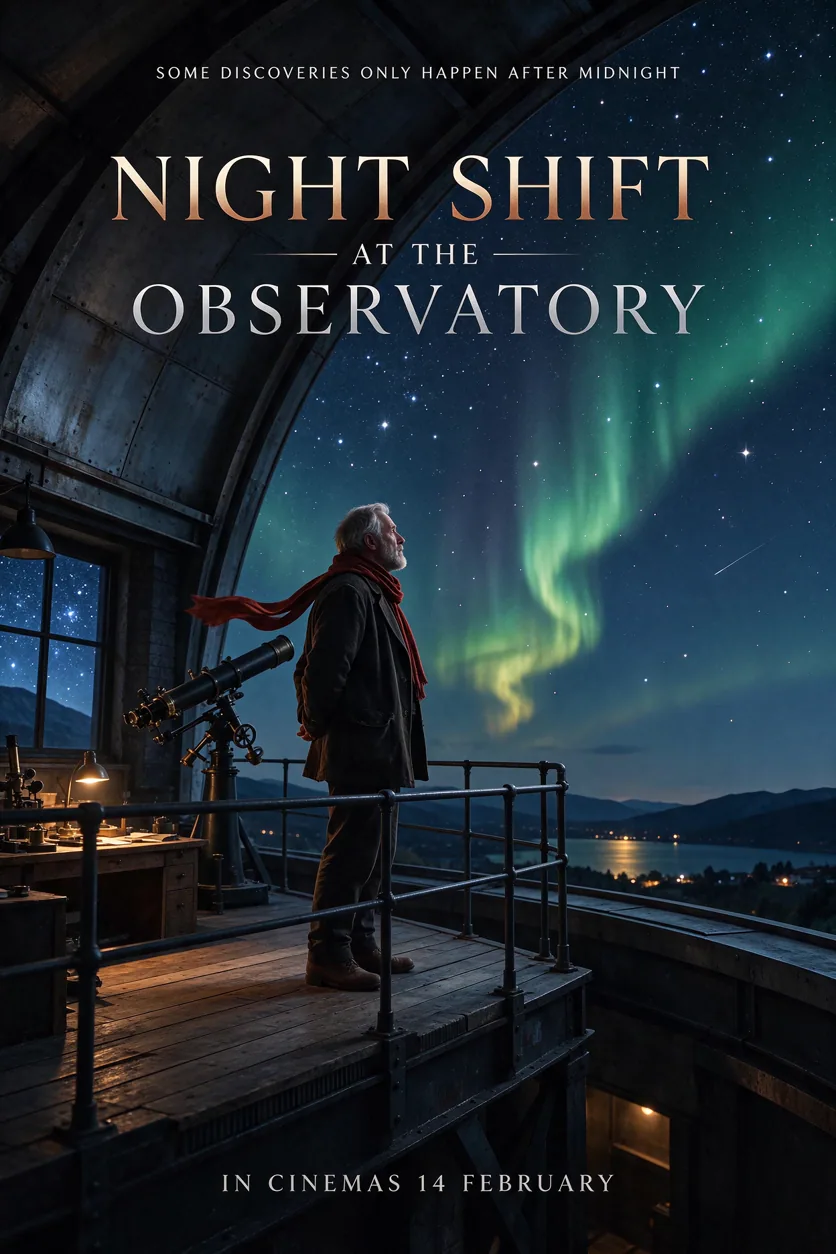
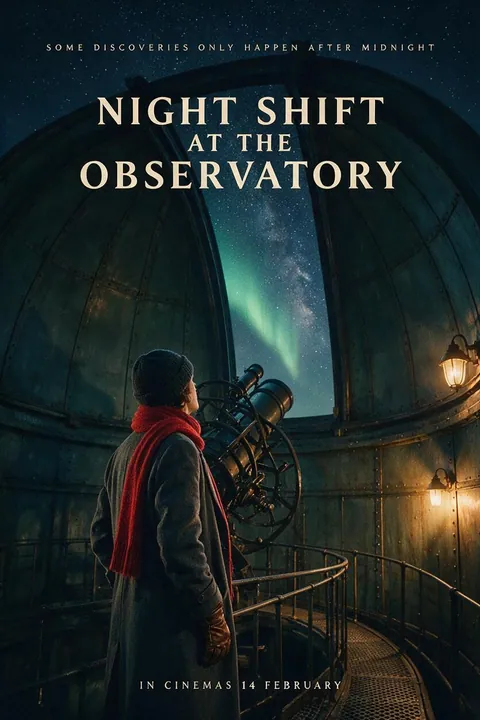
| Movie poster | Tie | Every line right on both, no extra text. 5.0 Pro went darker and moodier inside the dome; 5.5 opened the view to the aurora and a lake town and made the title bigger. |
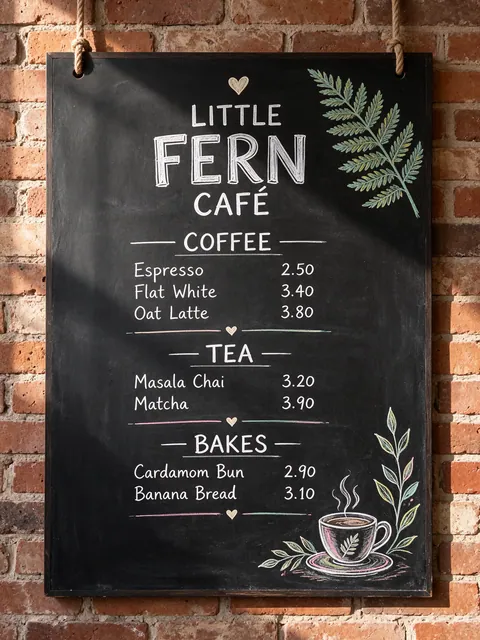
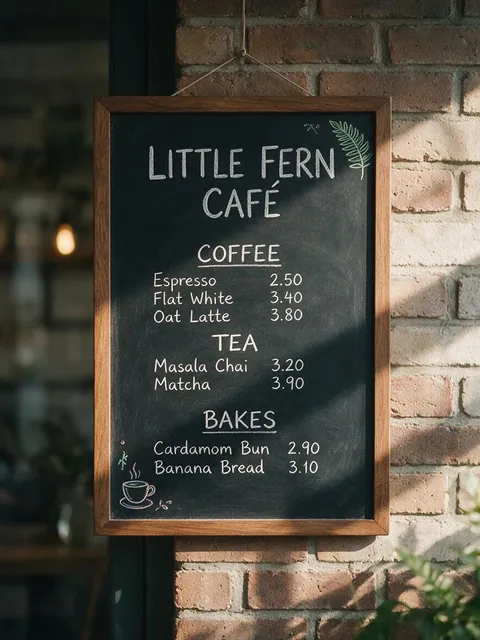
| Chalkboard menu | Seedream 5.5 | Both spelled every item and price right and kept them aligned. 5.5 used the white and pastel chalk we asked for, with dividers and both doodles; 5.0 Pro wrote almost everything in plain white. |
| Infographic | Tie | All five labels right on both. 5.0 Pro stayed plainer and tidier; 5.5 painted richer icons but added coffee branches and hills we didn't ask for. |
| Street portrait | Seedream 5.5 | Both are convincing. 5.5 framed a closer portrait with softer, more natural skin, as ByteDance promised; 5.0 Pro pulled back and warmed everything up to a more saturated, glossier look. |
| Perfume product shot | Seedream 5.5 | Both lettered AURELIA and EAU DE PARFUM correctly. 5.5 kept the faceted glass and amber backlight from the prompt; 5.0 Pro made a smooth rectangular bottle on a pale backdrop. |
Seedream 5.5 at 1K; Seedream 5.0 Pro at 1K, same day. No retries, no retouching.
Same prompt
Movie poster: Seedream 5.5 vs Seedream 5.0 Pro
A tie. Every line right on both, no extra text. 5.0 Pro went darker and moodier inside the dome; 5.5 opened the view to the aurora and a lake town and made the title bigger.
PromptCinematic movie poster for a quiet sci-fi drama titled "NIGHT SHIFT AT THE OBSERVATORY". A lone astronomer in a red scarf stands on the catwalk of an old domed observatory, the slit open to a sky full of stars and a faint green aurora. Tagline at the top in small spaced caps: "SOME DISCOVERIES ONLY HAPPEN AFTER MIDNIGHT". Bottom billing block in small condensed type: "IN CINEMAS 14 FEBRUARY". Deep navy and teal palette with warm lamp light, film grain. Spell every word exactly as written, no other text.
Seedream 5.5November 2026 · 1K
Seedream 5.0 ProJuly 2026 · 1K
Same prompt
Chalkboard menu: Seedream 5.5 vs Seedream 5.0 Pro
Seedream 5.5 wins. Both spelled every item and price right and kept them aligned. 5.5 used the white and pastel chalk we asked for, with dividers and both doodles; 5.0 Pro wrote almost everything in plain white.
PromptChalkboard menu for a small café called "LITTLE FERN CAFÉ", hand-lettered in white and pastel chalk, hanging on a brick wall. Sections and items exactly: "COFFEE" — "Espresso 2.50", "Flat White 3.40", "Oat Latte 3.80"; "TEA" — "Masala Chai 3.20", "Matcha 3.90"; "BAKES" — "Cardamom Bun 2.90", "Banana Bread 3.10". Small doodles of a fern leaf and a coffee cup. Photographed straight on, soft morning light. Spell every word and price exactly as written, no other text.
Seedream 5.5November 2026 · 1K
Seedream 5.0 ProJuly 2026 · 1K
Same prompt
Infographic: Seedream 5.5 vs Seedream 5.0 Pro
A tie. All five labels right on both. 5.0 Pro stayed plainer and tidier; 5.5 painted richer icons but added coffee branches and hills we didn't ask for.
PromptClean editorial infographic titled "HOW A COFFEE BEAN BECOMES YOUR CUP". Five numbered steps in a vertical flow, each with a flat illustrated icon and a short label exactly: "1 Harvest", "2 Wash & Dry", "3 Roast", "4 Grind", "5 Brew". Warm cream background, coffee-brown and terracotta palette, rounded sans-serif type, thin connecting arrows between steps. Spell every word exactly as written, no other text.
Seedream 5.5November 2026 · 1K
Seedream 5.0 ProJuly 2026 · 1K
Same prompt
Street portrait: Seedream 5.5 vs Seedream 5.0 Pro
Seedream 5.5 wins. Both are convincing. 5.5 framed a closer portrait with softer, more natural skin, as ByteDance promised; 5.0 Pro pulled back and warmed everything up to a more saturated, glossier look.
PromptCandid street portrait photograph of a fictional flower seller in her 50s at a morning market in Mumbai, warm smile, silver nose stud, marigold-orange cotton saree, strings of jasmine and marigold garlands hanging around her stall. Golden-hour side light, 85mm lens, shallow depth of field, natural skin texture and fine wrinkles, real fabric detail. Documentary photography, a real photograph.
Seedream 5.5November 2026 · 1K
Seedream 5.0 ProJuly 2026 · 1K
Same prompt
Perfume product shot: Seedream 5.5 vs Seedream 5.0 Pro
Seedream 5.5 wins. Both lettered AURELIA and EAU DE PARFUM correctly. 5.5 kept the faceted glass and amber backlight from the prompt; 5.0 Pro made a smooth rectangular bottle on a pale backdrop.
PromptLuxury product photograph of a faceted glass perfume bottle with a brushed gold cap, the word "AURELIA" etched on the glass in thin serif capitals and "EAU DE PARFUM" in small type below. The bottle stands on a wet black stone slab with a few drops of water, soft amber backlight, a sprig of orange blossom beside it, shallow depth of field, studio photography, 100mm macro lens. No other text.
Seedream 5.5November 2026 · 1K
Seedream 5.0 ProJuly 2026 · 1K
Models
Every version on Kenerate
Every Seedream in the image generator, and what each version is good at.
ByteDance
Seedream 5.5
- Reference images
- Up to 10
- Output
- 1K–2K
Open Seedream 5.5Best for
Newest: realism, small text, transparent PNG

ByteDance
Seedream 5.0 Pro
- Reference images
- Up to 10
- Output
- 1K–2K
Open Seedream 5.0 ProBest for
Layer separation, regional edits
ByteDance
Seedream 5.0 Lite
- Reference images
- Up to 10
- Output
- 2K–4K
Open Seedream 5.0 LiteBest for
4K wallpapers and prints
ByteDance
Seedream 5.0 Flash
- Reference images
- Up to 10
- Output
- 1K–2K
Open Seedream 5.0 FlashBest for
Fast drafts
Our take
Which to pick for what
Seedream 5.5 is the better default: as good or better on every prompt we tried, at less than half the price, with transparent output and steadier edits. 5.0 Pro and 5.0 Lite still cover layer separation and 4K.
Pick Seedream 5.5 for

- Closer to the prompt: the faceted bottle, the pastel chalk and the tight portrait all came out as written.
- Native transparent PNGs — 5.0 Pro needs a separate background-removal step.
- Edits that leave the rest of the image alone across many rounds.
- Less than half the price at 1K and 1.5K.
Pick Seedream 5.0 Pro for
- Layer separation into 10+ editable layers is a 5.0 Pro feature.
- 4K: use Seedream 5.0 Lite, which renders 2K to 4K.
- Plain, tidy layouts: 5.0 Pro added less decoration of its own in our infographic test.
- Very fast, cheap drafts at one flat price are what 5.0 Flash is for.
How to
How to compare Seedream 5.5 and Seedream 5.0 Pro on Kenerate
Step 1
Open the image generator
Go to /app/image. Every Seedream is in the model menu; they need a one-time credit pack.
Step 2
Run one prompt on Seedream 5.5
Pick Seedream 5.5, set the ratio and size, and generate.
Step 3
Switch to Seedream 5.0 Pro
Keep the same prompt and ratio, pick Seedream 5.0 Pro and generate again.
Step 4
Compare and keep the best
Check the details you asked for, then edit the winner with references.
See it in the app

Open Image Studio and type what you want to see — subject, style, lighting and mood.


Watch the tour · 1:23
Prompts, styles, references, edit, Arena & chat
Chapters
FAQ
Seedream 5.5 vs Seedream 5.0 questions
8 questions

What is the difference between Seedream 5.5 and 5.0?
Seedream 5.5 (9 November 2026) adds native transparent PNGs, edits that keep unedited areas pixel-identical across up to 100 rounds, more natural skin and light with less gloss, and better dense small text. Seedream 5.0 Pro (8 July 2026) has layer separation and point, lasso and box editing; 5.0 Lite reaches 4K.
Link to this answerIs Seedream 5.5 better than 5.0 Pro?
In our five same-prompt tests 5.5 won three (menu, portrait, product) and two were ties (poster, infographic); 5.0 Pro won none. ByteDance's own tests report higher quality and usability for 5.5 in all six use cases, with usability more than twice as high in film and television and office work.
Link to this answerIs Seedream 5.5 cheaper than 5.0 Pro?
Yes. On Kenerate 5.5 costs 6 credits at 1K or 1.5K and 10.5 at 2K; 5.0 Pro costs 13.5 and 27. 5.0 Lite is 10.5 at any size and 5.0 Flash 8.1.
Link to this answerShould I still use Seedream 5.0 Pro?
Use it when you need layer separation — splitting an image into editable layers — or when you prefer its plainer, tidier layouts. For everything else 5.5 is the better and cheaper default.
Link to this answerDoes Seedream 5.5 support 4K?
Not on Kenerate: 5.5 renders 1K, 1.5K or 2K. Seedream 5.0 Lite renders 2K to 4K, so use it for wallpapers and prints.
Link to this answerCan Seedream 5.0 make transparent backgrounds?
No. Transparent (RGBA) output is new in Seedream 5.5: turn on Transparent background in /app/image. With 5.0 you would remove the background in a second step.
Link to this answerIs there a Seedream 5.5 Pro or Lite?
Not yet. ByteDance says a Pro version of the 5.5 series will come later, with no date. Kenerate will add new versions when they are available.
Link to this answerDo my 5.0 prompts work on 5.5?
Yes. The settings are the same — 15 ratios, 1K to 2K and up to 10 references — so you can switch the model and rerun. Add "no other text" or "nothing else" if 5.5 adds props you don't want.
Link to this answerIn depth
Seedream 5.5 vs Seedream 5.0, in depth
Background, how to prompt it, and when to pick something else.
On this page
How we tested
Five prompts that each stress one skill — poster lettering, a long price list, an infographic, a documentary portrait and a product shot with etched text — ran once each on Seedream 5.5 and Seedream 5.0 Pro at 1K in Kenerate on 15 November 2026. No retries, no retouching. The full prompts are under each pair above.
What ByteDance changed
From ByteDance's 5.5 announcement [1]:
- Multi-round editing keeps unedited regions at the pixel level without colour shifts, for up to 100 rounds.
- Native RGBA output with full and partial transparency.
- More natural light, materials and skin, with less excessive gloss and overexposure.
- More accurate dense small text and complex characters.
- Higher quality and usability than 5.0 Pro across e-commerce, marketing, film and television, gaming, office work and fashion design.
What 5.0 Pro still does
5.0 Pro was built around design work: information-dense layouts, point, lasso, box and sketch editing, and splitting an image into 10+ layers [2]. Those tools are still useful, and 5.0 Lite remains the Seedream for 4K. On Kenerate all of them stay in the model menu next to 5.5.
By the Kenerate AI teamLast updated and reviewed
We run these models in the Kenerate generator. Model facts come from the makers' own pages; specs and limits were checked against our code; the examples are our own outputs.
Sources: Introducing Seedream 5.5 — ByteDance Seed · Introducing Seedream 5.0 Pro — ByteDance Seed

Run one prompt on both versions
One credit balance for every Seedream. No watermark.
Tried it? Tell us how it went