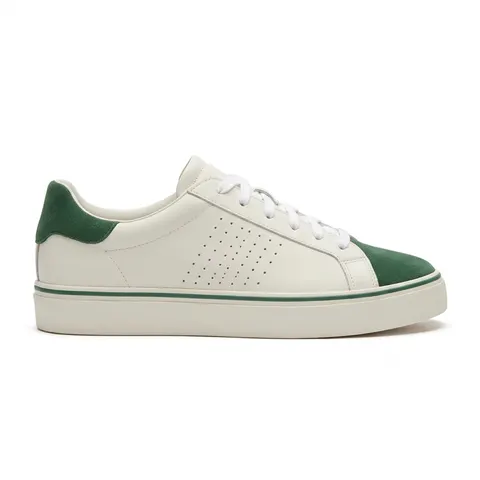
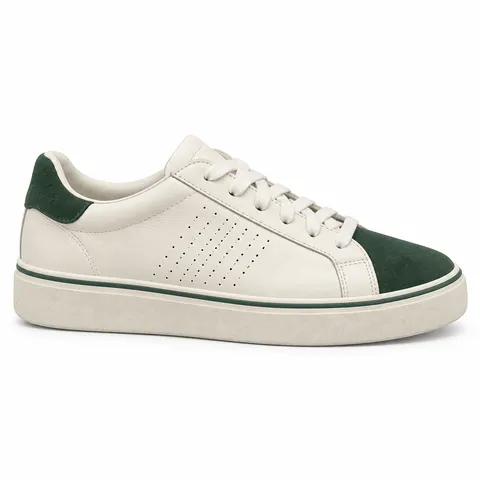
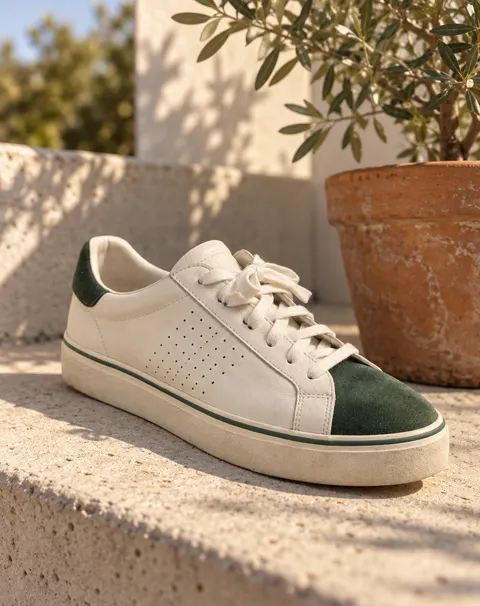
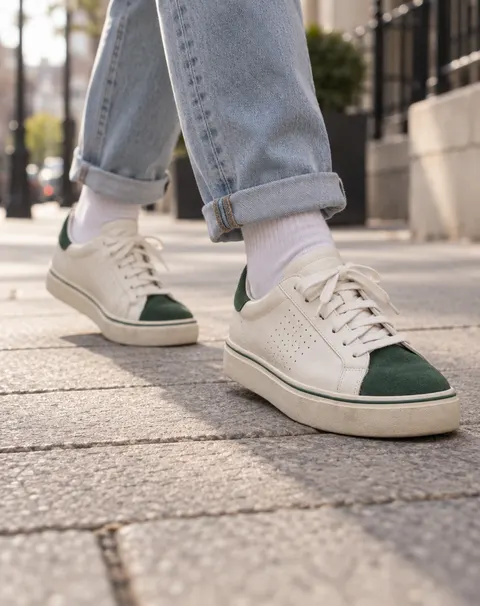
Sneakers · white packshot · side profile · lifestyle
Shoe Photography AI
Upload a phone photo of a shoe. The AI removes the carpet, the dust and the clutter and gives you a pure-white packshot in the classic side profile or a styled lifestyle shot, keeping the materials, colours, laces and sole.
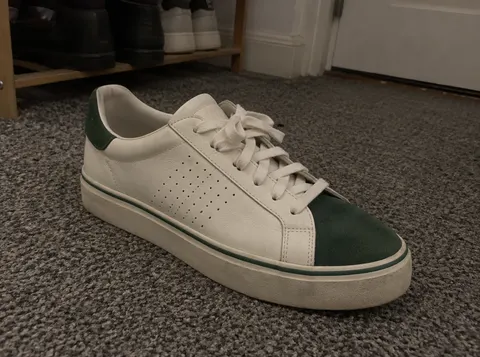
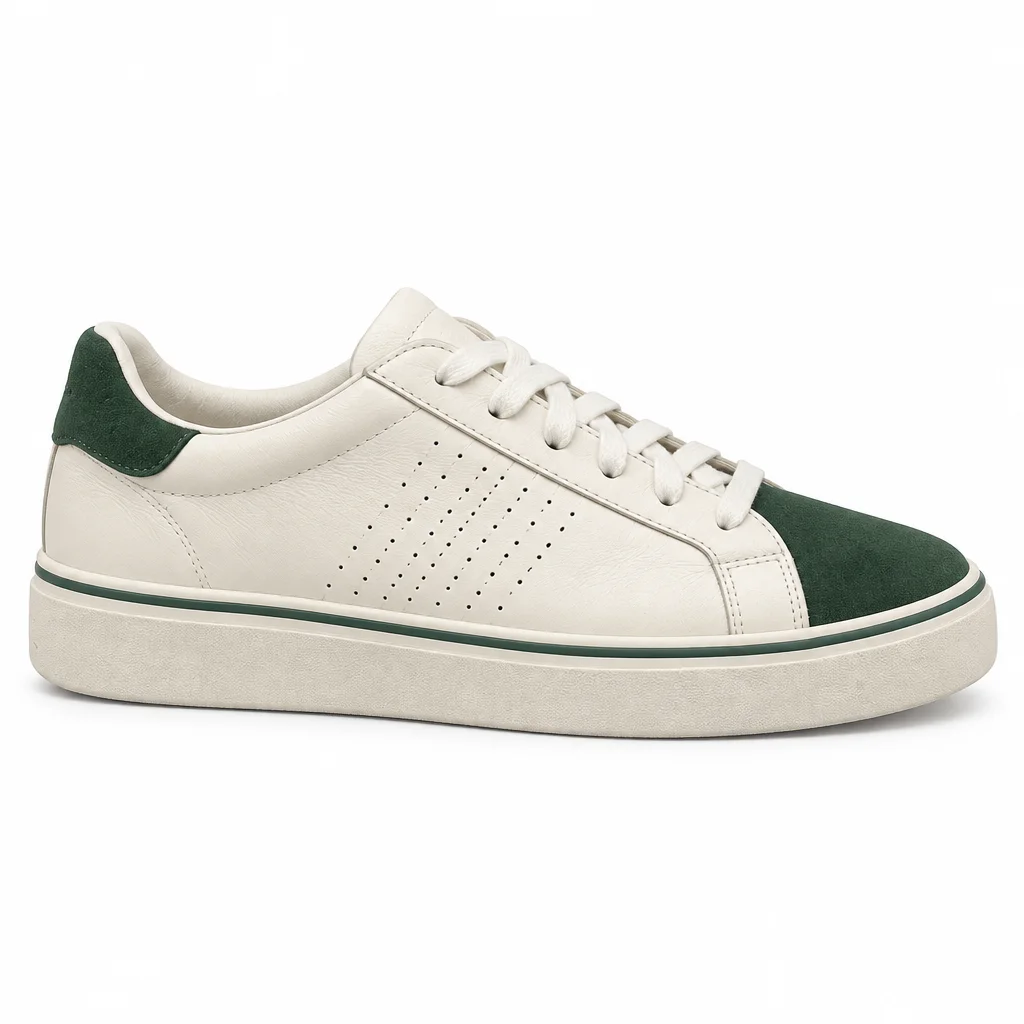
- Pure white background
- Side profile or lifestyle
- Materials, laces, sole kept
- No watermark
Updated by the Kenerate AI team




On this page
Quick answer

How do I make shoe product photos with AI?
Shoe photography AI turns a phone photo of a shoe into a clean product photo. On Kenerate, upload the photo with GPT Image 2.5 Sunburst (11.7 credits at 1K) and the packshot instruction: it removes the carpet and dust and returns a side profile on pure white (RGB 254). It kept our sneaker's suede toe, perforations and sole stripe; check colours.
Key facts
- Starts from
- A phone photo of one shoe, from the side you want
- Makes
- White side profile · lifestyle shot · on-foot shot
- Best model in our sneaker test
- GPT Image 2.5 Sunburst
- Background
- RGB 254 (Sunburst) · 255 (Nano Banana 2.1)
- Watch for
- Suede colour, perforations, the unseen side
- Shape
- 1:1 for shops · 4:5 for Instagram
- Watermark
- None
Before / after
Shoe photography AI: real before and after
One phone photo of a sneaker on a hallway carpet, turned into a white packshot, a lifestyle shot and an on-foot shot, one try each. Drag the slider to compare.
Gallery
The second model in our sneaker test
Nano Banana 2.1 on the same sneaker photo and prompt. Open it to copy the prompt.
Same prompt
Same sneaker, two models
The phone photo, then the same packshot prompt on GPT Image 2.5 Sunburst and on Nano Banana 2.1. Both gave a clean side profile; they changed different details.
PromptTurn this phone photo into a clean e-commerce shoe packshot of the sneaker only on a pure white seamless background (RGB 255,255,255): a straight side profile of the same outer side shown in the photo, toe pointing right, soft even studio light, a faint soft contact shadow under the sole, clean and dust-free, no carpet. Keep the sneaker exactly the same: the off-white smooth leather upper, the forest green suede toe cap and green suede heel tab, white flat laces, the diagonal rows of small perforations on the side panel, and the thick off-white rubber cupsole with one thin green stripe around it. Do not add logos, stripes or decoration. No text.
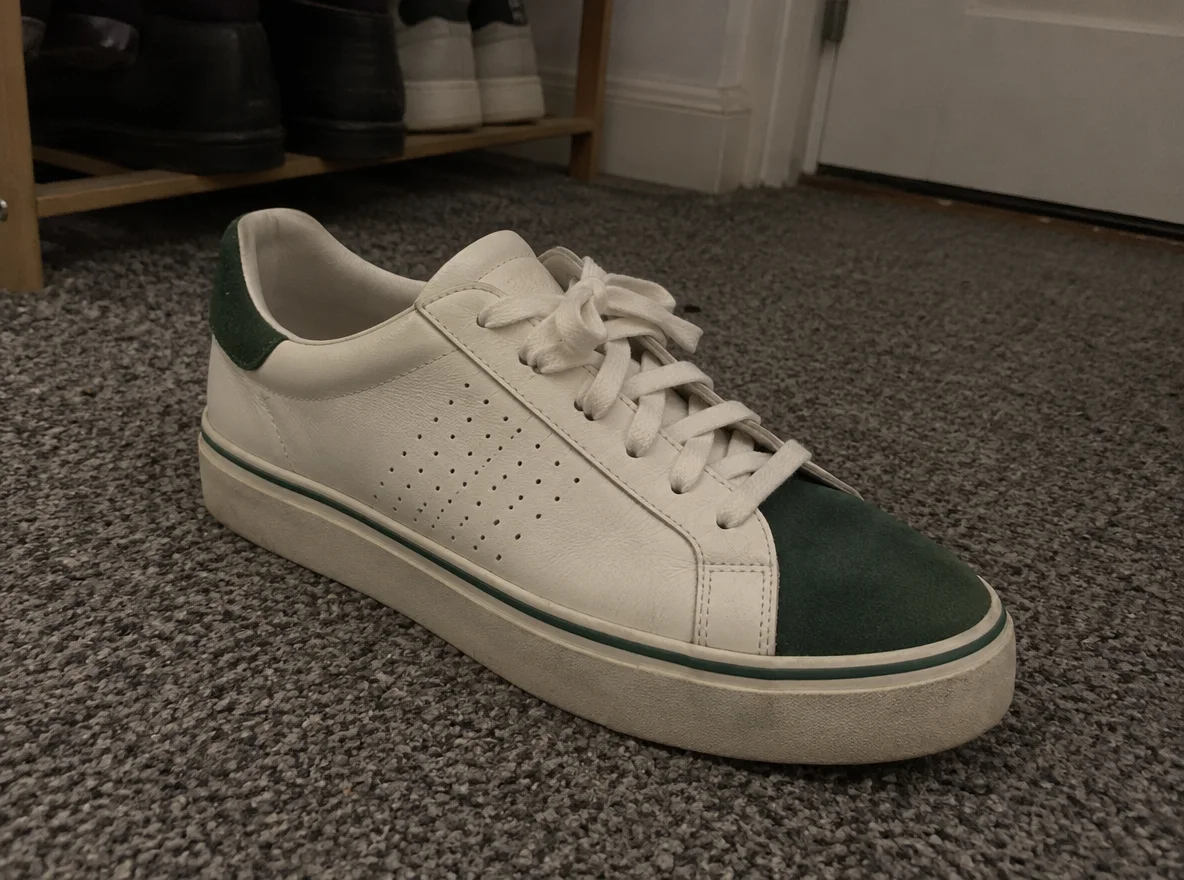 InputPhone photo on a hallway carpet
- GPT Image 2.5 SunburstDark forest green and perforation rows kept; white RGB 254
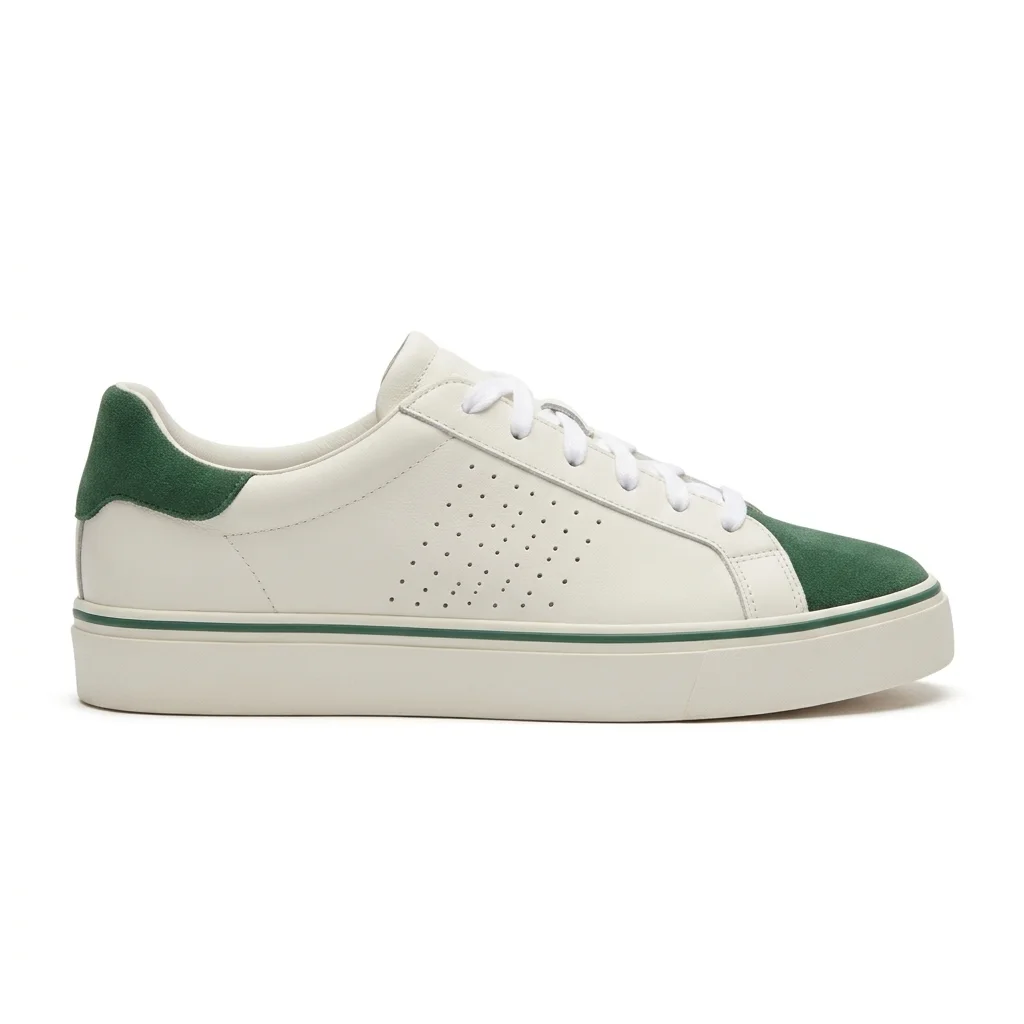 Nano Banana 2.1Brighter green, smaller patch of holes; white RGB 255
How to
How to use the shoe photography AI
- Time needed
- Steps
- 4 steps
Step 1
Open the shoe tool
Press “Add your photo”: the Image Studio opens with GPT Image 2.5 Sunburst and the white-packshot instruction filled in.
Step 2
Upload the phone photo
One shoe, clean, stuffed and laced, from the side you want to show. JPG, PNG or WebP. Pick 1:1 for a shop or 4:5 for Instagram.
Step 3
Describe the shoe
Add the upper, toe and heel details, laces, perforations and the sole. For a lifestyle shot, describe the scene too.
Step 4
Check and download
Compare materials, colours and the sole with the real shoe, check the corners are white, then download. No watermark.
See it in the app

Open Image Studio and type what you want to see — subject, style, lighting and mood.


Watch the tour · 1:23
Prompts, styles, references, edit, Arena & chat
Chapters
Tips
Shoe photography tips for phone and AI
What matters most when you shoot shoes, and what made the difference in our tests.
Clean the shoe first: wipe the sole edge and the toe. The AI cleans dust, but it can't tell dirt from a real mark.
Stuff the shoe with paper so it holds its shape, and lace it neatly the way you'll sell it.
Shoot the side you want in the packshot. Ask for “the same side as in the photo”: the other side has to be invented.
Name every detail in the prompt: upper material and colour, toe cap, heel tab, laces, perforations, sole colour and stripes.
Say “do not add logos, stripes or decoration”. Plain sneakers tempt models to add familiar-looking marks.
Compare the result with the shoe: perforation pattern, stripe count and the sole height are what to check first.
Shoe listings usually show the side profile, the front three-quarter, the back, the top and the sole. Shoot the views you can, and keep real photos of the sole and the inside.
Models
Which model is best for shoe photos?
What each model is good at. Open any one straight in the generator.

OpenAI
GPT Image 2.5 Sunburst
- Reference images
- Up to 16
- Output
- 1K–4K
Open GPT Image 2.5 SunburstBest for
Kept our sneaker's dark green and perforations · white RGB 254
Google
Nano Banana 2.1
- Reference images
- Up to 14
- Output
- 1K–4K
Open Nano Banana 2.1Best for
Same layout, brighter green, fewer holes · white RGB 255
Kenerate
Marketing Studio · Studio white
- Reference images
- Your product photo
- Output
- 1:1
Open Marketing Studio · Studio whiteBest for
E-commerce hero on seamless white, no props
FAQ
Shoe Photography AI questions
8 questions

How do I make shoe product photos with AI?
Take a phone photo of the clean, stuffed shoe from the side you want to show, upload it in Kenerate's Image Studio with GPT Image 2.5 Sunburst and the packshot instruction, and name the upper, toe and heel details, laces and sole. The sneaker above went from a hallway carpet to a white side profile and a lifestyle shot in one try each.
Link to this answerCan AI put my shoes on a white background?
Yes. In our test GPT Image 2.5 Sunburst returned RGB 254 in all four corners and Nano Banana 2.1 returned 255, both close enough to pure white for a shop's main image. Check the corners after downloading if a marketplace is strict.
Link to this answerWill AI change my shoes?
It can. The model redraws the shoe rather than cutting it out. In our test both models kept the toe cap, heel tab, laces and the green sole stripe, but Nano Banana 2.1 made the suede a brighter green and drew fewer perforations. Any side the photo doesn't show is invented, so shoot the side you want in the packshot.
Link to this answerWhich AI is best for shoe photography?
On our sneaker, GPT Image 2.5 Sunburst kept the dark forest-green suede and the rows of perforations closest to the photo, and it is the cheaper of the two at 11.7 credits per edit with one photo. Nano Banana 2.1 (21 credits) gave the whiter background but a brighter green.
Link to this answerHow much does AI shoe photography cost?
One GPT Image 2.5 Sunburst edit with one photo costs 11.7 credits at 1K; Nano Banana 2.1 costs 21. A new Kenerate account gets 25 credits, enough for two Sunburst packshots. Downloads have no watermark.
Link to this answerHow do you photograph shoes with a phone?
Clean the shoe, stuff it with paper and lace it neatly, put it on white card curved up a wall near a window, turn off the ceiling light, and hold the phone at sole height for the side profile. Then shoot the front three-quarter, back, top and sole, and use the AI to clean the background or restage the shot.
Link to this answerCan I show the shoes being worn?
Yes. Describe the scene and crop, for example “worn by an adult walking on a city pavement, cropped at the ankle, cuffed jeans”. Use a fictional adult model or a person who agreed, and check that the shoe's details survive.
Link to this answerIs it okay to sell with AI-edited shoe photos?
Only if the photo still shows the real shoe accurately: same materials, colours, perforations and sole. Shops and marketplaces expect images to represent the item for sale, so don't let the AI add logos or change colours, and keep real photos of the sole and the inside.
Link to this answerIn depth
Shoe Photography AI, explained
What works, what to avoid, and how to pick a model.
On this page
Shoe photography at home: the phone setup
A good input photo makes every AI result better. What to do before you upload:
- Prep: clean the upper and the sole edge, stuff the shoe with paper, lace it neatly and tuck the lace ends in.
- Surface: a sheet of white card curved up a wall, or a plain table. Avoid patterned carpet: the AI has to guess where the sole ends.
- Light: daylight from a window to one side, ceiling lights off; a white card on the other side fills the shadow.
- Angle: the phone at sole height for the side profile, then the front three-quarter, the back, the top and the sole.
- Pairs: shoot one shoe for the profile and the pair together for a second image.
Shoe photo prompts to copy
Upload the shoe, keep the instruction's “keep the shoe exactly the same” line with your details, and swap the scene:
- White packshot: “straight side profile of the same side as in the photo, pure white seamless background, faint contact shadow”.
- Lifestyle: “on a sunlit concrete step beside a potted plant, morning light, shallow depth of field”.
- On foot: “worn by an adult walking on a city pavement, cropped at the ankle, cuffed jeans, candid”.
- Pair: “the pair side by side at a slight angle on light oak, soft daylight”.
- Dramatic: “floating at an angle over a solid colour background, soft drop shadow below”.
What it doesn't do
It doesn't photograph your shoe; it redraws it from your photo. Perforation patterns, stitching, stripes on the sole and the exact shade of suede are the details most likely to change, and any side the photo doesn't show is invented. Describe the details in the prompt, check the result against the shoe, and keep your own photos of the sole and the inside in the listing.
By the Kenerate AI teamLast updated and reviewed
We build and run the Kenerate generator. Every example is a real output of the model named under it; models and presets were checked against the app's code.
Sources: Kenerate Image Studio · Kenerate Marketing Studio