Birthday · wedding · themed · words on the cake
AI Cake Design Generator — design the cake before anyone bakes it
Describe the cake — tiers, colours, frosting, the exact words to pipe on it — and get a photo-real design you can refine, print, or hand to your baker as the reference.
- Exact words on the cake
- Top-down or side view
- Any theme or palette
- No watermark
Updated by the Kenerate AI team




On this page
Quick answer

How do you design a cake with AI?
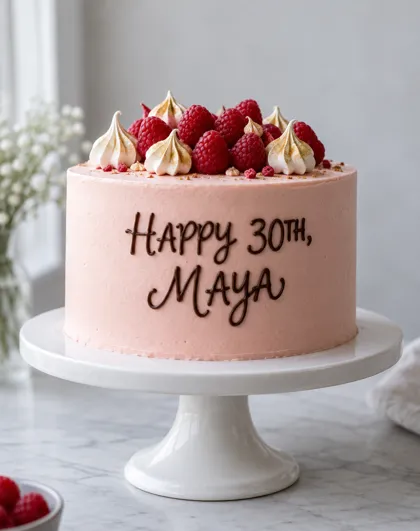
An AI cake design generator turns a written brief — "three tiers, ivory fondant, gold leaf, blush roses" — into a photo-real picture of the finished cake. On Kenerate AI you type the brief in the Image Studio and GPT Image 2.5 Sunburst draws it, including exact lettering: our test cake came back with "HAPPY 30TH, MAYA" piped in chocolate cursive, letter-perfect on the first try. A design costs 7.2 credits, a new account starts with 25 free credits — three designs — and downloads carry no watermark.
Key facts
- Designs made for this page
- 3 (birthday · wedding · galaxy)
- Lettering on the cake
- "HAPPY 30TH, MAYA" — exact, first try
- Model
- GPT Image 2.5 Sunburst (OpenAI)
- Views
- Side, top-down, or any angle you ask for
- Watch out for
- Crowded toppers can repeat an element
- Watermark
- None
Gallery
Three briefs, three cakes
Real GPT Image 2.5 Sunburst designs, one try each, 7.2 credits apiece. Open any one to copy the prompt.
Same prompt
The brief, then the cake
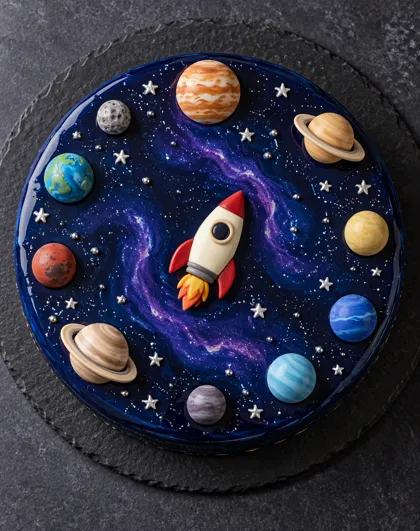
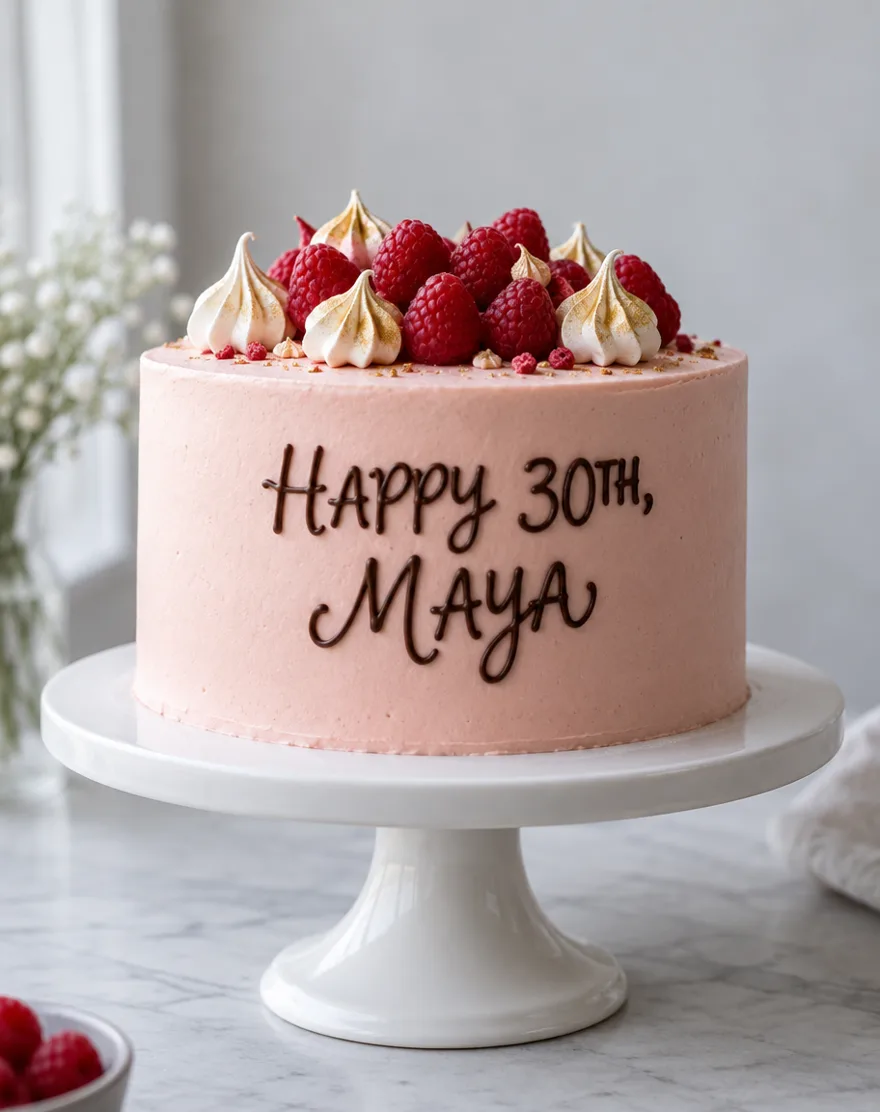
Each design started as a written brief. The birthday brief asked for exact piped lettering — and got every letter; the galaxy brief asked for a top-down view a baker could copy for the layout.
PromptProfessional bakery photograph of a single-tier round birthday cake. Smooth blush-pink buttercream, the words "HAPPY 30TH, MAYA" hand-piped in dark chocolate cursive, raspberries and gold-dusted meringues on top. Eye-level side view, photorealistic.
 LetteringSide view
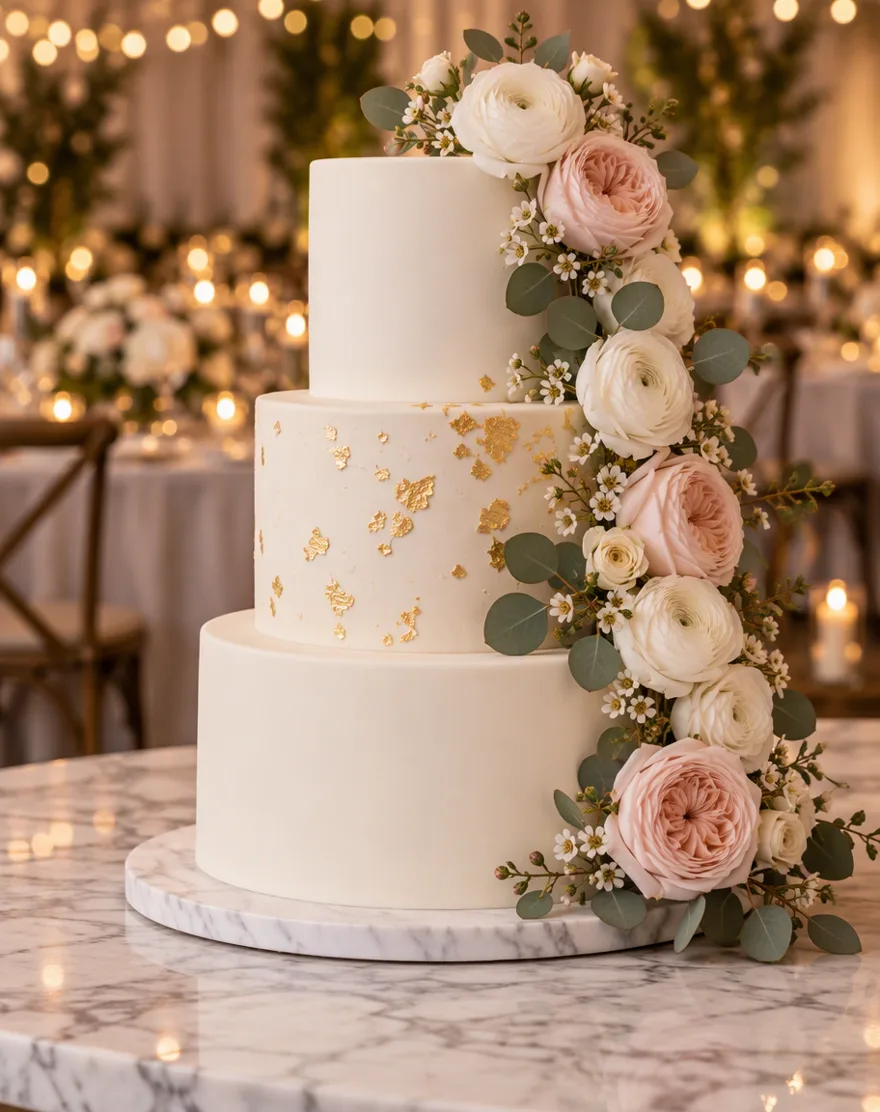 Wedding tiersSide view
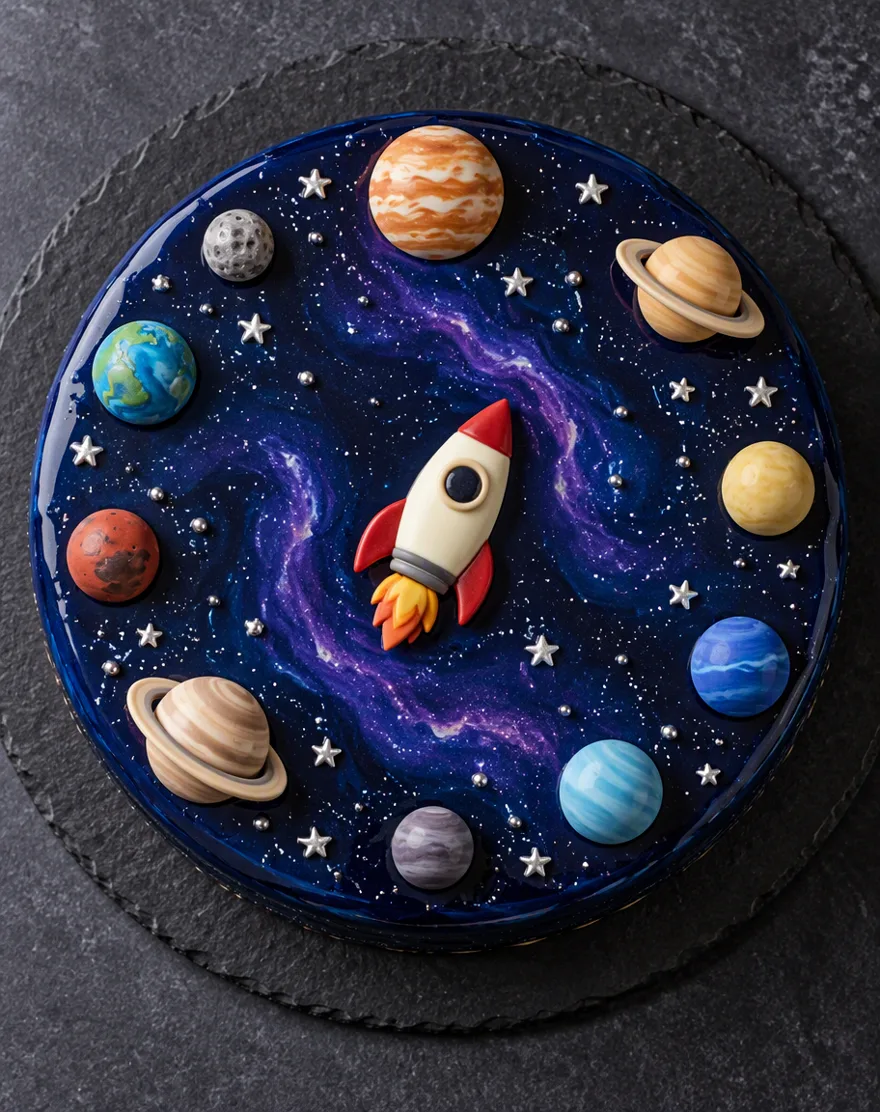 GalaxyTop-down
How to
How to use the AI cake design generator
- Time needed
- Steps
- 4 steps
Step 1
Describe the cake
In /app/image, write the brief: tiers, finish, colours, decorations, the words to pipe on it in quotes. Sign in free for starter credits.
Step 2
Pick GPT Image 2.5 Sunburst
It handles lettering — our “HAPPY 30TH, MAYA” came out letter-perfect.
Step 3
Pick the view
Eye-level side view to judge the shape; top-down to lay out the toppers. Generate both if you're showing a baker.
Step 4
Refine and download
Change the palette or swap decorations and regenerate, then download without a watermark.
See it in the app

Open Image Studio and type what you want to see — subject, style, lighting and mood.


Watch the tour · 1:23
Prompts, styles, references, edit, Arena & chat
Chapters
Tips
Get a cake design a baker can actually use
What worked in our tests.
Put the exact words to pipe on the cake in quotes — and say where: “across the front”, “on the top”.
Name the view: eye-level side view for the overall shape, top-down for the layout of toppers.
Count the tiers and name the finish: buttercream, fondant, mirror glaze, naked, semi-naked.
Give a colour palette — “blush pink, ivory and gold” beats “pretty colours”.
List the decorations you'd really buy: fresh raspberries, gold leaf, fondant planets.
Add “photorealistic, no people, no other text” so it reads like a bakery photo, not an illustration.
Models
Models for cake designs
What each model is good at. Open any one straight in the generator.

OpenAI
GPT Image 2.5 Sunburst
- Reference images
- Up to 16
- Output
- 1K–4K
Open GPT Image 2.5 SunburstBest for
Made all three designs; best for lettering
Google
Nano Banana 2.1
- Free plan

FAQ
AI Cake Design Generator questions
10 questions

How do I design a cake with AI?
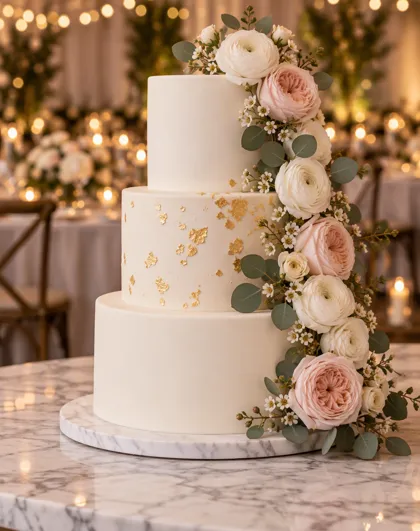
Write the cake as a brief in Kenerate's Image Studio: tiers, finish, colours, decorations and the view — then generate on GPT Image 2.5 Sunburst. “Three-tier ivory fondant wedding cake, gold leaf on the middle tier, cascade of blush roses, side view, photorealistic” came back as the wedding design on this page, one try, 7.2 credits.
Link to this answerIs there an AI cake design generator online free?
Kenerate runs in the browser and a new account gets 25 free credits — three Sunburst designs — plus Qwen Image 3.0 on the free plan at 9 credits a design. After that, credits come in one-time packs that never expire, with no subscription. Downloads carry no watermark.
Link to this answerCan it write a name or message on the cake?
Yes — that's the reason to use GPT Image 2.5 Sunburst rather than a preset cake app. Put the exact words in quotes: our test asked for “HAPPY 30TH, MAYA” hand-piped in chocolate cursive and every letter came out right on the first try. Keep it to a short line or two; a paragraph of tiny piping is asking for typos.
Link to this answerCan I generate a birthday cake design with a specific theme?
Yes. Name the theme and the real decorations that build it: our galaxy brief asked for navy mirror glaze, silver star sprinkles, fondant planets and a white chocolate rocket, and the design came back with all of them. Themes from colours, flowers, fruit or shapes work well; leave licensed characters out and build the look from the palette instead.
Link to this answerCan I show the design to a real baker?
That's the best use of it. Generate an eye-level side view for the overall shape and a top-down view for the topper layout, and your baker gets what they usually sketch by hand. One honest caveat from a baker's point of view: the model doesn't know structural limits, so treat a six-tier floating design as a conversation starter, not a quote.
Link to this answerCan it redesign a cake from a photo?
Yes. Add a photo — your venue, a cake you liked, a colour swatch — as a reference and describe what to change: “this cake, but in sage green with pressed flowers”. A redesign from one photo costs 11.7 credits on Sunburst. Nano Banana 2.1 (21 credits, up to 14 references) is the pick when the same cake must stay identical across several views.
Link to this answerWhat details should a cake prompt include?
Five things: tier count and shape, the finish (buttercream, fondant, mirror glaze), a named colour palette, the decorations, and the view. Add the piped words in quotes if you want lettering. The full prompt behind every design on this page is one click away in the gallery.
Link to this answerIs the design mine to use?
You can download it without a watermark and use it in your bakery's menu, an order form, a party invite or a social post. It's a generated image, so nothing is baked yet — pair it with /ai-menu-generator or /ai-invitation-maker if the cake is part of a bigger party plan.
Link to this answerWhich view should I generate — side or top-down?
Both, for different jobs. The side view sells the cake: tiers, height, the cascade of flowers. The top-down view is the working drawing: where each topper sits, how the ring of planets spaces out. At 7.2 credits each, generating both is still under two of the 25 free credits' worth.
Link to this answerDid anything go wrong in the tests?
One thing worth knowing: the galaxy cake's ring of planets repeated Saturn twice. Crowded toppers are where the model is most likely to duplicate an element — if exact toppers matter, list them by name and count (“eight planets, one of each”) or generate again; a retry is 7.2 credits.
Link to this answerIn depth
AI Cake Design Generator, explained
What works, what to avoid, and how to pick a model.
On this page
Why design the cake before anyone bakes it
Most cake conversations fail at the same point: the words. “Elegant but fun, kind of blush, some gold” means four different cakes to four different bakers. A generated design ends the ambiguity — everyone is looking at the same picture, arguing about real things: that shade of pink, that many raspberries, lettering that size.
It also fails cheaply. A design you hate cost 7.2 credits and ten seconds; a baked cake you hate cost the party. Generate five directions, keep one, and spend the real money once.
The cake brief, written out
Every strong cake prompt answers the same five questions:
- Shape: how many tiers, round or square, tall or shallow.
- Finish: buttercream, fondant, mirror glaze, naked or semi-naked.
- Palette: name the colours — “blush, ivory, muted gold”.
- Decorations: the things a baker would really buy or make — berries, gold leaf, fondant planets, fresh flowers.
- View and words: side or top-down, and the exact lettering in quotes.
Lettering is the real test
Any image model can make a pretty cake. The thing people actually need — “Happy 30th, Maya”, “Mr & Mrs Osei”, “Congrats Dr Patel” — is where most cake apps quietly give up: one big competitor's own FAQ says its tool adds no text to the cake, and the apps that do write names run cheap models that mangle them.
GPT Image 2.5 Sunburst is OpenAI's image model and lettering is its strength. Our blush birthday cake asked for “HAPPY 30TH, MAYA” hand-piped in chocolate cursive and got it letter-perfect, first try. Keep lettering short, put it in quotes, say where it goes and in what — piped chocolate, icing, a fondant plaque — and generate again if a flourish goes astray.
Birthday, wedding, themed — three different jobs
The three designs on this page were picked to cover the three briefs people actually bring:
- Birthday: one tier, a palette, fruit, and the person's name on the cake. The lettering is the point — see above.
- Wedding: tiers, structure and flowers. Generate the side view first; this is the design you'll hand to a real baker, so keep decorations to things that exist — our brief named ranunculus, garden roses and eucalyptus.
- Themed: build the theme from palette and props, not characters — navy glaze, star sprinkles and a rocket read as “space” without any licensed character. That keeps the design printable, postable and bakeable anywhere.
Preset cake apps vs a prompt you control
Most cake generators are template tools: pick “wedding”, pick a style tile, get a square image — some cap you at a few free goes a day, and the phone apps route everything through one cheap model. Quick, but you can't move the flowers, change the view, or put your own words on the cake.
Here the prompt is yours, so the design can include anything you can describe — and every example on this page shows its full prompt. The trade-off is the same as the caricature and invitation tools: credits instead of presets, 25 free on sign-up, then one-time packs.
What we got
Three designs, one try each, on GPT Image 2.5 Sunburst at 1K:
- Birthday lettering: every letter of “HAPPY 30TH, MAYA” right, the piping texture convincing.
- Wedding tiers: gold leaf where asked, the flower cascade in the named flowers, reception lighting carried.
- Galaxy top-down: glaze, stars, rocket and planet ring all there — though Saturn appeared twice in the ring.
By the Kenerate AI teamLast updated and reviewed
We build and run the Kenerate generator. Every example is a real output of the model named under it; models and presets were checked against the app's code.
Sources: Kenerate Image Studio · Kenerate credit pricing