Flurries · blizzards · snowy scenes · pets
AI Snow Filter — add falling snow to any photo
Upload a photo and turn it into a winter scene: light flurries, a full blizzard, snow on your hair and coat, or a snowy garden for your dog — you say how much snow and what has to stay the same.
- Any amount of snow
- Snow on hair and clothes
- Free credits to start
- No watermark
Updated by the Kenerate AI team




On this page
Quick answer

How do you add snow to a photo with AI?
An AI snow filter edits your photo so it looks like it was taken in snow — falling flakes, snow on the ground, rooftops and cars, and a dusting on hair and clothes. On Kenerate AI you upload the photo to the Image Studio and describe the snow in one sentence, plus what must not change. GPT Image 2.5 Sunburst made all four winter edits on this page at 11.7 credits each; the hiker and the dog came back clearly the same, while the street and road edits changed more than we asked for.
Key facts
- Edits tested
- 4 photos: hiker, dog, city street, coast road
- Kept closely
- Hiker's face and freckles, the dog's face and coat
- Changed more than asked
- Street: hair and face · Road: camera angle
- Model
- GPT Image 2.5 Sunburst (OpenAI)
- Watermark
- None
Gallery
Snow added with Kenerate AI
Four edits of existing photos of fictional people, a dog and a road. GPT Image 2.5 Sunburst, one try each. Open any one to copy the prompt.
Same prompt
Before and after: same photo, now snowing
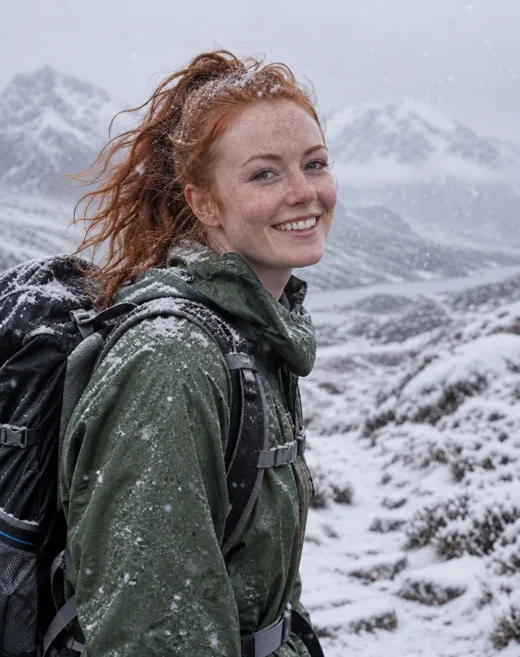
The originals are summer photos from our other pages. One sentence added the snow; the hiker's freckles and smile and the dog's face and coat stayed. The wind loosened the hiker's ponytail — the model's idea, not ours.
PromptAdd snow to this photo: light snow is falling across the whole frame, a dusting of snowflakes sits on her red hair and the shoulders of her green jacket, and the mountains behind her are covered in fresh snow. Keep her face, freckles, smile, hair colour, jacket, backpack, pose and the camera angle exactly the same.
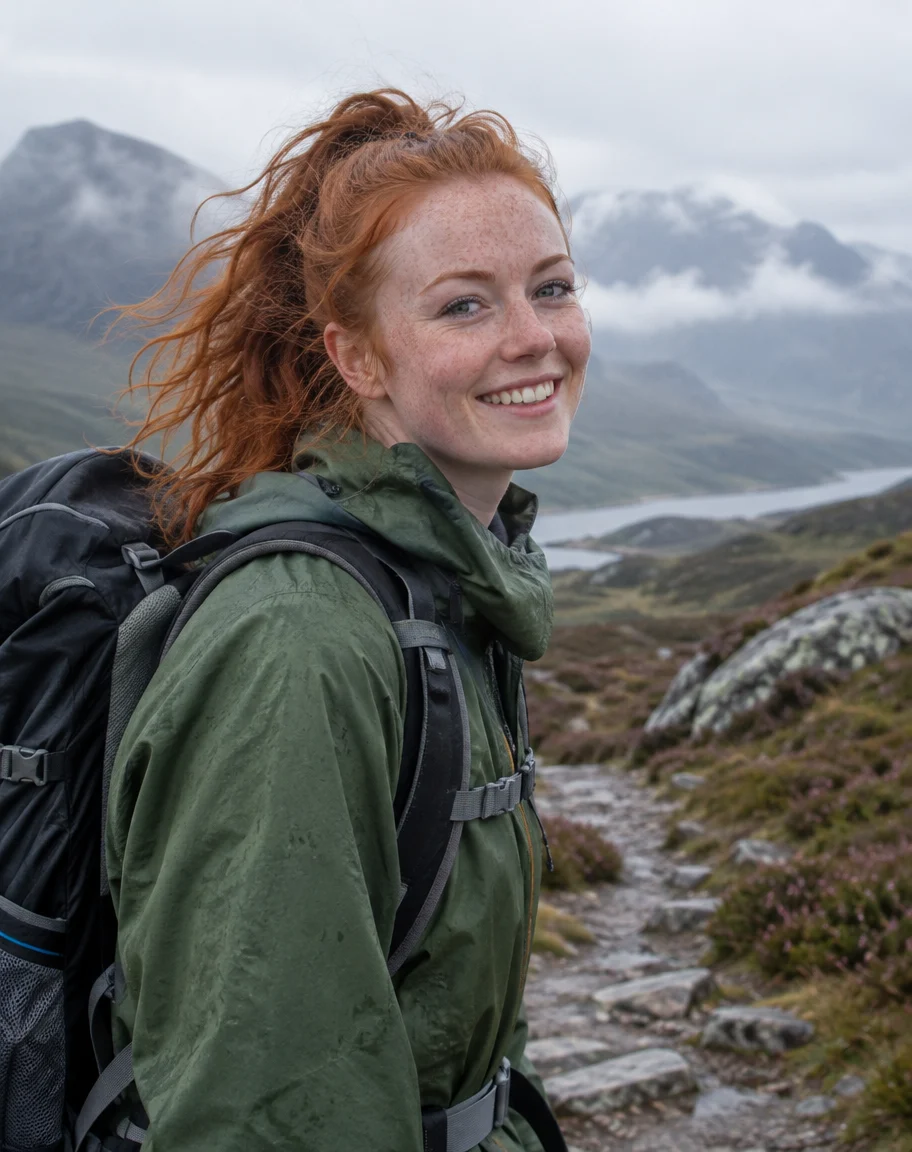 OriginalSummer hike
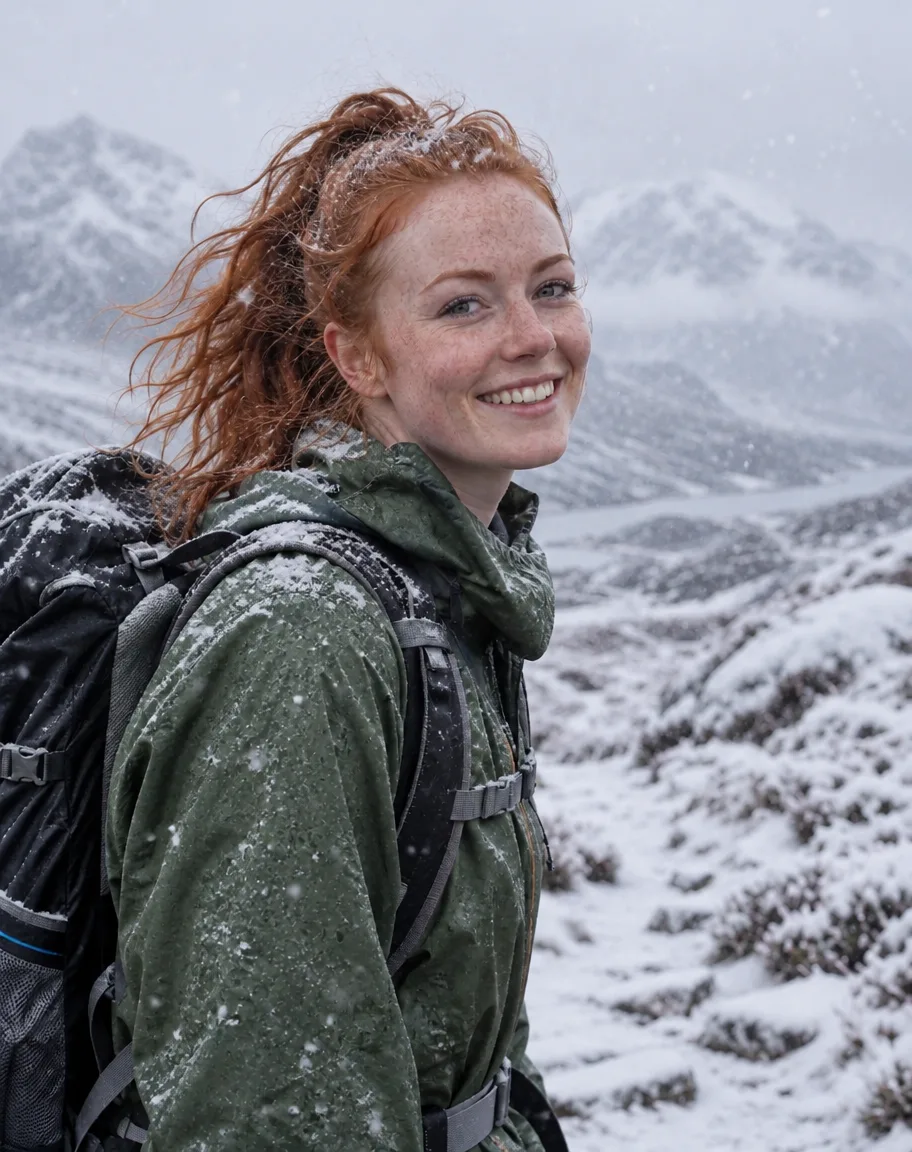 Snow addedSunburst edit · 11.7 credits
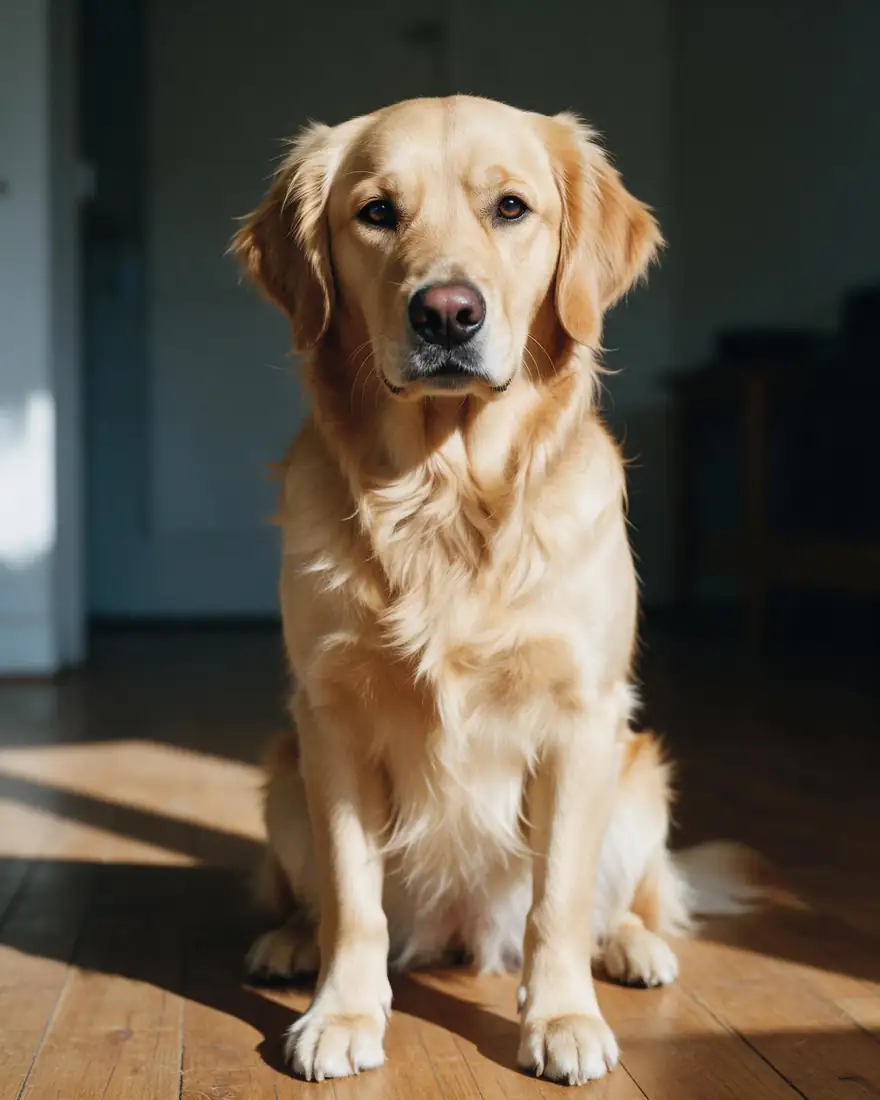 OriginalIndoor pet photo
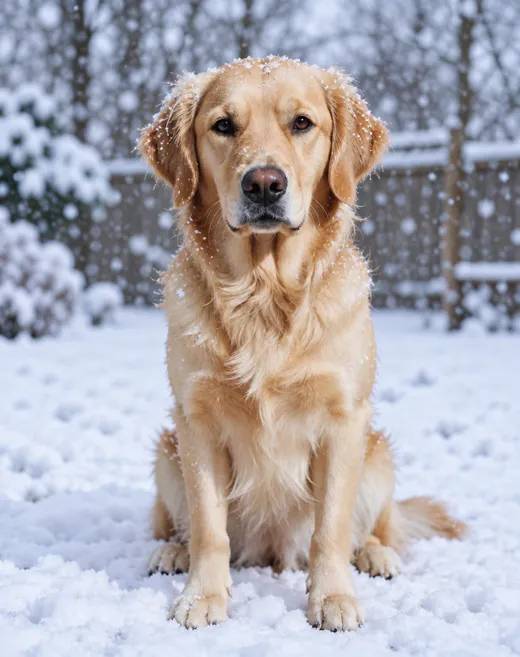
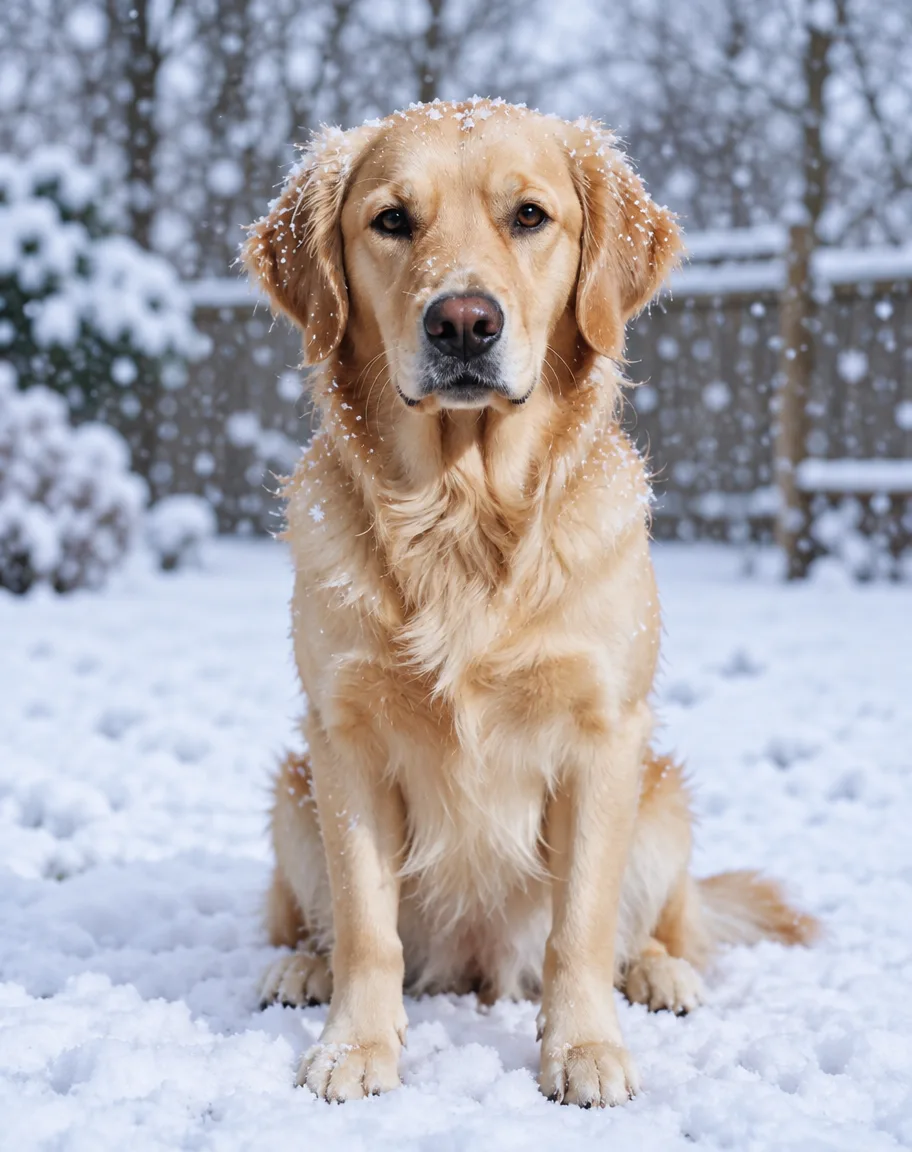 Snowy gardenSunburst edit · 11.7 credits
How to
How to use the AI snow filter
- Time needed
- Steps
- 4 steps
Step 1
Open the Image Studio
Go to /app/image. Sign in free for 25 starter credits.
Step 2
Upload your photo
Add the photo you want covered in snow — a portrait, a pet, a street, a house or a landscape.
Step 3
Describe the snow
How heavy, where it settles and the winter light — plus what must stay the same. Pick GPT Image 2.5 Sunburst.
Step 4
Download
Regenerate if a detail moved, then download without a watermark — or upscale up to 4K for printing.
See it in the app

Open Image Studio and type what you want to see — subject, style, lighting and mood.


Watch the tour · 1:23
Prompts, styles, references, edit, Arena & chat
Chapters
Tips
Get snow that looks real
What worked — and what didn't — in our four tests.
Say how much snow: “light flurries”, “big soft flakes” or “heavy snow blowing diagonally” give very different pictures.
Say where it settles: on the hair and shoulders, the ground, car roofs, shop awnings, tree branches.
Change the light too — “soft grey winter sky” or “cold blue daylight”. Snow under summer sun looks pasted on.
List what stays: “keep her face, freckles, hair colour, outfit and the camera angle exactly the same”.
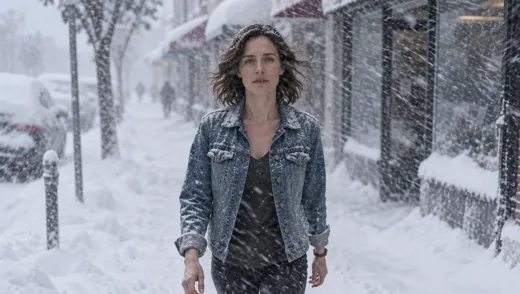
Close-up portraits keep the face best. In our wide street shot the woman's hair and face drifted; crop closer or regenerate.
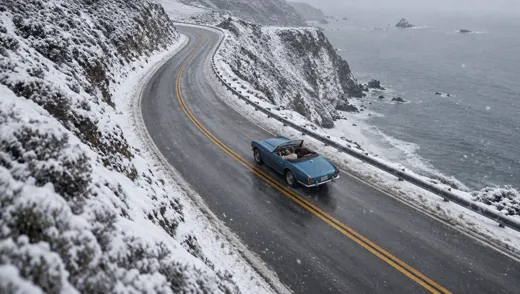
Aerial and landscape shots may get re-framed. If the composition matters, regenerate or try Nano Banana 2.1.
Models
Models for adding snow to a photo
What each model is good at. Open any one straight in the generator.

OpenAI
GPT Image 2.5 Sunburst
- Reference images
- Up to 16
- Output
- 1K–4K
Open GPT Image 2.5 SunburstBest for
Made every edit on this page
Google
Nano Banana 2.1
- Reference images
- Up to 14
- Output
- Up to 4K
Open Nano Banana 2.1Best for
Keeps a person or product the same across a set

ByteDance
Seedream 5.0 Pro
- Reference images
- Up to 10
- Output
- 1K · 2K
Open Seedream 5.0 ProBest for
Painted and illustrated winter scenes
- Free plan

FAQ
AI Snow Filter questions
9 questions

What is an AI snow filter?
It is an image edit that makes a photo look as if it was taken in snow: falling flakes, snow on the ground and rooftops, and a dusting on hair and clothes. Unlike a fixed overlay, an AI model redraws the scene — the light, the ground, the sky — so the snow sits in the picture. On Kenerate AI you do it in the Image Studio with one sentence.
Link to this answerHow do I add snow to a photo?
Open the Kenerate Image Studio, upload the photo, pick GPT Image 2.5 Sunburst and write what you want — for example “light snow falling, snow on her hair and shoulders, snowy mountains behind, soft grey winter sky; keep her face, outfit and the camera angle exactly the same”. An edit costs 11.7 credits and returns one image without a watermark.
Link to this answerIs the AI snow filter free?
Free to start. A new Kenerate account gets 25 credits on sign-up — enough for two one-photo edits with Qwen Image 3.0 (9.9 credits each), which works on the free plan. GPT Image 2.5 Sunburst (11.7 credits per edit) unlocks once you buy a credit pack; packs are one-time, with no subscription. Downloads carry no watermark.
Link to this answerWill my face stay the same?
Usually, in a close portrait, if you ask for it. Our hiker kept her freckles, smile and jacket, and the dog kept its face and coat. In a wide street shot the woman's hair turned curlier and her face matched less well. Use a photo where the face is large and clear, name what must stay, and regenerate if something drifts.
Link to this answerCan I choose between light snow and a blizzard?
Yes — the amount of snow is whatever you write. “Light flurries” or “a few big soft flakes” gives a gentle look; “heavy snow blowing diagonally, snow piled on cars and awnings” gives a blizzard, as in our street example. You can also ask for snow only on the ground, or a frosty morning with no falling snow.
Link to this answerCan I add snow to a landscape or a house photo?
Yes. Describe what should be covered — roofs, trees, cliffs, the road — and ask for an overcast winter sky. Our coast-road edit covered the cliffs in snow, but the model also re-framed the shot (the road curves the other way) even though we asked it not to. For a composition you care about, regenerate or try Nano Banana 2.1.
Link to this answerCan I add snow to a pet photo?
Yes. Upload the pet photo and ask for a snowy garden or park with flakes on its fur, adding “keep the same dog, fur colour, face and pose”. Our golden retriever moved from an indoor floor to a snowy back garden with the same face and coat.
Link to this answerCan I make the snow move in a video?
The snow filter makes a still image. To make it fall, take the snowy photo to an image-to-video model and describe the motion — “snow keeps falling, her hair moves in the wind”. Video models cost more than image edits and need a paid plan.
Link to this answerCan I add snow to photos of celebrities or other real people?
No. Only upload photos of yourself or of people who have agreed, and don't use celebrities' or strangers' photos or names. Kenerate's terms of service apply to everything you generate.
Link to this answerIn depth
AI Snow Filter, explained
What works, what to avoid, and how to pick a model.
On this page
Snow filter app or AI snow edit?
Classic snow filters lay the same falling-flake overlay over every picture. The ground stays green, the sky stays blue and the light stays summery, which is why the result often looks pasted on.
An AI edit redraws the scene instead: snow settles on rooftops, car roofs, branches and shoulders, the sky turns winter grey and the colours cool down. The cost is that the model may change things you didn't ask about, so the prompt has to say what stays.
15 AI snow filter prompt ideas
Add “keep my face (or my pet, or my house) and the camera angle exactly the same” to any of these:
- Light flurries, a dusting of snow on hair and shoulders, soft grey sky.
- Heavy blizzard blowing diagonally, snow piled on cars and awnings.
- Big soft snowflakes falling in front of the face, shallow depth of field.
- Snowy pine forest behind, cold blue daylight.
- Evening street with warm shop lights and gentle snow.
- Christmas market stalls with string lights and snow on the roofs.
- Frosty morning: white frost on the grass and windows, no falling snow.
- Snow globe effect with glitter snow swirling around you.
- House exterior with snow on the roof, icicles on the gutter, porch light on.
- Mountain lake frozen over, snowy peaks, still air.
- City skyline at night in falling snow, street lamps glowing.
- Dog in a snowy park, snowflakes on its nose and fur.
- Cabin window with snow outside and a warm lamp inside.
- Ski slope at golden hour, powder spray in the air.
- Vintage film look: grainy snowfall, faded colours, 1970s winter.
What we got
Four edits of existing summer photos, all GPT Image 2.5 Sunburst at 1K, one try each:
- Hiker: freckles, smile, jacket and backpack kept; snow on her hair and shoulders; the wind loosened her ponytail on its own.
- Dog: same face, coat and sitting pose, moved from an indoor floor into a snowy garden as asked.
- City street: the layout, parked cars and bollards stayed and got buried in snow, but her hair turned curlier and her face matched less well.
- Coast road: cliffs and verges covered in snow and the sea turned grey, but the shot was re-framed — the road curves the other way and the car is seen from behind.
By the Kenerate AI teamLast updated and reviewed
We build and run the Kenerate generator. Every example is a real output of the model named under it; models and presets were checked against the app's code.
Sources: Kenerate Image Studio · Kenerate terms of service