

Battle maps · city maps · town maps · continent maps · 5-foot grid
D&D Map Generator — city, town, battle and continent maps from one sentence
Describe the place — a tavern brawl, a market town, a walled city or a whole continent — and get a D&D map back in seconds: battle maps with a 5-foot grid for Roll20, Foundry VTT or print, and labelled town, city and continent maps for your players.
- Battle, city, town, continent
- Square grid, 1 inch = 5 ft
- Place names spelled right
- No watermark
Updated by the Kenerate AI team




Made with Kenerate
On this page
Quick answer

How do you generate a D&D map with AI?
A D&D map generator turns one sentence into a campaign map: write the map type (battle, town, city or continent), the places and labels, and for battle maps a square 1-inch grid. On Kenerate AI, GPT Image 2.5 Sunburst made all eight maps on this page in one try each, at 7.2 credits a map; a new account gets 25 free credits, and Qwen Image 3.0 is on the free plan.
Key facts
- Maps on this page
- 8: 5 battle maps, 1 town, 1 city, 1 continent
- Map types
- Battle · dungeon · town · city · continent
- Grid
- Square, 1 inch = 5 feet — ask for thick lines
- View
- Battle maps strictly top-down · town and city maps bird's-eye
- Best shape
- 1:1 for rooms, 3:2 for outdoor encounters
- Upscale to 4K first
- Watermark
- None
Gallery
Eight D&D maps: battle, town, city and continent
Real D&D map generator outputs from Kenerate's Image Studio on GPT Image 2.5 Sunburst, one try each, not retouched. Open any map to copy its full prompt.
How to
How to use the d&d map generator
- Time needed
- Steps
- 4 steps
Step 1
Open the Image Studio
Go to /app/image and pick GPT Image 2.5 Sunburst — or Qwen Image 3.0 on the free plan. A free account starts with 25 credits.
Step 2
Describe the map
For a battle map start with “top-down tabletop RPG battle map of”, list cover and hazards and add “square 1-inch grid overlay with thick dark grid lines”; for a town, city or continent map name each place in quotes and add “no grid”.
Step 3
Pick the shape
1:1 for a room, cave or dungeon level; 3:2 for an outdoor encounter. Generate.
Step 4
Fix, upscale, play
Change one detail with the image editor, upscale to 4K for print, then import the image into Roll20 or Foundry and match the grid.
See it in the app

Open Image Studio and type what you want to see — subject, style, lighting and mood.


Watch the tour · 1:23
Prompts, styles, references, edit, Arena & chat
Chapters
Tips
Prompt a battle map you can actually play on
What made the difference in our tests.
Start with “top-down tabletop RPG battle map of …” and end with “strictly top-down orthographic view” — otherwise you get a pretty angled scene, not a map.
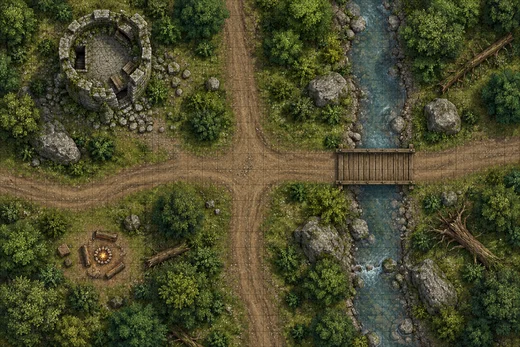
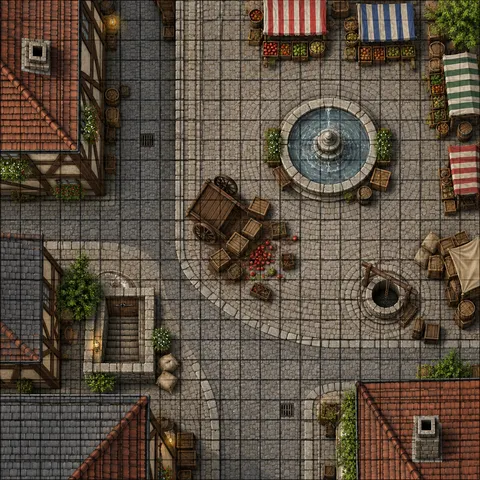
Ask for “square 1-inch grid overlay with thick dark grid lines”. Without “thick”, the grid comes out thin (see the forest map) and disappears on a screen.
List the things that matter in combat: cover, doors, stairs, water, difficult terrain, a chokepoint. The model draws what you name.
Add “no characters, no text” so you place your own tokens and labels.
Use 1:1 for one room or cave, 3:2 for a road or outdoor encounter, and keep it to one area per image.
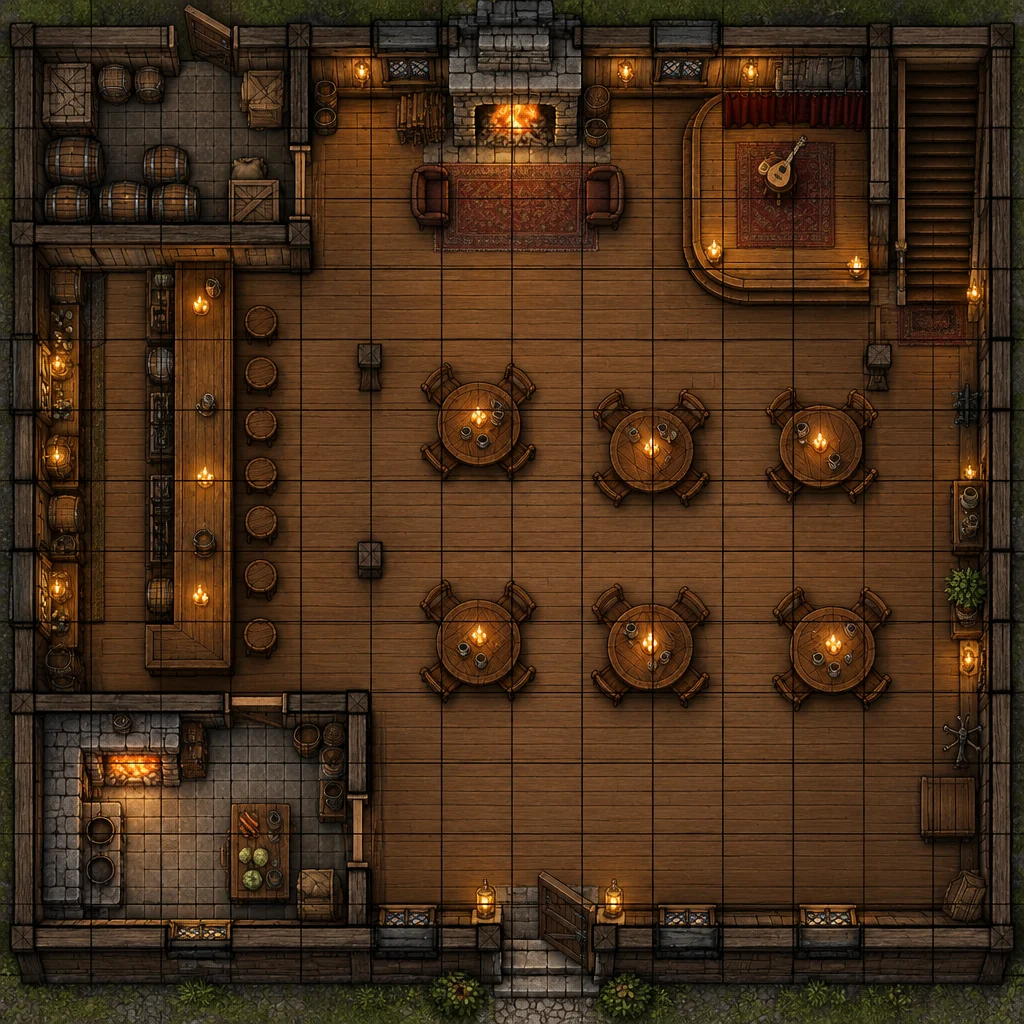
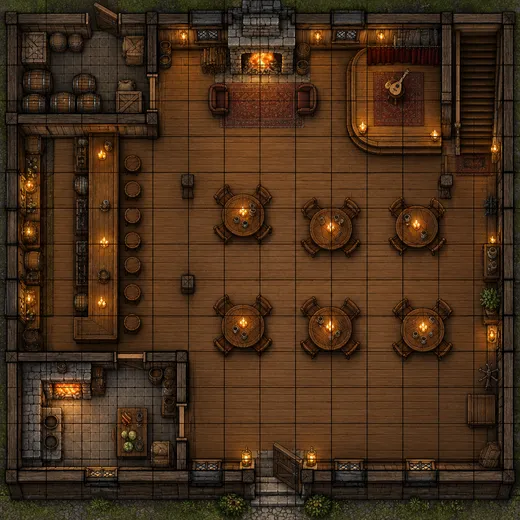
Count what you asked for: our tavern got 6 round tables instead of 8. If a number matters, fix it with an edit instead of regenerating.
Models
Models for D&D battle maps
What each model is good at. Open any one straight in the generator.

OpenAI
GPT Image 2.5 Sunburst
- Reference images
- Up to 16
- Output
- 1K–4K
Open GPT Image 2.5 SunburstBest for
Made all four maps; clean top-down grid
- Free plan

Alibaba
Qwen Image 3.0
- Reference images
- Up to 3
- Output
- 1K · 2K
Open Qwen Image 3.0Best for
Free plan; good with labels and numbers

ByteDance
Seedream 5.0 Pro
- Reference images
- Up to 10
- Output
- 1K–2K
Open Seedream 5.0 ProBest for
Painterly look; check any text
FAQ
D&D Map Generator questions
13 questions

What is the best D&D map generator?
It depends on the job. For a finished, painted battle, town, city or continent map from a sentence, an AI image model such as GPT Image 2.5 Sunburst is the fastest: it made all eight maps on this page in one try each. For maps you build square by square with walls, layers and fog of war, a dedicated editor such as Dungeon Scrawl (free, in the browser) or Inkarnate does that. Many DMs generate the art with AI and run it in their virtual tabletop.
Link to this answerHow do I make a D&D battle map with AI?
Open Kenerate's Image Studio, pick GPT Image 2.5 Sunburst and write: “top-down tabletop RPG battle map of [place], [features, cover, hazards], square 1-inch grid overlay with thick dark grid lines, strictly top-down orthographic view, no characters, no text”. Choose 1:1 for a room or 3:2 for an outdoor encounter and generate.
Link to this answerWhat grid size does a D&D battle map use?
A square grid where one square is 5 feet, printed at 1 inch per square for miniatures. Put “square 1-inch grid” in the prompt. On a screen what matters is pixels per square, which you set in your virtual tabletop when you import the map.
Link to this answerCan I use an AI battle map in Roll20 or Foundry VTT?
Yes — download the image and upload it as a map. The grid is painted into the picture, so line it up: count the squares across, then set the VTT's grid size to the image width divided by that number (or use the VTT's grid-alignment tool). Roll20 works in 70-pixel squares by default and Foundry's default grid is 100 pixels; both can be changed per scene.
Link to this answerIs the D&D map generator free?
Yes, to start. A new Kenerate account gets 25 credits, and Qwen Image 3.0 is on the free plan at 9 credits a map — two free maps. GPT Image 2.5 Sunburst, which made the maps here, costs 7.2 credits a map from one-time credit packs that never expire, with no subscription. Downloads have no watermark.
Link to this answerCan it make a tavern, cave or dungeon map?
Yes — all three are on this page. Name the place and the things in it: bar, fireplace, stage and stair for a tavern; river, bridge and stalagmites for a cave; numbered rooms, doors and a secret door for a dungeon. Keep one room or one level per image so it stays readable.
Link to this answerDoes the AI follow exact counts and positions?
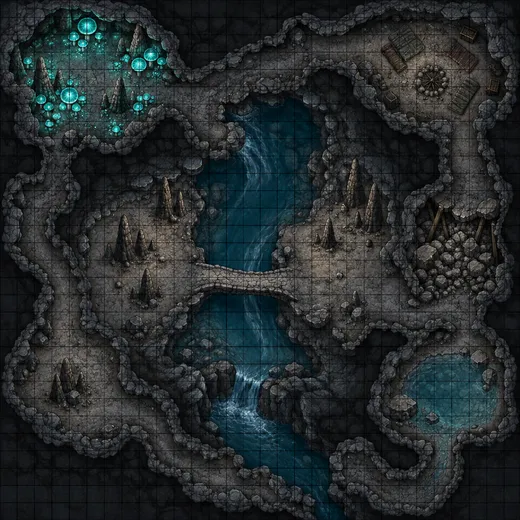
Mostly, not exactly. Our cave got every feature we asked for, but the tavern got 6 round tables instead of 8. If a number or a position matters for the encounter, fix it with an edit — “add two more round tables near the fireplace, keep everything else the same” — instead of regenerating the whole map.
Link to this answerHow do I print a battle map at table size?
Generate at 1:1 or 3:2, check the grid lines at full size, then run the AI image upscaler to 4K. Print so each grid square measures 1 inch — for a large encounter, print in tiles on letter or A4 paper, or use a print shop for poster sizes.
Link to this answerCan it make a D&D city map?
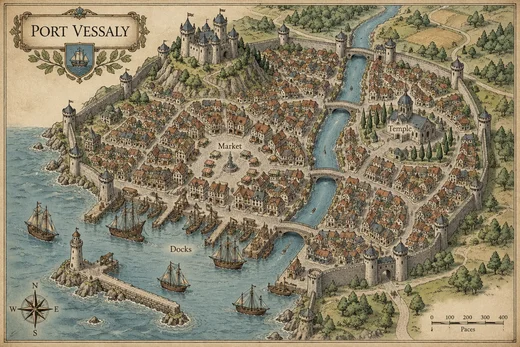
Yes. Say “hand-drawn fantasy city map” and list the districts with their labels in quotes: walls and towers, a castle, a market, a temple, docks, a river with bridges. Our Port Vessaly map got every label right. Keep it to 6–10 labels; long lists of street names are where letters start to slip.
Link to this answerCan it make a D&D town or village map?
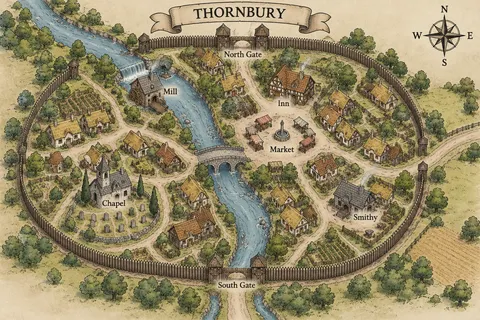
Yes. A town map is a city map with fewer places: a wall or palisade with gates, a market square, an inn, a smithy, a chapel, a mill, cottages and a road out. Our Thornbury map spelled all six asked-for labels right and added gate labels of its own. It came out bird's-eye rather than flat top-down, which reads well as a handout.
Link to this answerCan it make a D&D continent or world map?
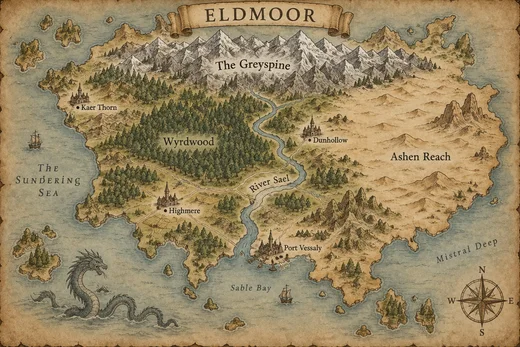
Yes. Ask for “a hand-drawn fantasy world map on aged parchment”, name the continent in a banner, and list mountains, forests, rivers, deserts and four or five towns in quotes. Our Eldmoor continent map got 9 of 9 names right. For whole-planet atlases and hex-crawl regions, see the AI fantasy map generator.
Link to this answerDoes a D&D city or continent map need a grid?
No. Grids are for battle maps, where tokens move in 5-foot squares. Town, city and continent maps are for travel and roleplay, so ask for “no grid” and a compass rose instead; add a scale bar in the prompt if your players will measure travel days.
Link to this answerCan I sell or publish AI battle maps?
Kenerate doesn't watermark downloads. Copyright rules for AI-made images differ by country, so before selling maps or putting them in a published adventure, read Kenerate's terms and check the rules where you sell.
Link to this answerIn depth
D&D Map Generator, explained
What works, what to avoid, and how to pick a model.
On this page
D&D map generator: which map do you need?
A D&D campaign uses maps at four scales, and the prompt changes with each. All four are on this page:
- Battle (encounter) map: one room, street, cave or clearing seen from directly above, with a 5-foot grid for tokens or miniatures — tavern, cave, crypt, forest and city street above.
- Town map: a village or market town with a handful of labelled places — inn, smithy, chapel, mill, market — and gates, no grid.
- City map: walls, districts, castle, temple and docks, with 6–10 labels, no grid.
- Continent (world) map: mountains, forests, rivers, deserts and towns on parchment, every name in quotes, no grid. For whole planets and hex-crawls, use the AI fantasy map generator.
Battle map prompts by location
Swap the place and features into the same frame: “top-down tabletop RPG battle map of …, square 1-inch grid overlay with thick dark grid lines, strictly top-down orthographic view, no characters, no text”.
- Tavern: long bar with stools, round tables, stone fireplace, bard's stage, stair up, storeroom, kitchen, front and back door.
- Cave: winding passages, underground river with a narrow stone bridge, glowing mushrooms, stalagmites, rubble-blocked tunnel, pool.
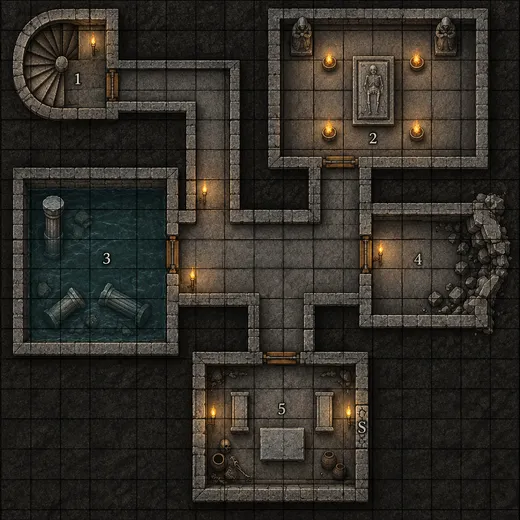
- Crypt: stone corridors, numbered rooms, sarcophagus chamber, flooded room, collapsed wall, secret door marked S.
- Forest road: crossroads, ruined watchtower, stream with a wooden bridge, boulders and fallen logs for cover, campfire.
- Ship deck: two masts, cargo hatch, ship's wheel on a raised stern, cannons along the rails, rope coils, open sea around it.
- Temple: pillared hall, altar on a dais, braziers, side chapels, a collapsed section of roof letting light in.
D&D city map generator prompts
Frame: “a hand-drawn fantasy city map of [city] titled "NAME" in an ornate cartouche, bird's-eye view: …, black ink linework on cream paper with muted colour washes, labels spelled exactly as written”. Then list the places you'll use in play, each label in quotes:
- Harbour city: walls with towers, castle on a hill, “Market”, “Temple”, “Docks”, a river with three bridges (our Port Vessaly map).
- Capital: inner and outer walls, “Palace”, “Cathedral”, “Guild Quarter”, “Slums”, a moat and a main gate.
- Desert city: sandstone walls, “Bazaar”, “Oasis”, “Sultan's Keep”, a caravan road and palms.
D&D town map generator prompts
A town map is the one your players get when they arrive: a few buildings they can visit, clearly labelled. Frame: “a hand-drawn fantasy town map for a D&D campaign, seen from directly above like a printed adventure-module map, titled "NAME" in a ribbon banner …, no grid”.
- Market town: palisade with two gates, river and stone bridge, “Mill”, “Market”, “Inn”, “Smithy”, “Chapel” (our Thornbury map).
- Fishing village: “Harbour”, “Fishmonger”, “Lighthouse”, a beach with boats, cliffs to the north.
- Mining town: “Mine Entrance”, “Assay Office”, “Tavern”, ore carts on tracks, a mountain behind.
D&D continent map generator prompts
Frame: “a hand-drawn fantasy world map on aged parchment, in the style of a classic fantasy novel endpaper map, one large continent titled "NAME" in a decorative banner …, sepia ink linework with soft watercolour washes, all labels spelled exactly as written”. Then name the regions in quotes: one mountain range, one forest, one river, one desert and four or five towns is about as much as stays readable on one image. Our Eldmoor map got all 9 names right.
Getting the grid right for a virtual tabletop
An AI battle map is a picture with the grid painted on, so your VTT has to match it. Count the squares across the image, divide the image width in pixels by that number, and set that as the scene's grid size — or use the VTT's grid-alignment tool and drag one square to fit.
Ask for thick grid lines: thin lines (like the forest map above) look fine in a gallery but vanish when the VTT zooms out. If you'd rather use the VTT's own grid, ask for “no grid” and let Roll20 or Foundry draw it on top.
What we got
Eight maps on GPT Image 2.5 Sunburst, one try each:
- City street battle map: fountain plaza, striped market stalls, tipped cart with spilled crates, alley, well, barrels and sacks, cellar stair — grid present but thinner than the “thick” we asked for.
- Thornbury town map: palisade, river, stone bridge, mill, market, inn, smithy, chapel with graveyard — all six labels right, plus gate labels it added; bird's-eye, not flat top-down.
- Port Vessaly city map and Eldmoor continent map: every asked-for label spelled right (made for the AI fantasy map generator).
- Tavern: bar with stools, fireplace with armchairs, bard's stage with a lute, stair, barrel storeroom, kitchen hearth, two doors — but 6 round tables, not 8.
- Cave: river, stone bridge, teal mushroom grove, stalagmites, rubble-blocked tunnel, camp with bedrolls, pool — everything asked for.
- Crypt: five numbered rooms, spiral stair, flooded room, collapsed wall, secret door, thick grid.
- Forest crossroads: clean top-down encounter with cover; the grid came out thin because the prompt said “thin”.
By the Kenerate AI teamLast updated and reviewed
We build and run the Kenerate generator. Every example is a real output of the model named under it; models and presets were checked against the app's code.
Sources: Kenerate Image Studio · Wargamer — best DnD map makers · getimg.ai — AI D&D map maker (competitor page, read 1 Nov 2026) · Roll20 community forum — default 70 px grid unit
