

Lost dog · found dog · missing pet posts · bilingual flyers
Lost Dog Flyer Maker — from your own dog's photo
Upload a clear photo of your dog, put the name, a short description, where it was last seen, a reward line and your phone number in quotes, and get a print-ready LOST DOG flyer with your photo kept as the main picture. Print it for lamp posts and post it online the same hour.
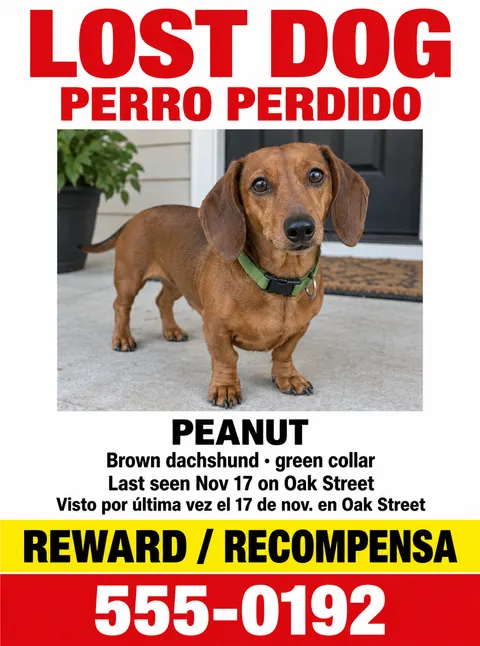
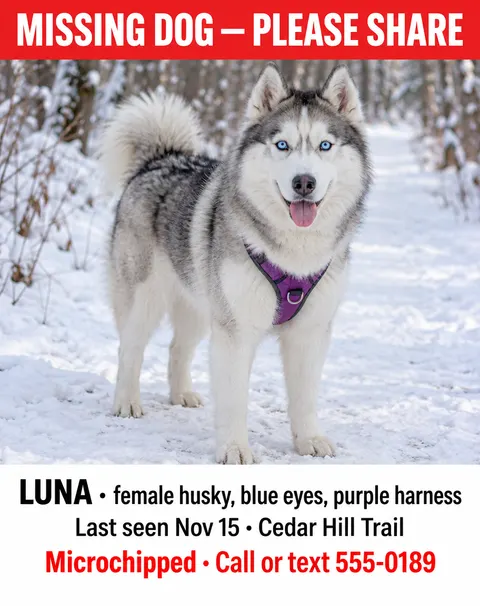
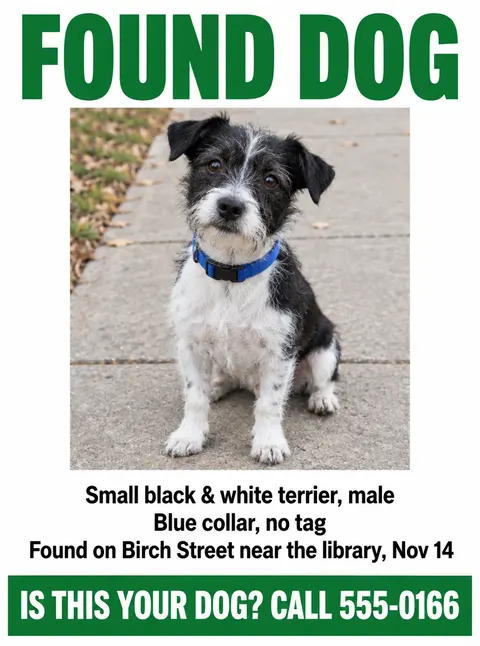
- Your dog's photo kept as the main picture
- LOST DOG, description and phone in big type
- Letter flyer and social post sizes
- No watermark
Updated by the Kenerate AI team




Made with Kenerate
On this page
Quick answer

How do I make a lost dog flyer?
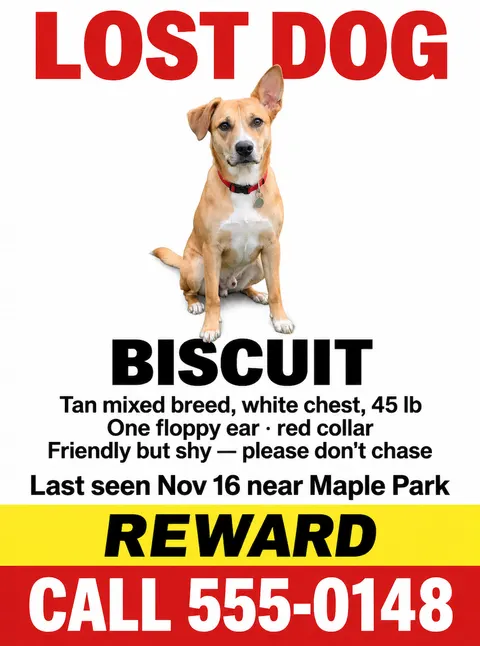
A lost dog flyer maker turns your dog's photo and details into a flyer you can print. On Kenerate AI, upload the photo in the Image Studio, pick GPT Image 2.5 Sunburst (11.7 credits with one photo at 1K), choose 3:4 for a US Letter flyer and write “LOST DOG”, the name, three description lines, where last seen, “REWARD” and your phone in quotes. Our test kept the dog unchanged and spelled all eight lines right.
Key facts
- Best for flyers with your photo
- GPT Image 2.5 Sunburst · GPT Image 2.6 Sunburst
- Free plan model
- Qwen Image 3.0
- Photos per flyer
- Up to 16 (Sunburst models), e.g. face and full body
- US Letter flyer
- 3:4
- Facebook or Nextdoor post · story
- 4:5 · 9:16
- Lines that fit
- Eight short lines lettered right in our test
- Watermark
- None
Gallery
Lost dog flyers made with AI
Lost and found dog flyer examples from one try each at 1K. Every dog here is AI-generated as a stand-in: for a real flyer, upload your own dog's photo so people can recognise it. We read every word on these five: all spelled right. Names, streets and 555 numbers are made up.
Same prompt
One dog photo, two models
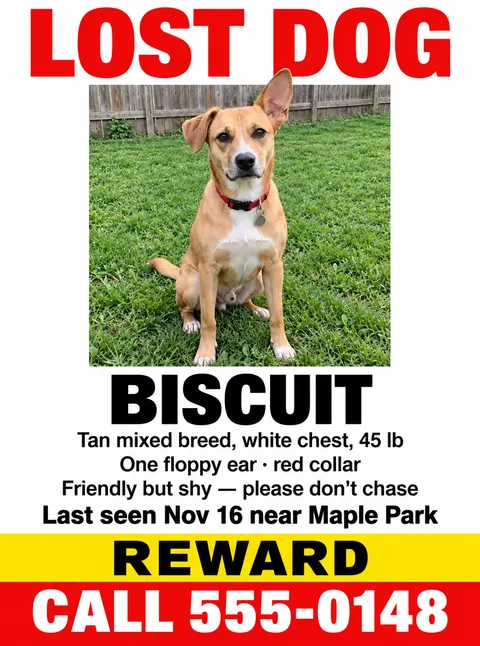
The dog photo (AI-generated here; use your own), then the same LOST DOG prompt on GPT Image 2.5 Sunburst and GPT Image 2.6 Sunburst. Both kept the dog's face, ears and collar and spelled all eight lines right; 2.6 cut the dog out of the backyard.
PromptMake a printed "LOST DOG" flyer for lamp posts, US Letter portrait, flat design shown straight on (not a mockup), using this dog photo exactly as the main picture across the top half — keep the dog, its markings, ears and red collar unchanged. White background, high contrast. Above the photo, a huge bold red headline "LOST DOG". Under the photo: "BISCUIT" in large black capitals, then three short lines in black: "Tan mixed breed, white chest, 45 lb", "One floppy ear · red collar", "Friendly but shy — please don't chase", then "Last seen Nov 16 near Maple Park" in bold black. Then a yellow band: "REWARD". Bottom band in red with big white capitals: "CALL 555-0148". Simple, readable layout with big type. No logos, no other text.
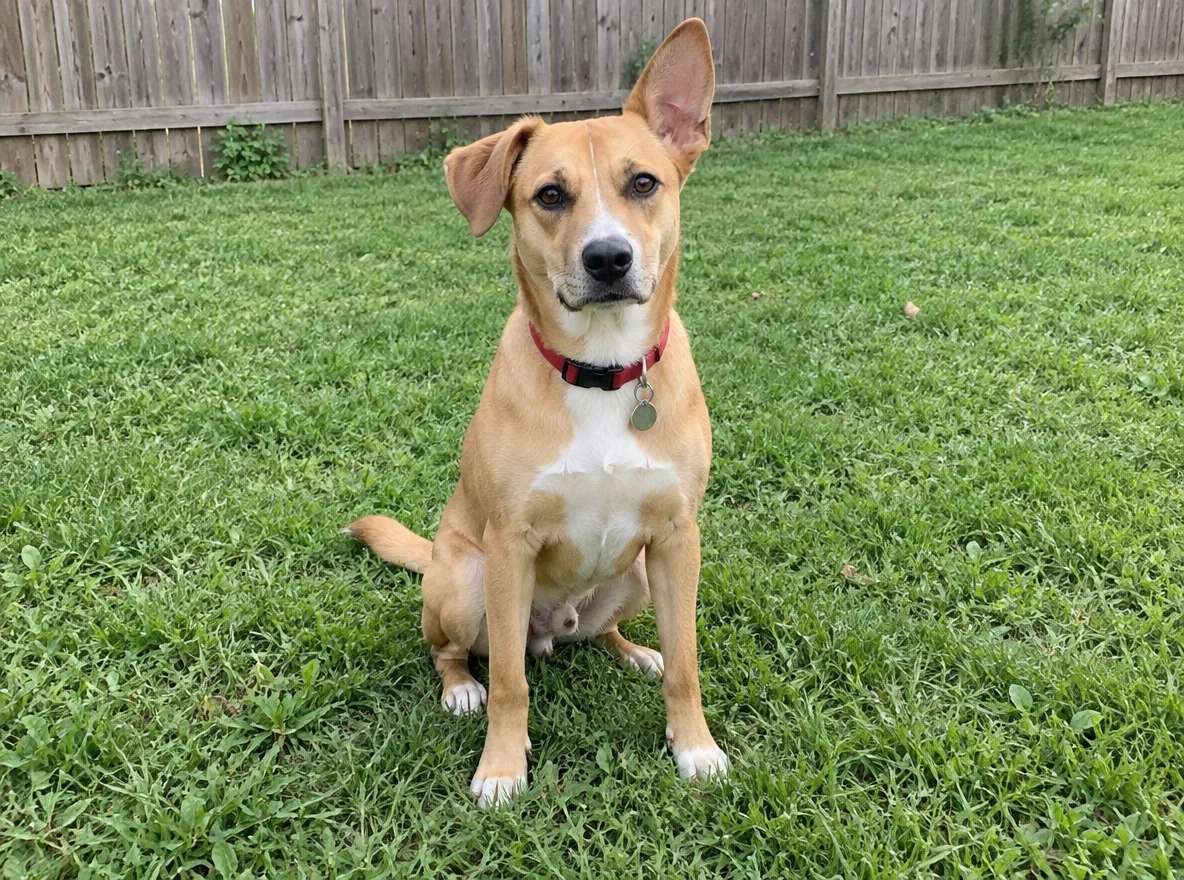 InputDog photo, 4:3 (stand-in for yours)
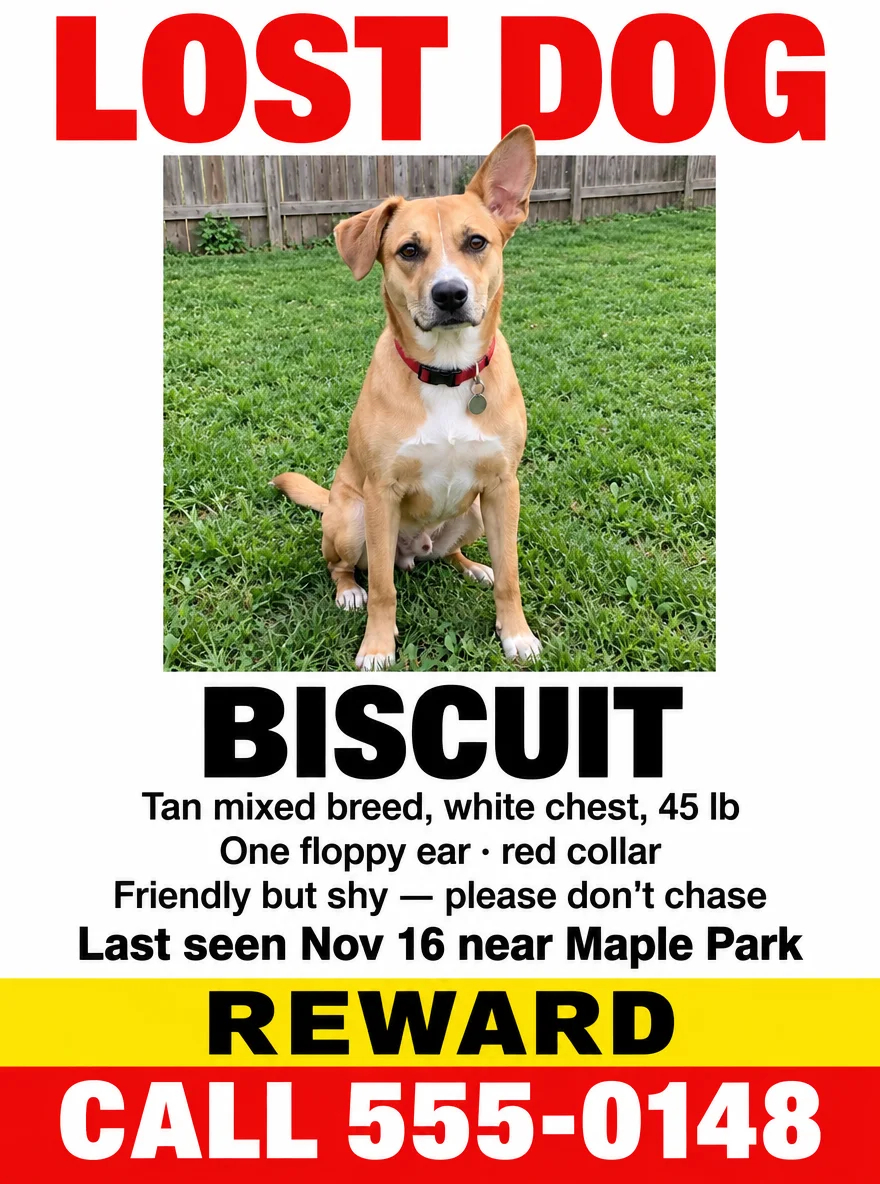 GPT Image 2.5 SunburstPhoto kept as shot, backyard and all
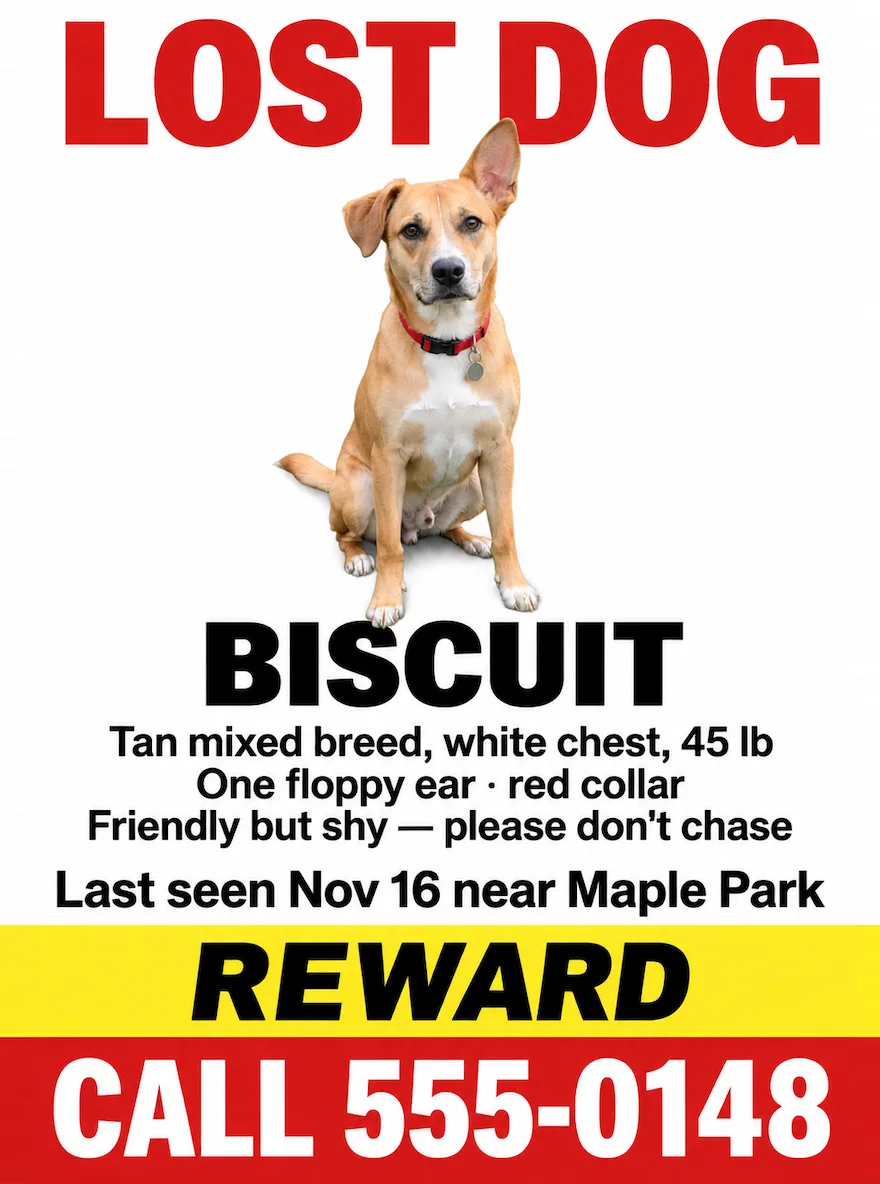 GPT Image 2.6 SunburstDog cut out onto white, REWARD in italics
How to
How to use the lost dog flyer maker
- Time needed
- Steps
- 4 steps
Step 1
Open the Image Studio
Go to /app/image and pick GPT Image 2.5 Sunburst, or Qwen Image 3.0 on the free plan.
Step 2
Upload your dog's photo
Use your clearest recent photo of your own dog. Choose 3:4 for a US Letter flyer or 4:5 for a social post.
Step 3
Write the flyer
“LOST DOG”, the name, three short description lines, where and when last seen, “REWARD” and your phone, each in quotes, with where each goes.
Step 4
Check, print and post
Read every line and every digit, fix any slip with a follow-up edit, then download with no watermark, print and post online.
See it in the app

Open Image Studio and type what you want to see — subject, style, lighting and mood.


Watch the tour · 1:23
Prompts, styles, references, edit, Arena & chat
Chapters
Tips
How to make a lost dog flyer that gets calls
What worked in our tests, plus what a lost pet flyer has to do: be read from a passing car and make the phone number impossible to miss.
Use your own dog's clearest recent photo, face and body visible, and say “keep the dog and its markings unchanged”. A drawn or generated dog won't help anyone recognise yours.
Make “LOST DOG” the biggest words and the phone number the second biggest; a driver reads the flyer for two or three seconds.
Three short description lines are enough: colour and breed, one mark only your dog has (an ear, a patch, a collar), and how it behaves (“shy, please don't chase”).
Add where and when it was last seen, and “REWARD” on its own line if you're offering one; leave the amount off so you can't be pressed for it by scammers.
Proofread the phone number digit by digit before printing, then print on bright paper and cover it with a plastic sleeve if rain is likely.
Make a 4:5 version from the same prompt for Facebook, Nextdoor and local groups, and post it the same hour you print.
Models
Which model to use for lost dog flyers
What each model is good at. Open any one straight in the generator.

OpenAI
GPT Image 2.5 Sunburst
- Reference images
- Up to 16
- Output
- 1K–4K
Open GPT Image 2.5 SunburstBest for
Made the Lost Dog flyer from a photo, the found dog, social and bilingual examples
OpenAI
GPT Image 2.6 Sunburst
- Reference images
- Up to 16
- Output
- 1K–4K
Open GPT Image 2.6 SunburstBest for
Same Lost Dog prompt and photo; kept the dog but cut it out of the backyard
- Free plan

Alibaba
Qwen Image 3.0
- Reference images
- Up to 3
- Output
- 1K or 2K
Open Qwen Image 3.0Best for
Free plan; its tear-off tab test spelled “muzzle” as “munzzle”, so it isn't shown
FAQ
Lost Dog Flyer Maker questions
8 questions

How do I make a lost dog flyer?
Upload your dog's clearest recent photo in Kenerate's Image Studio, pick GPT Image 2.5 Sunburst and a 3:4 shape, and write the flyer in one prompt: “LOST DOG”, the name, three short description lines, where and when last seen, “REWARD” and your phone, each in quotes. Say “keep the dog unchanged”. Our Biscuit flyer was made that way in one try.
Link to this answerWhat should a lost dog flyer say?
“LOST DOG” in the biggest letters, a clear photo, the dog's name, colour and breed, one mark only your dog has, how it behaves (“shy, please don't chase”), where and when it was last seen, “REWARD” if you're offering one, and your phone number in big type. Eight short lines fit; more gets too small to read from a car.
Link to this answerShould I use an AI-generated dog on the flyer?
No. Use your own dog's photo so people can recognise it; a generated dog that only looks similar can send searchers after the wrong animal. The dogs on this page are AI-generated stand-ins so we could show the layouts without using a real pet.
Link to this answerIs there a free lost dog flyer maker?
You can start free. A new Kenerate account gets 25 credits, which covers two flyers from your photo on GPT Image 2.5 Sunburst at 11.7 credits each. Qwen Image 3.0 is on the free plan at 9 credits a flyer. Downloads have no watermark.
Link to this answerShould I put the reward amount on a lost dog flyer?
Many owners leave it off and write just “REWARD”: it still gets attention, and an amount can attract hoax calls. Never send money before you have your dog back, and meet in a public place if someone says they have found it.
Link to this answerWhat size should a lost dog flyer be?
US Letter, 8.5 × 11 in (A4 outside North America), in portrait; pick 3:4 in the Image Studio. Print on bright paper, and put it in a plastic sleeve if rain is likely. For Facebook, Nextdoor and local groups, run the same prompt at 4:5.
Link to this answerCan I make a found dog flyer too?
Yes. Swap the headline for “FOUND DOG”, describe the dog without every detail (keep one back so the real owner can prove it's theirs) and end with “Is this your dog? Call” and your number, as in our found dog example.
Link to this answerCan AI get the phone number right?
Usually. Every line on the five flyers shown came out right first time, including “CALL 555-0148” and the Spanish line “Visto por última vez el 17 de nov.”. Our one free-plan test misspelled “muzzle”, so read every word and every digit before you print, and fix a slip with a follow-up edit.
Link to this answerIn depth
Lost Dog Flyer Maker, explained
What works, what to avoid, and how to pick a model.
On this page
The lost dog flyer layout that works
From top to bottom, in the order a passer-by reads it:
- “LOST DOG” in the largest, boldest letters, red or black on white.
- One big, clear, recent photo of your dog, face and body visible.
- The name in large capitals: people call out a name when they see a dog.
- Three short lines: breed and colour, one unique mark, how the dog behaves.
- Where and when it was last seen: “Last seen Nov 16 near Maple Park”.
- “REWARD” on its own band, then the phone number as big as the headline allows.
After you print
Put flyers at eye level near where your dog was last seen, at junctions, dog parks, vets, pet shops and noticeboards, and ask before posting on private property. Post the 4:5 version to local Facebook groups and Nextdoor the same hour.
Call local shelters and animal control and visit in person, since a description over the phone is easy to miss, and if your dog is microchipped, check your contact details with the microchip registry.
What still goes wrong
Our free-plan Qwen Image 3.0 test, a flyer with eight tear-off phone tabs, spelled “muzzle” as “munzzle”, so it isn't in the gallery; read every word before you print. GPT Image 2.6 Sunburst cut the dog out of its photo onto white; if you want your photo kept as shot, say “keep the photo's background too”.
By the Kenerate AI teamLast updated and reviewed
We build and run the Kenerate generator. Every example is a real output of the model named under it; models and presets were checked against the app's code.
Sources: Kenerate Image Studio
