Classic · cartoon · watercolor · pixel · tilted · with a name · on your photo
Santa hat PNG with a real transparent background
Describe the hat, make it on plain white, then cut it out in Remove BG — you get a Santa hat PNG with a true alpha channel to drop onto a photo, a card, a slide or a stream overlay. Or skip the PNG and have the AI put the hat straight onto your photo or your dog.

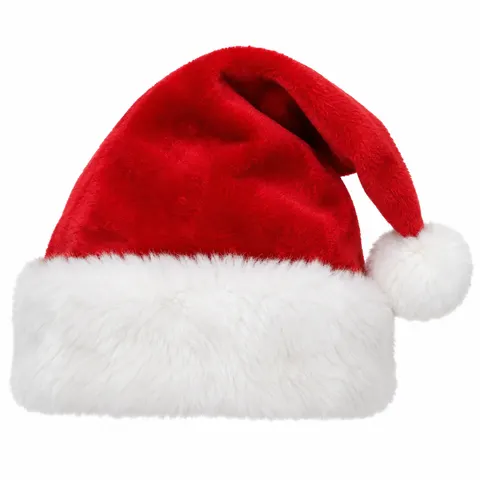
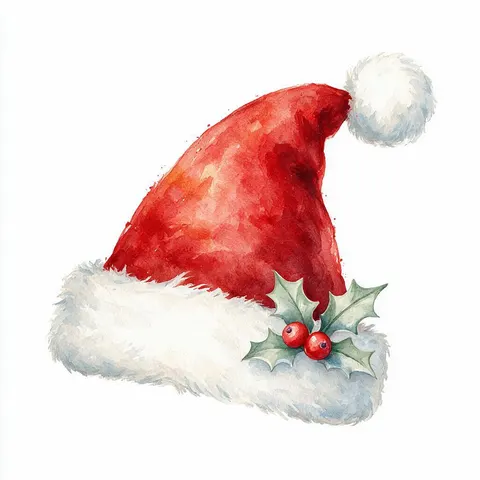

- Six real hat styles
- True transparent PNG
- Shown on a checkerboard
- Add the hat to your photo
Updated by the Kenerate AI team




Made with Kenerate
{throw Error("Attempted to call IG_BASE() from the server but IG_BASE is on the client. It's not possible to invoke a client function from the server, it can only be rendered as a Component or passed to props of a Client Component.")}/santahat-cartoon-cut-chk-sm.webp)
{throw Error("Attempted to call IG_BASE() from the server but IG_BASE is on the client. It's not possible to invoke a client function from the server, it can only be rendered as a Component or passed to props of a Client Component.")}/santahat-classic-cut-chk-sm.webp)
{throw Error("Attempted to call IG_BASE() from the server but IG_BASE is on the client. It's not possible to invoke a client function from the server, it can only be rendered as a Component or passed to props of a Client Component.")}/santahat-watercolor-cut-chk-sm.webp)
{throw Error("Attempted to call IG_BASE() from the server but IG_BASE is on the client. It's not possible to invoke a client function from the server, it can only be rendered as a Component or passed to props of a Client Component.")}/santahat-pixel-cut-chk-sm.webp)
{throw Error("Attempted to call IG_BASE() from the server but IG_BASE is on the client. It's not possible to invoke a client function from the server, it can only be rendered as a Component or passed to props of a Client Component.")}/santahat-tilted-cut-chk-sm.webp)
{throw Error("Attempted to call IG_BASE() from the server but IG_BASE is on the client. It's not possible to invoke a client function from the server, it can only be rendered as a Component or passed to props of a Client Component.")}/santahat-name-cut-chk-sm.webp)
On this page
Quick answer
How do I get a Santa hat PNG with a transparent background?
To get a Santa hat PNG, describe one hat and end the prompt with “isolated on a plain pure white background, no shadow, no text” — then open it in Kenerate's Remove BG and run Kenerate Cutout (1.2 credits) or Cutout HD for fluffy fur brims (3 credits). The download is a PNG with a real alpha channel, so the area around the hat is empty, not white. Every hat on this page was made that way (the pixel hat on light blue, because its flat white brim vanished on white): Qwen Image 3.0 (free plan, 9 credits) for cartoon and pixel art, Seedream 5.0 Pro for watercolor, GPT Image 2.5 Sunburst (7.2 credits) for the realistic and name-band hats. To add a Santa hat to a photo instead, upload the photo and ask Sunburst to add the hat and keep everything else the same (11.7 credits).
Key facts
- Styles on this page
- Classic · cartoon · watercolor · pixel · tilted · name band
- Transparent PNG
- Remove BG · Kenerate Cutout or Cutout HD
- Fur and soft edges
- Cutout HD
- On your photo
- GPT Image 2.5 Sunburst edit · pets work
- Names on the brim
- GPT Image 2.5 Sunburst · quote the name
- Free plan model
- Qwen Image 3.0
- Format
- PNG keeps transparency · JPG doesn't
Santa hat styles
Santa hat PNG styles: which model, which cut-out, where to use it
Five were made on plain white and the pixel hat on light blue, then all six were cut out in Remove BG. Use Cutout HD for anything with a fluffy fur brim or soft painted edges.
| Style | Model | Cut-out | Best for |
|---|---|---|---|
| Classic | GPT Image 2.5 Sunburst | Cutout HD | Photo edits, realistic cards, product mockups |
| Cartoon | Qwen Image 3.0 | Cutout | Flyers, stickers, emoji-style overlays, slides |
| Watercolor | Seedream 5.0 Pro | Cutout HD | Invitations, handmade-look cards, gift tags |
| Pixel art | Qwen Image 3.0 | Cutout | Game sprites, Twitch and Discord emotes, retro designs |
| Tilted | GPT Image 2.5 Sunburst | Cutout HD | Dropping onto a head in a photo — the angle and visible opening sit on hair more naturally |
| With a name | GPT Image 2.5 Sunburst | Cutout HD | Personalised cards, place cards, family photos — quote the name in the prompt |
Gallery
Santa hat PNGs: six real transparent cut-outs
Drag the slider: the original on one side, the transparent PNG on a checkerboard on the other. Open any one to copy its prompt.
On your photo
Add a Santa hat to your photo (or your pet)
No PNG needed: upload the photo and ask GPT Image 2.5 Sunburst to add the hat and keep everything else. The “before” photos here were made with Sunburst to stand in for yours; the “after” is the same model editing each one.
How to
How to use the santa hat PNG
- Time needed
- Steps
- 4 steps
Step 1
Describe the hat
Press “Make my Santa hat”. Image Studio opens with Qwen Image 3.0 and a cartoon hat prompt; swap in another style from the gallery. Keep the plain white background words.
Step 2
Create it
Press Create and check the hat: one hat, no shadow, no stray text.
Step 3
Cut it out
Open the image in Remove BG (/app/tool/remove-bg) and run Kenerate Cutout — or Cutout HD for fluffy fur and watercolor edges.
Step 4
Download the PNG
Save as PNG to keep the transparency, then drop it onto your photo, card, slide or overlay.
See it in the app

Open Image Studio and type what you want to see — subject, style, lighting and mood.


Watch the tour · 1:23
Prompts, styles, references, edit, Arena & chat
Chapters
Tips
Get a Santa hat PNG that cuts out clean
The cut-out is only as good as the background you give it.
End the prompt with “isolated on a plain pure white background, no shadow, no text” — a shadow under the hat gets cut out as a grey smudge.
Asking the model for a “transparent background” in words usually paints a fake grey checkerboard. Make it on white and cut it out instead.
Flat white areas touching the background can vanish with it. Our first pixel hat on white came back with its brim and pompom cut away (Cutout, Cutout HD and Object Pick all did it); remade on light sky blue, it cut out whole on the first try.
White fur on a white background is the hard part: use Cutout HD, which is built for fur and soft edges, or ask for a light grey shadow inside the brim.
For a hat you'll put on a photo, ask for it tilted with the opening visible — a straight-on hat looks pasted on.
Want a name on the brim? Put it in quotes and use GPT Image 2.5 Sunburst, then check every letter.
Always download PNG. A JPG has no transparency and fills the empty area with white again.
Models
Models for Santa hat PNGs
What each model is good at. Open any one straight in the generator.
- Free plan
Alibaba
Qwen Image 3.0
- Reference images
- Up to 3
- Output
- 1K or 2K
Open Qwen Image 3.0Best for
Free plan · made the cartoon and pixel hats
OpenAI
GPT Image 2.5 Sunburst
- Reference images
- Up to 16
- Output
- 1K to 4K
Open GPT Image 2.5 SunburstBest for
Realistic, tilted and name-band hats · adds the hat to your photo
ByteDance
Seedream 5.0 Pro
- Reference images
- Up to 10
- Output
- Up to 2K
Open Seedream 5.0 ProBest for
Made the watercolor hat
OpenAI
GPT Image 1.5
- Reference images
- Up to 10
- Output
- 1024 · 1536
Open GPT Image 1.5Best for
Transparent background option — PNG straight out of the model
FAQ
Santa Hat PNG questions
8 questions

How do I make a Santa hat PNG with a transparent background?
Make the hat on a plain white background — end the prompt with “isolated on a plain pure white background, no shadow, no text” — then open it in Remove BG and run Kenerate Cutout (1.2 credits) or Cutout HD (3 credits, better for fluffy fur brims). Download as PNG. Five of the six hats here were made exactly that way; the pixel hat was made on light blue, because its flat white brim was cut away along with a white background. The gallery shows each one on a checkerboard so you can see the transparency is real.
Link to this answerIs the Santa hat PNG free?
Free to start. A new Kenerate account gets 25 credits, and Qwen Image 3.0 is on the free plan at 9 credits a hat; with a 1.2-credit Kenerate Cutout, that's two finished transparent hats from the starter credits. GPT Image 2.5 Sunburst, Seedream 5.0 Pro and Cutout HD use credits from one-time packs, with no subscription. There's no watermark.
Link to this answerHow do I add a Santa hat to a photo?
Two ways. Put a Santa hat PNG on top of your photo in any editor and scale and rotate it to sit on the head — the tilted hat on this page is made for that. Or let the AI do it: upload the photo to Image Studio, pick GPT Image 2.5 Sunburst and write “add a red Santa hat with a white fur brim to the head, keep everything else exactly the same” (11.7 credits with one photo). The AI edit matches the light and the angle of the head, which a pasted PNG doesn't.
Link to this answerCan I put a Santa hat on my dog or cat?
Yes — the dog and cat on this page are examples. Describe where the hat sits (“between the ears, tilted to one side”) and ask to keep the fur, face and background the same. Name the animal so the model knows which head to put it on in a photo with more than one.
Link to this answerWhy does my “transparent” Santa hat have a checkerboard in it?
Image models can't write an alpha channel from a prompt; asked for a transparent background, they often paint a grey-and-white checkerboard as part of the picture. Make the hat on plain white and cut it out with Remove BG, or use GPT Image 1.5 with its transparent-background option, which returns a real PNG.
Link to this answerCan I put a name on the Santa hat?
Yes. Put the name in quotes — “the name "JAMIE" in gold glitter letters on the white brim” — and use GPT Image 2.5 Sunburst, which handles lettering well. Check every letter before you print, and run it again if one slipped.
Link to this answerCan I use these Santa hat PNGs commercially?
Kenerate's Terms say Kenerate claims no ownership of what you generate and you may use it commercially, subject to the Terms and the law. The hats here are original, not traced from a stock library. Note that the US Copyright Office ties copyright to human authorship, so an image made only from a prompt may not be protected against others copying it.
Link to this answerWhat size should a Santa hat PNG be?
The hats here were made at 1K (about 1024 pixels square) and cut out at that size, which is plenty for a profile picture, a slide or a social post. For print, upscale the white-background version first and cut it out after, so the edges stay clean.
Link to this answerIn depth
Santa Hat PNG, explained
What works, what to avoid, and how to pick a model.
On this page
PNG hat or AI edit: which way to add a Santa hat
Both end with a hat on a head. Pick by what you're making:
- Santa hat PNG on top — you're designing: a card, a group photo you'll edit by hand, a stream overlay, a sticker. You control size, angle and position, and one PNG works on many photos. It can look pasted on if the light doesn't match.
- AI edit of the photo — you want one finished picture: your dog, your profile photo, a family snap. The model fits the hat to the head, the light and the angle (GPT Image 2.5 Sunburst, 11.7 credits with one photo). Check the face and background didn't change.
Why the cut-out is real
PNG stores a full alpha channel: each pixel can be fully see-through, solid or anything in between, which is what lets the soft edge of a fur brim blend into whatever sits behind it. Remove BG writes that channel for you.
A checkerboard in an image viewer is just how apps show empty pixels. If the checkerboard is part of the picture itself — it moves with the hat when you place it — the image isn't transparent.
Prompts for more Santa hat styles
Untested starting points. Keep “isolated on a plain pure white background, no shadow, no text” at the end of each:
- Green elf hat: a single green felt elf hat with a red brim, a curled tip and a small gold bell, flat vector illustration.
- Knitted Santa hat: a single red knitted Santa hat with a white cable-knit brim and a yarn pompom, realistic photo.
- Black and white: a single Santa hat, black and white line art, bold clean outlines, no shading.
- Glitter: a single Santa hat covered in fine red glitter with a white faux-fur brim, product photo.
- Side view: a single Santa hat seen from the side, tip hanging down behind, realistic photo — for profile shots.
By the Kenerate AI teamLast updated and reviewed
We build and run Kenerate Image Studio and Remove BG. Every hat here is a real output of the model named under it, cut out with the Remove BG mode named in its caption (13 November 2026, one try each); the pet photos are Sunburst edits of Sunburst-made photos. Models, modes and limits were checked against the app's code.
Sources: W3C — Portable Network Graphics (PNG) Specification, Third Edition · US Copyright Office — Copyright and Artificial Intelligence · Kenerate AI — Terms of Service · Kenerate Remove BG · Kenerate Image Studio